
iZEEKER GD850
iZEEKER 4K Dual Dash Cam User Manual
Model: GD850
1. Introducció
The iZEEKER GD850 4K Dual Dash Cam is designed to provide comprehensive vehicle recording with advanced features for enhanced safety and convenience. This manual provides detailed instructions for setting up, operating, maintaining, and troubleshooting your dash cam.
Característiques principals:
- Gravació frontal de 4K i posterior de 1080p: Captures clear, high-resolution video from both front and rear perspectives.
- 3'' IPS Touch Screen: Offers intuitive and responsive control for easy navigation.
- Sony Starvis Sensor & WDR: Ensures superior night vision and balanced exposure in various lighting conditions.
- Built-in WiFi & GPS: Allows for easy video management via mobile app and accurate location/speed tracking.
- Gravació en bucle i sensor G: Sobreescriu automàticament el menjar antictage and locks important video segments upon impact.
- Monitor d'aparcament: Provides surveillance when the vehicle is parked (requires hardwire kit).

Figure 1.1: iZEEKER GD850 4K Dual Dash Cam and Rear Camera.
This image displays the primary components of the iZEEKER GD850 dash cam system, including the main front camera unit with its large display and the compact rear camera.
2. Components del producte
Abans de la instal·lació, comproveu que tots els components siguin presents al paquet:
- Main Dash Cam Unit (Front Camera)
- Càmera posterior
- Power Cable with Integrated GPS Module
- Cable de connexió de la càmera posterior
- Mounting Options (Suction Cup Mount, Adhesive Mount)
- Lector de targetes USB
- Manual d'usuari
- Wiring Tools (e.g., pry tool)

Figure 2.1: Included Components of the GD850 Dash Cam System.
This image illustrates the various items included in the product package, such as the main dash cam, rear camera, GPS module, and a 64GB memory card with a USB card reader.
3. Configuració i instal·lació
3.1 Inserció de la targeta Micro SD
Insert a high-speed (Class 10 or higher) Micro SD card (up to 256GB, not included) into the designated slot on the dash cam. Ensure the card is inserted correctly until it clicks into place.
3.2 Muntatge de la càmera frontal del salpicader
Trieu una ubicació adequada al parabrisa, preferiblement darrere de la part posteriorview mirror, to avoid obstructing your view. Clean the area thoroughly before applying the mount.
- Muntatge amb ventosa: Premeu la ventosa fermament contra el parabrisa i gireu la palanca per fixar-la.
- Muntatge adhesiu: Peel off the protective film from the adhesive pad and firmly press the mount onto the windshield for at least 30 seconds.

Figure 3.1: Strap-on Installation Method for the Dash Cam.
This image demonstrates the easy strap-on installation method, allowing the dash cam to be securely attached to the vehicle's rearview mirall.
3.3 Instal·lació de la càmera posterior
Mount the rear camera on the rear windshield or license plate area. Connect the rear camera to the main dash cam unit using the provided rear camera cable. Ensure the cable is routed neatly and securely.

Figure 3.2: Rear Camera with Guide Function and Waterproof Design.
This image highlights the rear camera's design, featuring a guide function for parking assistance and a waterproof construction for reliable performance in various weather conditions.
3.4 Connexió d'alimentació
Connect the power cable (with integrated GPS module) to the dash cam and plug the other end into your vehicle's 12V power outlet (cigarette lighter socket). Route the cable along the windshield trim to keep it tidy and out of the way.
4. Instruccions de funcionament
4.1 Funcionament bàsic
- Encès/apagat: The dash cam will automatically power on and begin recording when your vehicle starts. It will power off when the vehicle is turned off.
- Control de pantalla tàctil: Use the 3-inch IPS touch screen to navigate menus, adjust settings, and review footage.
- Indicador de gravació: A white light under the screen indicates that the camera is recording.
4.2 Funcions d'enregistrament
- Enregistrament en bucle: The dash cam records video in continuous loops (e.g., 1, 3, or 5-minute segments). When the memory card is full, the oldest unlocked footage se sobreescriurà.
- Enregistrament d'emergència (sensor G): In the event of a sudden impact or collision, the built-in G-sensor will automatically detect the event and lock the current video segment, preventing it from being overwritten.
- Enregistrament manual d'emergència: Touch the triangle icon on the touchscreen to manually lock the current recording.

Figure 4.1: Front 4K Ultra HD and Rear 1080P Full HD Recording.
This image illustrates the high-definition recording capabilities of the dash cam, with the front camera capturing in 4K Ultra HD and the rear camera in 1080P Full HD.

Figure 4.2: 64GB TF Card and Loop Recording Feature.
This image explains the loop recording functionality, showing how the dash cam continuously records and manages storage using a 64GB TF card and an included card reader for easy file transferència.
4.3 Funcions avançades
- Connectivitat WiFi: Download the "Lucky Cam" or "OK cam" app on your smartphone (Android/iOS). Connect your phone to the dash cam's WiFi network to view viu footage, playback recordings, and download files directly to your device.
- Funcionalitat GPS: The integrated GPS module records your driving route, speed, and coordinates, which can be viewed using dedicated player software on a computer.
- Monitor d'aparcament: When enabled (requires a hardwire kit, sold separately), the dash cam will automatically power on and record a short video if a collision is detected while your vehicle is parked.
- Traffic Signal Detection: Supports recognition of traffic signals to enhance driving awareness.

Figure 4.3: Parking Monitor, Traffic Signal Detection, and GPS Features.
This image visually represents the advanced functionalities of the dash cam, including the parking monitor (requiring a hardwire kit), traffic signal detection for improved safety, and reliable GPS for location tracking.
4.4 Type-C Fast Charging
The dash cam utilizes a Type-C port for power, offering stable and efficient charging. This modern connection is reversible, preventing incorrect insertion.
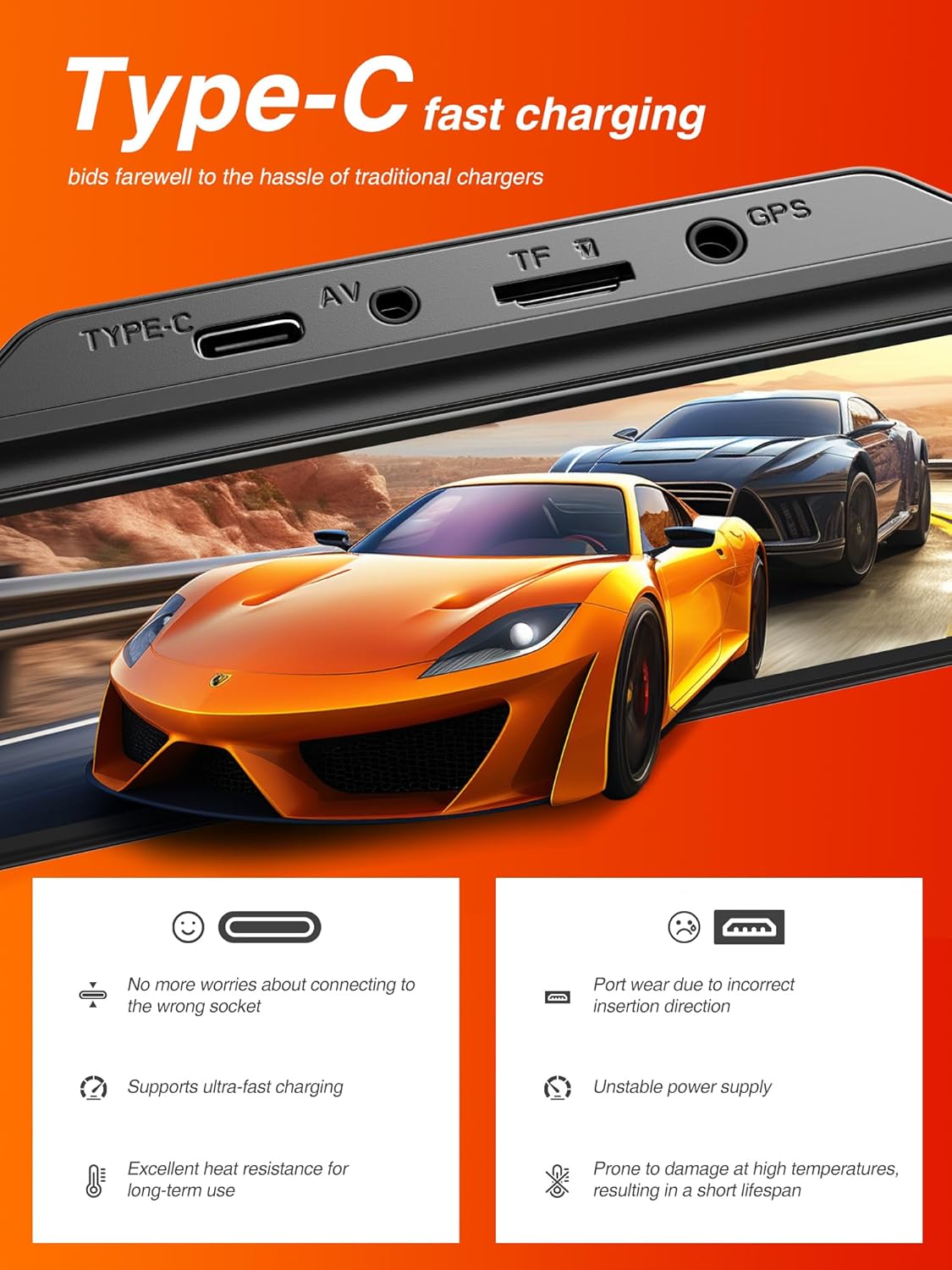
Figure 4.4: Type-C Fast Charging Port.
This image highlights the Type-C charging port on the dash cam, emphasizing its benefits such as ease of connection and support for ultra-fast charging.
5. Manteniment
5.1 Formatació de la targeta Micro SD
It is recommended to format the Micro SD card regularly (e.g., once a month) to ensure optimal performance and prevent data corruption. This can typically be done through the dash cam's settings menu.
5.2 Neteja del dispositiu
Use a soft, dry cloth to clean the dash cam's screen and lenses. Avoid using abrasive cleaners or solvents that could damage the device.
5.3 actualitzacions de microprogramari
Check the iZEEKER official website periodically for any available firmware updates. Updating the firmware can improve performance, add new features, or fix bugs.
6. Solució De Problemes
If you encounter issues with your iZEEKER GD850 dash cam, refer to the following common problems and solutions:
| Problema | Possible causa/solució |
|---|---|
| Dash cam turns on/off randomly. |
|
| G-Sensor is too sensitive or not sensitive enough. |
|
| "SD Card Full" error or not recording. |
|
| Problemes de connexió Wi-Fi. |
|
| Videos not saving or missing segments. |
|
If the problem persists after trying these solutions, please contact iZEEKER customer support for further assistance.
7. Especificacions
| Característica | Detall |
|---|---|
| Marca | iZEEKER |
| Nom del model | iZEEKER GD850 |
| Dimensions del producte | 3.53 x 2.54 x 1.31 polzades |
| Pes de l'article | 4.2 unces |
| Resolució de captura de vídeo | Davant: 4K, Posterior: 1080P |
| Mostra | 3'' IPS Touch Screen |
| Tecnologia de connectivitat | Wi-Fi |
| Característiques especials | Loop Recording, Emergency Recording, GPS, Parking Monitor, Night Vision (Sony Starvis Sensor, WDR) |
| Tipus de muntatge | Muntatge adhesiu, Muntatge de succió |
| Compatibilitat màxima amb targetes SD | 256 GB |
| Font d'alimentació | 1 Lithium Ion battery required (internal), Vehicle 12V power outlet (external) |
| Color | Negre |
8. Garantia i Suport
8.1 Informació de la garantia
The iZEEKER GD850 Dash Cam comes with a 24 mesos de garantia from the date of purchase. This warranty covers manufacturing defects and ensures the product's quality and performance under normal use. Please retain your proof of purchase for warranty claims.
8.2 Atenció al client
For technical assistance, troubleshooting, or warranty inquiries, please contact iZEEKER customer support:
- Correu electrònic: support@izeeker.co
- Fabricant: iZEEKER (Accion Innovations LLC)
- Adreça: 17928 Rowland St, City of Industry, CA 91748, USA

Figure 8.1: Warranty and Support Contact Details.
This image provides information regarding the 24-month warranty and the official contact email for customer support, along with the manufacturer's address.
Ask a question about this manual
Ask about setup, troubleshooting, compatibility, parts, safety, or missing instructions. Manuals+ will review the question and use this page’s manual context to help answer it.