
1. Introducció
This manual provides detailed instructions for the installation, operation, and maintenance of your BINIZE Wireless CarPlay Android Auto Multimedia Video Box. This device is designed to enhance your in-car infotainment system by providing wireless CarPlay and Android Auto functionalities, along with access to various Android applications directly on your vehicle's display.

Image 1.1: BINIZE Wireless CarPlay Android Auto Multimedia Video Box with included USB cables.
2. Producte acabatview
2.1 Característiques clau
- Sistema operatiu: Android 13 with 8-core processor.
- Memòria: 4GB LPDDR4 RAM + 64GB UFS ROM for efficient performance.
- Connectivitat: Supports 4G Cellular, Dual Bluetooth (BLE 4.2 + BLE 5.0), and Wi-Fi.
- Navegació: Built-in GPS functionality.
- Suport de l'aplicació: Pre-installed video applications and access to Google Play Store for additional app downloads.
- Visualització: Supports split-screen viewing.
- Control de veu: Integration with Siri.
- Expansió d'emmagatzematge: Supports SIM and TF (MicroSD) cards.
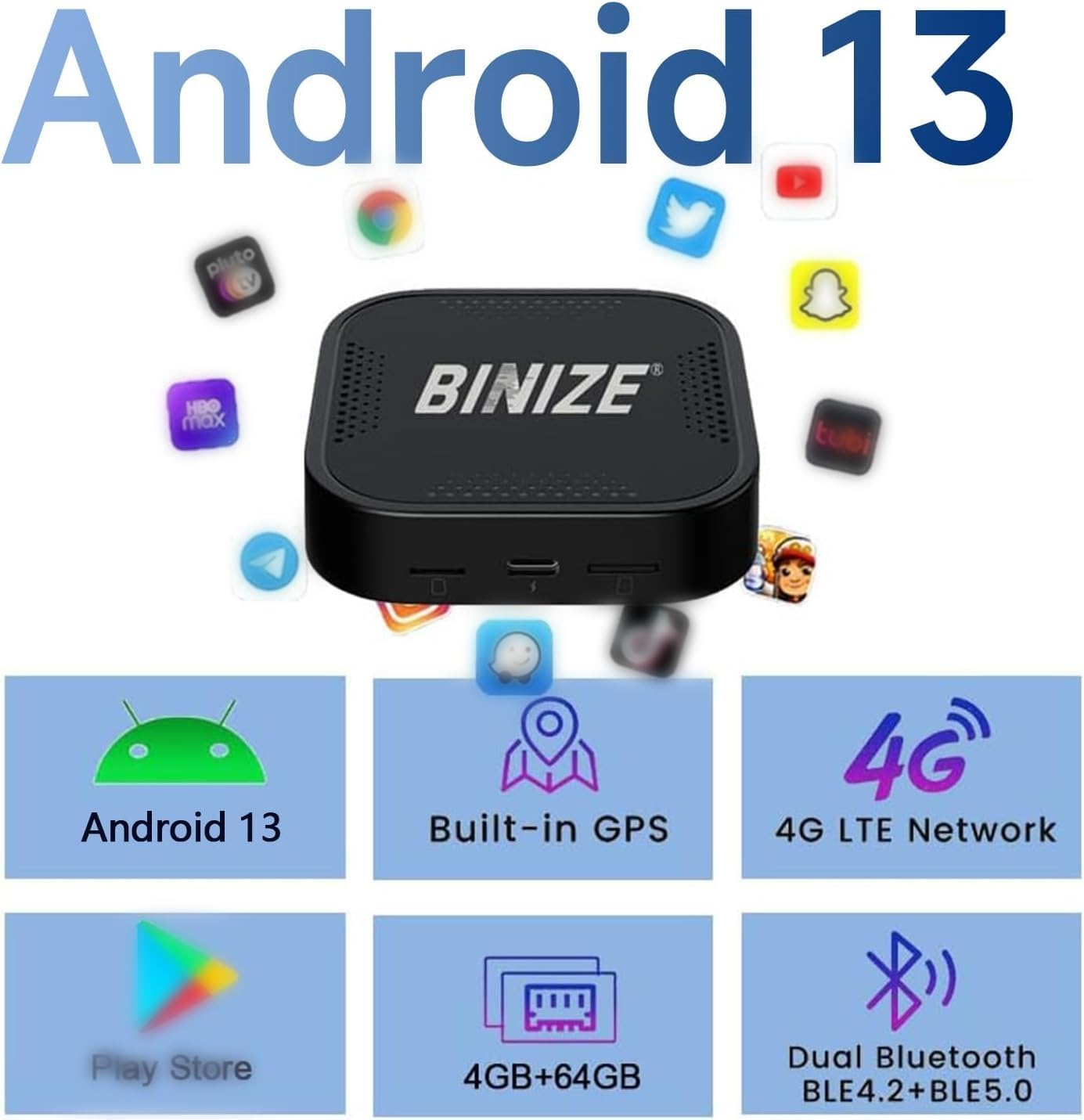
Imatge 2.1: acabatview of the Android 13 system features including 4G LTE, GPS, and memory specifications.
2.2 Què hi ha a la caixa
- BINIZE CarPlay AI Box
- USB Cable(s) (USB-A and/or USB-C)
3. Compatibilitat
This device is designed for vehicles equipped with OEM (Original Equipment Manufacturer) wired CarPlay or wired Android Auto functionality. It is generally compatible with cars from 2018 and newer. Please verify your vehicle's infotainment system before purchase.
3.1 Notes importants de compatibilitat
- Wired CarPlay Requirement: The CarPlay box defaults to supporting original cars with wired CarPlay.
- Wired Android Auto Conversion: If your vehicle only supports wired Android Auto, or supports both wireless CarPlay and wired Android Auto, you may need to convert the device's port using a TF card with a specific reverse file. Instructions for this conversion are provided in Section 4.2.
- CarPlay sense fil: This device is not compatible with vehicles that already have OEM wireless CarPlay.
- Models incompatibles: This CarPlay AI Box is not compatible with BMW Series, Nissan Series, Changan series, Mitsubishi, Polestar, and 2022 Ford models.

Imatge 3.1: Ex.amples of compatible car brands and models. Note: Not for BMW cars.
4. Instruccions de configuració
4.1 Initial Connection (Plug and Play)
- Ensure your vehicle's engine is running or the ignition is in accessory mode.
- Locate the USB port in your vehicle that supports OEM wired CarPlay or Android Auto.
- Connect the BINIZE CarPlay AI Box to this USB port using the provided USB cable (USB-A or USB-C, depending on your vehicle).
- The device will power on, and an interface will appear on your car's display.
- On your car's screen, click on the 'Autokit' icon to initiate the connection process.
- On your mobile phone, search for the device's Bluetooth signal and pair with it. Follow any on-screen prompts to complete the connection.
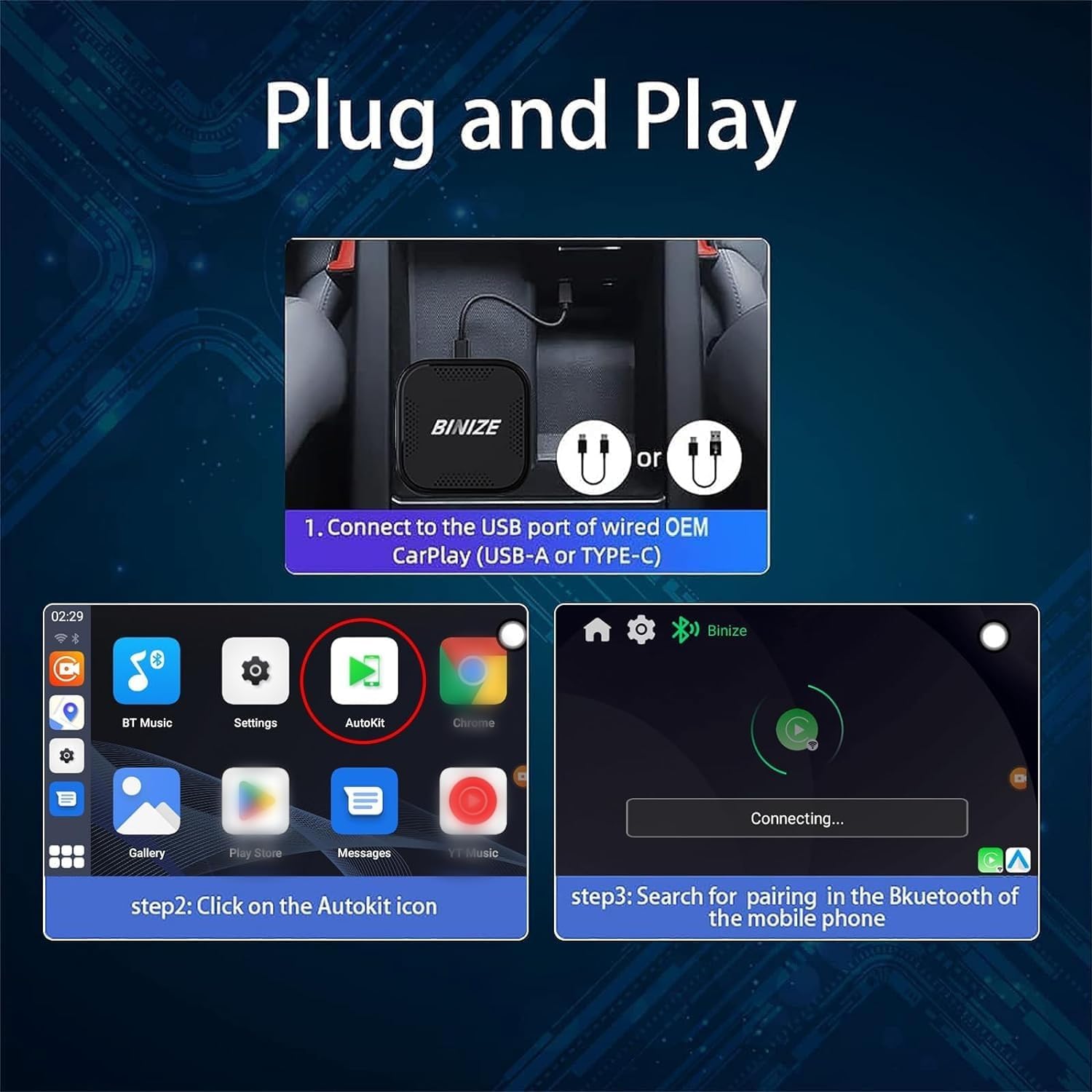
Image 4.1: Visual guide for connecting the BINIZE AI Box and pairing via Bluetooth.
4.2 Switching Between CarPlay and Android Auto Modes
The device defaults to wired CarPlay functionality. If your vehicle primarily uses wired Android Auto, or if you need to switch modes, follow these steps:
- Insert a TF card containing the appropriate reverse file (provided by BINIZE support or available for download) into the device's TF card slot.
- Using a SIM card ejector tool or a similar thin object, gently press the small reset button located in a pinhole on the device. Hold until the screen changes or the device reboots.
- The device will then switch to the desired mode (e.g., Android Auto).
If your vehicle supports both wired CarPlay and wired Android Auto, and you experience no response with one connection, try switching to the other functionality using the method described above.

Image 4.2: Visual guide for converting the device's operating mode using a reset tool.
5. Instruccions de funcionament
5.1 Connexió a Internet
To access online features and download applications, the device requires an internet connection:
- Punt d'accés Wi-Fi: Connect the device to your mobile phone's Wi-Fi hotspot.
- Targeta SIM: Insert a Nano SIM card into the designated slot on the device for independent 4G cellular data connectivity.
5.2 Ús d'aplicacions
The BINIZE AI Box comes with pre-installed Android applications. You can also download additional apps from the Google Play Store:
- Navigate the interface using your car's touchscreen or control knob.
- Launch desired applications such as navigation, music streaming, or video playback.
- The device supports split-screen viewing, allowing you to run two applications simultaneously (e.g., navigation and music).

Image 5.1: Displaying the Android 13 system interface with various applications and wireless CarPlay/Android Auto.
5.3 Dual Bluetooth Functionality
The device features dual Bluetooth (BLE 4.2 + BLE 5.0) for enhanced connectivity:
- Connect your smartphone for hands-free calling and music streaming.
- Connect other Bluetooth accessories, such as game controllers, to unlock additional entertainment features.

Image 5.2: Demonstrating the use of dual Bluetooth to connect a game controller for in-car entertainment.
5.4 Voice Control (Siri)
The device integrates with Siri for voice commands, allowing for hands-free operation of navigation, calls, and music playback.
6. Solució De Problemes
6.1 El dispositiu no es connecta
- Comprova la connexió USB: Ensure the device is securely connected to the correct OEM wired CarPlay/Android Auto USB port in your vehicle.
- Verify Car Compatibility: Confirm your vehicle is listed as compatible and does not have OEM wireless CarPlay.
- Emparellament Bluetooth: Ensure your phone's Bluetooth is on and correctly paired with the device.
- Conversió de mode: If your car has wired Android Auto, ensure you have performed the TF card conversion as described in Section 4.2.
6.2 Problemes d'aplicació
- Connexió a Internet: Verify the device has a stable internet connection via Wi-Fi hotspot or SIM card.
- Actualitzacions de l'aplicació: Some applications may prompt for updates. It is generally recommended to avoid updating certain pre-installed apps if advised by BINIZE support, as updates can sometimes cause compatibility issues.
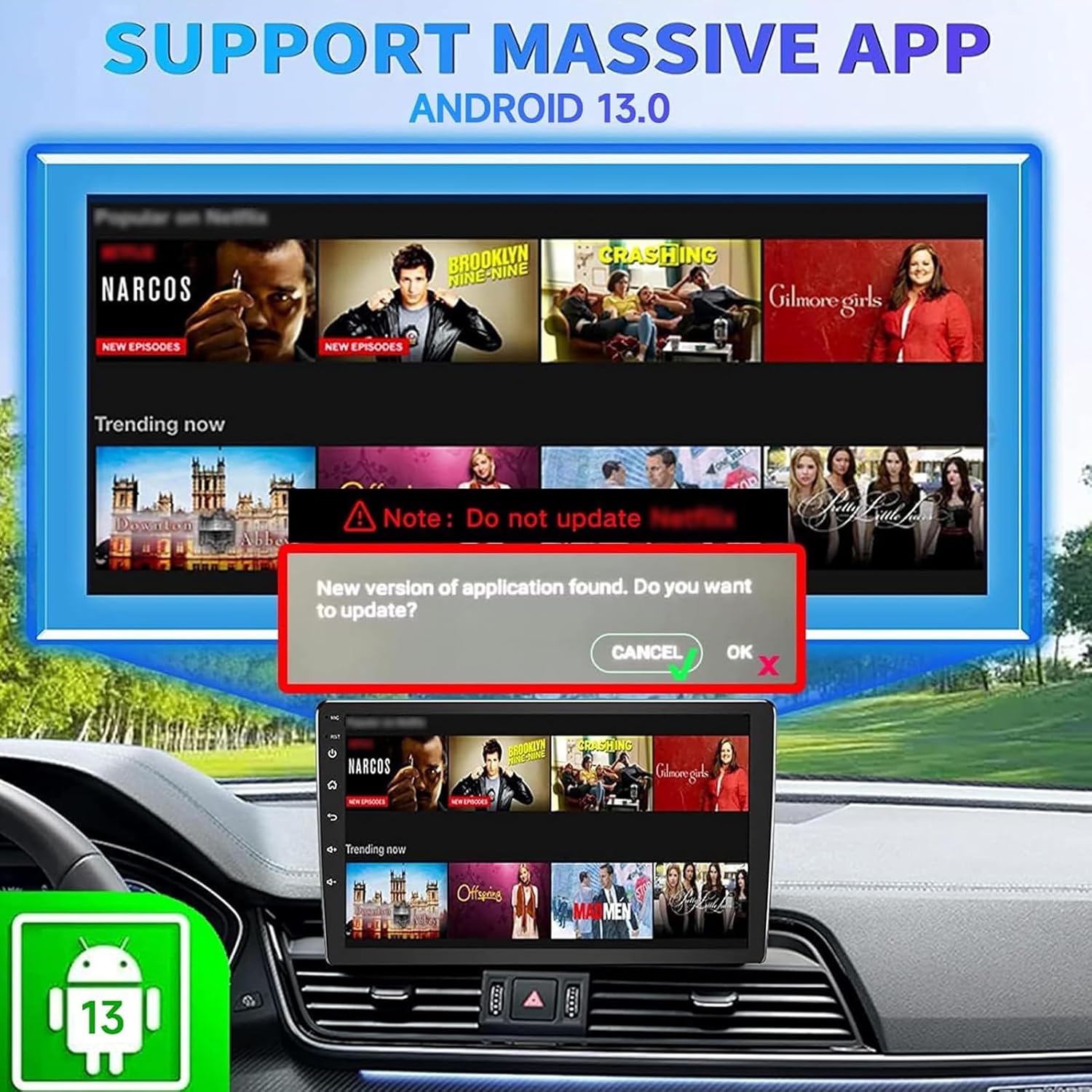
Imatge 6.1: Ex.ample of an application update prompt with a warning to avoid updating certain apps.
6.3 No Internet Signal (SIM Card)
- Inserció de la targeta SIM: Ensure the Nano SIM card is correctly inserted into the device.
- Compatibilitat de xarxa: Verify that your SIM card's carrier and frequency bands are supported by the device. Refer to the 4G LTE Frequency Band table in Section 7.1.
7. Especificacions
| Característica | Especificació |
|---|---|
| Número de model | Binize-4G-64GB-Android13 |
| Dimensions del producte | 3.07 x 0.71 x 3.07 polzades (7.8 x 1.8 x 7.8 cm) |
| Pes de l'article | 6.7 unces (190 grams) |
| Sistema operatiu | Android 13 |
| RAM | 4 GB LPDDR4 |
| ROM | 64 GB UFS |
| Tecnologia de connectivitat | Bluetooth, USB, 4G Cellular, Wi-Fi |
| Versió Bluetooth | BLE 4.2, BLE 5.0 |
| Tipus de controlador | Android |
| Mode de sortida d'àudio | estèreo |
| Codificació de vídeo | H.264, H.265/HEVC |
7.1 4G LTE Frequency Band Compatibility
The device supports various 4G LTE frequency bands. Please check with your cellular provider for compatibility.
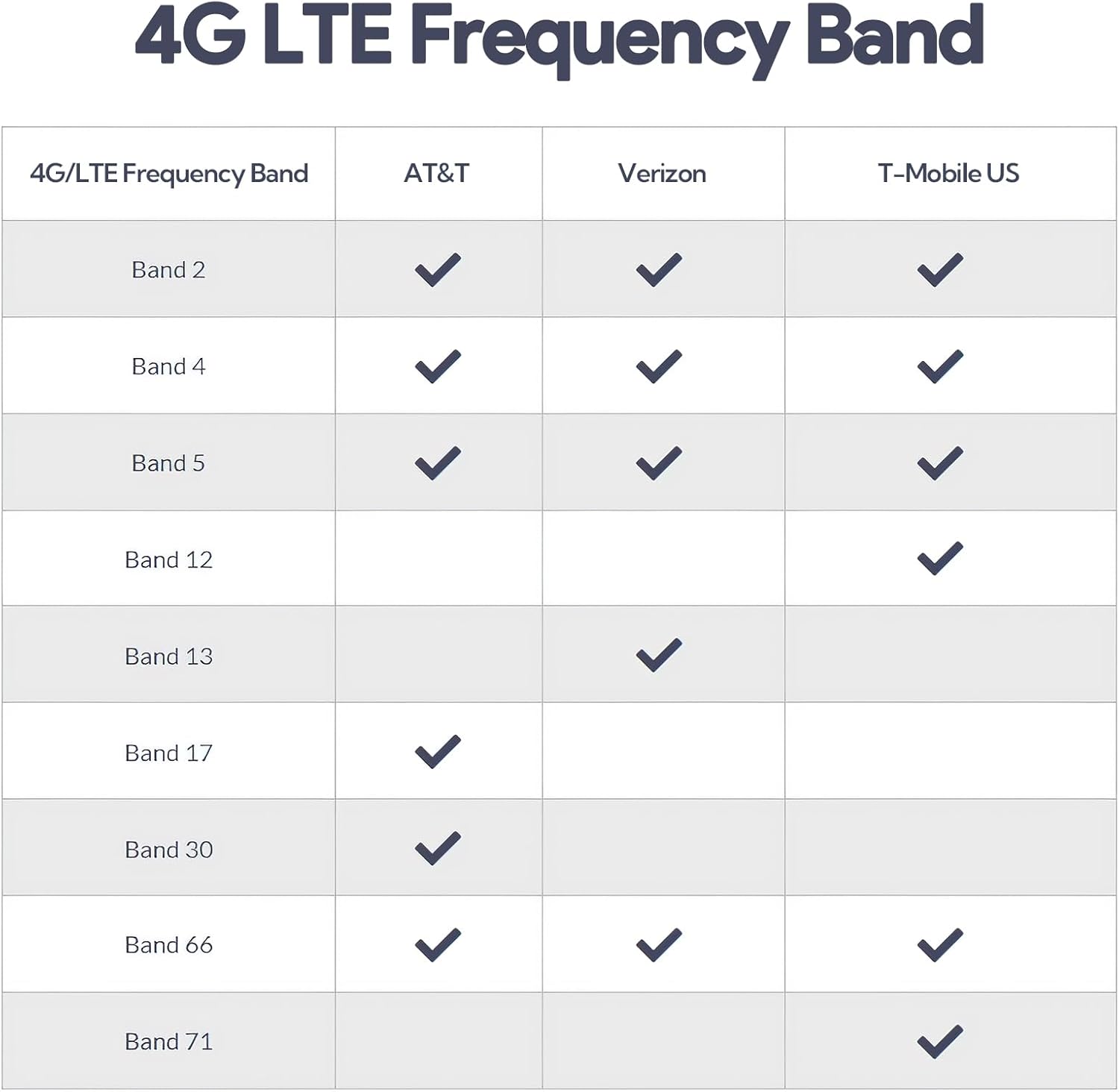
Image 7.1: Table showing supported 4G/LTE frequency bands for major US carriers (AT&T, Verizon, T-Mobile US).
8. Manteniment
To ensure optimal performance and longevity of your BINIZE Wireless CarPlay Android Auto Multimedia Video Box:
- Mantingueu el dispositiu net i lliure de pols i brutícia. Feu servir un drap suau i sec per netejar-lo.
- Eviteu exposar el dispositiu a temperatures extremes, a la llum solar directa durant períodes prolongats o a la humitat.
- Ensure proper ventilation around the device when in use.
- Comproveu periòdicament si hi ha actualitzacions de firmware del fabricant per millorar el rendiment i afegir noves funcions.
9. Garantia i Suport
BINIZE offers customer support for product inquiries and technical assistance. For troubleshooting or further questions, please refer to the contact information provided with your purchase or visit the official BINIZE weblloc.
Política de devolució: This product typically includes a 30-day return policy. Please refer to your purchase documentation for specific terms and conditions.


