
1. Introducció
The Blackstar Dept. 10 Dual Drive pedal is a high-quality valve overdrive and preamp designed for guitarists. It features four distinct pro-quality clean and distortion voices, operating at 250V. This innovative design, premium components, and advanced Cab Rig D.I. technology provide a versatile tool for both live performance and studio recording.
Les característiques clau inclouen:
- Two switchable channels with distinct overdrive voices for maximum versatility.
- Real ECC83 preamp tube for rich, tube-driven overdrive with natural harmonic complexity.
- Blackstar's Infinite Shape Feature (ISF) for precise tonal shaping between American and British characteristics.
- 3-band EQ for fine-tuning sound to various pickup configurations.
- Built-in CabRig DSP speaker simulator for the sound and feel of a miked-up guitar cabinet.
- Low latency USB audio interface for direct recording to a DAW or mixing board.
- Effects loop for seamless integration with existing pedalboards.
- XLR output for easy connection to PA systems or recording interfaces.
- Rugged design for durability in stage i entorns d'estudi.
- Adds true tube warmth and dynamics, enhancing both clean and overdriven tones.
2. Configuració
2.1 Desembalatge i inspecció inicial
Carefully remove the Dept. 10 Dual Drive pedal from its packaging. Inspect the unit for any signs of damage that may have occurred during transit. Ensure all included components are present: the Dept. 10 Dual Drive pedal, USB cable, and XLR cable.

Figura 1: superior view of the Blackstar Dept. 10 Dual Drive Pedal, showcasing its red finish and control knobs.
2.2 Connexió d'alimentació
Connect a compatible 9V DC, 500mA power supply (sold separately) to the 9V DC input jack on the rear panel of the pedal. Ensure the power supply meets the specified voltage i amperage requirements to prevent damage.

Figure 2: Rear panel connections including the 9V DC power input, USB audio port, and XLR line out.
2.3 Connexions d'àudio
Entrada: Connect your guitar to the INPUT jack on the right side of the pedal using a standard 1/4" instrument cable.
Sortida: Connecteu la presa OUTPUT del costat esquerre del pedal al vostre amplifier's input or other pedals in your signal chain using a standard 1/4" instrument cable.
Cab Rig Output: The CAB RIG output provides a speaker-emulated signal. Connect this 1/4" jack to a mixing console, audio interface, or headphones for direct recording or silent practice.
Sortida de línia XLR: For professional recording or direct connection to a PA system, use the XLR LINE OUT on the rear panel. This output also features Cab Rig DSP speaker simulation.
Effects Loop (SEND/RETURN): To integrate external effects pedals, connect the SEND jack to the input of your external effect and the output of your external effect to the RETURN jack.

Figura 3: lateral view showing the 1/4" input and output jacks.
Connexió d'àudio USB 2.4
Connect the pedal to your computer using the included USB cable for direct recording or to access the Cab Rig software for advanced speaker simulation customization. The pedal functions as a low-latency USB audio interface.
3. Instruccions de funcionament
3.1 Controlsview
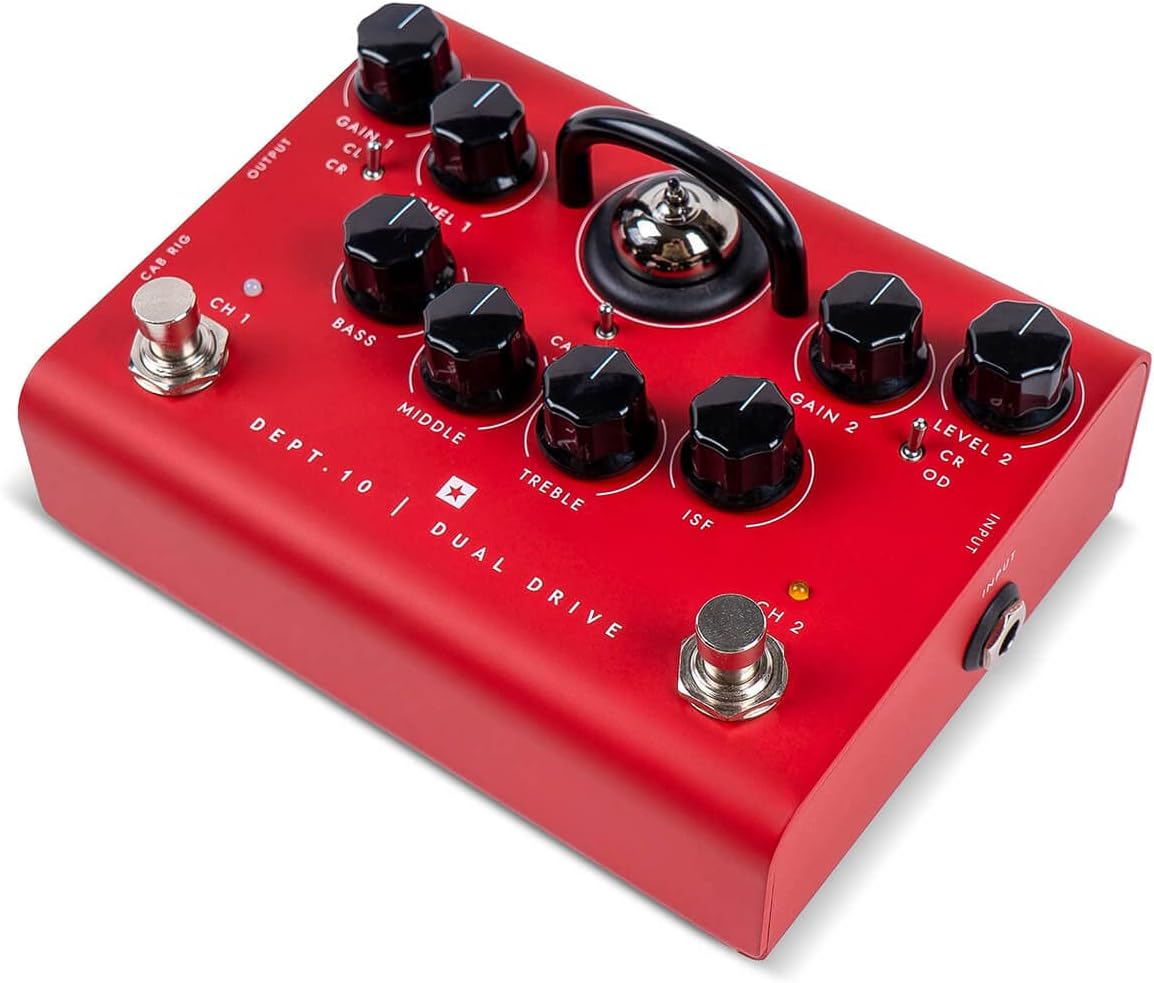
Figura 4: Detallada view of the pedal's top panel controls.
- GAIN 1 (CL/CR Switch): Controls the amount of gain for Channel 1. The switch selects between Clean (CL) and Crunch (CR) modes.
- NIVELL 1: Adjusts the output volume for Channel 1.
- BAIX, MITJANS, AIGTS: 3-band equalizer to shape the tone.
- ISF (Característica de forma infinita): Blackstar's patented control that sweeps between a "British" (counter-clockwise) and "American" (clockwise) amplifier tone.
- GAIN 2 (CR/OD Switch): Controls the amount of gain for Channel 2. The switch selects between Crunch (CR) and Overdrive (OD) modes.
- NIVELL 2: Adjusts the output volume for Channel 2.
- Pedal CH 1: Activates Channel 1.
- Pedal CH 2: Activates Channel 2.
- CAB RIG Footswitch: Toggles the Cab Rig DSP speaker simulation on/off for the 1/4" CAB RIG output and XLR LINE OUT.
3.2 Selecció de canals
The Dept. 10 Dual Drive features two independent channels. Use the CH 1 footswitch to engage Channel 1 and the CH 2 footswitch to engage Channel 2. Only one channel can be active at a time. The corresponding LED will illuminate to indicate the active channel.
3.3 Tone Shaping with ISF and EQ
El BASS, MITJÀ, i AGUTS controls function as a traditional 3-band EQ. The ESF control works in conjunction with these EQ controls to provide a wide range of tonal characteristics. Turning ISF counter-clockwise provides a tighter, more aggressive "American" sound, while turning it clockwise offers a warmer, more resonant "British" tone.
3.4 Cab Rig DSP
The built-in Cab Rig DSP speaker simulator allows you to emulate various speaker cabinet and microphone setups. Use the APARELL DE CABINA footswitch to activate or deactivate this feature for the dedicated outputs. For advanced customization of Cab Rig settings, connect the pedal to your computer via USB and use the Blackstar Architect software (downloadable from the Blackstar weblloc).
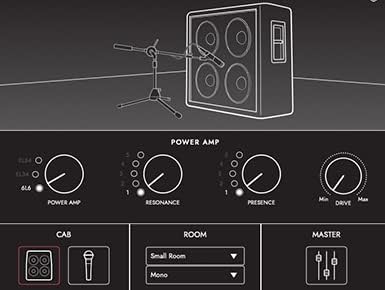
Figura 5: Example interface of the Cab Rig DSP software for detailed sound customization.
4. Manteniment
4.1 Neteja
To clean the pedal, use a soft, dry cloth. Do not use abrasive cleaners, solvents, or waxes, as these can damage the finish and internal components. Ensure the pedal is disconnected from power before cleaning.
4.2 Substitució del tub
The Dept. 10 Dual Drive uses an ECC83 preamp tube. While preamp tubes generally have a long lifespan, if you experience a significant degradation in tone or unusual noise, the tube may need replacement. Tube replacement should ideally be performed by a qualified technician. If attempting yourself, ensure the pedal is unplugged and allowed to cool completely. Carefully remove the protective cage and gently pull the tube straight out. Insert the new ECC83 tube, aligning the pins correctly, and replace the cage.
4.3 Emmagatzematge
Store the pedal in a cool, dry place away from direct sunlight and extreme temperatures. If transporting, use appropriate padding to protect the unit.
5. Solució De Problemes
| Problema | Causa possible | Solució |
|---|---|---|
| Sense sortida de so. |
|
|
| Weak or distorted sound (unintended). |
|
|
| No Cab Rig sound. |
|
|
| USB audio not recognized by computer. |
|
|
6. Especificacions
| Característica | Detall |
|---|---|
| Marca | Blackstar |
| Nom del model | Dept. 10 Dual Drive |
| Número de model | DEPT10DDR |
| Estil | Dual Drive |
| Pes de l'article | 0.7 quilos |
| Voltage | 9 Volts |
| Ampedat | 500 milionsamps |
| Efectes de sortida d'àudio | XLR |
| Tipus de controls | Pom |
| Font d'alimentació | Elèctric amb cable |
| Interfície del maquinari | USB |
| Format del senyal | Analògic |
| Dimensions de l'article (L x A x A) | 6.81 x 4.92 x 4.8 polzades |
| UPC | 845644006649 |
| Components inclosos | USB cable, XLR cable |
7. Garantia i assistència
7.1 Informació de la garantia
The Blackstar Dept. 10 Dual Drive pedal comes with a Garantia del fabricant de 1 anys. Please retain your proof of purchase for warranty claims. The warranty covers defects in materials and workmanship under normal use. It does not cover damage caused by misuse, accidents, unauthorized modifications, or normal wear and tear, including vacuum tubes which are consumable items.
7.2 Atenció al client
For technical assistance, troubleshooting, or warranty inquiries, please contact Blackstar customer support. Visit the official Blackstar weblloc web per obtenir la informació de contacte i els recursos d'assistència més actualitzats.
Blackstar Official Weblloc: www.blackstaramps.com