
1. Producte acabatview
The KUNA Craftsman Camera Porch Light is an outdoor lighting fixture integrated with a security camera and intercom system. It is designed to enhance home security by detecting nearby activity, sending alerts to your mobile device, and allowing two-way communication. This device works with both iOS and Android platforms and supports integration with Alexa and Google Assistant.

Figura 1: Davant view of the KUNA Craftsman Camera Porch Light, showcasing its traditional design with an integrated camera at the base.
2. Característiques clau
- Kuna App Features: 24/7 Wide-angle HD Video, Pre-recorded Messages, 2-Hour Event Look Back, 3 Downloads / Month, Two-Way Talk, Alexa integration, Google Assistant integration.
- Kuna Premium Features (Subscription Required): 7, 14 or 30 Event Look Back, Kuna AI (Advanced Detection), Lifetime Theft Protection, Unlimited Recording Downloads.
- Característiques del maquinari: 1080p HD camera, 115 dB siren, UL Wet Certified, Dimmable 2400 lumen/ 5000K (daylight color) lights, 100-277V Power Supply, 270-degree, 70-foot detection range, 155-degree field of view, 2.4GHz and 5GHz 802.11b/g/n WEP, WPA, and WPA2 supported.
- Setup Information: Easy 15-minute installation with no batteries to replace, ensuring continuous protection. Easy setup with iOS or Android devices.

Figura 2: Visual representation of the KUNA system capabilities, including cloud storage, real-time alerts, visitor identification, and an audible alarm.
3. Guia d'instal·lació
The KUNA Craftsman Camera Porch Light is designed for straightforward hardwired installation. It replaces existing outdoor light fixtures and typically takes about 15 minutes to install. No batteries are required, ensuring continuous power and operation.
3.1. Abans de començar
- Assegureu-vos que l'alimentació de la lluminària existent estigui apagada a l'interruptor automàtic.
- Gather necessary tools: screwdriver, wire nuts, electrical tape, ladder (if needed).
- Confirm you have a stable 2.4GHz or 5GHz Wi-Fi network available at the installation location.
3.2. Muntatge del dispositiu
- Carefully remove your existing light fixture.
- Attach the KUNA mounting bracket to your electrical box.
- Connect the KUNA light fixture wires to your home's electrical wiring (ground, neutral, hot) using wire nuts.
- Secure the KUNA Craftsman Camera Porch Light to the mounting bracket.
- Resta l'alimentació al disjuntor.
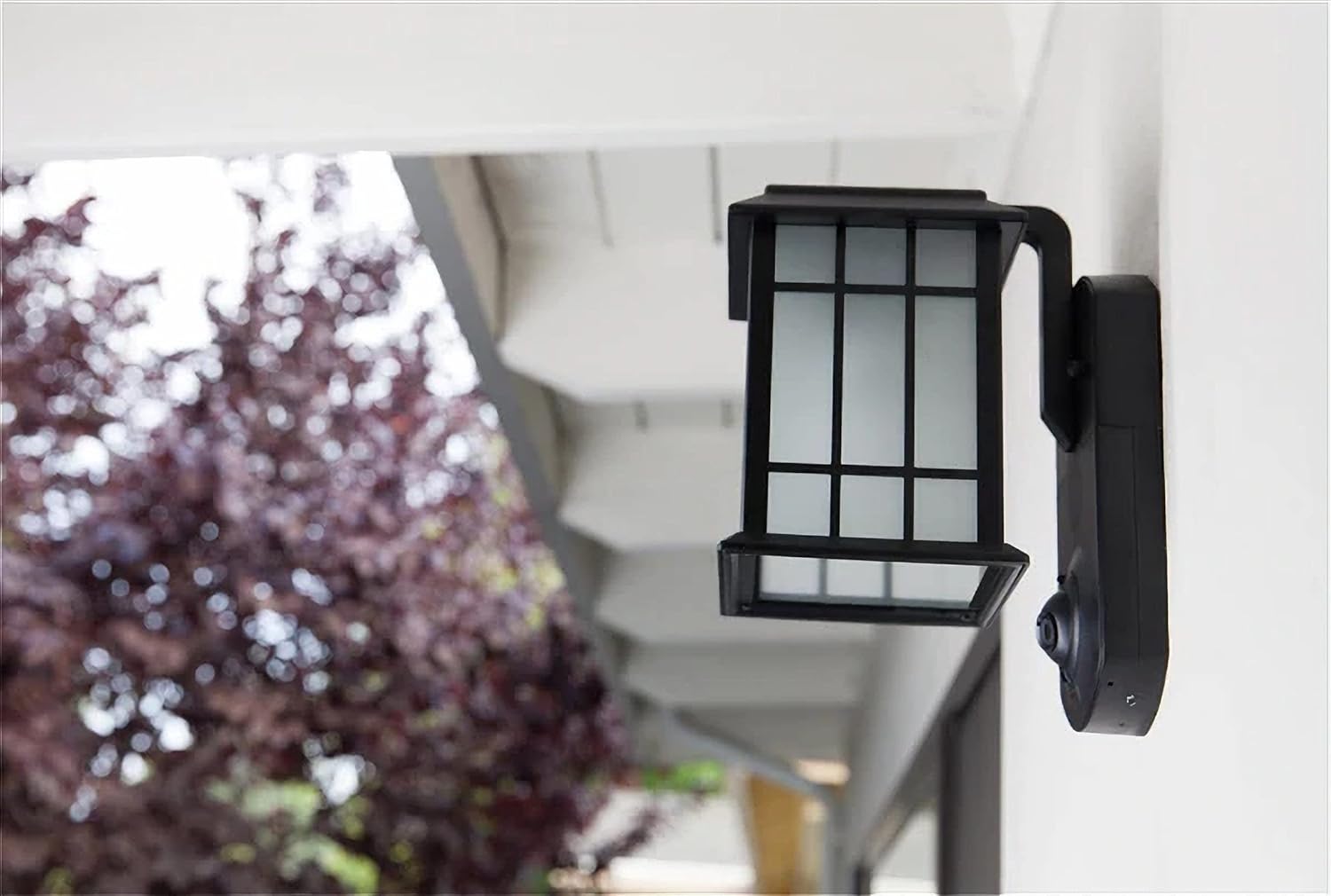
Figura 3: lateral view of the KUNA Craftsman Camera Porch Light installed on a home's exterior, demonstrating its profile.

Figura 4: The KUNA Craftsman Camera Porch Light installed and active on a residential exterior, providing illumination.
4. Configuració i connectivitat de l'aplicació
After physical installation, the next step is to connect your KUNA device to your home Wi-Fi network and set it up using the KUNA mobile application.
- Download the KUNA App: Cerca "KUNA" in the Apple App Store (for iOS devices) or Google Play Store (for Android devices) and download the official application.
- Crea un compte: Open the app and follow the on-screen instructions to create a new KUNA account or log in if you already have one.
- Afegeix el teu dispositiu: Select the option to "Add a New Device" within the app.
- Follow In-App Prompts: The app will guide you through connecting your KUNA Craftsman Camera Porch Light to your Wi-Fi network. This typically involves scanning a QR code or entering your Wi-Fi credentials.
- Personalitza la configuració: Once connected, you can customize motion detection zones, notification preferences, light schedules, and other settings.
5. Operating Your KUNA Light
Your KUNA Craftsman Camera Porch Light offers a range of functionalities accessible through the KUNA app to enhance your home security.
- Live HD Video: Access a live, wide-angle HD video feed from your camera at any time, from anywhere, via the KUNA app.
- Detecció de moviment i alertes: The device detects people nearby and sends instant push notifications to your iOS or Android device.
- Xerrada bidireccional: Use the built-in microphone and speaker to communicate with visitors or deter unwanted guests directly through the app.
- Pre-recorded Messages: Play pre-recorded messages to greet visitors or warn intruders.
- 115 dB Siren: Activate a loud siren from your app to scare off potential threats.
- Enregistrament d'esdeveniments: The camera automatically records events from beginning to end. Free accounts include a 2-hour event look-back and 3 downloads per month. Premium plans offer extended look-back periods and unlimited downloads.
- Integració de la llar intel·ligent: Control your KUNA light and access features through Amazon Alexa and Google Assistant.
Vídeo 1: An official KUNA video demonstrating how the KUNA Craftsman Camera Porch Light can be used to deter intruders by sounding an alarm from a mobile device after receiving a motion notification.
6. Manteniment
Regular maintenance ensures the longevity and optimal performance of your KUNA Craftsman Camera Porch Light.
- Neteja: Periodically wipe the camera lens and light fixture with a soft, damp cloth to remove dust, dirt, and cobwebs. Avoid abrasive cleaners.
- Actualitzacions de firmware: Ensure your device's firmware is always up-to-date through the KUNA app. Updates often include performance improvements and security enhancements.
- Connexió Wi-Fi: Verify your Wi-Fi signal strength in the app to ensure a stable connection for reliable video streaming and notifications.
- Inspecció física: Occasionally check the fixture for any signs of wear, damage, or loose connections.
7. Solució De Problemes
If you encounter issues with your KUNA Craftsman Camera Porch Light, refer to the following common troubleshooting steps:
- No Power/Light Not Turning On:
- Comproveu l'interruptor per assegurar-vos que està encès.
- Verifiqueu que totes les connexions elèctriques siguin segures.
- Ensure the light schedule in the KUNA app is correctly configured.
- Problemes de connectivitat Wi-Fi:
- Ensure your Wi-Fi router is within range and functioning correctly.
- Restart your router and the KUNA device (by cycling power at the breaker).
- Confirm you are connecting to a 2.4GHz or 5GHz network supported by the device.
- No Notifications/Motion Detection:
- Check app notification settings on your phone and within the KUNA app.
- Verify motion detection zones are properly set up in the app.
- Assegureu-vos que la lent de la càmera estigui neta i sense obstruccions.
- Poca qualitat de vídeo:
- Comproveu la intensitat del senyal Wi-Fi. Un senyal feble pot afectar la qualitat del vídeo.
- Netegeu la lent de la càmera.
- Ensure adequate lighting conditions for optimal video capture.
- Two-Way Talk Not Working:
- Check your phone's microphone and speaker permissions for the KUNA app.
- Assegureu-vos que la vostra connexió a Internet sigui estable.
8. Especificacions
| Característica | Detall |
|---|---|
| Nom del model | Craftsman Black |
| Número de model | KNA-CP01-BK-01 |
| ASIN | B09JVKC43S |
| GTIN/UPC | 860002313221 |
| Usos recomanats | Outdoor, Home Security & Surveillance |
| Tecnologia de connectivitat | Sense fil (Wi-Fi, Bluetooth) |
| Característica especial | Sensor de moviment |
| Ús interior/exterior | A l'aire lliure |
| Dispositius compatibles | Telèfon intel·ligent (iOS, Android) |
| Tipus de muntatge | Muntatge de paret |
| Color | Negre |
| Factor de forma | Caixa |
| Tipus d'instal·lació | Cablejat |
| Material de tancament | Plastic, Cast Aluminum, Glass |
| Tipus d'alerta | Només moviment |
| Font de llum | LED (Dimmable 2400 lumen/ 5000K) |
| Classificació impermeable | IP43 |
| Mètode de control | App |
| Tecnologia sense fils | Wi-Fi (2.4GHz and 5GHz 802.11b/g/n WEP, WPA, WPA2) |
| Resolució de captura de vídeo | 720p (Camera hardware supports 1080p HD) |
| Tipus d'enfocament | Enfocament automàtic |
| Tipus de zoom | Zoom digital |
| Dimensions de l'article | 6 x 8.5 x 11.1 polzades |
| Pes de l'article | 4 lliures |
| Font d'alimentació | Hardwired (100-277V Power Supply) |
| Visió nocturna | Color nocturn |
| Interval de detecció | 270 degrees, 70 feet |
| Camp de View | 155 graus |
| Sirena | 115 dB |
9. Garantia i Suport
The KUNA Craftsman Camera Porch Light comes with a manufacturer's warranty and dedicated customer support.
- Garantia del fabricant: A 1-year limited warranty covers defects in materials and workmanship. Please refer to the official KUNA weblloc web o la documentació de compra per conèixer els termes i condicions complets de la garantia.
- Atenció al client: For technical assistance, troubleshooting, or warranty claims, please visit the official KUNA support weblloc o poseu-vos en contacte amb el seu equip d'atenció al client.
- Recursos en línia: Additional FAQs, video tutorials, and community forums may be available on the KUNA website to help you get the most out of your device.