
Introducció
This manual provides detailed instructions for the safe and efficient installation, operation, and maintenance of your VIVO MOUNT-E-UP65A Motorized TV Stand. This motorized lift is designed to support 32" to 65" televisions weighing up to 132 lbs (60 kg) and is intended for installation inside a cabinet. It is not designed for freestanding use or ceiling mounting.
Contingut del paquet
An accessory kit containing all necessary hardware and instructions is provided. Please verify all components are present and undamaged before beginning installation. If any parts are missing or damaged, contact VIVO customer support.
Informació de seguretat
Read all instructions carefully before assembly and operation. Failure to understand and follow these instructions can result in serious injury or property damage. Keep this manual for future reference.
- No supereu la capacitat de pes de 132 lliures (60 kg).
- Aquest producte està dissenyat per cabinet installation only. Do not attempt to use it as a freestanding unit or for ceiling mounting.
- Ensure the cabinet structure is stable and capable of supporting the combined weight of the TV stand and television.
- Mantingueu els nens i les mascotes allunyats de l'elevador motoritzat durant el funcionament.
- Avoid placing hands or objects near moving parts during operation to prevent pinching or injury.
- Desconnecteu l'alimentació abans de realitzar qualsevol manteniment o ajust.
- If any parts are missing or damaged, contact VIVO customer support immediately.
Configuració i instal·lació
This section outlines the steps for installing your motorized TV stand within a cabinet. Detailed step-by-step instructions with diagrams are included in the separate accessory kit.
Requisits del gabinet
The motorized lift requires a cabinet for stable installation. Ensure the cabinet dimensions accommodate the lift and your television. The overall lowered height is 30.8" to 65" and the overall maximum height is 40.8" to 75.1", depending on the adjusted shelf height and TV size.
Compatibilitat VESA
The mount is compatible with the following VESA mounting hole patterns:
- 75x75mm
- 100x100mm
- 200x100mm, 200x200mm
- 300x200mm, 300x300mm
- 400x200mm, 400x300mm, 400x400mm
- 400x600mm, 600x400mm, 600x600mm
Refer to your TV's manual for its specific VESA pattern and screw requirements.
Passos generals d'instal·lació
- Preparar el gabinet: Ensure the cabinet is sturdy and has appropriate openings for the lift mechanism and cable management.
- Mount the Lift: Securely attach the motorized lift to the inside of your cabinet using the provided hardware and following the detailed instructions.
- Fixeu els suports de TV: Fasten the TV mounting brackets to the back of your television using the appropriate screws from the accessory kit.
- Mount TV to Lift: Carefully lift the television and hook the TV brackets onto the lift mechanism. Secure the TV in place with the safety screws.
- Connectar l'alimentació: Connecteu el cable d'alimentació a una presa elèctrica amb connexió a terra.

Image: The VIVO Motorized TV Stand with a television fully raised from within a cabinet.

Image: Measurement diagram illustrating screen size compatibility, weight capacity, and VESA patterns for the TV stand.
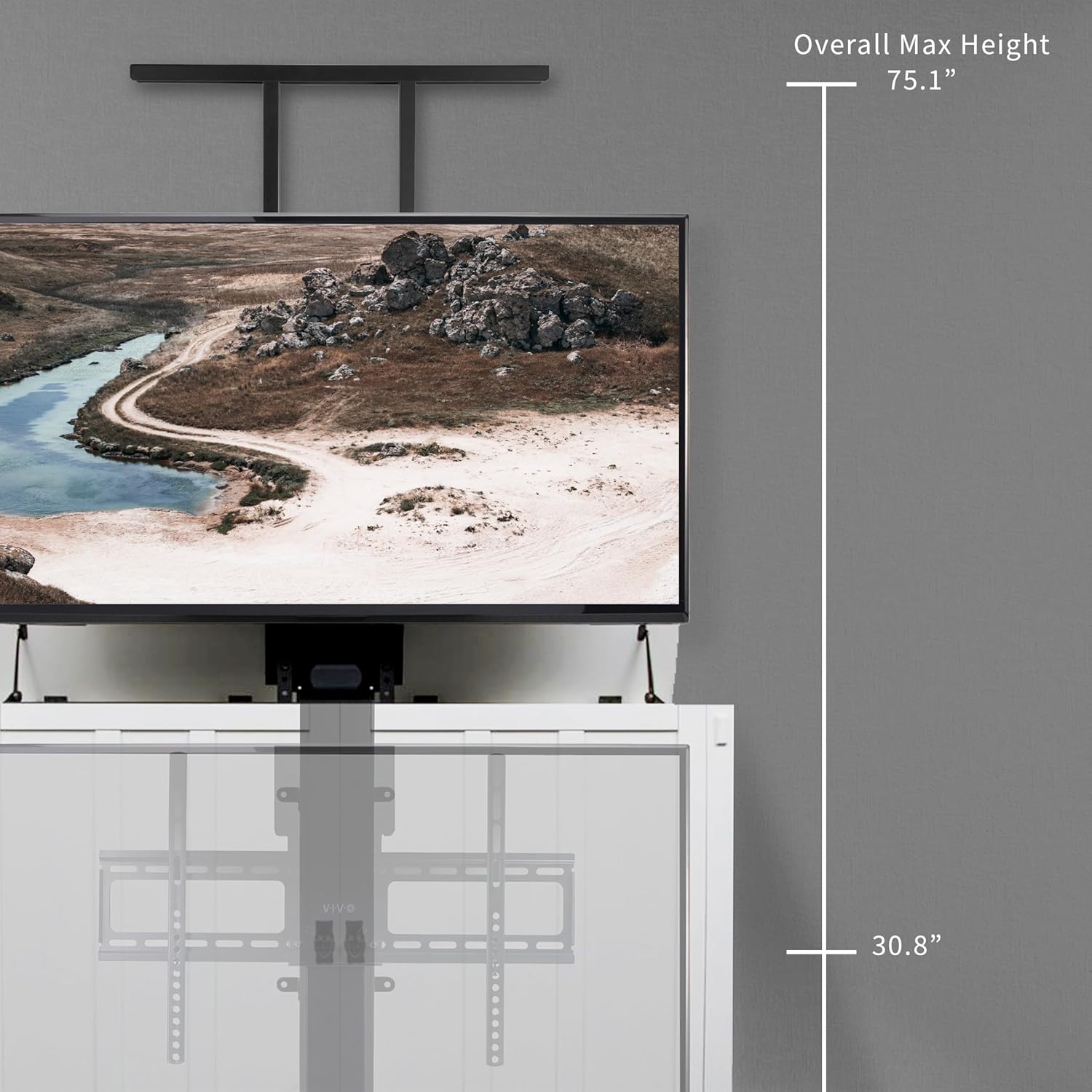
Image: Height adjustment range diagram, showing the minimum and maximum possible heights of the TV lift.
Instruccions de funcionament
The VIVO MOUNT-E-UP65A is operated using the included remote control.
Funcions de control remot
The remote control allows for smooth and simple adjustments of the TV lift.
- Fletxa cap amunt: Raises the television.
- Fletxa avall: Lowers the television.
- Botons de memòria (1, 2, 3, 4): Store and recall preferred height positions.
- Set Memory (M): Used to program memory positions.
Setting Memory Positions
- Adjust the TV to your desired height using the Up/Down arrows.
- Press the "M" button on the remote.
- Press one of the numbered memory buttons (1, 2, 3, or 4) to save the current height.
- To recall a saved position, simply press the corresponding numbered button.

Image: Remote control and its functions for operating the TV lift.

Image: Demonstrating the ease of height adjustment using the remote control.
Vídeo demostració
Video: A demonstration of the VIVO motorized TV stand moving up and down with a remote control. This video highlights the smooth and quiet operation of the lift.
Manteniment
Regular maintenance ensures the longevity and proper function of your VIVO Motorized TV Stand.
- Keep the lift mechanism clean and free from dust and debris.
- Reviseu periòdicament tots els cargols i connexions per assegurar-vos que estiguin ben ajustats i segurs.
- Do not lubricate the lift mechanism unless specifically instructed by VIVO support.
- If the lift operates unusually or makes excessive noise, discontinue use and contact support.
Resolució de problemes
If you encounter issues with your VIVO Motorized TV Stand, refer to the following common solutions.
| Problema | Causa possible | Solució |
|---|---|---|
| L'ascensor no es mou. | No power, remote battery low, or motor overload protection activated. | Check power connection. Replace remote batteries. Disconnect power for 10 minutes to reset motor, then try again. |
| L'ascensor es mou de manera irregular o fa un soroll inusual. | Obstruction, loose connections, or damaged components. | Inspect for obstructions. Check all mounting screws. Contact VIVO support if the issue persists. |
| El comandament a distància no respon. | Remote battery low or remote not paired. | Replace remote batteries. Refer to the full user guide for remote pairing instructions if necessary. |
Especificacions
- Número de model: MOUNT-E-UP65A
- Marca: VIVO
- Tipus de muntatge: Muntatge del Gabinet
- Tipus de moviment: Altura regulable motoritzada
- Material: Acer d'aliatge, alumini
- Color: Negre
- Dispositius compatibles: Televisió
- Compatibilitat de la mida de la pantalla: 32" a 65"
- Capacitat de pes: Fins a 132 lliures (60 kg)
- Compatibilitat VESA: 75x75, 100x100, 200x100, 200x200, 300x200, 400x200, 200x300, 300x300, 400x300, 400x400, 400x600, 600x400, 600x600
- Alçada total rebaixada: 30.8" to 65" (adjustable)
- Alçada màxima total: 40.8" to 75.1" (adjustable)
- Pes de l'article: 28.5 lliures
Garantia i Suport
Aquest producte VIVO està cobert per una 3 anys de garantia. For technical assistance, missing parts, or warranty claims, please contact VIVO customer support through their official channels.
Additional resources, including a detailed User Manual (PDF) and User Guide (PDF), are available for download: