
1. Introducció
Thank you for choosing the FLEXISPOT EG1 Electric Standing Desk. This manual provides essential information for the safe and efficient assembly, operation, and maintenance of your new height-adjustable desk. The EG1 desk is designed to promote a healthier work environment by allowing seamless transitions between sitting and standing positions, enhancing focus and comfort throughout your workday.
The FLEXISPOT EG1 features a wide height adjustment range, a smooth one-piece desktop, and an intuitive control panel for ease of use. Please read this manual thoroughly before assembly and operation to ensure proper functionality and longevity of your product.
2. Informació de seguretat
- Assegureu-vos que tots els components siguin presents i no estiguin danyats abans del muntatge. No utilitzeu el producte si hi falta alguna peça o si està danyada.
- Mantingueu els nens i les mascotes allunyats de l'escriptori durant el funcionament per evitar lesions.
- Do not place hands or other objects near moving parts (e.g., lifting columns) during height adjustment.
- Assegureu-vos que l'escriptori estigui col·locat sobre una superfície plana per mantenir l'estabilitat.
- No sobrecarregueu l'escriptori. Consulteu les especificacions per conèixer la capacitat màxima de pes.
- Només feu servir l'adaptador de corrent i els cables proporcionats.
- Desconnecteu l'alimentació abans de la neteja o el manteniment.
- Eviteu vessar líquids sobre el tauler de control o els components elèctrics.
- This desk is equipped with an anti-collision rebound function. However, always be aware of surroundings during movement.
3. Contingut del paquet
The FLEXISPOT EG1 Electric Standing Desk is shipped in two separate packages to ensure better protection during transit. Please verify that all components listed below are present before beginning assembly.
- Desktop (1 piece)
- Desk Frame (includes legs, motor, control box)
- Tauler de control
- Adaptador d'alimentació i cable
- Maquinari de muntatge (cargols, perns, eines)
- Manual d'instruccions

Image: The FlexiSpot EG1 desk components are shipped in two distinct packages: one containing the desktop and another for the desk frame, ensuring secure delivery.
4. Muntatge i muntatge
Assembly of the FLEXISPOT EG1 desk is designed to be straightforward with pre-drilled holes and a complete set of tools included. Follow these general steps for assembly:
- Desempaquetar components: Traieu amb cura totes les peces de l'embalatge i col·loqueu-les sobre una superfície neta i suau per evitar ratllades.
- Muntar el marc de l'escriptori: Attach the lifting columns to the crossbar, ensuring all screws are securely tightened.
- Enganxar els peus: Secure the foot pads to the bottom of the lifting columns. The anti-slip foot pads provide stability and protect your floor.
- Munta l'escriptori: Carefully place the desktop upside down on a soft surface. Align the assembled desk frame with the pre-drilled holes on the desktop and secure it with the provided screws.
- Instal·leu el tauler de control: Attach the control panel to the underside of the desktop in a convenient location.
- Connectar els cables: Connect the motor cables, control panel cable, and power adapter to the control box. Ensure all connections are firm.
- Gestió de cables: Use cable ties or clips (if provided) to organize and secure cables, preventing them from snagging during height adjustments.
- Taula de posicions: Carefully flip the desk upright and place it in its desired location. Ensure there is adequate clearance for height adjustments.

Image: The desk features a smooth, one-piece desktop, eliminating gaps and burrs often found in spliced desktops, contributing to a clean and stable work surface.
5. Instruccions de funcionament
The FLEXISPOT EG1 Electric Standing Desk is operated using a simple 2-button control panel, allowing for quick and easy height adjustments and memory presets.
5.1 Funcions del tauler de control

Image: The smart control panel features an LED display, up/down buttons for height adjustment, and four memory preset buttons for saving preferred desk heights.
- Pantalla LED: Shows the current desk height in centimeters or inches.
- Botons amunt/avall (▲ / ▼): Press and hold to move the desk up or down. Release the button to stop at the desired height.
- Preajustos de memòria (1, 2, 3, 4): These buttons allow you to save and recall up to four preferred desk heights.
5.2 Configuració de preajustos de memòria
- Ajusteu l'escriptori a l'alçada desitjada amb els botons Amunt/Avall.
- Press the 'M' or 'SET' button (if available, otherwise proceed to step 3). The display may flash.
- Press one of the numbered memory buttons (1, 2, 3, or 4) within a few seconds. The display will confirm the setting.
- To recall a saved height, simply press the corresponding numbered memory button. The desk will automatically move to that height.
5.3 Anti-Collision Feature
The desk is equipped with an anti-collision system. If the desk encounters an obstacle during height adjustment, it will automatically stop and reverse slightly to prevent damage. Always ensure the area around the desk is clear during operation.

Image: The desk offers a wide height range (71.5 to 116 cm), accommodating various users for comfortable sitting or standing positions.
6. Manteniment
Regular maintenance ensures the longevity and optimal performance of your FLEXISPOT EG1 Electric Standing Desk.
- Neteja: Netegeu l'escriptori i el marc amb un drap suauamp cloth. Avoid abrasive cleaners or harsh chemicals that could damage the finish. Ensure the desk is unplugged before cleaning.
- Gestió de cables: Periodically check cables for wear or damage. Ensure they are neatly organized and not pinched or tangled.
- Comprovació de fixació: De tant en tant, comproveu tots els cargols i perns per assegurar-vos que estiguin ben ajustats. Torneu-los a apretar si cal.
- Comprovació de moviment: Operate the desk through its full height range periodically to ensure smooth and consistent movement.
7. Solució De Problemes
If you encounter issues with your FLEXISPOT EG1 desk, refer to the following troubleshooting guide:
| Problema | Causa possible | Solució |
|---|---|---|
| L'escriptori no es mou. | Power cable disconnected, control box error, motor issue. | Check power connections. Unplug and replug the desk for 10 seconds to reset. If problem persists, contact customer support. |
| L'escriptori es mou de manera irregular o fa un soroll inusual. | Càrrega desigual, fixacions fluixes, obstrucció. | Ensure weight is evenly distributed. Check and tighten all assembly fasteners. Clear any obstructions. |
| L'escriptori s'atura durant l'ajust. | Anti-collision activated, overload. | Remove any obstacles. Reduce weight on the desk if it exceeds maximum capacity. |
| Els preajustaments de memòria no funcionen. | Els preajustos no s'han desat correctament. | Torneu a desar els preajustos de memòria seguint les instruccions de la Secció 5.2. |
8. Especificacions
Key specifications for the FLEXISPOT EG1 Electric Standing Desk:
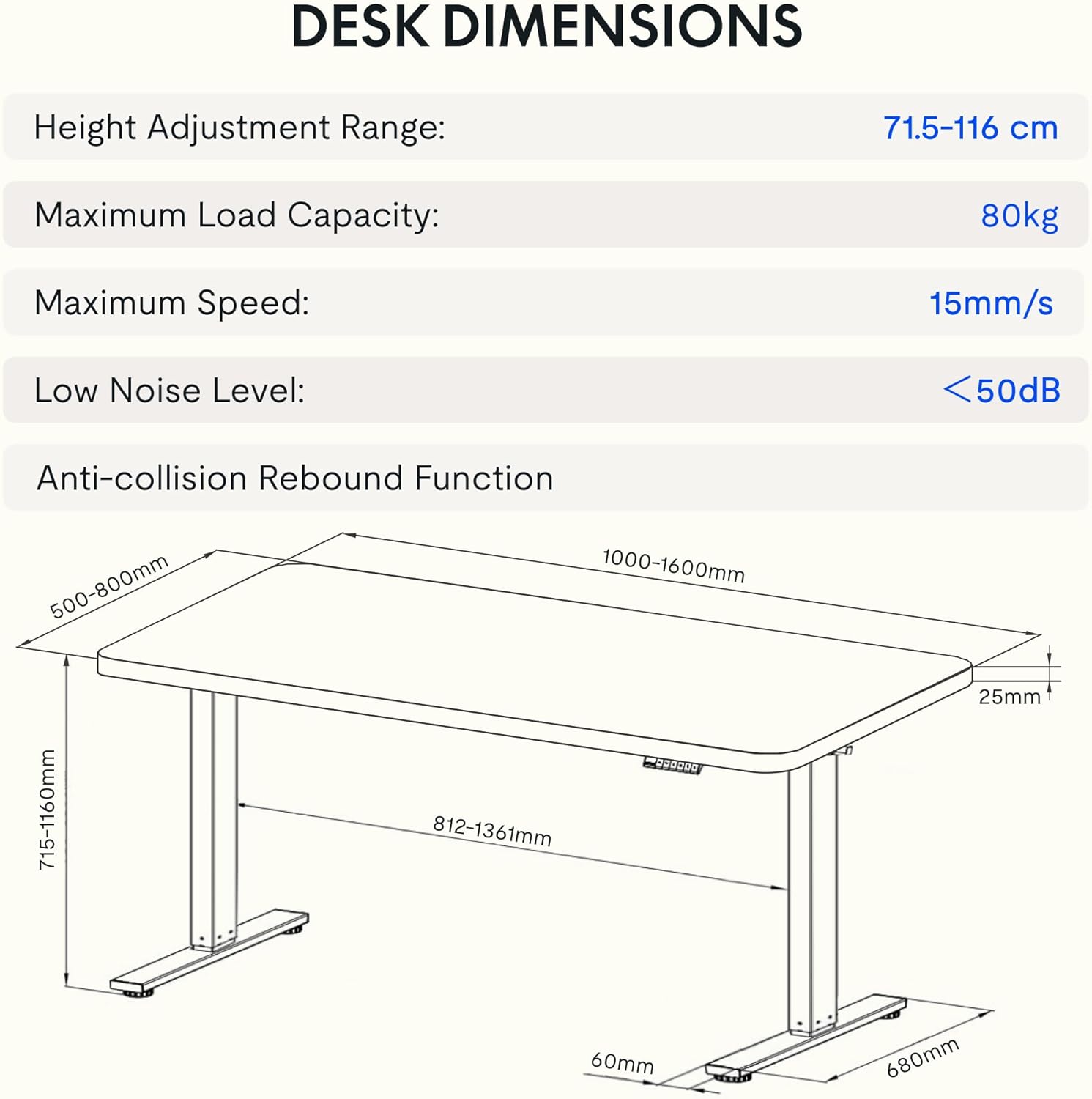
Image: Detailed diagram illustrating the desk's dimensions, height adjustment range (71.5-116 cm), maximum load capacity (80kg), maximum speed (15mm/s), and low noise level (<50dB).
| Característica | Especificació |
|---|---|
| Número de model | EG1B+TP1608-Black |
| Interval d'ajust d'altura | 71.5 - 116 cm (28 - 48 polzades) |
| Capacitat de càrrega màxima | 80 kg (176 lliures) |
| Velocitat màxima | 15 mm/s |
| Baix nivell de soroll | < 50 dB |
| Material d'escriptori | Wood (2.5 cm thickness) |
| Material del marc | Acer |
| Dimensions del producte (P x A x A) | 31.5" x 62.99" x 11.02" (envasat) |
| Pes de l'article | 30 quilos |
| Característiques especials | Electric, Anti-collision Rebound Function, 4 Memory Presets |
9. Garantia i Suport
FLEXISPOT is committed to providing high-quality ergonomic solutions. With over 20 years of experience, our products undergo rigorous testing and meet various European certifications (IGR, CE, TÜV).
For warranty information, technical support, or any questions regarding your FLEXISPOT EG1 Electric Standing Desk, please visit the official FLEXISPOT website or contact our customer service department. You can find more information and contact details on the FLEXISPOT Store on Amazon.