
1. Introducció i informació de seguretat
Thank you for choosing the Hayward Micro 3.5KW Mono Heat Pump. This manual provides important information for the safe installation, operation, and maintenance of your heat pump. Please read this manual thoroughly before installation and use, and keep it for future reference.
Instruccions importants de seguretat
- Desconnecteu sempre l'alimentació abans de realitzar qualsevol servei o manteniment.
- La instal·lació ha de ser realitzada per un professional qualificat d'acord amb totes les normes elèctriques i de fontaneria locals i nacionals.
- No feu funcionar la bomba de calor si alguna peça està danyada o falta.
- Mantingueu els nens allunyats de la unitat durant el funcionament.
- Assegureu-vos una ventilació adequada al voltant de la unitat.
2. Producte acabatview & Característiques
The Hayward Micro 3.5KW Mono Heat Pump is specifically designed for above-ground pools, offering efficient heating to extend your swimming season. It features a robust construction and smart control capabilities.
Característiques principals:
- Dedicated for Above-Ground Pools: Optimized performance for smaller pool volumes.
- Només el mode de calefacció: Provides efficient water heating.
- Construcció duradora: Galvanized casing offers high resistance to UV radiation and corrosion, ensuring longevity.
- Low Ambient Temperature Operation: Functions effectively down to an ambient temperature of 10°C.
- Funcionament silenciós: Engineered for minimal noise during use.
- Connectivitat Bluetooth: Control your heat pump remotely via a dedicated mobile application.

Figura 2.1: Davant view of the Hayward Micro 3.5KW Mono Heat Pump, showcasinpel seu disseny compacte i la pantalla digital.
3. Configuració i instal·lació
Proper installation is crucial for the performance and safety of your heat pump. It is highly recommended that installation be carried out by a qualified pool professional.
3.1 Col·locació
- Choose a location with adequate airflow, away from walls or obstructions.
- Assegureu-vos que la unitat estigui col·locada sobre una superfície estable i plana.
- Maintain a minimum distance of 50 cm from any vertical surface for optimal air circulation.
3.2 Connexions de fontaneria
Connect the heat pump to your pool's filtration system. Water flows from the filter, through the heat pump, and back to the pool. Nota: While some product descriptions may suggest otherwise, a bypass kit is generally recommended for proper flow control and maintenance of pool heat pumps. Consult with your installer regarding the necessity of a bypass for your specific setup.
3.3 Connexions elèctriques
The heat pump requires a dedicated electrical circuit. All electrical wiring must comply with local and national electrical codes. Ensure the power supply matches the specifications of the unit.

Figura 3.1: lateral view of the heat pump, illustrating the water inlet/outlet connections and general unit layout for installation planning.
4. Instruccions de funcionament
Once installed and connected, operating your Hayward heat pump is straightforward, either via the integrated control panel or the dedicated Bluetooth application.
4.1 Posada en marxa inicial
- Assegureu-vos que la bomba de la piscina estigui en funcionament i que l'aigua flueixi a través de la bomba de calor.
- Turn on the electrical power to the heat pump.
- The unit will perform a self-check and display the current water temperature.
4.2 Configuració de la temperatura desitjada
Use the control panel on the unit to adjust the desired water temperature. Refer to the specific button functions indicated on the unit's display for temperature up/down adjustments.
4.3 Control de l'aplicació Bluetooth
The Hayward Micro Heat Pump can be controlled remotely via a dedicated smartphone application. Download the official Hayward app from your device's app store.
- Activa el Bluetooth al teu telèfon intel·ligent.
- Open the Hayward app and follow the on-screen instructions to pair with your heat pump.
- Once connected, you can monitor the pool temperature, set the desired temperature, and manage other settings directly from your phone.
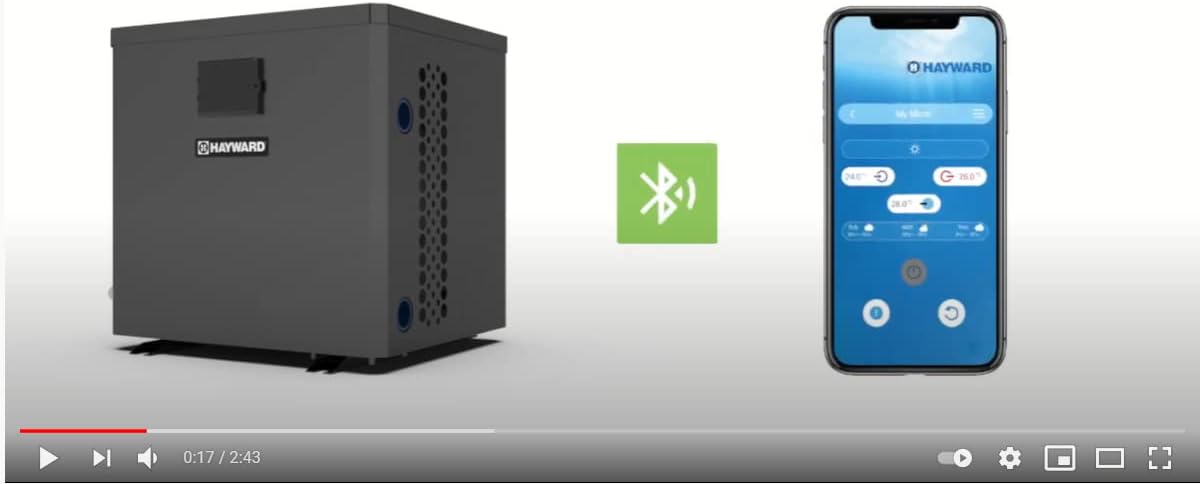
Figura 4.1: The heat pump unit alongside a smartphone displaying the Bluetooth connection interface, indicating remote control capability.
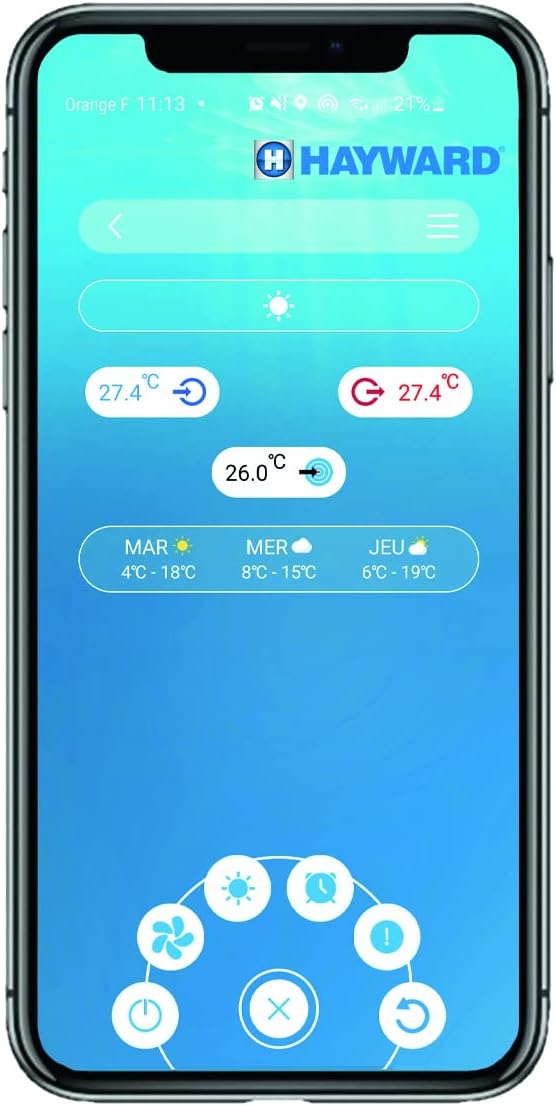
Figura 4.2: Un detallat view of the Hayward mobile application interface, showing temperature settings and control options for the heat pump.
5. Manteniment
Un manteniment regular garanteix un rendiment òptim i allarga la vida útil de la bomba de calor.
5.1 Neteja
- Neteja de bobines: Periodically inspect and clean the evaporator coil (fins) to remove leaves, dirt, and debris. Use a soft brush or vacuum cleaner.
- Neteja exterior: Netegeu l'exterior casing amb anunciamp tela. No utilitzeu productes químics aggressivs ni netejadors abrasius.
5.2 Hivernització
Before freezing temperatures arrive, it is essential to properly winterize your heat pump to prevent damage.
- Turn off the heat pump and disconnect its power supply.
- Drain all water from the heat pump's plumbing.
- Cover the unit with a protective, breathable cover.
6. Solució De Problemes
This section addresses common issues you might encounter. For problems not listed here or if issues persist, contact a qualified service technician.
Problemes comuns:
- No Heat/Insufficient Heating: Check if the pool pump is running, ensure the desired temperature is set correctly, and verify that the unit has power. Low ambient temperatures (below 10°C) can reduce heating efficiency.
- La unitat no s'encén: Check the circuit breaker and ensure the power supply is connected.
- Codis d'error a la pantalla: Refer to the specific error code in the full technical manual (if available) or contact customer support with the code displayed.
- Soroll inusual: Inspect for debris in the fan or loose components. If the noise persists, contact a technician.
7. Especificacions
| Característica | Detall |
|---|---|
| Número de model | HP2031DT3C |
| Dimensions (L x A x A) | 41.76 x 38.13 x 41.98 cm |
| Pes | 1.5 kg |
| Tipus d'energia | Elèctric |
| Temperatura ambient de funcionament | Down to 10°C |
| Connectivitat | Bluetooth |
8. Garantia i assistència
Hayward products are manufactured to the highest standards and are backed by a limited warranty. For specific warranty terms and conditions, please refer to the warranty card included with your product or visit the official Hayward weblloc.
For technical assistance, spare parts, or service inquiries, please contact Hayward customer support or your authorized Hayward dealer. When contacting support, please have your model number (HP2031DT3C) and purchase date available.
Hayward Customer Service: Please refer to the contact information provided on the official Hayward weblloc per a la vostra regió.