
Introducció
This manual provides detailed instructions for the setup, operation, and maintenance of your Muddy Morph AT&T Cellular Trail Camera. Designed for outdoor use, this camera captures high-resolution images and videos, transmitting them via the AT&T cellular network. Please read this manual thoroughly to ensure proper use and optimal performance of your device.
Configuració
1. Desembalatge i components
Verifiqueu que tots els components siguin presents al paquet:
- Muddy Morph Cellular Trail Camera
- Corretja d'arbre
2. Instal·lació de la bateria
The camera requires 8 AA batteries (not included). Ensure batteries are inserted with correct polarity as indicated inside the battery compartment.
3. Instal·lació de la targeta SD
Insert a compatible SD card (up to 32GB, Class 10 recommended) into the designated slot. Ensure the card is inserted correctly until it clicks into place.
4. Instal·lació de la targeta SIM
This cellular trail camera requires an activated AT&T compatible SIM card for cellular data transmission. Insert the SIM card into its slot as per the diagram inside the camera.

Image: Muddy Morph Trail Camera with its compartment open, revealing the QR code for setup and slots for batteries and SIM/SD cards.
5. Command Pro App Installation and Activation
Download the 'Command Pro' app from the Google Play Store or Apple App Store. Follow the in-app instructions for quick QR code setup. This app allows you to monitor and control your camera remotely.

Image: A person using a smartphone to configure the trail camera, which is mounted on a tree.
6. Muntatge de la càmera
Use the provided tree strap to securely mount the camera to a tree or post. Ensure the camera is stable and pointed towards the desired monitoring area.

Image: The Muddy Morph Trail Camera mounted on a tree, ready for operation.
Instruccions de funcionament
1. Encès / apagat
Once batteries and SD/SIM cards are installed, power on the camera using the designated switch. The camera will perform a self-check and connect to the cellular network.
2. Captura d'imatges i vídeo
The camera is equipped to capture 26 Megapixel still images and 1080p video at 30 frames per second. It features a rapid 0.4-second trigger speed and a 100-foot detection range. Burst mode allows for 1-9 images per triggering event.
3. Capacitats de visió nocturna
The camera utilizes 42pcs 940nm LEDs for discreet night vision, offering a 100-foot night vision range. Advanced low-light technology enables 'Night Color' images, providing color detail in low-light conditions.
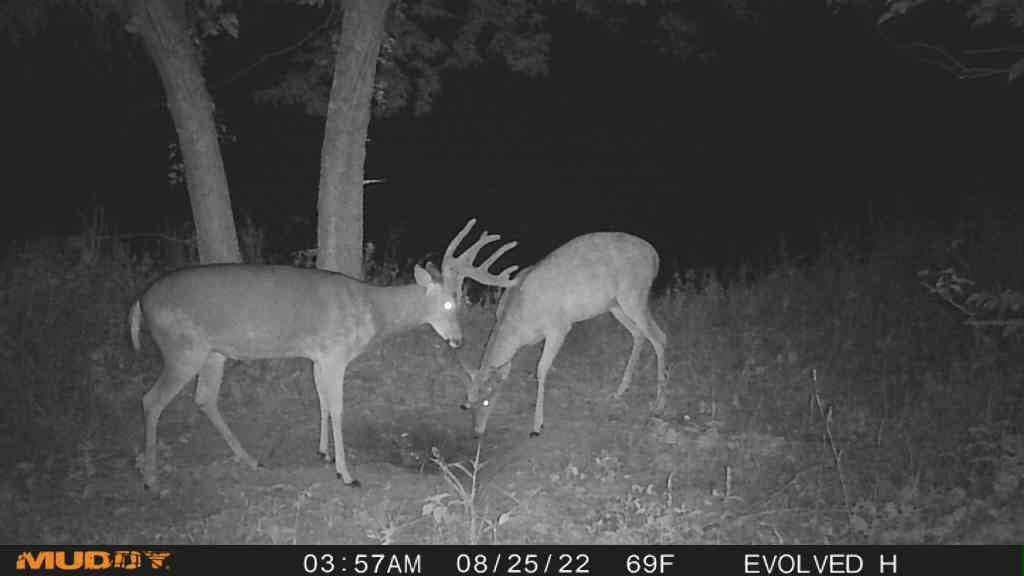
Image: A night vision photograph of two deer, demonstrating the camera's low-light imaging capabilities.

Image: A night vision photograph of a deer with prominent antlers, showcasing the camera's clarity in darkness.

Image: A daytime photograph of a deer with large antlers, illustrating the camera's image quality in daylight.
4. Remote Control and Management via Command Pro App
The Command Pro app allows you to remotely monitor your camera, change settings, and download images. You can receive high- or low-resolution images directly to your phone in real-time, and manage your media from anywhere with AT&T service.

Image: Command Pro app interface demonstrating the night colorization feature for captured images.

Image: Command Pro app interface highlighting the option for downloading high-resolution photos.
Manteniment
1. Substitució de la bateria
Regularly check battery levels via the Command Pro app. Replace all 8 AA batteries simultaneously with new, high-quality alkaline or lithium batteries for optimal performance, especially in cold weather.
2. Gestió de targetes SD
Periodically format your SD card using the camera's settings or a computer to ensure reliable operation and prevent data corruption. Back up important images and videos before formatting.
3. Neteja
Gently clean the camera lens and PIR sensor window with a soft, lint-free cloth. Avoid abrasive materials or harsh chemicals. Ensure the camera housing is free from dirt, dust, and debris.
4. Actualitzacions de firmware
Check the Command Pro app or the Muddy website for available firmware updates. Keeping your camera's firmware up-to-date ensures access to the latest features and performance improvements.
Resolució de problemes
- La càmera no s'encén: Ensure batteries are correctly installed and fully charged. Check for proper SD card insertion.
- No Images/Videos Captured: Verify the camera is in an active mode. Check the SD card for sufficient space and proper formatting. Ensure the PIR sensor is not obstructed.
- No Cellular Transmission: Confirm the SIM card is active and has a data plan. Check cellular signal strength in the camera's location via the app. Ensure the camera's firmware is up-to-date.
- Mala qualitat d'imatge/vídeo: Clean the camera lens. Ensure the camera is mounted securely to prevent movement. Check settings for desired resolution.
- Problemes de connectivitat de l'aplicació: Ensure your mobile device has an internet connection. Verify the camera is powered on and connected to the cellular network.
For further assistance, refer to the Command Pro app's help section or contact Muddy customer support.
Especificacions
| Model | MUD-MPHATW |
| Resolució d'imatge fixa | 26 megapíxels (MP) |
| Resolució de vídeo | 1080p at 30 FPS |
| Velocitat de desencadenament | 0.4 segons |
| Interval de detecció | 100 peus |
| LED de visió nocturna | 42pcs 940nm (No-Glow) |
| Gamma de visió nocturna | 100 peus |
| Font d'alimentació | 8 piles AA (no incloses) |
| Tipus de targeta de memòria | Targeta SD (fins a 32 GB) |
| Connectivitat | AT&T Cellular Network, Wi-Fi (for local app connection) |
| Mètode de control | Remote (via Command Pro App) |
| Dimensions (L x A x A) | 5.5 x 3 x 7.5 polzades |
| Pes | 1.19 lliures |
| Classificació IP | IP54 |
Garantia i Suport
For information regarding product warranty, technical support, or service, please visit the official MUDDY Store or contact their customer service directly. Keep your purchase receipt for warranty claims.