
UNIWA F100
Manual d'usuari del telèfon intel·ligent UNIWA F100 4G LTE PoC Radio
Model: F100 | Brand: UNIWA
1. Introducció
Thank you for choosing the UNIWA F100 4G LTE PoC Radio Smartphone. This device combines the functionality of a modern smartphone with the robust features of a Push-to-Talk over Cellular (PoC) radio, designed for reliable communication in various environments. It features a durable IP54 waterproof rating, a powerful 3800mAh battery, and runs on Android 10.0, offering a versatile and resilient communication tool. Please read this manual carefully to ensure proper use and maintenance of your device.
2. Contingut del paquet
Abans de començar, comproveu el contingut del paquet. Si falta algun article o hi ha algun malmès, poseu-vos en contacte amb el vostre distribuïdor.
- UNIWA F100 Smartphone
- Removable Li-polymer Battery (3800mAh)
- Adaptador d'alimentació
- Cable USB
- Manual d'usuari
- Charging Dock (if included with your purchase)

Image: Contents of the UNIWA F100 package, including the smartphone, charger, battery, and user manual.
3. Disseny del dispositiu
Familiarize yourself with the physical components of your UNIWA F100 device.

Imatge: Múltiple views of the UNIWA F100 smartphone, showing the front display, side buttons, and rear panel.
- Davant: 4-inch IPS WVGA Touchscreen, Front Camera, Earpiece.
- Costat esquerre: Volume Up/Down Buttons, Push-to-Talk (PTT) Button.
- costat dret: Power/Lock Button.
- A dalt: Antenna, SOS Button.
- A baix: USB Charging Port, Microphone.
- posterior: Rear Camera, LED Flash, Loudspeaker, NFC Area.

Image: Close-up of the rear top section of the UNIWA F100, highlighting the camera, speaker grille, and SOS button.
4. Configuració
4.1. Instal·lació de la targeta SIM i la targeta MicroSD
The UNIWA F100 supports dual SIM cards and one MicroSD card for expanded storage (up to 128GB).
- Apagueu completament el dispositiu.
- Traieu la tapa de la bateria a la part posterior del dispositiu.
- Carefully insert the SIM card(s) into the designated SIM slots. Ensure the gold contacts face downwards.
- If using a MicroSD card, insert it into the MicroSD card slot.
- Replace the battery cover, ensuring it clicks securely into place to maintain IP54 rating.

Imatge: Part posterior view of the UNIWA F100 with the battery cover removed, showing the dual SIM card slots and the MicroSD card slot.
4.2. Instal·lació i càrrega de la bateria
The device comes with a removable 3800mAh Li-polymer battery.
- After installing SIM/MicroSD cards, insert the battery into the battery compartment, aligning the contacts.
- Substituïu la tapa de la bateria.
- Connect the USB cable to the device's charging port and the other end to the power adapter. Plug the adapter into a power outlet.
- Alternatively, place the device into the charging dock (if purchased) to charge.
- Allow the device to fully charge before first use. The charging indicator will show the charging status.

Image: The UNIWA F100 smartphone placed in its dedicated charging dock.

Image: Two UNIWA F100 devices shown in their respective charging docks, illustrating different angles.
4.3. Engegada inicial
Press and hold the Power button on the right side of the device until the UNIWA logo appears. Follow the on-screen prompts to complete the initial setup, including language selection, Wi-Fi connection, and Google account setup.
5. Instruccions de funcionament
5.1. Navegació bàsica
- Pantalla tàctil: Tap, swipe, pinch-to-zoom as you would on any Android smartphone.
- Botons de volum: Adjust media volume during playback or call volume during a call.
- Botó d'encesa: Short press to lock/unlock the screen. Long press to power off or restart the device.
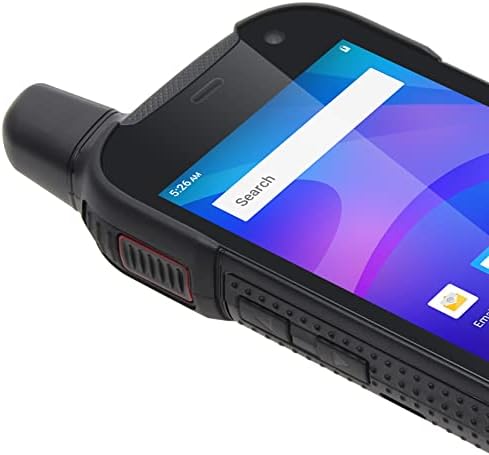
Image: Close-up of the side of the UNIWA F100, showing the textured grip and physical buttons.
5.2. Realització de trucades
Use the standard Phone application to dial numbers or select contacts for voice calls over the cellular network.
5.3. Using PoC (Push-to-Talk over Cellular)
The UNIWA F100 is designed for PoC communication, often utilizing applications like Zello.
- Ensure you have a PoC application (e.g., Zello) installed and configured with your account and channels.
- Select the desired channel or contact within the PoC application.
- Press and hold the dedicated PTT button on the left side of the device to transmit your voice. Release to listen.
- The φ36 loudspeaker ensures clear audio even in noisy environments.
5.4. Ús de la càmera
The device features an 8MP rear camera and a 5MP front camera.
- Obriu l'aplicació Càmera des de la pantalla d'inici o des del calaix d'aplicacions.
- Tap the shutter button to take photos or switch to video mode to record.
- Use the settings within the app to adjust camera parameters.
5.5. Funcionalitat NFC
The UNIWA F100 supports Near Field Communication (NFC) for quick pairing with other NFC-enabled devices or for mobile payments.
- Enable NFC in the device settings (Settings > Connected devices > Connection preferences > NFC).
- Tap the back of your device near another NFC-enabled device or tag to initiate a connection or transaction.
5.6. Funció SOS
The dedicated SOS button on the top of the device can be configured for emergency situations.
- Go to Settings to configure emergency contacts and messages for the SOS function.
- In an emergency, press the SOS button to activate the pre-set emergency actions (e.g., sending an SOS message with location, dialing an emergency contact).
6. Manteniment
6.1. Neteja del dispositiu
To keep your device in optimal condition, clean it regularly.
- Feu servir un drap suau i sense borrissol per netejar la pantalla i la carcassa.
- Per a la brutícia persistent, lleugerament dampNetegeu el drap amb aigua o un netejador de pantalles.
- Avoid using harsh chemicals, abrasive cleaners, or aerosols.
- Assegureu-vos que totes les tapes dels ports estiguin ben tancades abans de netejar-les amb humitat.
6.2. Cura de la bateria
Una cura adequada de la bateria n'allarga la vida útil i garanteix un rendiment òptim.
- Eviteu les temperatures extremes (calor o fred), ja que poden degradar el rendiment de la bateria.
- Do not leave the device charging for excessively long periods after it's fully charged.
- Si no heu d'utilitzar el dispositiu durant un període prolongat, carregueu-lo al 50% aproximadament abans de guardar-lo.
6.3. Resistència a l'aigua i la pols (IP54)
The UNIWA F100 is rated IP54, meaning it is protected against dust ingress and splashing water from any direction.
- This rating does not mean the device is fully waterproof or submersible.
- Ensure all port covers (USB, headphone jack if present) and the battery cover are securely closed to maintain the IP54 rating.
- Avoid exposing the device to high-pressure water jets or prolonged submersion.
- If the device gets wet, dry it thoroughly before charging or opening any covers.
7. Solució De Problemes
If you encounter issues with your UNIWA F100, try the following solutions before seeking professional assistance.
| Problema | Possible solució |
|---|---|
| El dispositiu no s'encén. | Ensure the battery is correctly installed and charged. Connect to charger and try again. |
| No es poden fer ni rebre trucades. | Check SIM card installation. Verify network signal strength. Ensure airplane mode is off. |
| PoC (Zello) not working. | Check internet connection (Wi-Fi or mobile data). Ensure the PoC app is logged in and configured correctly. |
| La bateria s'esgota ràpidament. | Reduce screen brightness. Close unused apps. Disable Wi-Fi/Bluetooth when not in use. Check for background app activity. |
| Device is slow or unresponsive. | Restart the device. Clear cache of frequently used apps. Consider a factory reset (backup data first). |
8. Especificacions
| Característica | Detall |
|---|---|
| Model | UNIWA F100 |
| Sistema operatiu | Android 10.0 |
| Mostra | 4-inch IPS WVGA Touchscreen, 800 x 480 px, 240 dpi |
| RAM | 2 GB |
| Emmagatzematge intern | 16 GB de ROM |
| Emmagatzematge ampliable | Targeta MicroSD de fins a 128 GB (no inclosa) |
| Càmera posterior | 8 MP |
| Càmera frontal | 5 MP |
| Bateria | 3800 mAh Removable Li-polymer |
| Ranures per a targetes SIM | Doble SIM |
| Suport a la xarxa | 2G/3G/4G/WLAN |
| Connectivitat | NFC |
| Característiques especials | IP54 Waterproof, SOS Button, φ36 Loudspeaker |
9. Garantia i Suport
The UNIWA F100 comes with a standard manufacturer's warranty. Please refer to the warranty card included in your package for specific terms and conditions, including warranty period and coverage details.
For technical support, troubleshooting beyond this manual, or warranty claims, please contact your point of purchase or the official UNIWA customer service. Contact information can typically be found on the manufacturer's weblloc web o a l'embalatge del producte.
Important: Conserveu el tiquet de compra com a comprovant de compra a efectes de garantia.
Ask a question about this manual
Ask about setup, troubleshooting, compatibility, parts, safety, or missing instructions. Manuals+ will review the question and use this page’s manual context to help answer it.