
Cabletech URZ0336B
Cabletech URZ0336B DVB-T2 H.265 HEVC Digital Tuner
Manual d’instruccions de l’usuari
1. Introducció
This manual provides comprehensive instructions for the installation, operation, and maintenance of your Cabletech URZ0336B DVB-T2 H.265 HEVC Digital Tuner. Please read this manual thoroughly before using the device to ensure proper functionality and to prevent damage.
2. Informació de seguretat
Always observe the following safety precautions to avoid electric shock, fire, or damage to the device:
- No exposeu el dispositiu a la pluja o la humitat.
- No obriu la c.asing. Demaneu totes les tasques de manteniment a personal qualificat.
- Ensure proper ventilation around the device. Do not block ventilation openings.
- Utilitzeu només l'adaptador d'alimentació subministrat amb el dispositiu.
- Mantingueu el dispositiu lluny de fonts de calor i de la llum solar directa.
- Disconnect the power plug from the wall outlet if the device will not be used for a long period.
3. Contingut del paquet
Si us plau, comproveu el paquet per veure si hi ha els elements següents:
- Cabletech URZ0336B DVB-T2 H.265 HEVC Digital Tuner
- Control remot
- Piles AAA (2x)
- Adaptador d'alimentació
- Manual d'usuari (aquest document)
4. Producte acabatview
Familiarize yourself with the main components and connections of your Cabletech URZ0336B tuner.
4.1. Device and Remote Control
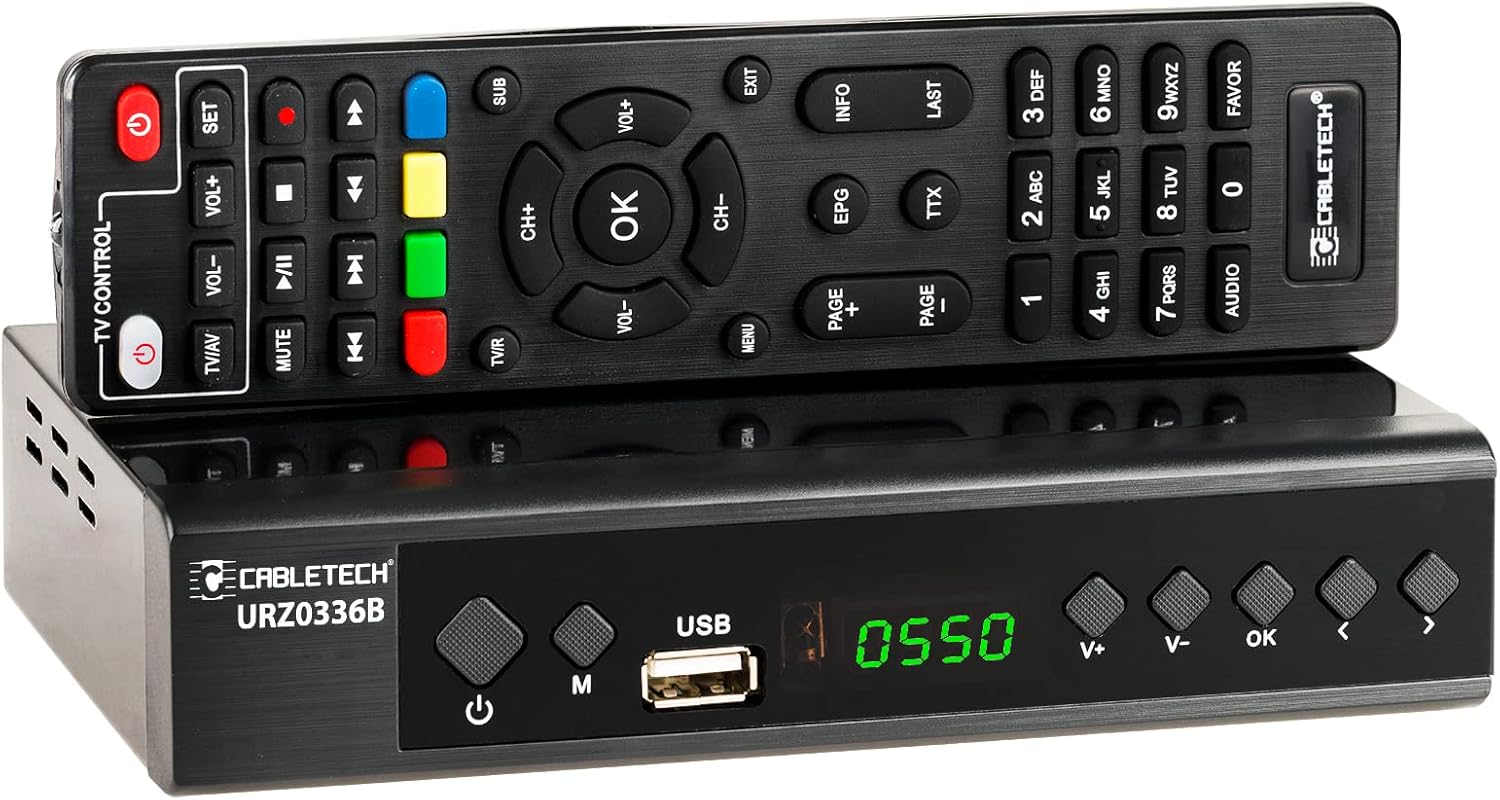
Image: The Cabletech URZ0336B DVB-T2 H.265 HEVC Digital Tuner shown with its accompanying remote control. The tuner is a compact black box, and the remote is also black with various control buttons.
4.2. Tauler frontal
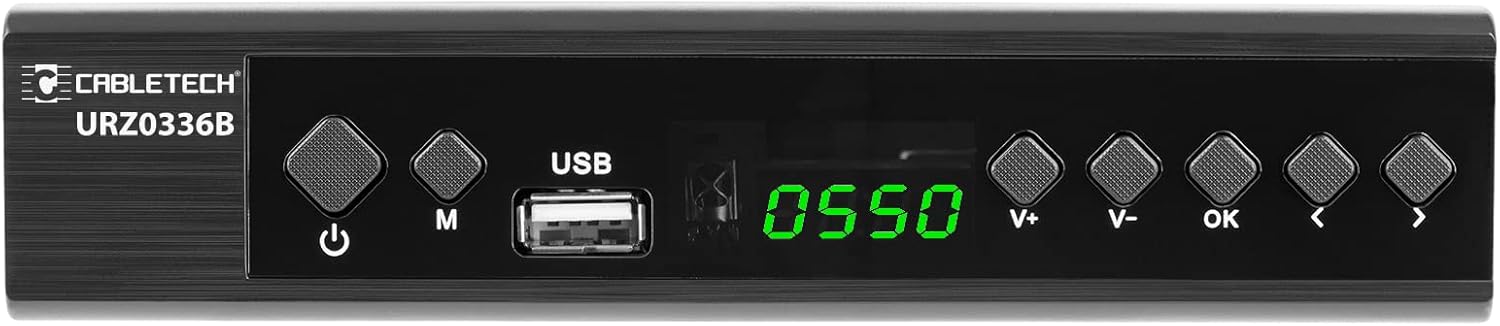
Image: Close-up of the Cabletech URZ0336B front panel, featuring a power button, menu button (M), USB 2.0 port, LED display showing "0550", and navigation/volume buttons (V+, V-, OK, <, >).
- Botó d'encesa: Turns the device on/off or to standby.
- Botó M (Menú): Accedeix al menú principal.
- Port USB 2.0: For software updates, PVR recording, and media playback.
- Pantalla LED: Mostra el número de canal o l'hora.
- V+/V- Buttons: Ajusta el volum.
- Botó D'acord: Confirma les seleccions.
- </> Buttons: Navigates through menus or changes channels.
4.3. Connexions del panell posterior

Image: The rear panel of the Cabletech URZ0336B, showing various input and output ports: ANT IN (IEC socket), COAXIAL, USB, HD OUT (HDMI), SCART, and the power input (110-240V~ 50/60Hz).
- FORMIGA A: Connects to your DVB-T/T2 antenna.
- COAXIAL: Sortida d'àudio digital.
- USB: Additional USB 2.0 port for external devices.
- HD OUT (HDMI): Connects to your TV for high-definition video and audio.
- SCART: Connects to older TVs or VCRs.
- Entrada d'alimentació: Es connecta a l'adaptador de corrent.
4.4. Disseny del comandament a distància

Imatge: Detallada view of the Cabletech URZ0336B remote control, showing buttons for power, TV/AV, volume, channel, mute, playback controls, EPG, TTX, INFO, numeric keypad, and special function buttons.
The remote control provides full functionality for operating your tuner. Insert 2x AAA batteries into the battery compartment before first use.
5. Configuració
5.1. Connecting the Tuner
- Connectar l'antena: Connect your DVB-T/T2 antenna cable to the FORMIGA EN port on the rear panel of the tuner.
- Connectar-se al televisor:
- For HD TVs: Connect an HDMI cable from the HD OUT (HDMI) port on the tuner to an HDMI input on your TV.
- For older TVs: Connect a SCART cable from the SCART port on the tuner to the SCART input on your TV.
- Connectar l'alimentació: Connect the power adapter to the tuner's power input and then plug it into a wall outlet.
- Insereix les piles: Open the battery compartment on the remote control and insert 2x AAA batteries, observing polarity.
5.2. First-Time Installation and Channel Scan
- Turn on your TV and select the correct HDMI or SCART input source that the tuner is connected to.
- Power on the Cabletech URZ0336B tuner using the power button on the front panel or remote control.
- The first-time installation wizard should appear on your TV screen. Follow the on-screen prompts.
- Select your preferred language and country.
- Initiate an Cerca automàtica for channels. The tuner will scan for all available DVB-T/T2 channels in your area. This process may take several minutes.
- Once the scan is complete, the tuner will save the found channels and display the first channel.
Note: If you experience poor signal quality, adjust your antenna position or consider using a signal ampmés viu.
6. Instruccions de funcionament
6.1. Funcions bàsiques
- Encès/apagat: Premeu el botó PODER botó del comandament a distància.
- Canvi de canal: Utilitza el CH + / CH- buttons or the numeric keypad to enter a channel number.
- Control de volum: Utilitza el VOL + / VOL- botons.
- Silenciar: Premeu el botó MUT botó per silenciar temporalment l'àudio.
- Menú: Premeu el botó MENÚ botó per accedir al menú principal de configuració i funcions.
- D'ACORD: Confirms selections in menus or displays the channel list.
- SORTIDA: Surt del menú o pantalla actual.
6.2. Guia electrònica de programes (EPG)
The 7-day EPG provides a schedule of current and upcoming programs.
- Premeu el botó EPG botó del comandament a distància.
- Navigate through channels and program times using the arrow buttons.
- Premeu OK a view details about a selected program.
6.3. PVR (Program Recording) and Timeshift
Connect a USB storage device (e.g., USB flash drive or external hard drive) to one of the USB 2.0 ports to use PVR and Timeshift functions.
- Enregistrament PVR:
- Premeu el botó REC button (red circle) on the remote to start immediate recording of the current program. Press STOP (square) to end recording.
- Schedule recordings via the EPG: Select a program in the EPG and press OK, then choose the record option.
- Canvi d'hora:
- Mentre mireu un programa, premeu la tecla PAUSA button. The tuner will begin recording the live broadcast to the USB device.
- Llavors pots JUGAR, AVANT RÀPID, o REBOBINAR within the buffered content.
- Premeu STOP to exit Timeshift and return to live TV.
6.4. Reproducció multimèdia
The tuner supports playback of various media files from a connected USB storage device.
- Connect your USB device to a USB port on the tuner.
- Go to the main menu and select "Media" or "USB".
- Navegueu fins al que desitgeu file type (MP3, WMA, JPEG, BMP, AVI) and select the file per jugar.
6.5. Supported Applications
The tuner supports various online applications when connected to the internet via an external MT7601 Wi-Fi adapter (not included).
- Temps: View previsions meteorològiques locals.
- IPTV: Access Internet Protocol Television streams.
- YouTube: Watch videos from YouTube.
- RSS: Read RSS news feeds.
Note: An external MT7601 Wi-Fi adapter is required for internet connectivity and access to these applications.
6.6. Control parental
Set up parental control to restrict access to certain channels or programs based on age ratings.
- Access the "Parental Control" section in the main menu.
- Enter your PIN (default is usually 0000 or 1234, check your device for specifics).
- Configure age restrictions or lock specific channels.
6.7. Funció de temporitzador
The timer function allows you to schedule the tuner to turn on/off at specific times or to switch to a particular channel.
- Navigate to the "Timer" section in the main menu.
- Set the event type (e.g., Power On, Power Off, Record), time, and duration.
7. Manteniment
7.1. Neteja
To clean the device, disconnect it from the power supply and wipe the exterior with a soft, dry cloth. Do not use liquid or aerosol cleaners.
7.2. Actualització de programari
Software updates can improve performance and add new features. Updates are performed via the USB port.
- Baixeu l'últim firmware file from the official Cabletech support weblloc (si està disponible).
- Copieu el firmware file al directori arrel d'una unitat flash USB.
- Connect the USB flash drive to the tuner's USB port.
- Go to the "System" or "Tools" menu, then select "Software Update" or "Upgrade by USB".
- Follow the on-screen instructions to complete the update. Do not power off the device during the update process.
8. Solució De Problemes
If you encounter issues with your tuner, refer to the following common problems and solutions:
| Problema | Causa possible | Solució |
|---|---|---|
| Sense imatge ni so | Incorrect TV input selected; Loose cable connections; Tuner not powered on. | Select correct TV input (HDMI/SCART); Check all cable connections; Ensure tuner is powered on. |
| Missatge "Sense senyal" | Antenna not connected; Poor antenna signal; No channels scanned. | Connect antenna properly; Adjust antenna position; Perform an automatic channel scan. |
| El comandament a distància no funciona | Batteries are dead or inserted incorrectly; Obstruction between remote and tuner. | Replace batteries; Check battery polarity; Remove any obstructions; Point remote directly at the tuner. |
| No es pot gravar a USB | USB device not connected or formatted incorrectly; Insufficient storage space. | Ensure USB device is connected; Format USB device to FAT32 or NTFS; Free up space on USB device. |
| No internet access for apps | No MT7601 Wi-Fi adapter connected; Network configuration issues. | Connect a compatible MT7601 Wi-Fi adapter; Check network settings in the tuner's menu. |
9. Especificacions
| Característica | Detall |
|---|---|
| Número de model | URZ0336B |
| CPU | GX6702S5 |
| Memòria interna | 32 MB |
| RAM | 512 MB DDR2 |
| Connector ANT | presa IEC |
| Interval de freqüència | VHF: 170–230 MHz, UHF: 470–862 MHz |
| Demodulació | QPSK, 16QAM, 64QAM, 256QAM |
| Ample de banda | 7 MHz, 8 MHz |
| Descodificació | MPEG-1, MPEG-2, MPEG-4, H.264, H.265, AAC, HE-AAC, AC-3, DD+ |
| Entrades/sortides | 2x USB 2.0, HDMI, SCART, COAXIAL |
| Relació d'aspecte | Auto, 16:9 WS, 16:9 PB, 16:9 PS; 4:3 LB, 4:3 PS, 4:3 Full |
| Formats suportats | MP3, WMA, JPEG, BMP, AVI |
| Resolució de pantalla | 480i, 480p, 576i, 576p, 720p, 1080i, 1080p |
| Resolució de vídeo | 1920 x 1080 píxels |
| Descodificació d'àudio | MPEG-1 LayerI/II, Dolby-Downmix 2-Channel (License), AAC LC, HE-AAC v1/V2, PCM-Downmix, IEC958 SPDIF |
| File Sistema | FAT32, NTFS |
| Compatibilitat | Fully compatible with DVB-T2/DVB-T |
| Control remot | Requires 2x AAA batteries |
| Consum d'energia | Max. 6 W (Operating), Max. 50/60 Hz (Standby) |
| Dimensions (W x H) | 168 mm x 36 mm |
| Suport Wi-Fi | Requires external MT7601 chip adapter |
| Tuner Bit Depth | 10 bit |
10. Garantia i Suport
This product comes with a standard manufacturer's warranty. For specific warranty terms and conditions, please refer to the documentation included with your purchase or contact Cabletech customer support.
For technical assistance, troubleshooting beyond this manual, or warranty claims, please contact your retailer or the official Cabletech support channels.
Documents relacionatsURZ0336B


Ask a question about this manual
Ask about setup, troubleshooting, compatibility, parts, safety, or missing instructions. Manuals+ will review the question and use this page’s manual context to help answer it.