
PPLEE CR1018I
PPLEE Extra Loud Vibrating Alarm Clock with Bed Shaker
Model: CR1018I
1. Producte acabatview
The PPLEE Extra Loud Vibrating Alarm Clock is designed to provide effective wake-up solutions for deep sleepers, individuals with hearing impairment, and the deaf. It features multiple wake-up modes, a large digital display, dual alarm settings, and convenient charging capabilities.

Image 1.1: The PPLEE Extra Loud Vibrating Alarm Clock with its bed shaker accessory.
Característiques principals:
- Strong Bed Shaker & Loud Alarm Buzzer: Offers three wake-up modes: loud buzzer, strong bed shaker, or a combination of both.
- 8.7" Large Mirror LED Display: Provides clear time visibility and can also function as a makeup mirror.
- Dual Alarms with Snooze Function: Allows setting two independent alarms with a 9-minute snooze option.
- Adjustable Brightness & Volume: Features 8 levels of display brightness and 7 levels of alarm volume.
- Port de càrrega USB: Conveniently charge your mobile devices directly from the clock.
- Còpia de seguretat de la bateria: Maintains time and alarm settings during power outages (CR2032 battery included).
- 12/24H Mode & DST Function: Supports both 12-hour and 24-hour time formats, along with Daylight Saving Time adjustment.
2. Contingut del paquet
Marqueu la casella per als elements següents:
- 1 x PPLEE Mirror Alarm Clock
- 1 x Bed Shaker
- 1 x Power Plug with USB Cable
- 1 x manual d'instruccions
- 1 x CR2032 Cell Coin Battery (pre-installed or separate)

Imatge 2.1: Tots els components inclosos al paquet del producte.
3. Guia de configuració
3.1 Connexió d'alimentació
- Connect the USB cable to the alarm clock's power input port.
- Connecteu l'adaptador de corrent a una presa de corrent estàndard. La pantalla del rellotge s'il·luminarà.
- Ensure the CR2032 backup battery is installed in its compartment. This battery preserves time and alarm settings during power interruptions.

Imatge 3.1: posterior view of the alarm clock showing the AC power input and backup battery compartment.
3.2 Bed Shaker Placement
The bed shaker provides a strong vibration to assist in waking. For optimal effectiveness, place the bed shaker in one of the following locations:
- Under your pillow.
- Under your fitted sheet.
- Between your mattress and box spring.

Image 3.2: Recommended placements for the bed shaker to maximize vibration effectiveness.
4. Instruccions de funcionament
4.1 Configuració de l'hora
- Manteniu premut el botó HORA CONFIGURADA fins que els dígits de les hores comencin a parpellejar.
- Utilitza el HORA i MINUT botons per ajustar l'hora.
- Premeu HORA CONFIGURADA de nou per confirmar i sortir del mode de configuració de l'hora.
4.2 Configuració d'alarmes (alarma 1 i alarma 2)
El rellotge admet dues alarmes independents.
- Manteniu premut el botó ALARMA 1 or ALARMA 2 fins que els dígits de l'hora de l'alarma parpellegin.
- Utilitza el HORA i MINUT botons per configurar l'hora d'alarma desitjada.
- Premeu ALARMA 1 or ALARMA 2 de nou per confirmar l'hora de l'alarma.
- To activate or deactivate an alarm, short press the corresponding ALARMA 1 or ALARMA 2 botó. Apareixerà/desapareixerà una icona d'alarma a la pantalla.

Image 4.1: The dual alarm feature allows setting two separate wake-up times.
4.3 Funció de repetició
Quan soni una alarma, premeu el botó DORMITAR button to temporarily silence the alarm for 9 minutes. The alarm will sound again after the snooze period.
4.4 Desactivació d'alarmes
- Temporary Turn Off: Premeu el botó ALARMA DESACTIVADA button once when the alarm is sounding to stop it for the current day. It will reactivate the next day.
- Permanent Turn Off: Manteniu premut el botó ALARMA DESACTIVADA button to deactivate the alarm permanently. The alarm icon will disappear from the display.
4.5 Ajust de la brillantor de la pantalla
The display has 8 levels of brightness. Short press the DIMMER button repeatedly to cycle through the brightness levels (OFF, Level 1-7). When in 'OFF' mode, the red indicator on top will remain on.
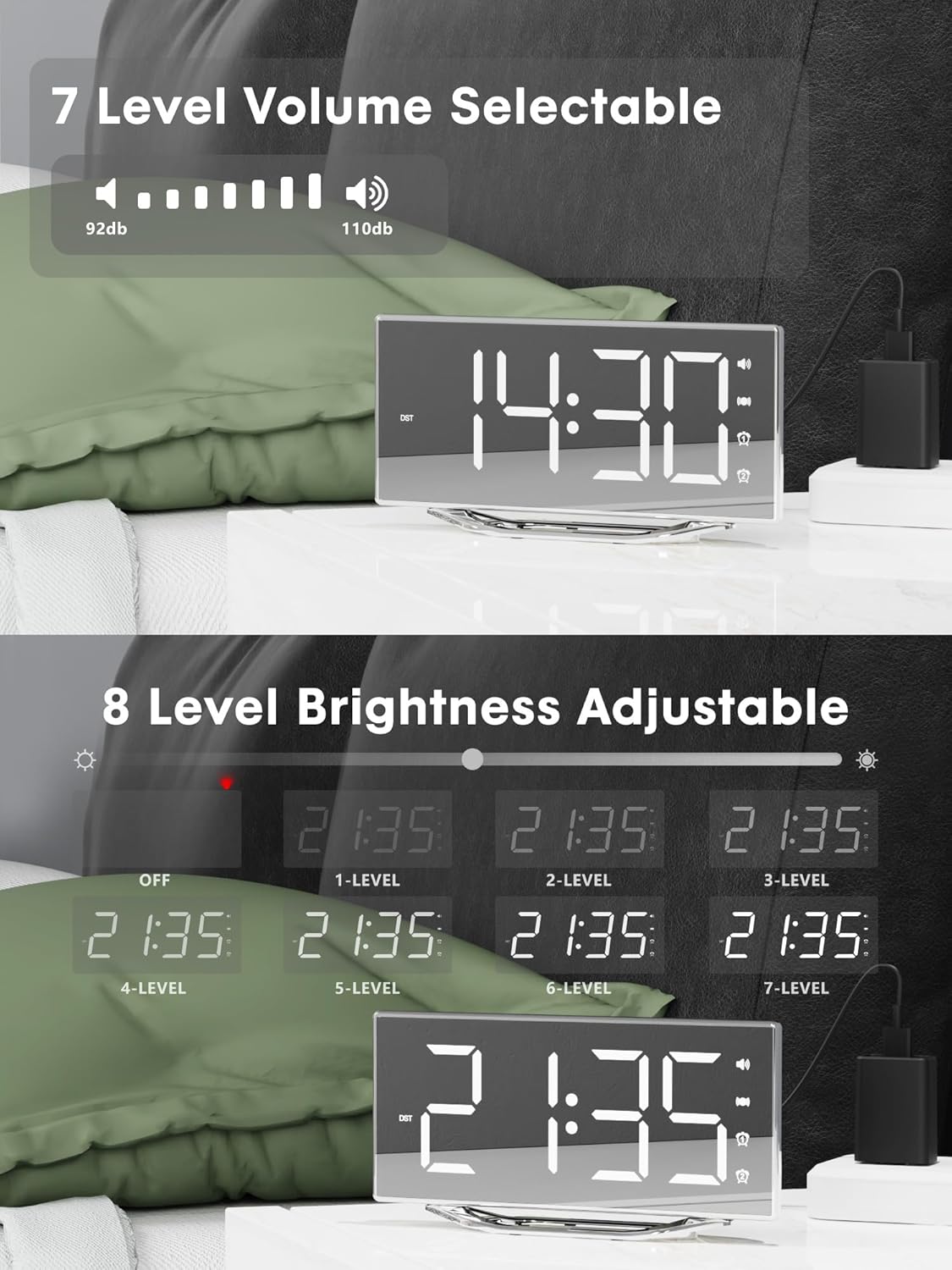
Image 4.2: Visual representation of the 8-level brightness adjustment for the LED display.
4.6 Ajust del volum de l'alarma
The alarm buzzer has 7 adjustable volume levels. Short press the VOLUM button repeatedly to cycle through the volume levels.

Image 4.3: The alarm volume can be adjusted across 7 levels, from 92dB to 110dB.
4.7 Selecting Wake-Up Mode
Premeu el botó BUZZ/VIB button to select your preferred wake-up method:
- Loud Buzzer only
- Strong Bed Shaker only
- Both Buzzer and Shaker

Image 4.4: The alarm clock offers three distinct wake-up modes for personalized use.
4.8 12/24 Hour Format & DST
- Format 12/24 hores: Premeu breument 12/24H button to switch between 12-hour and 24-hour time display.
- Funció DST: Premeu breument DST button to activate or deactivate Daylight Saving Time.

Image 4.5: The clock supports both 12-hour and 24-hour time formats, and features a USB charging port.
4.9 port de càrrega USB
The integrated USB charging port allows you to charge your smartphone or other USB-powered devices directly from the alarm clock. Simply connect your device's USB charging cable to the port on the clock.
5. Manteniment
- Clean the clock surface with a soft, dry cloth. Avoid using abrasive cleaners or solvents.
- Keep the clock away from water and high humidity.
- Do not expose the clock to direct sunlight or extreme temperatures.
- If the clock will not be used for an extended period, consider removing the backup battery to prevent leakage.
6. Solució De Problemes
| Problema | Causa possible | Solució |
|---|---|---|
| La pantalla del rellotge està apagada. | No power supply; power cable loose. | Ensure the power adapter is securely plugged into the clock and a working outlet. Check if the dimmer is set to 'OFF'. |
| L'alarma no sona/vibra. | Alarm not activated; volume too low; bed shaker not connected or placed incorrectly. | Verify alarm is activated (icon visible). Increase alarm volume. Ensure bed shaker is securely plugged in and properly placed. |
| Restabliment de l'hora/configuració després d'un apagadatage. | La bateria de reserva està morta o no està instal·lada. | Replace the CR2032 backup battery. Ensure it is installed correctly. |
| La càrrega USB no funciona. | Device not compatible; cable faulty; clock not powered. | Ensure the clock is powered. Try a different USB cable. Verify your device is compatible with standard USB charging. |
7. Especificacions
| Característica | Detall |
|---|---|
| Marca | PPLEE |
| Número de model | CR1018I |
| Color | Silver Surface (with Bed Shaker) |
| Tipus de visualització | LED digital |
| Dimensions del producte | 8.7"W x 8.7"H (Display size) |
| Font d'alimentació | Elèctric amb cable |
| Bateria de seguretat | 1 x CR2032 (inclòs) |
| Material | Plàstic |
| Pes de l'article | 7 unces (0.2 quilograms) |
| Modes d'alarma | Buzzer, Vibration, Buzzer + Vibration |
| Brillantor de la pantalla | 8 Levels (including OFF) |
| Volum de l'alarma | 7 nivells |
| Format horari | 12H/24H selectable |
| Característiques especials | Dual Alarms, Snooze, USB Charging Port, DST Function, Mirror Surface |
8. Garantia i Suport
PPLEE is committed to providing high-quality products and customer satisfaction.
- 1 any de garantia: El producte té una garantia d'1 any a partir de la data de compra contra defectes de fabricació.
- Garantia de devolució de 90 dies: If you are unsatisfied with the product, you may be eligible for a full refund within 90 days of purchase.
- Lifetime Free Support: PPLEE offers free lifetime user support for any questions or concerns regarding the product.
- 24-Hour Response Service: For any inquiries, please contact us via Amazon. We aim to respond within 24 hours.

Image 8.1: Summary of warranty and support offerings.
Ask a question about this manual
Ask about setup, troubleshooting, compatibility, parts, safety, or missing instructions. Manuals+ will review the question and use this page’s manual context to help answer it.