
1. Introducció
This manual provides detailed instructions for the installation, operation, and maintenance of your Kolink Stronghold Barricade EATX Gaming PC Case. Please read this manual carefully before beginning assembly to ensure proper setup and to prevent damage to the components or the case itself. Keep this manual for future reference.
The Kolink Stronghold Barricade is a Midi Tower EATX case designed for gaming PCs, featuring a removable hood, a hinged tempered glass door, and support for various components including EATX motherboards, long graphics cards, and extensive cooling solutions.
2. Informació de seguretat
- Desconnecteu sempre l'alimentació de la presa de corrent abans d'instal·lar o treure qualsevol component per evitar descàrregues elèctriques.
- Handle all components with care. Static electricity can damage electronic parts. Consider using an anti-static wrist strap.
- The tempered glass panel is fragile. Handle it with extreme care to avoid breakage and injury.
- Mantingueu les peces petites i els cargols fora de l'abast dels nens.
- Assegureu-vos que hi hagi una ventilació adequada al voltant de la carcassa de l'ordinador per evitar el sobreescalfament.
3. Contingut del paquet
Verifiqueu que tots els components siguin presents al paquet:
- Kolink Stronghold Barricade PC Case
- Accessory box (containing screws, standoffs, cable ties, and other small parts)
- Manual d'usuari (aquest document)
If any items are missing or damaged, please contact your retailer or Kolink support.
4. Configuració i instal·lació de components
Follow these steps for assembling your PC within the Kolink Stronghold Barricade case. The case features a user-friendly, screwless design for many components.
4.1 Preparació del cas
- Col·loqueu la caixa sobre una superfície plana i estable.
- Open the hinged tempered glass side panel. This panel can be swung open for easy access to the interior.
- Remove the solid right side panel to access the cable management area.

Imatge: Interior view of the Kolink Stronghold Barricade case with the tempered glass side panel open, showing the spacious internal layout.
4.2 Instal·lació de la placa base
- The case supports motherboards from mITX to EATX form factors.
- Install the necessary standoffs for your motherboard size. The case typically comes with pre-installed standoffs for ATX.
- Col·loca amb cura la placa base sobre els separadors, alineant els forats dels cargols.
- Fixeu la placa base amb els cargols proporcionats.
4.3 Instal·lació de la unitat d'alimentació (PSU).
- The case supports ATX power supplies up to 190 mm in length.
- Install the PSU into the dedicated bottom mount compartment.
- Fixeu la font d'alimentació amb els cargols de la part posterior de la carcassa.
4.4 Instal·lació de la unitat d'emmagatzematge
- The case provides space for up to 4 HDDs: 2 x 2.5 inch SSDs and 2 x 3.5 inch or 2.5 inch HDDs.
- Locate the drive bays/mounts and secure your SSDs and HDDs using the provided screws or tool-less mechanisms.
4.5 Instal·lació de la targeta gràfica (GPU)
- The case accommodates graphics cards up to 330 mm in length.
- Traieu les cobertes de les ranures d'expansió necessàries de la part posterior de la carcassa.
- Insert your graphics card into the PCIe slot on the motherboard and secure it with the retention clip and a screw.
4.6 Instal·lació del refrigerador de CPU
- The case supports CPU coolers up to 165 mm in height.
- Install your CPU cooler according to its manufacturer's instructions. The motherboard tray features a cutout for easy access to the CPU cooler backplate.
4.7 Instal·lació de ventilador i refrigeració per aigua
- The case supports up to 6 x 120 mm fans.
- For water cooling, the case supports radiators up to 360 mm at the front, 240 mm at the top, and 120 mm at the back.
- Install fans or radiators in desired locations, ensuring proper airflow direction.

Imatge: Lateral view of the Kolink Stronghold Barricade PC case, showing the solid right side panel and ventilation on the front edge.
4.8 Connexió d'E/S del panell frontal
The I/O panel on the top of the case includes:
- 1 x port USB 3.1
- 2 x ports USB 2.0
- 3.5 mm jack ports for headphones and microphone
Connect the corresponding cables from the front panel to the appropriate headers on your motherboard. Refer to your motherboard manual for header locations.

Imatge: Primer pla view of the top I/O panel, showing the USB 3.0, USB 2.0, audio jacks, and power/reset buttons.
4.9 Gestió de cables
Utilize the space behind the motherboard tray and the provided cable ties to route and secure cables. This improves airflow and aesthetics.
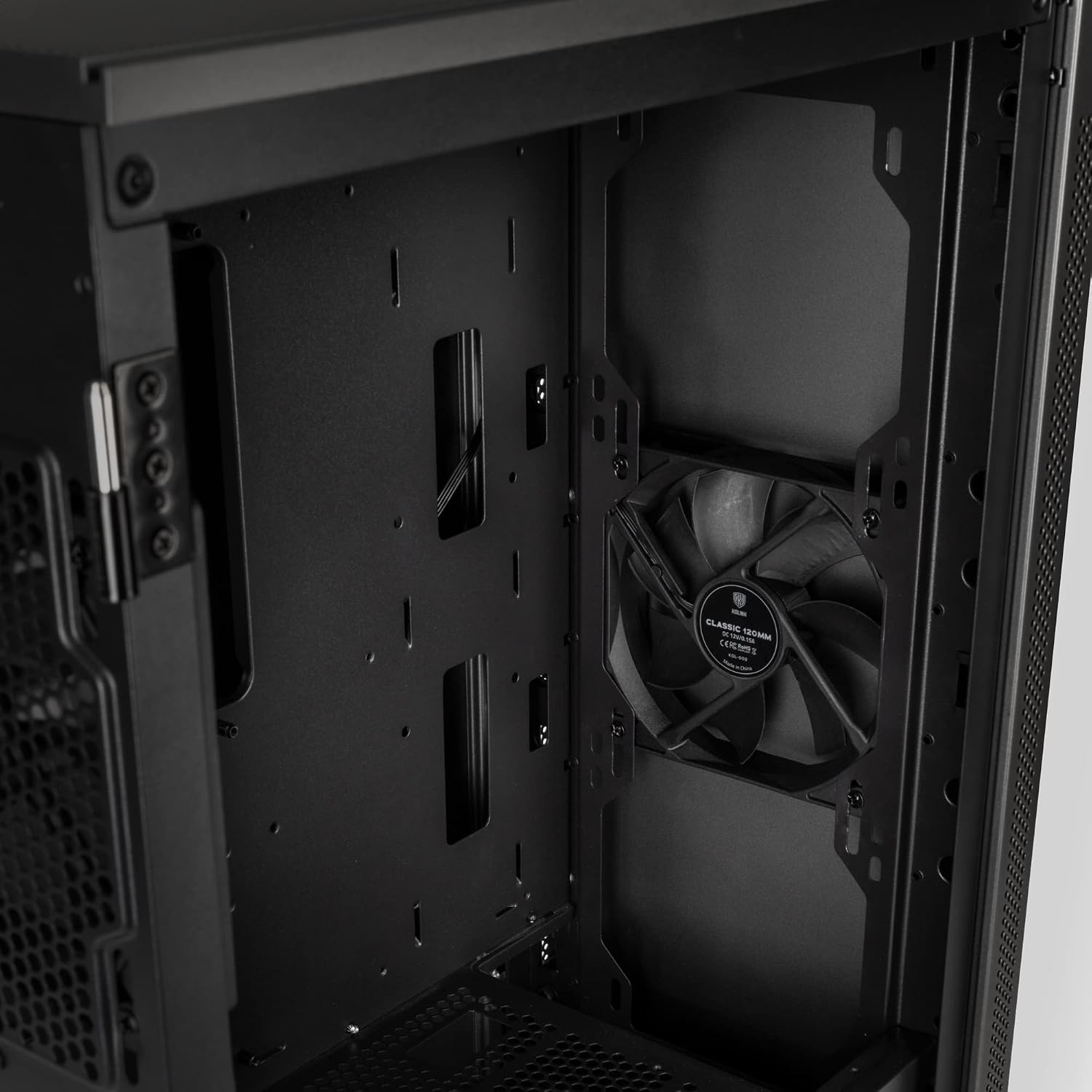
Imatge: Interior posterior view of the Kolink Stronghold Barricade case, highlighting the cable management routes and the CPU cooler cutout.
5. Instruccions de funcionament
5.1 Engegada/apagada
- After all components are installed and cables connected, close both side panels.
- Connecteu el cable d'alimentació a la font d'alimentació i a una presa de corrent.
- Press the power button on the top I/O panel to turn on your PC.
- Per apagar-lo, feu servir la funció d'apagada del sistema operatiu o manteniu premut el botó d'engegada durant uns segons.
5.2 RGB Lighting (if applicable)
The Kolink Stronghold Barricade supports RGB lighting. If you have installed additional ARGB PC fans and LED strips, connect them to your motherboard's RGB headers or a dedicated controller. Control the lighting effects using your motherboard's software or the controller's buttons.
6. Manteniment
Un manteniment regular ajuda a garantir un rendiment òptim i una llarga vida útil dels components del teu PC.
6.1 Neteja dels filtres de pols
- The case features dust filters on the top and bottom.
- Periodically remove and clean these filters to prevent dust buildup, which can restrict airflow and cause overheating.
- Clean filters using compressed air or by rinsing with water (ensure they are completely dry before reinstallation).
6.2 Neteja general
- Utilitzeu un suau, damp cloth to wipe down the exterior surfaces of the case. Avoid abrasive cleaners.
- Per al panell de vidre temperat, feu servir un netejador de vidres i un drap de microfibra per evitar ratlles.
- Use compressed air to clear dust from internal components and fan blades. Ensure fans are held stationary when using compressed air to prevent damage.
7. Solució De Problemes
Aquesta secció tracta problemes comuns que podeu trobar.
7.1 PC Does Not Power On
- Comproveu si el cable d'alimentació està connectat correctament tant a la font d'alimentació com a la presa de corrent.
- Ensure the power switch on the PSU itself is in the 'ON' position.
- Verify that the front panel power button cable is correctly connected to the motherboard's power header.
- Confirm all internal power connections (24-pin ATX, 8-pin CPU, PCIe power for GPU) are secure.
7.2 Els ventiladors no giren
- Check if the fan cables are properly connected to the motherboard fan headers or a fan controller.
- Ensure fan headers are enabled in the motherboard's BIOS/UEFI settings.
7.3 Sense sortida de pantalla
- Ensure your monitor is connected to the graphics card's output, not the motherboard's integrated graphics output (unless you are using integrated graphics).
- Verify the graphics card is fully seated in its PCIe slot and any necessary power cables are connected.
- Check monitor input selection.
8. Especificacions
Detailed specifications for the Kolink Stronghold Barricade PC Case:
| Característica | Especificació |
|---|---|
| Marca | ESTIC TRUCANT |
| Nom del model | Stronghold Barricade |
| Tipus de cas | Torre del Midi |
| Compatibilitat amb la placa base | mITX, mATX, ATX, EATX |
| Material | Glass, Steel |
| Color | Gris Gunmetal |
| Mètode de refrigeració | Aire |
| Fan Size (Included) | 120 Millimeters (2 x 120mm fans included) |
| Suport màxim del ventilador | Fins a 6 x 120 mm |
| Suport de refrigeració per aigua | Front: up to 360 mm, Top: up to 240 mm, Rear: up to 120 mm |
| Ranures d'expansió | 8 |
| Badies d'unitats internes | 2 x 2.5" SSD, 2 x 3.5"/2.5" HDD |
| Longitud màxima de la GPU | 330 mm |
| Alçada màxima del refrigerador de la CPU | 165 mm |
| Longitud màxima de la PSU | 190 mm |
| Ports d'E / S frontals | 1 x USB 3.1, 2 x USB 2.0, 3.5mm Audio (Headphone/Mic) |
| Pes de l'article | 7200 grams |
| Característiques especials | Hinged Tempered Glass Door, Removable Hood, RGB Lighting Support |
9. Informació de la garantia
This Kolink Stronghold Barricade PC Case is covered by a Manufacturer Guarantee. For specific terms, conditions, and duration of the warranty, please refer to the documentation provided with your purchase or contact your retailer.
10. Suport
If you require further assistance or encounter issues not covered in this manual, please contact your retailer or visit the official KOLINK weblloc web per a recursos de suport i informació de contacte.