
1. Introducció
This manual provides comprehensive instructions for the assembly, setup, and maintenance of your Dardoo G923 Racing Simulator Cockpit Frame. Designed for compatibility with a wide range of racing peripherals, this frame offers a stable and adjustable platform to enhance your simulation experience. Please read these instructions carefully before assembly and use to ensure proper functionality and safety.

Figure 1: Assembled Dardoo G923 Racing Simulator Cockpit Frame (peripherals not included).
2. Característiques del producte
- Ultimate Stability: The racing simulator features a flange structure with four large screws for secure joint fixation, providing a professional and stable driving equipment foundation.
- Robust Round Tube Structure: Constructed with 50mm round tubes, the frame is designed for stability and to withstand significant loads, contributing to a realistic racing feel.
- Multi-Position Adjustment: The steering wheel platform offers adjustable height and angle. The pedal and shift lever platforms also support customized adjustments for optimal gaming comfort.
- Seat Compatibility: The cockpit frame includes pre-drilled mounting holes to accommodate most racing seats available on the market. Custom drilling for car seats is also an option.
- Wide Wheel Compatibility: This racing simulator cockpit is compatible with Logitech, Fanatec, and Thrustmaster series racing wheels, pedals, and gear shifters, including specific models like Logitech G29, G920, G923, and Thrustmaster T300RS, TX.

Figure 2: Detail of the frame's stable 50mm round tube structure and flange design.

Figure 3: Multi-position adjustment capabilities for optimal user comfort.
3. Contingut del paquet
Verifiqueu que tots els components siguin presents abans de començar el muntatge. Si falta alguna peça o hi ha alguna peça danyada, poseu-vos en contacte amb el servei d'atenció al client.
- Main Frame Components (various tubes and plates)
- Steering Wheel Platform
- Plataforma de pedals
- Shift Lever Platform
- Seat Mounting Brackets
- Hardware Kit (screws, nuts, washers, U-bolts)
- Coixinets de goma per als peus
- Assembly Tools (hex keys, wrench)
4. Instruccions de muntatge
Follow these steps to assemble your Dardoo G923 Racing Simulator Cockpit Frame. Refer to the detailed assembly video for visual guidance.
Video 1: Detailed assembly guide for the Dardoo Racing Simulator Cockpit Frame.
- Pas 1: Muntar el marc base. Connect the main U-shaped frame components using the provided U-bolts and nuts. Ensure all connections are snug but do not fully tighten yet.
- Step 2: Attach the Seat Rails. Secure the seat rails to the main base frame using the appropriate screws and washers. These rails will support your racing seat.
- Step 3: Install the Steering Wheel Support. Mount the steering wheel support arms to the front section of the base frame. Attach the steering wheel platform to these arms, ensuring it can be adjusted later.
- Step 4: Mount the Pedal Platform. Secure the pedal platform to the lower front section of the frame. This platform is also designed for angle and distance adjustments.
- Step 5: Attach the Shifter Platform. Install the shifter platform to either the left or right side of the frame, according to your preference. This platform is height-adjustable.
- Step 6: Final Tightening and Leveling. Once all components are in place, systematically tighten all screws and bolts. Ensure the frame is stable and level using the adjustable rubber foot pads.

Figura 4: Mésview of frame components during assembly.
5. Adjustments and Setup
The Dardoo G923 frame offers multiple adjustment points to customize your racing setup for optimal ergonomics and comfort.
- Steering Wheel Platform: Adjust the height and angle of the steering wheel platform by loosening the corresponding bolts, setting to your desired position, and re-tightening.
- Pedal Platform: The pedal platform can be adjusted for angle and distance to suit your leg length and preferred pedal feel. Loosen the bolts, slide or tilt the platform, and secure it.
- Shift Lever Platform: The shift lever platform's height can be customized. Loosen the clamps, adjust the height, and re-tighten to ensure stability.
- Muntatge del seient: The seat mounting part allows for adjustable usage width to fit various racing seats. Ensure your seat is securely bolted to the frame's rails.

Figure 5: Steering wheel platform with adjustable height and angle.

Figure 6: Pedal platform with customizable angle and distance.
6. Compatibilitat
The Dardoo G923 Racing Simulator Cockpit Frame is designed to be compatible with a broad range of popular racing peripherals.
- Logitech Series: Compatible with Logitech G25, G27, G29, G920, and G923 racing wheels, pedals, and shifters.
- Thrustmaster Series: Supports Thrustmaster T80, T150, T300, T500, TX, and T248 racing wheels, pedals, and shifters.
- Fanatec Series: Compatible with Fanatec CSL-DD, GT-DD PRO, and other Fanatec racing wheels, pedals, and shifters.

Figure 7: Compatibility with major racing peripheral brands.
7. Especificacions
| Atribut | Detall |
|---|---|
| Número de model | NÚM.14 |
| Dimensions del producte | 48.5 x 24.7 x 28.6 polzades |
| Pes de l'article | 42.6 lliures |
| Tube Structure | 50mm Round Tube |
| Material | Metal (Black finish) |
| Player Height Range | 4.6ft - 6.3ft (approximate) |
| Player Weight Limit | 500 pounds (for the frame) |
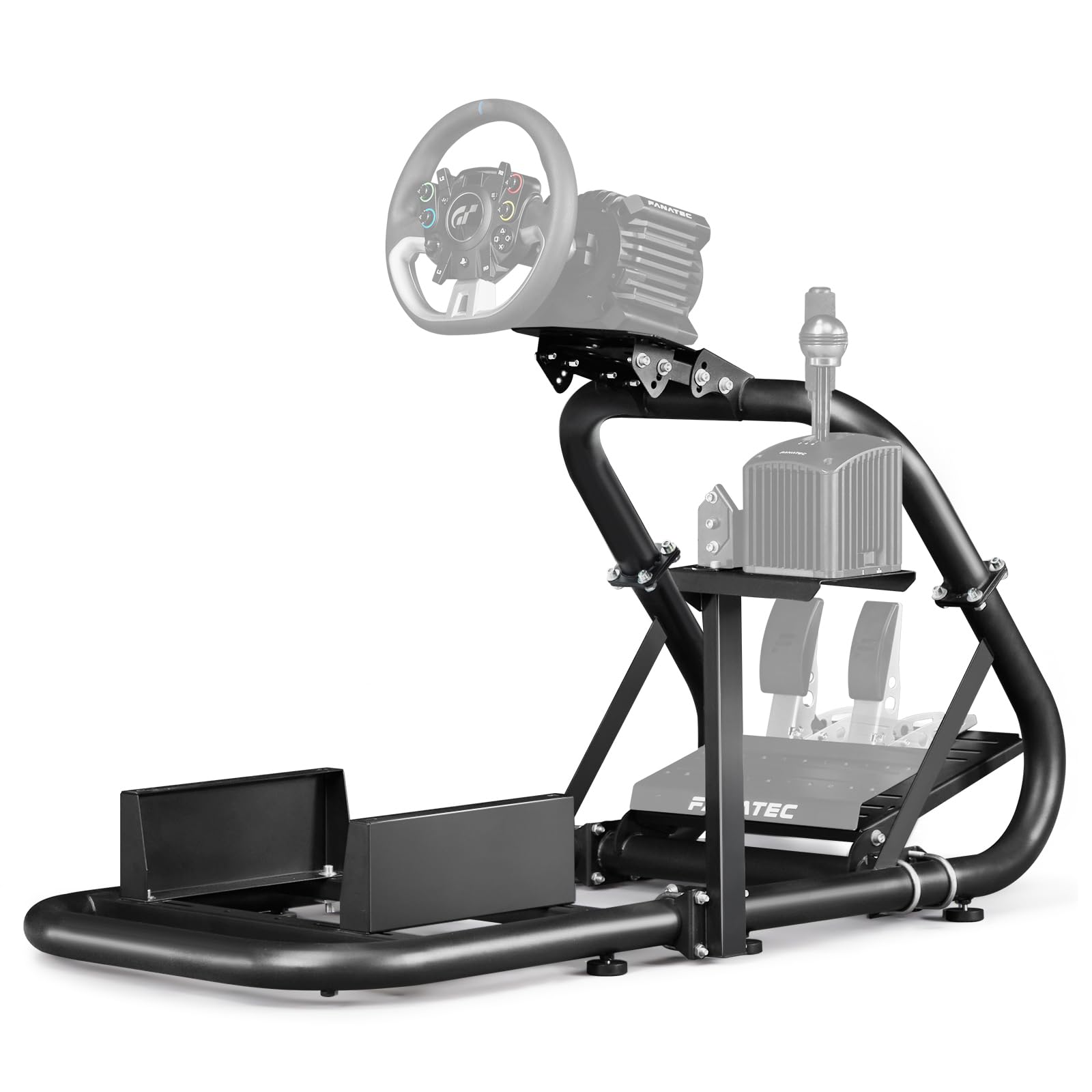
Figure 8: Product dimensions and user specifications.
8. Manteniment
Regular maintenance ensures the longevity and optimal performance of your racing simulator cockpit frame.
- Neteja: Netegeu el marc amb un drap suauamp drap per eliminar la pols i les restes. Eviteu productes de neteja abrasius o dissolvents que puguin danyar l'acabat.
- Comprovació de fixació: Periodically inspect all screws, bolts, and clamps. Re-tighten any loose fasteners to maintain stability and prevent unwanted movement during use.
- Rubber Foot Pads: Ensure the rubber foot pads are intact and properly positioned to prevent scratching floors and provide grip.
9. Solució De Problemes
If you encounter any issues with your Dardoo G923 Racing Simulator Cockpit Frame, refer to the following common troubleshooting tips:
- Frame Instability: If the frame feels wobbly, check all connection points and ensure that all bolts and U-bolts are securely tightened. Adjust the rubber foot pads to ensure the frame is level on your surface.
- Peripherals Not Fitting: Verify that your racing wheel, pedals, or shifter are compatible with the frame's mounting plates. The frame features pre-drilled holes for common brands; however, some peripherals may require minor adjustments or custom mounting solutions (not provided).
- Difficulty Adjusting Platforms: Loosen the adjustment bolts sufficiently before attempting to reposition platforms. Ensure no cables or other obstructions are hindering movement. Re-tighten firmly once the desired position is achieved.
10. Garantia i Suport
For warranty information or technical support, please refer to the documentation included with your purchase or contact Dardoo customer service directly. Keep your proof of purchase for any warranty claims.