
1. Informació de seguretat
Si us plau, llegiu i comprengui totes les instruccions de seguretat abans d'utilitzar aquest producte. Si no segueix aquestes instruccions, es poden produir descàrregues elèctriques, incendis o altres perills.
- Do not expose the receiver to water or extreme humidity.
- Keep the push button away from direct sunlight for prolonged periods to ensure optimal battery life.
- No intenteu desmuntar o reparar el dispositiu vosaltres mateixos. Contacteu amb l'assistència al client per obtenir assistència.
- Ensure the receiver is plugged into a standard 110V AC outlet.
2. Contingut del paquet
Verifiqueu que tots els elements siguin presents al vostre paquet:
- 2 x Plug-in Receivers
- 1 x Push Button Transmitter
- 1 x Door Sign
- 1 x 12V23A Battery (pre-installed in transmitter)
- 1 x tornavís
- 4 x Tacs
- 2 x cinta adhesiva de doble cara
- 1 x manual d'instruccions
3. Producte acabatview
The SURFOU Wireless Doorbell Kit N128 provides a reliable and customizable solution for your home or office. Featuring a 1300ft wireless range, 55 chimes, and adjustable volume, it ensures you never miss a visitor.


4. Configuració i instal·lació
4.1. Instal·lació del transmissor
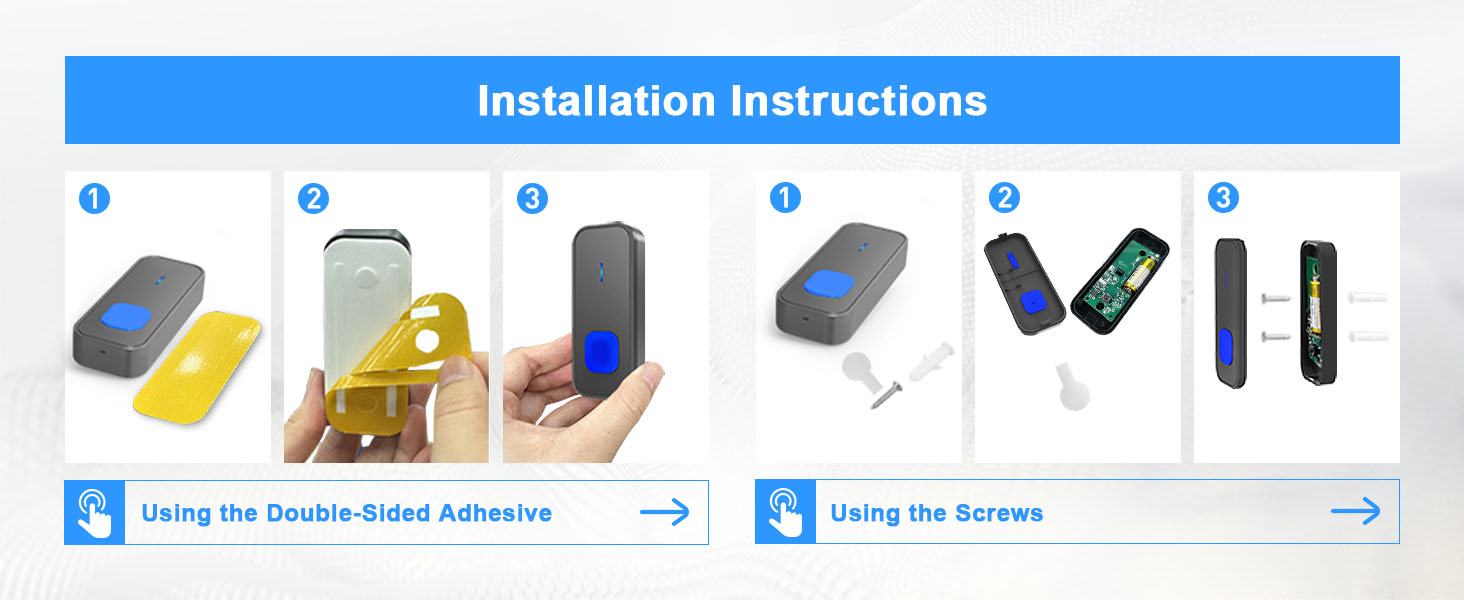
The push button transmitter can be installed using either the provided adhesive tape or screws.
- Clean the desired mounting surface thoroughly to ensure proper adhesion.
- Ús de cinta adhesiva: Peel off one side of the double-sided adhesive tape and attach it to the back of the transmitter. Peel off the other side and firmly press the transmitter onto the desired location on your wall or door frame for at least 30 seconds.
- Ús de cargols: Open the back cover of the transmitter (refer to Section 6.1 for battery replacement instructions, as this involves opening the cover). Mark the screw holes on the wall. Drill pilot holes, insert the dowels, and then secure the transmitter with the provided screws. Close the back cover.
4.2. Col·locació del receptor
Simply plug the receiver into any standard electrical outlet within the wireless range of the transmitter. For optimal performance, avoid placing receivers near large metal objects or thick walls that may interfere with the signal.

5. Instruccions de funcionament
5.1. Changing Ringtones
To select your preferred ringtone:
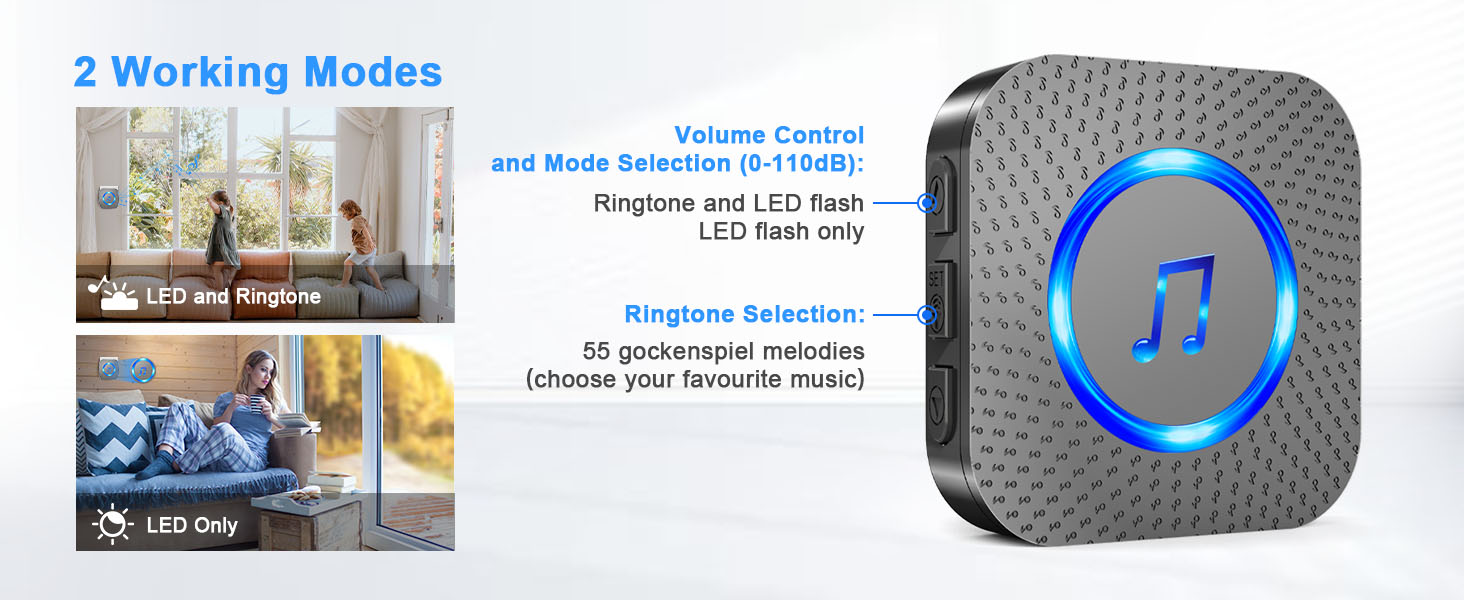
- Press the 'Up' or 'Down' button on the side of the receiver to cycle through the 55 available melodies.
- Once you hear a melody you like, stop pressing the buttons. The receiver will automatically save this selection.
This video demonstrates how to change the ringtone and re-pair the SURFOU wireless doorbell receiver with the transmitter.
5.2. Ajust de volum
Press the 'Volume' button on the side of the receiver to cycle through the 5 adjustable volume levels (0dB to 110dB).
5.3. Pairing Additional Devices (or Re-pairing)
If you need to pair an additional transmitter or re-pair an existing one:
- Long press the 'Volume' button on the receiver for approximately 8 seconds until it emits a 'ding' sound and the LED flashes. This indicates it's in learning mode.
- Quickly press the push button transmitter within 8 seconds. The receiver will emit two 'ding' sounds and the LED will flash, confirming successful pairing.
- The learning mode will automatically exit after 8 seconds if no transmitter is pressed.
5.4. Modes de treball
The receiver supports two working modes:
- LED and Ringtone: The receiver will play the selected melody and flash its LED light when the push button is pressed.
- LED Only (Silent Mode): The receiver will only flash its LED light without an audible chime. This is useful for quiet environments or for individuals with hearing impairments.
6. Manteniment
6.1. Battery Replacement (Transmitter)
The push button transmitter uses a 12V23A battery. When the LED indicator on the transmitter no longer lights up or the range decreases significantly, it's time to replace the battery.
- Use the provided mini screwdriver to gently pry open the back cover of the transmitter. Insert the screwdriver at a 45-degree angle into the bottom slot and carefully lift the cover.
- Traieu la bateria antiga.
- Insert a new 12V23A battery, ensuring correct polarity (negative contact spring).
- Snap the back cover firmly into place.
Watch this video for a step-by-step guide on how to safely replace the battery in your SURFOU wireless doorbell transmitter.
6.2. Neteja
Wipe the doorbell units with a soft, dry cloth. Do not use abrasive cleaners or solvents, as these may damage the finish or internal components.
7. Solució De Problemes
| Problema | Causa possible | Solució |
|---|---|---|
| El receptor no sona. | Receiver unplugged or power outage. Bateria del transmissor baixa o gastada. Units out of range or signal interference. Receiver in silent mode. | Ensure receiver is plugged in and powered. Replace transmitter battery (see Section 6.1). Move receiver closer to transmitter; avoid metal objects. Adjust volume (see Section 5.2) or change working mode. |
| Short range or intermittent ringing. | Obstructions (thick walls, metal). Bateria baixa del transmissor. Interferències d'altres dispositius sense fil. | Relocate receiver or transmitter. Substituïu la bateria del transmissor. Move other wireless devices away from the doorbell. |
| Receiver rings unexpectedly. | Interference from another doorbell system. | Re-pair the transmitter and receiver (see Section 5.3). |
8. Especificacions
| Característica | Detall |
|---|---|
| Número de model | N128 |
| abast sense fils | Fins a 400 m (1300 peus) en zones obertes |
| Campanes | 55 melodies seleccionables |
| Nivells de volum | 5 nivells (de 0 dB a 110 dB) |
| Classificació d'impermeabilitat (transmissor) | IP55 |
| Temperatura de funcionament | -22 °F a 158 °F (-30 °C a 70 °C) |
| Font d'alimentació (receptor) | 110 V CA |
| Font d'alimentació (transmissor) | 1 x 12V23A Alkaline Battery |
| Average Battery Life (Transmitter) | 3 anys |
| Material | ABS |
| Dimensions (transmissor) | 3.39 x 1.38 x 0.79 polzades |
| Dimensions (receptor) | 2.75 x 2.75 x 0.79 polzades |
| Pes de l'article | 7.8 unces |
9. Informació de la garantia
SURFOU products are designed and manufactured to the highest quality standards. This product is covered by a standard manufacturer's warranty against defects in materials and workmanship. Please retain your proof of purchase for warranty claims. For specific warranty terms and conditions, refer to the product packaging or contact customer support.
10. Atenció al client
If you have any questions, require technical assistance, or need to report an issue with your SURFOU Wireless Doorbell Kit, please contact our customer support team. You can typically find contact information on the product packaging or through the retailer where you purchased the item.