
Azumi LS5018FP
Azumi Senwa LS5018FP Smartphone User Manual
Your comprehensive guide to the Senwa LS5018FP 4G LTE Smartphone
Introducció
Thank you for choosing the Azumi Senwa LS5018FP 4G LTE Smartphone. This device is designed to provide a reliable and user-friendly mobile experience. This manual will guide you through the setup, operation, and maintenance of your new smartphone, ensuring you get the most out of its features.
The Senwa LS5018FP features a 5-inch HD display, a fingerprint sensor for enhanced security, and runs on Android 11 (Go edition). It is compatible with AT&T and T-Mobile networks, offering broad connectivity options.
Informació de seguretat
Please read this section carefully before using your device to ensure safe and proper operation.
- Seguretat de la bateria: Use only manufacturer-approved batteries, chargers, and accessories. Do not disassemble, puncture, or short-circuit the battery. Dispose of batteries properly.
- Seguretat de conducció: Always prioritize driving safety. Do not use your phone while driving if it distracts you. Use hands-free accessories when necessary.
- Dispositius mèdics: Maintain a safe distance between your phone and medical devices like pacemakers to avoid interference. Consult your physician and medical device manufacturer for specific guidelines.
- Ambients explosius: Turn off your phone in areas with potentially explosive atmospheres, such as gas stations or chemical plants.
- Resistència a l'aigua: Aquest dispositiu no és resistent a l'aigua. Eviteu l'exposició a líquids.
- Eliminació: Do not dispose of the device in household waste. Follow local regulations for electronic waste disposal.
Contingut del paquet
Assegureu-vos que tots els elements estiguin presents al paquet del producte:
- Azumi Senwa LS5018FP Smartphone
- Carregador
- Cable USB
- Targeta SD de 16 GB (preinstal·lada o inclosa per separat)
- Guia d'inici ràpid (pot estar en castellà)

Image: The Azumi Senwa LS5018FP smartphone displayed on its orange retail box, showcasing the device's screen with pre-installed applications and the included accessories.
Producte acabatview
Familiarize yourself with the physical components of your Senwa LS5018FP smartphone.
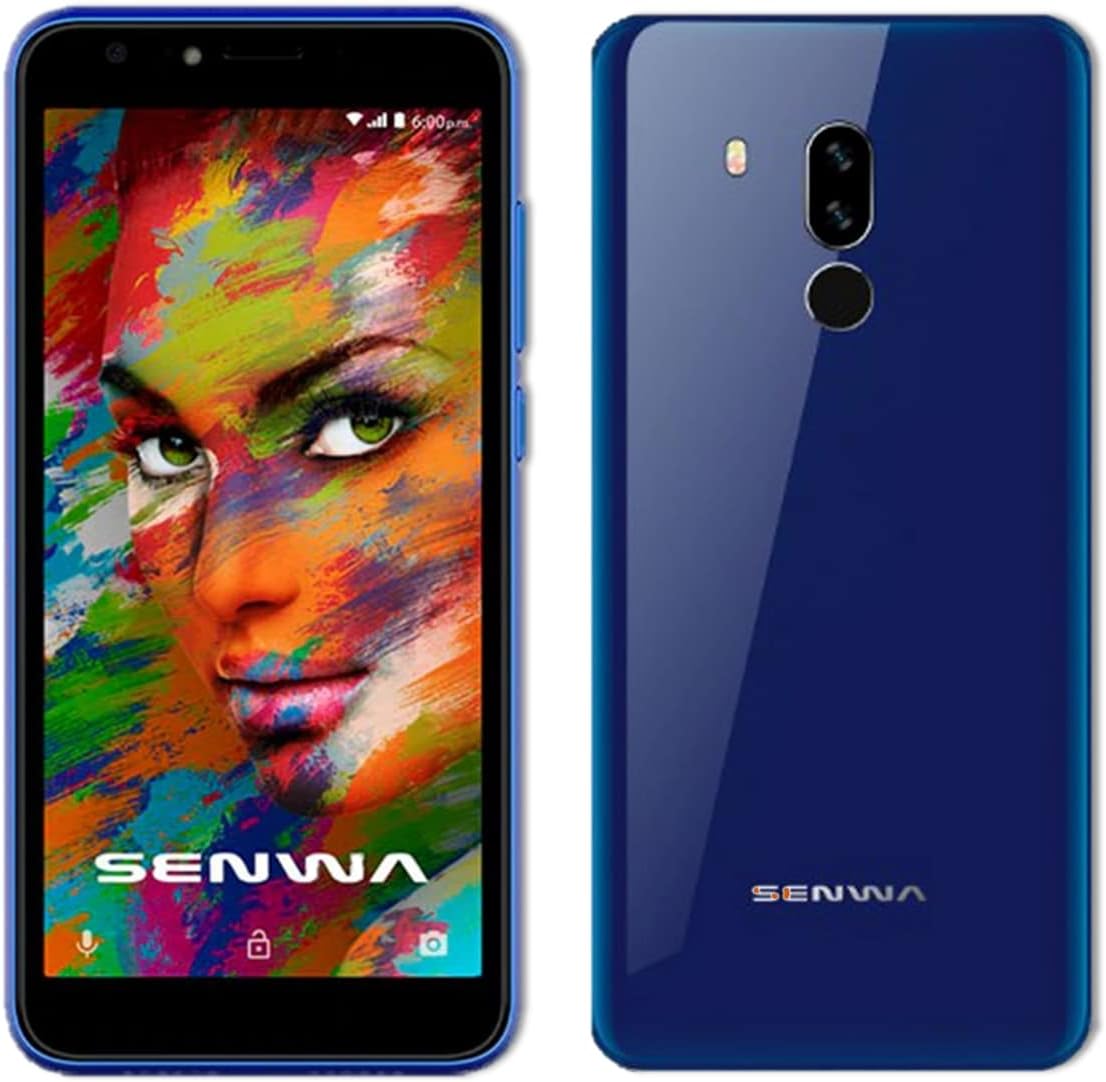
Imatge: Anvers i revers views of the Azumi Senwa LS5018FP smartphone. The front shows the display, earpiece, and front camera. The back highlights the dual rear cameras, LED flash, and fingerprint sensor.
Components clau:
- Càmera frontal: For selfies and video calls, equipped with a flash.
- Visualització: 5-inch HD screen with an 18:9 aspect ratio.
- Botons de volum: Ajusta els nivells d'àudio.
- Botó d'encesa: Encendre/apagar el dispositiu, bloquejar/desbloquejar la pantalla.
- Càmeres posteriors: Main camera with flash for capturing photos and videos.
- Sensor d’empremta digital: Located on the back for secure unlocking.
- Ponent: Per a la sortida d'àudio.
- Port USB: Per a càrrega i transferència de dades.
- Conector d'àudio de 3.5 mm: Per a auriculars.
Configuració
1. Inserció de la targeta SIM i la targeta SD
Your phone uses a standard SIM card. An additional 16GB SD card is included for expanded storage.
- Locate the SIM/SD card tray on the side of the phone.
- Feu servir l'eina d'expulsió de la SIM proporcionada (si s'inclou) o un petit clip per obrir la safata.
- Carefully place your activated SIM card into the designated slot. Ensure the gold contacts face down.
- Insert the included 16GB SD card into its slot. The phone supports up to 64GB SD cards.
- Empenyeu suaument la safata cap enrere dins del telèfon fins que quedi alineada amb el lateral.
2. Carregant la bateria
Abans del primer ús, carregueu completament la bateria del telèfon.
- Connecteu el cable USB al carregador.
- Connecteu el carregador a una presa de corrent.
- Connect the other end of the USB cable to the phone's USB port.
- L'indicador de càrrega apareixerà a la pantalla.
3. Engegada i configuració inicial
- Press and hold the Power button until the Azumi logo appears.
- Follow the on-screen prompts to complete the initial setup. This includes selecting your language, connecting to Wi-Fi, setting up your Google account, and configuring security options like the fingerprint sensor.
Funcionament del telèfon intel·ligent
Navegació bàsica
- Gestos de la pantalla tàctil: Tocar, lliscar i pessigar per fer zoom són gestos estàndard d'Android.
- Pantalla d'inici: Accedeix a les teves aplicacions, widgets i notificacions.
- Barra de navegació: Feu servir els botons Enrere, Inici i Aplicacions recents a la part inferior de la pantalla.
Trucades i missatges
- Fer trucades: Obriu l'aplicació Telèfon, marqueu el número i toqueu la icona de trucada.
- Enviament de missatges: Open the Messages app, tap "Start chat," enter recipient and message.
Connectivitat
- Wi-Fi: Ves a Configuració > Xarxa i internet > Wi-Fi per connectar-te a les xarxes disponibles.
- Bluetooth: Go to Settings > Connected devices > Bluetooth to pair with other devices.
- Dades mòbils: Ensure mobile data is enabled in Settings > Network & internet > Mobile network for internet access via your carrier.
Ús de la càmera
The Senwa LS5018FP features both front and rear cameras, each with a flash.
- Obriu l'aplicació Càmera.
- Toqueu el botó de l'obturador per fer una foto.
- Toca la icona de vídeo per gravar un vídeo.
- Use the flash icon to toggle the flash on/off/auto.
- Canvieu entre la càmera frontal i la posterior mitjançant la icona de canvi de càmera.
Seguretat d'empremtes dactilars
Set up your fingerprint for quick and secure unlocking.
- Aneu a Configuració > Seguretat > Empremta digital.
- Follow the on-screen instructions to register your fingerprint. You will need to set up a backup screen lock method (PIN, pattern, or password) first.
- Once registered, simply place your finger on the rear fingerprint sensor to unlock your phone.
Gestió d'emmagatzematge
Your phone comes with 8GB of internal storage and an included 16GB SD card. You can expand storage up to 64GB with a compatible SD card.
- To check storage usage, go to Settings > Storage.
- Esborra regularment la memòria cau i les innecessàries files per alliberar espai.
- Move photos and videos to the SD card to optimize internal storage.
Manteniment
Neteja del teu dispositiu
- Feu servir un drap suau i sense borrissol per netejar la pantalla i la carcassa del telèfon.
- Eviteu utilitzar productes químics o materials abrasius.
Cura de la bateria
- Eviteu les temperatures extremes, ja que poden afectar la durada de la bateria.
- No deixeu el telèfon carregant-se durant llargs períodes després que estigui completament carregat.
- Per a una durada òptima de la bateria, intenta mantenir la càrrega entre el 20% i el 80%.
Actualitzacions de programari
Periodically check for software updates to ensure your phone has the latest features and security patches.
- Aneu a Configuració > Sistema > Actualització del sistema.
- Connect to Wi-Fi before downloading updates to avoid mobile data charges.
Resolució de problemes
| Problema | Possible solució |
|---|---|
| El telèfon no s'encén. | Assegureu-vos que la bateria estigui carregada. Connecteu el carregador i espereu uns minuts abans d'intentar engegar-lo. |
| No es poden fer ni rebre trucades. | Check if the SIM card is properly inserted. Verify that your mobile network signal is strong. Ensure your account is active with your carrier. |
| Problemes de connexió Wi-Fi. | Restart your phone and Wi-Fi router. Forget the network in Wi-Fi settings and reconnect. |
| Les aplicacions es bloquegen o es congelen. | Clear the app's cache (Settings > Apps & notifications > [App Name] > Storage & cache > Clear cache). Restart the phone. |
| Low storage space. | Elimineu-les innecessàries files, photos, and videos. Move media to the SD card. Uninstall unused apps. |
| El sensor d'empremtes dactilars no funciona. | Ensure your finger and the sensor are clean and dry. Re-register your fingerprint in Settings > Security. |
Especificacions
| Característica | Detall |
|---|---|
| Nom del model | SENWA (LS5018FP) |
| Sistema operatiu | Android 11 (edició Go) |
| Mostra | 5 Inches, 1280 x 720 Resolution (HD) |
| Processador | Quad-core, 1.84 GHz CPU Speed |
| RAM | 1 GB |
| Emmagatzematge intern | 8 GB |
| Emmagatzematge ampliable | Up to 64 GB via SD Card (16GB included) |
| Càmera posterior | Sí, amb flash |
| Càmera frontal | Sí, amb flash |
| Capacitat de la bateria | 2000 mAh d'ions de liti |
| Connectivitat | 4G LTE, Wi-Fi, Bluetooth |
| Jack d'àudio | 3.5 mm |
| Característiques especials | Finger Print Security |
| Dimensions | 5 x 4 x 4 polzades |
| Pes de l'article | 1 lliures |
| Color | Blau |
Garantia i Suport
For warranty information and technical support, please refer to the documentation provided with your purchase or contact Azumi customer service through their official weblloc web. Conserveu el comprovant de compra per a reclamacions de garantia.
Recursos en línia:
- For general information and support, visit the Azumi Mobile official weblloc.
- For software updates and FAQs, check the support section of the manufacturer's weblloc.
Ask a question about this manual
Ask about setup, troubleshooting, compatibility, parts, safety, or missing instructions. Manuals+ will review the question and use this page’s manual context to help answer it.