
1. Introducció
Thank you for choosing the MageGee 60% Wired Gaming Keyboard. This ultra-compact keyboard is designed for gamers, typists, and travelers, offering a blend of performance, portability, and customizable RGB backlighting. This manual provides essential information for setting up, operating, maintaining, and troubleshooting your new keyboard.

Un acabatview of the MageGee 60% Wired Gaming Keyboard, showcasinel seu disseny compacte i la vibrant retroiluminació RGB.
2. Contingut del paquet
- MageGee 60% Wired Gaming Keyboard
- Cable USB tipus C a USB A
- Manual d'usuari (aquest document)
3. Instruccions de configuració
3.1 Connexió del teclat
- Locate the USB Type-C port on the back or side of the keyboard.
- Connecteu l'extrem més petit del cable USB tipus C proporcionat al port del teclat.
- Connecteu l'extrem USB-A més gran del cable a un port USB disponible de l'ordinador.
- El teclat és plug-and-play i el sistema operatiu l'hauria de reconèixer automàticament.
3.2 Compatibilitat del sistema
The MageGee 60% Wired Gaming Keyboard is compatible with a wide range of operating systems, including:
- Windows 10, Windows 8, Windows 7, Windows XP, Windows VISTA
- Mac OS
For use with gaming consoles such as XBOX, PlayStation, or Nintendo Switch, a compatible converter adapter is recommended (not included).

This image illustrates the core features of the keyboard, including its 61 anti-ghosting keys, detachable Type-C cable for connectivity, multiple backlight modes, compact 60% layout, ergonomic design, and durable construction.
4. Instruccions de funcionament
4.1 Keyboard Layout and Keys
This keyboard features a 60% compact layout with 61 keys. It includes anti-ghosting technology for all 61 keys, ensuring accurate registration of multiple simultaneous key presses, which is beneficial for gaming.
Control de retroiluminació 4.2
The keyboard features customizable RGB backlighting with multiple effects. You can adjust the backlight modes, brightness, and speed using specific key combinations.
- Changing Backlight Modes: The keyboard offers various backlight effects, including normal light, wave, horse riding, and breathing modes. Specific key combinations (often involving the 'FN' key) are used to cycle through these modes. Refer to the keycaps for symbols indicating backlight functions.
- Ajust de brillantor: There are 5 levels of brightness control. Use the designated key combinations (typically 'FN' + arrow keys or other function keys) to increase or decrease the backlight intensity.
- Ajust de velocitat: The speed of dynamic backlight effects can also be adjusted across 5 levels. Use the designated key combinations (typically 'FN' + arrow keys or other function keys) to modify the effect speed.

The keyboard's customizable RGB backlighting is shown, demonstrating different lighting patterns and the ability to adjust brightness and speed to suit user preferences.
4.3 Disseny ergonòmic
The keyboard is designed with an ergonomic key layout that adapts to the natural movement arc of your hands. The key height is optimized to provide comfort and reduce fatigue during long periods of use.
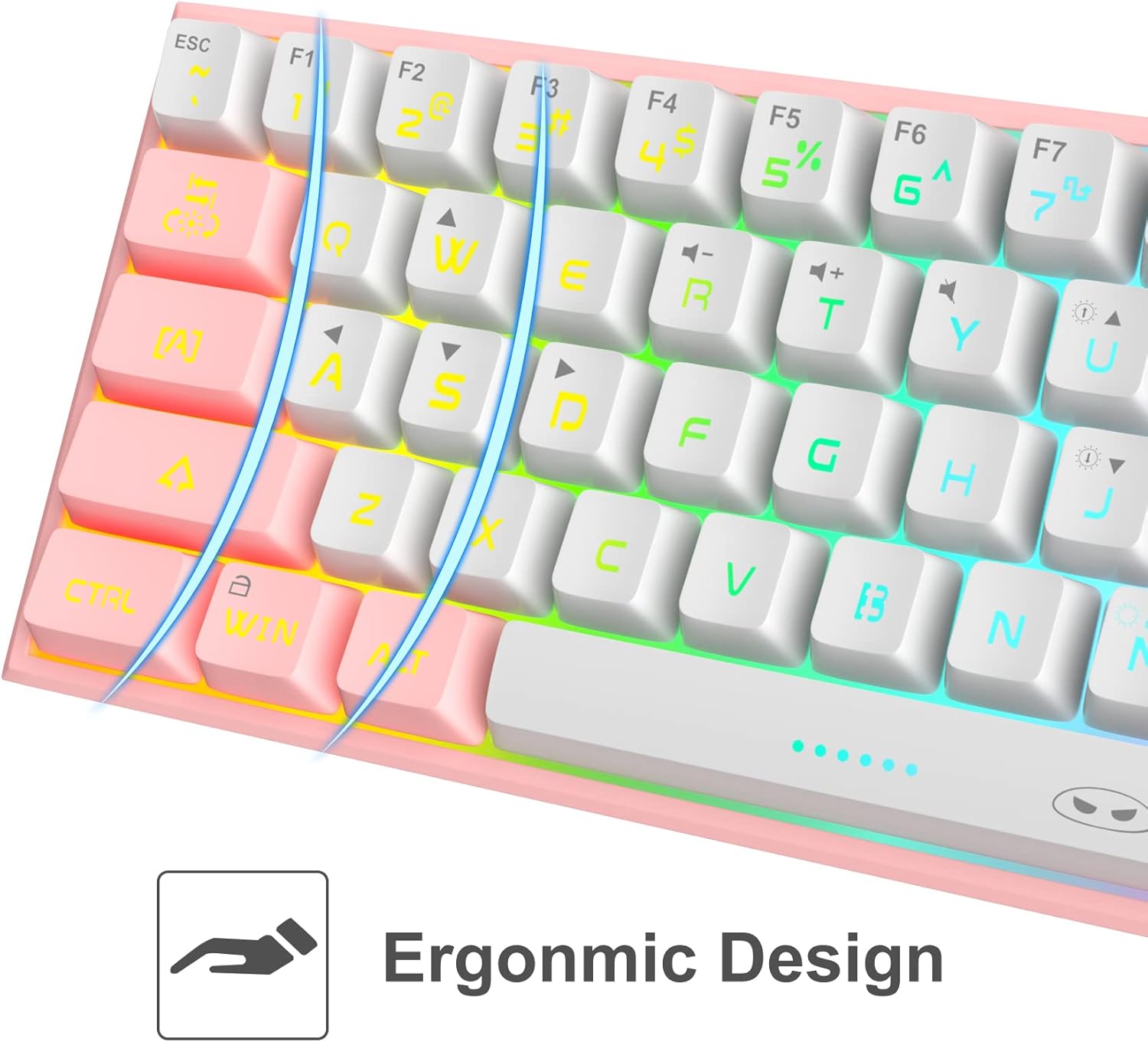
Un detallat view of the keyboard's keycaps, emphasizing the ergonomic design that contributes to comfortable and reduced-fatigue use during extended periods.
5. Manteniment
To ensure the longevity and optimal performance of your MageGee keyboard, follow these maintenance guidelines:
- Neteja: The keyboard features a waterproof design, which helps protect against accidental spills. For general cleaning, disconnect the keyboard from your computer. Use a soft, damp cloth to wipe down the keycaps and chassis. For stubborn dirt, a small amount of mild soap can be used. Ensure the keyboard is completely dry before reconnecting.
- Eliminació de pols: Feu servir aire comprimit per eliminar la pols i les restes que hi ha entre les tecles.
- Emmagatzematge: Quan no l'utilitzeu durant períodes prolongats, guardeu el teclat en un lloc sec i fresc, allunyat de la llum solar directa.
6. Solució De Problemes
If you encounter issues with your MageGee keyboard, refer to the following common problems and solutions:
| Problema | Causa possible | Solució |
|---|---|---|
| El teclat no respon | Loose cable connection, incorrect USB port, driver issue. | Assegureu-vos que el cable USB estigui connectat correctament tant al teclat com a l'ordinador. Proveu un port USB diferent. Reinicieu l'ordinador. |
| La llum de fons no funciona | Backlight turned off, brightness set to minimum. | Use the designated key combinations to turn on the backlight or increase brightness. |
| Certain keys not registering | Restes sota la tecla, conflicte de programari. | Clean the affected key area with compressed air. Test the keyboard on another computer to rule out software issues. |
| Keyboard input lag | USB port issue, system performance. | Try a different USB port. Ensure your computer meets the system requirements for your applications. |
7. Especificacions
| Característica | Detall |
|---|---|
| Model | B09LV96L71 |
| Marca | MageGee |
| Tecnologia de connectivitat | Amb cable (USB tipus C) |
| Disposició del teclat | 60% Compact, 61 Keys |
| Il·luminació de fons | RGB Backlit (multiple modes, adjustable brightness/speed) |
| Característiques especials | Waterproof, Anti-ghosting (all 61 keys), Ergonomic Design |
| Dimensions del producte | 12 x 5 x 2 polzades |
| Pes de l'article | 1.05 lliures |
| Material | Acrilonitril butadiè estirè (ABS) |
| Color | Blanc Rosa |
| Dispositius compatibles | PC, Mac, Gaming Consoles (with adapter) |
8. Garantia i Suport
8.1 Informació de la garantia
Specific warranty details for the MageGee 60% Wired Gaming Keyboard may vary by region and retailer. Please refer to the warranty card included with your purchase or contact your point of sale for detailed information regarding warranty coverage and terms.
8.2 Atenció al client
For technical assistance, troubleshooting beyond this manual, or inquiries about your product, please contact MageGee customer support through their official website or the retailer from whom you purchased the product. Have your model number (B09LV96L71) and purchase details ready when contacting support.