Introducció
This manual provides essential information for the safe and effective use of your Blackview BV6300 Rugged Phone. Designed for durability, this device features IP68 shockproof and waterproof capabilities, making it suitable for various demanding environments. Please read this manual thoroughly before operating your device.
Dispositiu acabatview
El Negreview BV6300 is a robust mobile phone equipped with a 5.7-inch HD+ display, an Octa-Core processor, 3GB RAM, 32GB internal storage, and a 4380mAh battery. It runs on Android 10 and features a 13MP Quad Rear HDR camera, NFC, and OTG capabilities.

Figura 1: Davant i darrere view del Negreview BV6300 Rugged Phone.

Figura 2: El Slim Profile (11.6mm) and rugged design of the BV6300, highlighting its IP68 waterproof, drop-proof (up to 1.5m), and dust-proof capabilities.
Configuració
1. Inserció de targetes SIM i targeta SD
El Negreview BV6300 supports dual Nano SIM cards and an expandable SD card up to 128GB.
- Localitza la safata de la targeta SIM al lateral del telèfon.
- Feu servir l'eina d'expulsió de la SIM proporcionada per obrir la safata.
- Carefully place your Nano SIM cards and/or SD card into the designated slots. Ensure they are correctly oriented.
- Empenyeu suaument la safata cap al telèfon fins que encaixi al seu lloc.

Figure 3: Illustration of dual SIM and TF card insertion.
2. Assistent d'encesa inicial i configuració
- Press and hold the Power button (located on the right side) until the Blackview apareix el logotip.
- Seguiu les instruccions que apareixen a la pantalla per completar la configuració inicial, inclosa la selecció d'idioma, la connexió Wi-Fi, l'inici de sessió al compte de Google i la configuració de seguretat.
Operating Your Blackview BV6300
1. Navegació bàsica (Android 10)
Your BV6300 runs on Android 10, offering intuitive gesture navigation and a dark theme option for improved user experience and battery efficiency.
- Pantalla d'inici: Llisca cap a l'esquerra o la dreta per accedir als diferents panells de la pantalla d'inici.
- Calaix d'aplicacions: Llisca cap amunt des de la part inferior de la pantalla per obrir el calaix d'aplicacions.
- Notificacions i configuració ràpida: Feu lliscar el dit cap avall des de la part superior de la pantalla fins a view notificacions i configuracions ràpides.
- Aplicacions recents: Llisca cap amunt des de baix i mantén premut per view aplicacions recents.
- Enrere: Llisca des de la vora esquerra o dreta de la pantalla per tornar enrere.

Figure 4: Android 10 interface with Dark Theme enabled.
2. Característiques de seguretat
The BV6300 offers multiple security options to protect your data.
- Desbloqueig de les empremtes digitals: Registra les teves empremtes dactilars per a un desbloqueig ràpid i segur. El sensor d'empremtes dactilars es troba a la part posterior del dispositiu.
- Desbloqueig facial: Use the front camera to unlock your phone with facial recognition.
- PIN/Patró/Contrasenya: Opcions de seguretat estàndard d'Android.

Figure 5: Fingerprint and Face Unlock options for enhanced security.
3. Funcionament de la càmera
The BV6300 features a 13MP Quad Rear Camera and an 8MP Front Camera, supporting HDR and AI Color Portrait modes.
- Obre l'aplicació Càmera des de la pantalla d'inici o des del calaix d'aplicacions.
- Canvia entre la càmera frontal i la posterior amb la icona de commutació de la càmera.
- Toqueu el botó de l'obturador per fer una foto.
- Explore modes like HDR, Night Mode, and AI Color Portrait for different shooting scenarios.
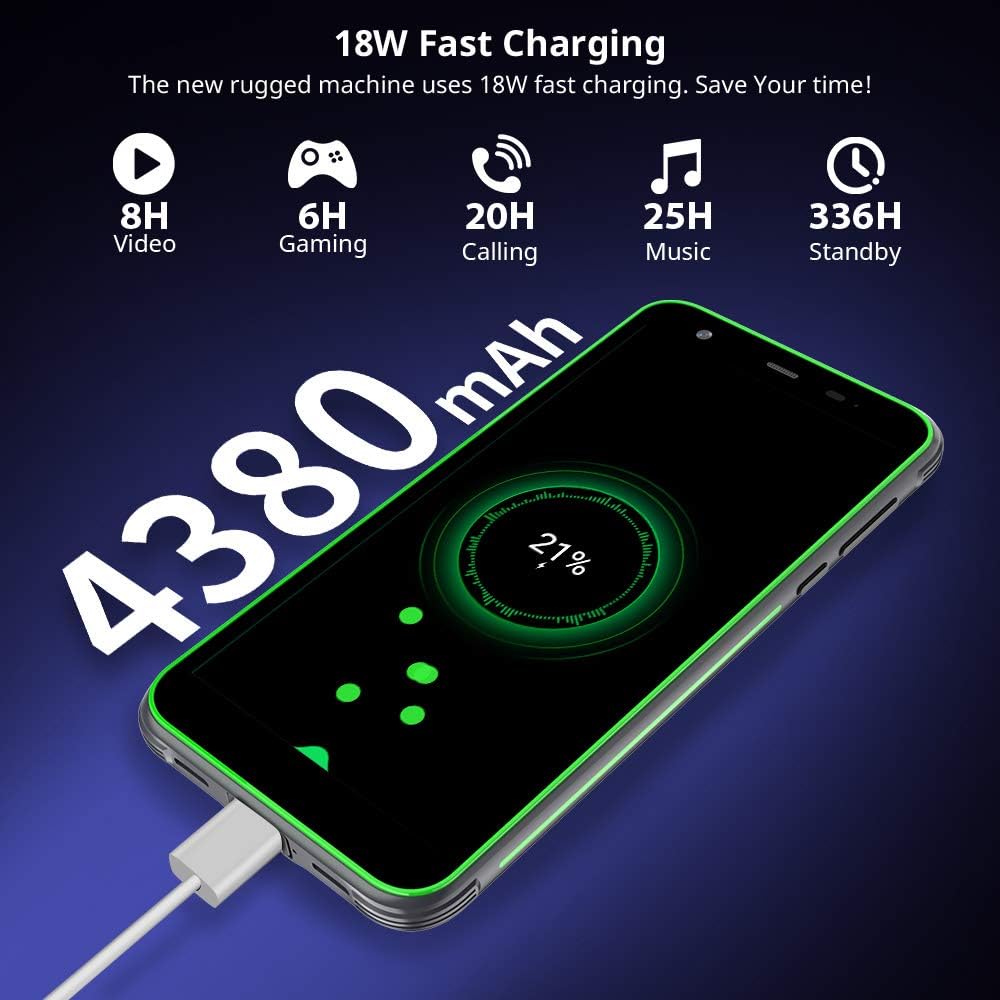
Figura 6: Examples of photos taken with the BV6300 camera, showcasing HDR and Night Mode capabilities.

Figure 7: AI Color Portrait feature, which keeps the subject in color while rendering the background in black and white.
4. Càrrega del dispositiu
The BV6300 is equipped with a 4380mAh battery and supports 18W fast charging.
- Connect the USB Type-C cable to the phone's charging port (located at the bottom, protected by a flap).
- Connect the other end of the cable to a compatible 18W fast charger.
- A charging indicator will appear on the screen.
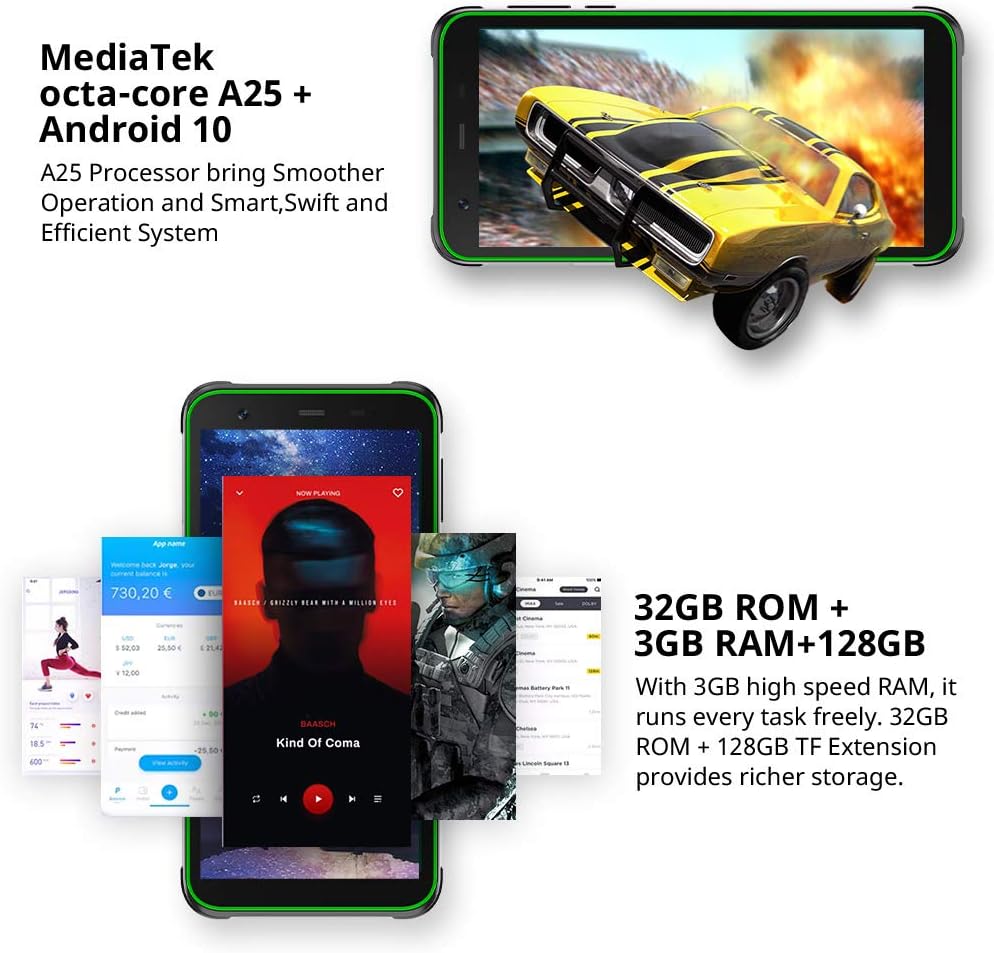
Figure 8: The BV6300 connected to a charger, illustrating its 4380mAh battery and 18W fast charging capability.
5. NFC and Other Connectivity
The phone supports NFC for contactless payments and data transfer, along with standard connectivity options.
- NFC: Enable NFC in Settings to use features like Google Pay or tap-to-share.
- OTG: Connect USB devices like flash drives or keyboards using an OTG adapter (sold separately).
- GPS/GLONASS/Beidou: For accurate navigation and location services.
- Bluetooth 5.0: Per connectar accessoris sense fil.

Figure 9: Using NFC for contactless payments with Google Pay.

Figure 10: GPS and GLONASS functionality for outdoor navigation.
Manteniment
Per garantir la longevitat i el rendiment òptim del vostre Blackview BV6300, follow these maintenance guidelines:
- Neteja: Feu servir un drap suau i sense borrissol per netejar la pantalla i el cos. Per a la brutícia persistent, netegeu lleugeramentamp es pot fer servir un drap. Eviteu productes químics agressius.
- Resistència a l'aigua: While IP68 rated, ensure all port covers (USB-C, SIM tray) are securely closed before exposing the phone to water. Do not intentionally submerge the phone in corrosive liquids or saltwater.
- Temperatura: Eviteu exposar el telèfon a temperatures extremes (molt caloroses o molt fredes), ja que això pot afectar la durada de la bateria i els components interns.
- Actualitzacions de programari: Regularly check for and install system updates to ensure your phone has the latest security patches and performance improvements.
- Gestió d'emmagatzematge: Netegeu periòdicament els innecessaris files i aplicacions per mantenir un rendiment òptim.
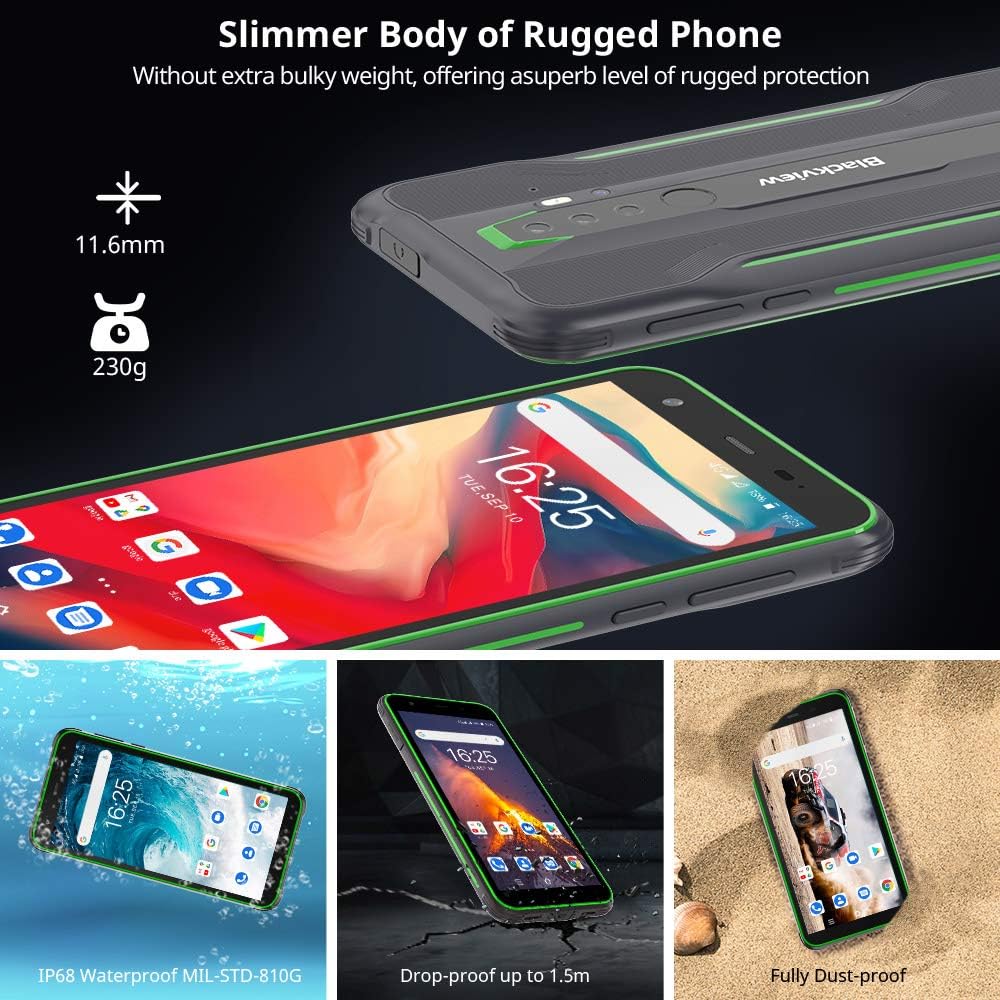
Figure 11: The BV6300's IP68 waterproof rating allows for submersion in fresh water up to 1.5 meters for 30 minutes.
Resolució de problemes
This section addresses common issues you might encounter with your Blackview BV6300.
| Problema | Possible solució |
|---|---|
| El telèfon no s'encén | Ensure the battery is charged. Connect to charger for at least 30 minutes. If still unresponsive, perform a forced restart by holding the Power button for 10-15 seconds. |
| La bateria s'esgota ràpidament | Close background apps, reduce screen brightness, disable unused features (Wi-Fi, Bluetooth, GPS), and check for app updates. Consider a factory reset if the issue persists. |
| No es pot connectar a la Wi-Fi/dades mòbils | Toggle Wi-Fi/Mobile Data off and on. Restart the phone. Check router/network settings. Ensure SIM card is properly inserted and activated. |
| Les aplicacions es bloquegen o es bloquegen | Clear app cache/data (Settings > Apps > [App Name] > Storage). Update the app. If the issue persists, uninstall and reinstall the app. |
| El sensor d'empremtes dactilars no funciona | Ensure your finger and the sensor are clean and dry. Re-register your fingerprints in Settings. |
Especificacions
| Característica | Detall |
|---|---|
| Nom del model | BV6300 |
| Sistema operatiu | Android 10.0 |
| Processador | Octa-Core (MediaTek A25) |
| RAM | 3 GB |
| Emmagatzematge intern | 32 GB |
| Emmagatzematge ampliable | Up to 128 GB (SD card) |
| Mida de la pantalla | 5.7 polzades |
| Resolució | 1440 x 720 (HD+) |
| Càmera posterior | 13MP Quad Rear HDR |
| Càmera frontal | 8MP |
| Capacitat de la bateria | 4380 mAh |
| Carregant | 18W Fast Charging (Wired) |
| Connectivitat | 4G, Dual SIM, NFC, OTG, Wi-Fi, Bluetooth 5.0, GPS, GLONASS, Beidou |
| Durabilitat | IP68 Shockproof, Waterproof, Dustproof (MIL-STD-810G compliant) |
| Dimensions | 159.6 x 78.2 x 11.6 mm |
| Pes | 230 g |

Figure 12: Physical dimensions of the Blackview BV6300.
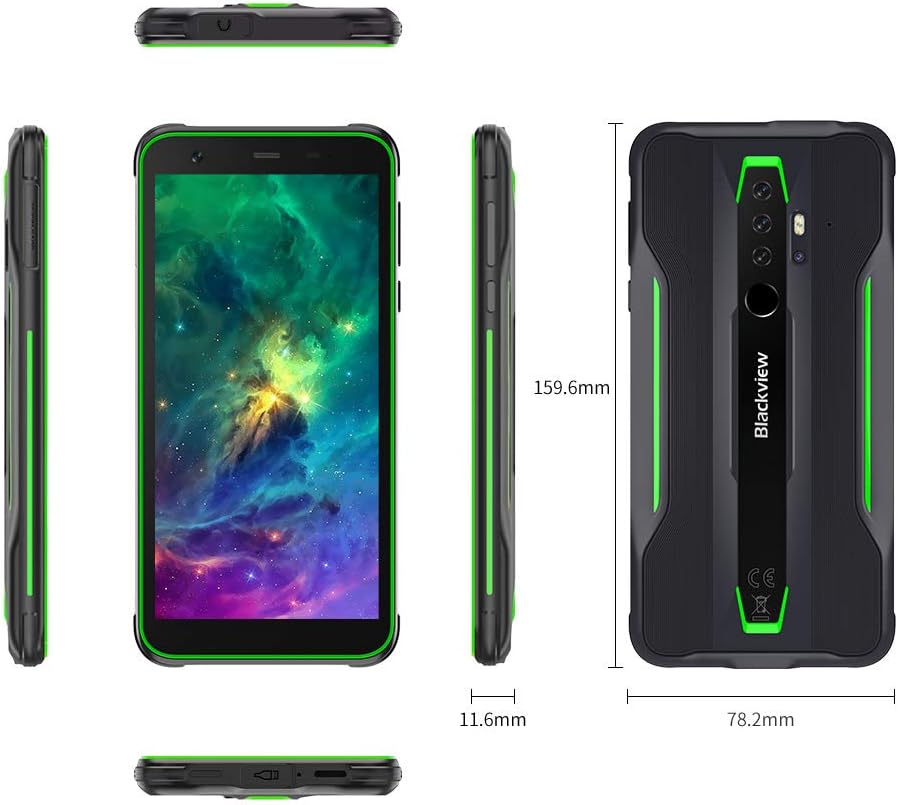
Figure 13: Detailed comparison of Blackview BV6300 and BV6300 Pro specifications.
Vídeo oficial del producte
Video 1: Official product video for the Blackview BV6300 Tough Phone, showcasing its features and durability.
Garantia i Suport
For warranty information and technical support, please refer to the official Blackview weblloc web o poseu-vos en contacte amb el servei d'atenció al client. Conserveu el comprovant de compra per a reclamacions de garantia.
Recursos en línia:
- Official Blackview Weblloc: www.negreview.hk (Si us plau, tingueu en compte: URL és un example, real URL pot variar)
- Support Email: Refer to your product packaging or official weblloc per obtenir dades de contacte.