
1. Introducció
Gràcies per la compraasing the TURBOX Giantpeak Mechanical Feel RGB Gaming Keyboard. This manual provides essential information for setting up, operating, and maintaining your new keyboard. Please read this manual carefully before use to ensure optimal performance and longevity of your device.
2. Informació de seguretat
- Keep the keyboard away from excessive heat, direct sunlight, and moisture.
- Although the keyboard is spill-resistant, avoid intentionally exposing it to large amounts of liquid. In case of spills, disconnect the keyboard immediately and allow it to dry completely before reconnecting.
- No intenteu desmuntar ni modificar el teclat. Això anul·larà la garantia i pot causar danys.
- Feu servir només amb dispositius i fonts d'alimentació compatibles segons les especificacions.
- Mantenir fora de l'abast dels nens.
3. Contingut del paquet
Si us plau, comproveu el paquet per veure si hi ha els elements següents:
- TURBOX Giantpeak Mechanical Feel RGB Gaming Keyboard
- Manual d'usuari (aquest document)
4. Producte acabatview
The TURBOX Giantpeak keyboard is designed for gaming, featuring a mechanical feel, customizable RGB lighting, and macro capabilities. It also includes a convenient mobile device holder.
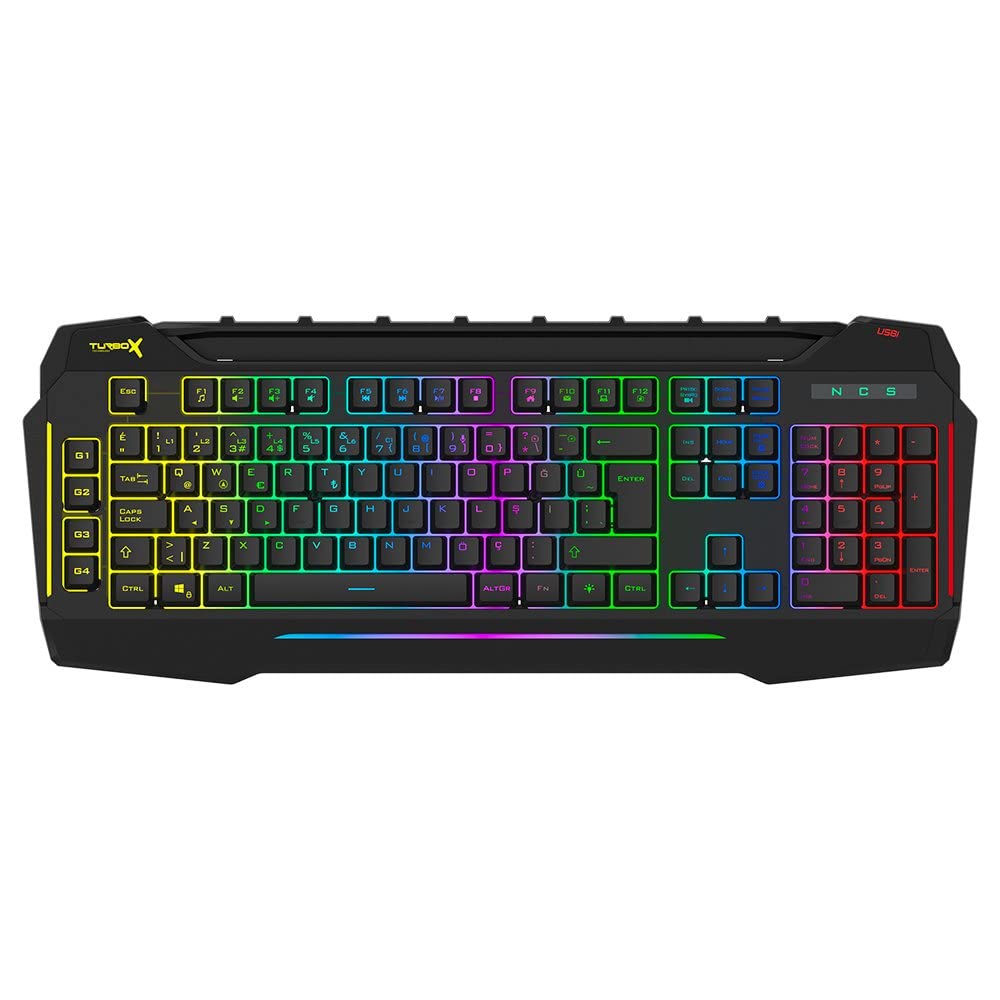
Figure 4.1: TURBOX Giantpeak keyboard with integrated mobile device stand.
This full-size keyboard offers a standard Q layout, providing a comfortable and responsive typing experience for both gaming and general use.

Figura 4.2: superior view of the TURBOX Giantpeak keyboard.
The keyboard features vibrant RGB backlighting that can be customized to various effects, including sound-sensitive modes. Its spill-resistant design provides added durability.

Figura 4.3: Angle view showing RGB lighting.
Dedicated macro keys (G1-G4) are located on the left side, allowing for quick execution of complex commands or sequences.

Figure 4.4: Close-up of programmable G-keys.
The keyboard also includes a full numeric keypad for data entry and additional functions.

Figure 4.5: Numeric keypad detail.
Connectivity is provided via a durable USB cable, ensuring a stable and responsive connection to your computer.

Figura 4.6: lateral view amb cable USB.
5. Configuració
Follow these steps to set up your TURBOX Giantpeak keyboard:
- Descomprimir el teclat: Carefully remove the keyboard and any packaging materials from the box.
- Connexió a l'ordinador: Plug the USB connector of the keyboard into an available USB port on your desktop or laptop computer.
- Instal·lació del controlador: Your operating system (Windows, macOS, etc.) should automatically detect and install the necessary drivers. This process may take a few moments.
- Verificació de la funcionalitat: Once drivers are installed, test the keyboard by typing in a text editor or browser to ensure all keys are functioning correctly. The RGB lighting should also illuminate.
6. Instruccions de funcionament
6.1 Funcions bàsiques del teclat
The TURBOX Giantpeak keyboard operates like a standard Q-layout keyboard. All standard keys (alphanumeric, function keys, numeric keypad, navigation keys) function as expected.
6.2 Control d'il·luminació RGB
The keyboard features customizable RGB backlighting with 7 different color options and sound-sensitive modes. Specific key combinations are used to cycle through lighting effects and adjust brightness:
- Canvia el mode d'il·luminació: Utilitza el Fn + Bloqueig de desplaçament keys to cycle through various lighting effects.
- Ajusta la brillantor: Utilitza el Fn + Amunt pàgina (augmentar) o Fn + Pàgina avall (decrease) keys to adjust the brightness level of the backlighting.
- Sound-Sensitive Mode: The keyboard supports sound-sensitive lighting. Refer to specific software or key combinations (if available) for activation. (Note: Specific key combinations for sound-sensitive mode may vary or require software.)
6.3 Macro Programming (G1-G4 Keys)
The TURBOX Giantpeak keyboard includes 4 programmable macro keys (G1, G2, G3, G4) for executing custom commands or sequences. Follow these general steps for macro recording:
- Entra al mode d'enregistrament macro: Premeu el botó MR key (Macro Record, usually near the G-keys). The keyboard's indicator light may flash to indicate recording mode.
- Select Macro Key: Press one of the G-keys (G1, G2, G3, or G4) where you want to save the macro.
- Seqüència de registre: Type the sequence of keys you wish to record. This can include multiple keystrokes, delays, and modifier keys.
- Exit Macro Recording Mode: Premeu el botó MR key again to save the macro and exit recording mode. The indicator light should stop flashing.
- Execute Macro: To use the recorded macro, simply press the assigned G-key.
Note: For advanced macro settings or specific software-based macro management, please check the manufacturer's website for any available utility software.
6.4 Mobile Device Holder
The integrated slot at the top of the keyboard is designed to hold smartphones or small tablets, providing a convenient viewing angle while gaming or working.
7. Manteniment
To ensure the longevity and performance of your keyboard, follow these maintenance guidelines:
- Neteja: Feu servir un drap suau i sec per netejar la superfície del teclat. Per a la brutícia persistent, netegeu lleugerament.ampNetegeu el drap amb aigua o una solució de neteja suau. Eviteu productes químics agressius o materials abrasius.
- Eliminació de pols: Feu servir aire comprimit per eliminar la pols i les restes que hi ha entre les tecles.
- Gestió de vessaments: In case of liquid spills, immediately disconnect the keyboard from your computer. Turn it upside down to drain any liquid and allow it to air dry completely for at least 24-48 hours before reconnecting.
- Emmagatzematge: When not in use for extended periods, store the keyboard in a clean, dry environment.
8. Solució De Problemes
If you encounter issues with your TURBOX Giantpeak keyboard, refer to the following common problems and solutions:
| Problema | Possible solució |
|---|---|
| El teclat no respon. |
|
| RGB lighting is not working or is stuck. |
|
| Macro keys (G1-G4) are not working. |
|
| Les tecles són enganxoses o no responen. |
|
9. Especificacions
| Característica | Detall |
|---|---|
| Nom del model | Giantpeak |
| Número de part | ID9923266 |
| Marca | TURBOX |
| Tecnologia de connectivitat | Cable USB |
| Dispositius compatibles | Portàtil, PC |
| Tipus de clau | Mechanical Feel (Membrane) |
| Característiques especials | RGB Lighting, Macro Keys (4), Sound-Sensitive Lighting, Spill-Resistant, Mobile Device Holder |
| Nombre de claus | 87 (Note: Visuals suggest a full-size layout, this number may refer to a specific key group or variant.) |
| Interfície del maquinari | USB |
| Dimensions del paquet | 51.2 x 22.2 x 5.2 cm |
| Pes de l'article | 1 quilograms |
10. Garantia i Suport
For warranty information and technical support, please refer to the warranty card included with your product or visit the official TURBOX weblloc web. Conserveu el comprovant de compra per a qualsevol reclamació de garantia.
If you require further assistance, please contact TURBOX customer support through their official channels.