
1. Producte acabatview
The HUAWEI Scale 3 Pro is an advanced smart scale designed for comprehensive body composition analysis. It features 8 measuring electrodes and utilizes dual-frequency bioelectrical impedance analysis (BIA) to provide 22 different body indicators. The scale connects via Wi-Fi and Bluetooth to the HUAWEI Health app for data synchronization and detailed health insights.

Figure 1: HUAWEI Scale 3 Pro Smart Scale, front view amb pantalla digital.
Característiques principals:
- 8 Measuring Electrodes for enhanced precision.
- 22 Measuring Indicators for comprehensive body composition analysis.
- Wi-Fi and Bluetooth Connectivity for seamless data synchronization.
- HUAWEI TruFit™ 2.0 algorithm for accurate measurements.
- Tempered glass panel for durability.
- LED display for clear readings.
2. Informació de seguretat
Please read all safety information carefully before using the device to ensure proper and safe operation.
- Do not use this device if you have an implanted electronic medical device, such as a pacemaker or defibrillator.
- Pregnant women, infants, and individuals undergoing medical treatment should consult a physician before using this device.
- The scale is not intended for medical diagnosis, treatment, or prevention of disease.
- Place the scale on a hard, flat surface to ensure accurate measurements. Avoid soft surfaces like carpets.
- Do not step on the edge of the scale or jump on it, as this may cause damage or injury.
- Keep the scale dry. Do not immerse it in water or use it in excessively humid environments.
- Netegeu la bàscula amb l'anunciamp drap i detergent suau. No utilitzeu netejadors abrasius ni dissolvents.
3. Contingut del paquet
Verifiqueu que tots els elements siguin presents al paquet:
- HUAWEI Scale 3 Pro Smart Scale
- Handle Electrode
- Manual d'usuari
- AAA Batteries (typically 4, pre-installed or included)
4. Guia de configuració
4.1 Instal·lació de la bateria
If batteries are not pre-installed, open the battery compartment on the underside of the scale and insert the AAA batteries according to the polarity indicators. Close the compartment securely.
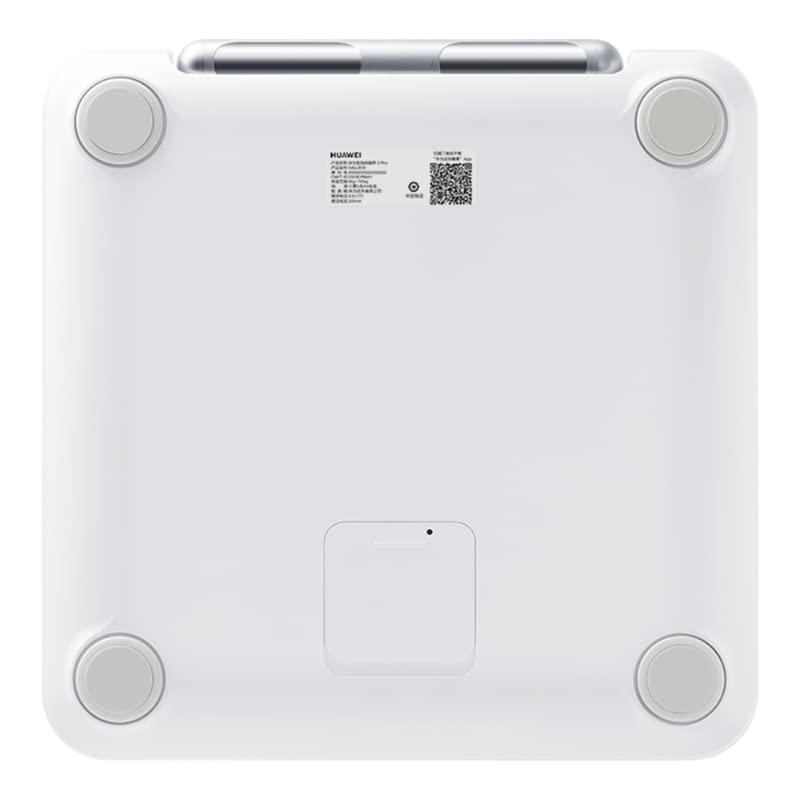
Figura 2: A baix view of the scale showing the battery compartment.
4.2 HUAWEI Health App Installation
- Download the HUAWEI Health app from your device's app store (App Store for iOS, HUAWEI AppGallery or Google Play Store for Android).
- Open the app and follow the on-screen instructions to create a HUAWEI ID or log in with an existing one.
- Complete your personal profile information, including gender, height, and date of birth, as this data is crucial for accurate body composition analysis.
4.3 Initial Pairing (Wi-Fi & Bluetooth)
- Assegureu-vos que el Bluetooth estigui habilitat al vostre telèfon intel·ligent.
- Open the HUAWEI Health app, navigate to the 'Devices' section, and tap '+' to add a new device.
- Select 'Smart Scale' and choose 'HUAWEI Scale 3 Pro' from the list of available devices.
- Step onto the scale briefly to activate it. The scale's display will light up.
- Follow the app's instructions to complete the Bluetooth pairing process.
- After successful Bluetooth pairing, the app will prompt you to connect the scale to your home Wi-Fi network. Enter your Wi-Fi credentials. Wi-Fi connectivity allows for automatic data synchronization without needing your phone nearby during measurements.
5. Instruccions de funcionament
5.1 Prendre una mesura
For a complete body composition analysis, both feet and hands must make contact with the electrodes.
- Col·loqueu l'escala sobre una superfície dura i plana.
- Ensure your feet are clean and dry. Step onto the scale barefoot, positioning your feet on the designated electrode areas.
- Pick up the handle electrode. Hold the handle firmly with both hands, ensuring your palms make full contact with the metal electrodes on the handle. Keep your arms straight and slightly away from your body.
- Stand still until the measurement is complete. The scale's display will show your weight, and then the data will be transmitted to the HUAWEI Health app.

Figure 3: HUAWEI Scale 3 Pro with handle electrode connected for measurement.
5.2 Understanding Your Data
After each measurement, open the HUAWEI Health app to view your detailed body composition report. The app provides insights into 22 indicators, including:
- Pes
- Percentatge de greix corporaltage
- Massa muscular
- Índex de massa corporal (IMC)
- Taxa metabòlica basal (BMR)
- Percentatge d'aigua corporaltage
- Bone Mineral Content
- Nivell de greix visceral
- Proteïna
- Massa muscular esquelètica
- I més.
The HUAWEI Health app uses the HUAWEI TruFit™ 2.0 algorithm to interpret your data and provide personalized health assessments and recommendations.
5.3 Multi-User Management
The HUAWEI Scale 3 Pro supports multiple users. Each user should create their own profile in the HUAWEI Health app. The scale can intelligently identify different users based on their weight and body composition data. If the scale cannot identify a user, you can manually assign the measurement to the correct profile dins de l'aplicació.
6. Manteniment
6.1 Neteja
- Netegeu la superfície de la bàscula amb un drap suau iamp tela.
- Do not use harsh chemicals, abrasive cleaners, or corrosive liquids.
- Assegureu-vos que la bàscula estigui completament seca abans de guardar-la o utilitzar-la el següent cop.
6.2 Emmagatzematge
- Guardeu la bàscula en un lloc fresc i sec, allunyat de la llum solar directa i de temperatures extremes.
- Eviteu col·locar objectes pesats a la bàscula quan no la feu servir.
- Si no heu d'utilitzar la bàscula durant un període prolongat, traieu-ne les piles per evitar fuites.
7. Solució De Problemes
| Problema | Causa possible | Solució |
|---|---|---|
| L'escala no s'encén. | Les piles estan baixes o instal·lades incorrectament. | Comproveu la polaritat de la bateria o substituïu-la per piles AAA noves. |
| No data synchronization to app. | Bluetooth/Wi-Fi connection issue, app not open, or scale not paired. | Ensure Bluetooth is on, app is open, and scale is paired. Check Wi-Fi connection in app settings. Re-pair if necessary. |
| Lectures inexactes. | Scale on uneven surface, feet/hands not making full contact, or incorrect profile dades. | Place scale on a hard, flat surface. Ensure bare feet and palms fully contact electrodes. Verify personal data in HUAWEI Health app. |
| Scale cannot identify user. | New user, or significant weight change. | Manually assign the measurement to the correct profile in the HUAWEI Health app. Ensure all users have distinct profiles. |
8. Especificacions
| Característica | Especificació |
|---|---|
| Marca | HUAWEI |
| Model | 343 |
| Color | Blanc |
| Límit de pes | 150 quilos |
| Exactitud de lectura | 0.1 kg |
| Tipus de visualització | LED |
| Material | Vidre temperat |
| Connectivitat | Wi-Fi, Bluetooth |
| Elèctrodes | 8 |
| Measuring Indicators | 22 |
| Pes de l'article | 1 quilos |
| Font d'alimentació | Piles AAA |
9. Garantia i Suport
The HUAWEI Scale 3 Pro comes with a standard manufacturer's warranty. For specific warranty terms and conditions, please refer to the warranty card included with your product or visit the official HUAWEI support weblloc.
If you encounter any issues not covered in this manual or require further assistance, please contact HUAWEI customer support through their official channels. Provide your product model number (343) and purchase details when seeking support.