
IROAD X5
Manual d'usuari de la càmera de salpicadero IROAD X5 2CH
Model: x5
Introducció
This manual provides detailed instructions for the installation, operation, and maintenance of your IROAD X5 2CH Dash Camera. Please read this manual thoroughly before using the product to ensure proper functionality and to maximize its features. The IROAD X5 is designed to provide high-definition video recording for your vehicle, enhancing safety and security on the road.
Producte acabatview
The IROAD X5 is a dual-channel dash camera system, featuring a front camera and a rear camera for comprehensive vehicle surveillance. It records in Full HD 1080p for both channels, ensuring clear video quality.
Components inclosos
- Front Camera & Rear Camera
- Dongle Wi-Fi
- Quick Guide & Extra Double-sided Tape
- Cable fusible ininterromput
- Cable de la càmera posterior
- Bressol

Image: IROAD X5 Front and Rear Dash Camera units.
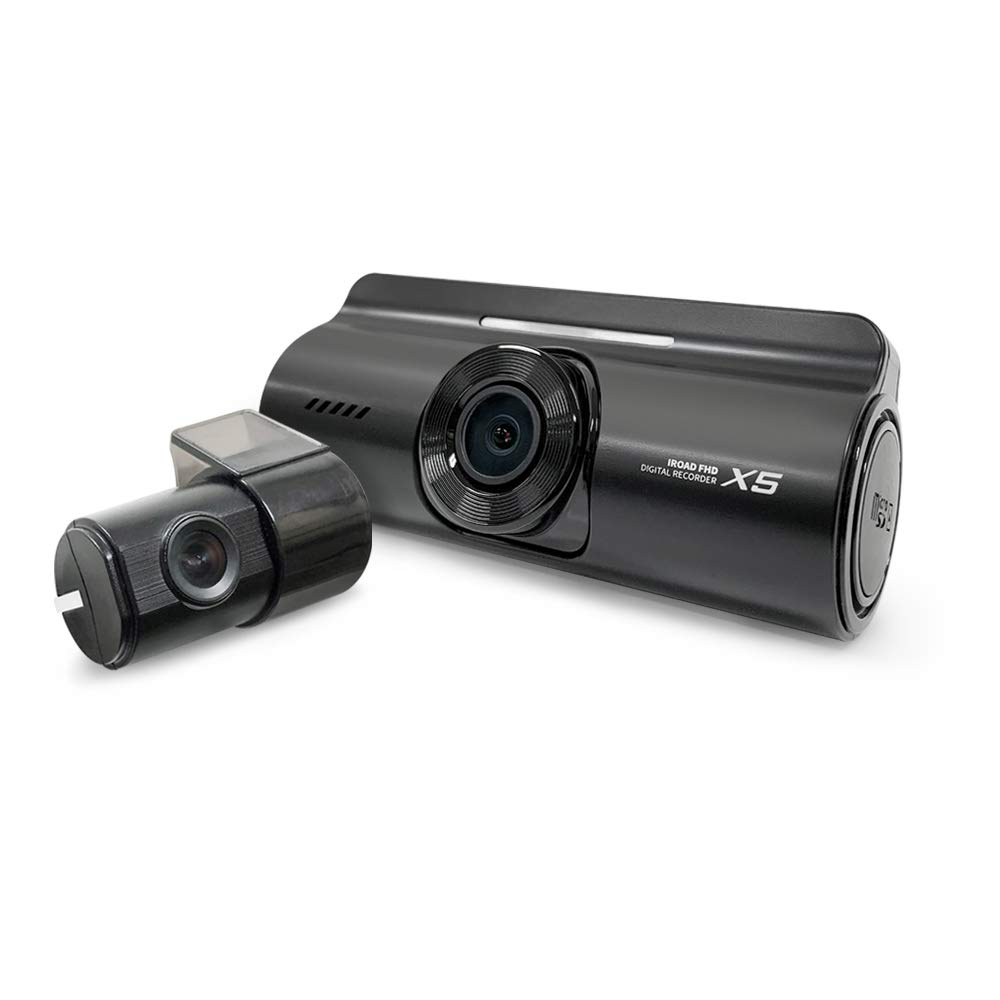
Image: IROAD X5 Front and Rear Dash Camera units, showing the main camera and the smaller rear camera.
Configuració
Passos d'instal·lació
- Mounting the Front Camera: Clean the windshield area where the camera will be mounted. Attach the cradle to the front camera. Remove the protective film from the double-sided tape on the cradle and firmly press it onto the windshield, ideally behind the rearview mirall per a una vista sense obstacles view.
- Connecting the Rear Camera: Route the rear camera cable from the front camera to the rear windshield. Mount the rear camera using its adhesive, ensuring a clear view of the rear. Connect the cable to the designated port on the front camera.
- Connexió d'alimentació: Use the provided Uninterrupted Fuse Cable to connect the dash camera to your vehicle's fuse box. This connection allows for continuous recording, including parking mode. Consult a professional if you are unsure about fuse box wiring.
- Wi-Fi Dongle Insertion: Insert the Wi-Fi dongle into the dedicated USB port on the main camera unit. This enables wireless connectivity for viewing and managing recordings via the IROAD mobile application.

Image: IROAD X5 Dash Camera installed in a car, mounted on the windshield.
Instruccions de funcionament
Modes d'enregistrament
- Gravació contínua: The camera automatically begins recording when the vehicle's ignition is turned on. Recordings are saved in 1-minute segments.
- Enregistrament d'esdeveniments: In the event of an impact or sudden braking, the G-sensor triggers event recording, saving a separate video file (e.g., 10 seconds before and 20 seconds after the event).
- Mode d'aparcament: When the vehicle is parked and the ignition is off, the camera enters parking mode. It records only when motion or impact is detected, conserving power and storage.
Funcions avançades
- Visió nocturna: The IROAD X5 utilizes ISP (Image Signal Processing) technology to enhance video clarity in low-light conditions, such as dark alleyways or underground parking lots. This feature brightens images captured during night time parking mode.
- Advanced Driver Assistance Systems (ADAS): The system provides audio and visual alerts for:
- Sistema d'avís de canvi de carril (LDWS): Alerts if the vehicle deviates from its lane.
- Front Collision Warning System (FCWS): Warns of an imminent collision with a vehicle ahead.
- Avís de sortida del vehicle davanter (FVDW): Notifies you when the vehicle in front starts moving.
- Connectivitat Wi-Fi: Connect your smartphone to the dash camera via Wi-Fi using the IROAD mobile application. This allows for live view, playback of recorded videos, settings adjustment, and firmware updates.

Image: Key features of the IROAD X5 Dash Camera.

Image: Illustration of Night Time Picture Quality Correction.
Manteniment
Gestió de dades
- JDR File System (Format-Free): The IROAD X5 utilizes the JDR file system, which enhances stability and reduces the need for frequent memory card formatting. Recordings are automatically saved securely.
- Auto Recovery System: This system ensures that saved images can be memorized and restored. It also allows users to adjust data allocation and space according to their needs.

Format Free System

Recuperació de dades
Battery Discharge Prevention
The IROAD X5 includes a Battery Discharge Prevention Function. This feature automatically detects when the vehicle's battery voltage drops below a certain point and cuts off power to the dash camera. This prevents the vehicle's battery from being completely drained, ensuring the car can start. Once initiated, recording stops and the device powers off.

Battery Discharge Prevention
Resolució de problemes
- La càmera no s'encén: Check the power cable connection to the fuse box and ensure the vehicle's ignition is on. Verify the fuse is not blown.
- Problemes d'enregistrament (per exemple, no hi ha enregistrament, enregistrament corrupte) files): Ensure the memory card is properly inserted. Although the JDR system reduces the need, occasionally formatting the memory card (via the mobile app or PC viewer) can resolve issues. Check for firmware updates.
- Problemes de connexió Wi-Fi: Ensure the Wi-Fi dongle is securely inserted. Restart the dash camera and your smartphone's Wi-Fi. Make sure you are within range of the dash camera's Wi-Fi signal.
- ADAS alerts not working: Ensure the GPS module (if external and purchased separately) is connected and receiving a signal. Calibrate the ADAS settings via the mobile app or PC viewer si cal.
- El mode d'aparcament no s'activa: Verify the dash camera is connected using the Uninterrupted Fuse Cable. Check the battery discharge prevention settings in the app to ensure the voltage cut-off is not set too high.
For persistent issues, please refer to the official IROAD support weblloc o contacteu amb el servei d'atenció al client.
Especificacions
| Característica | Detall |
|---|---|
| Nom del model | X5 |
| Resolució de captura de vídeo | 1080p (Full HD) |
| Tecnologia de connectivitat | Sense fil (Wi-Fi) |
| Dimensions del producte | 9 x 4 x 3 cm |
| Pes de l'article | 60 g |
| Color | Negre |
| Tipus de muntatge | Muntatge adhesiu |
| Fabricant | JAEWONCNC |
| Importador | NEXEX TECHNOLOGIES |
| Data de primera disponibilitat | 27 de novembre de 2021 |
Garantia i Suport
The IROAD X5 Dash Camera typically comes with a 1-year warranty. Please retain your proof of purchase for warranty claims. For technical support, firmware updates, or further assistance, please visit the official IROAD weblloc web o poseu-vos en contacte amb el vostre distribuïdor local.
Official IROAD Store: Visit the IROAD Store on Amazon
Documents relacionatsX5


Ask a question about this manual
Ask about setup, troubleshooting, compatibility, parts, safety, or missing instructions. Manuals+ will review the question and use this page’s manual context to help answer it.