
Introducció
Welcome to the VTech Bluey Ring Ring Phone user manual. This guide provides essential information for setting up, operating, and maintaining your new electronic learning toy. Designed for children aged 3-6 years, this interactive phone allows kids to engage in pretend play with characters from the popular Bluey series, fostering imaginative and educational experiences.

Imatge: Frontal view of the VTech Bluey Ring Ring Phone, displaying Bluey on the screen and various character buttons.
Configuració
1. Què hi ha a la caixa
- Telèfon Bluey Ring Ring
- Guia d'inici ràpid
2. Instal·lació de la bateria
The VTech Bluey Ring Ring Phone requires 2 AAA batteries. Batteries are included for demonstration purposes only. For regular use, new batteries are recommended.
- Locate the battery compartment on the back of the phone.
- Amb un tornavís, obriu la tapa del compartiment de la bateria.
- Introduïu 2 piles AAA noves, assegurant-vos de la polaritat correcta (+/-).
- Substituïu la tapa del compartiment de la bateria i fixeu-la amb el cargol.
Instruccions de funcionament
1. Encendre/apagar
Press the power button (usually located on the top or side) to turn the phone on or off.
2. Funcions bàsiques
- Character Buttons: Press the buttons featuring pictures of Bluey, her family, and friends to hear phrases about each character.
- Botons numèrics: Use the number buttons for various activities, including playing music.
- Activació de veu: Engage in interactive pretend play with Bluey and Bingo using the voice-activated chat-and-reply feature.
- Configuració: Adjust the ringtone, brightness, and other phone-like features to customize the play experience.
3. Games and Activities
The phone includes four interactive games based on themes from different Bluey episodes:
- Cheer Up Bingo: If Bingo is in a bad mood, press the number buttons to play music she can dance to.
- Bingo's Handstand: Use the arrow buttons to help Bingo do a handstand.
- Bluey the Fruit Bat: When Bluey pretends to be a fruit bat, press the arrows to help her catch fruit to eat.
- Bluey's Bubbles: Help Bluey blow bubbles by blowing into the microphone.
Explore these games to watch character animations and listen to popular phrases from the show.
Video: Official VTech Bluey Ring Ring Phone Demo, showcasing various interactive features and games.
Característiques
- Four interactive games featuring Bluey and Bingo.
- Animations of characters and popular phrases from the show.
- Buttons with character images for specific phrases.
- Voice-activated chat-and-reply for interactive conversations.
- Adjustable ringtone and brightness settings.
- Durable design for children aged 3-6 years.
Manteniment
- Clean the phone with a soft, damp tela. No submergir en aigua.
- Eviteu exposar el telèfon a temperatures extremes o a la llum solar directa.
- Traieu les piles si la joguina no s'utilitzarà durant un període prolongat per evitar fuites.
Resolució de problemes
No Power or Intermittent Operation
- Assegureu-vos que les bateries estiguin instal·lades correctament amb la polaritat adequada.
- Substitueix les piles velles per piles AAA noves.
- If the issue persists, try turning the unit off and on again.
Problemes de so
- Check if the volume setting is too low. While there isn't an explicit volume control button, some modes might have varying sound levels.
- Assegureu-vos que l'altaveu no estigui obstruït.
If problems persist, please refer to the Warranty and Support section for contact information.
Especificacions
- Dimensions del producte: 0.98 x 3.27 x 6.69 polzades
- Pes de l'article: 4.8 unces
- Número de model de l'article: 80-554600
- Edat recomanada pel fabricant: 36 mesos - 6 anys
- Bateries: Calen 2 piles AAA (incloses per a demostracions)
- Fabricant: VTech
- Data de llançament: 1 de desembre de 2021
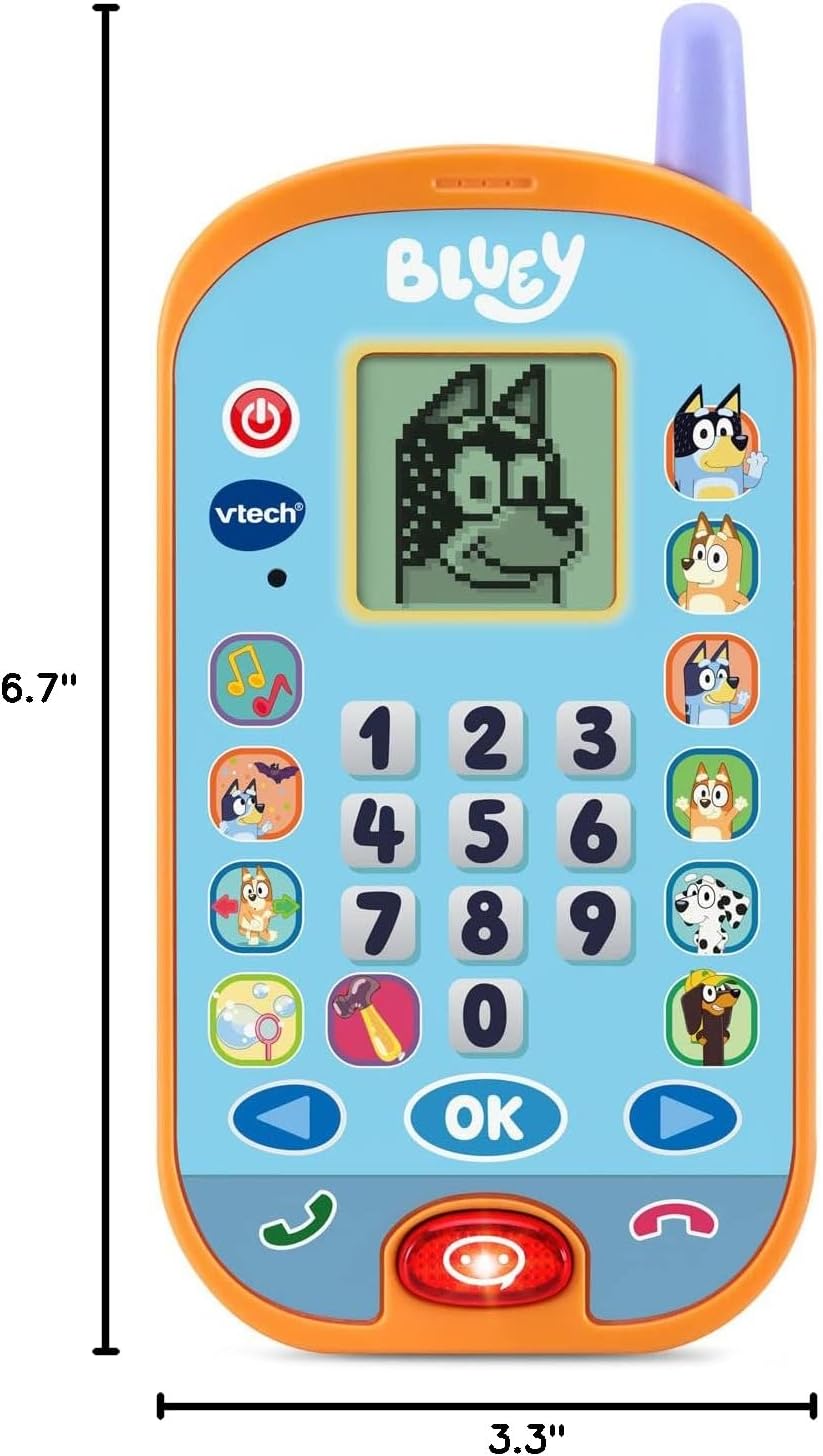
Image: VTech Bluey Ring Ring Phone with labeled dimensions.
Garantia i Suport
This VTech product is covered by the manufacturer's standard warranty. For detailed warranty information, product support, or to inquire about replacement parts, please visit the official VTech website or contact their customer service department. Contact details can typically be found in the Quick Start Guide included with your product or on the VTech brand store page.
VTech Store: Visit the VTech Store on Amazon


