
Introducció
The VTech My First Kidi Smartwatch is designed to help young children learn about time-telling and responsibility through interactive play. This smartwatch features a friendly digital pet, engaging games, and helpful routine reminders. It is intended for ages 3-5 years.

Image: The VTech My First Kidi Smartwatch in blue, featuring a dog-themed face with glowing ears.
Què hi ha a la caixa
- El meu primer rellotge intel·ligent Kidi
- Cable micro-USB
- Guia d'inici ràpid

Image: The retail packaging for the VTech My First Kidi Smartwatch, showing the watch and its features.
Configuració
Carregant el rellotge intel·ligent
The smartwatch includes a built-in, rechargeable lithium-ion battery. To charge the device, use the provided micro-USB cable only. Connect the micro-USB cable to the charging port on the side of the watch and plug the other end into a USB power source (not included). A full charge typically takes approximately 3.5 hours.
Controls bàsics
- Pantalla tàctil: Interact with the watch by tapping and swiping on the display.
- Botó d'inici: Located on the left side, this button returns you to the main menu.
- Botó del rellotge: Located on the right side, this button can be used to check the time.
- Llum d'anell: The watch features a ring light around the screen that can change colors.
Instruccions de funcionament
Time-Telling Features
The smartwatch offers over 20 analog and digital clock faces. Swipe left or right on the screen to change the clock face. Double-tap the clock face to hear the current time spoken aloud. The 'Time Master' app allows children to practice telling time.

Image: The smartwatch displaying an analog clock face with a dog character.
Interactive Pet Care
Care for your digital pet by feeding, walking, and grooming it using the touchscreen. You can also train your pet to perform up to 20 different tricks. The pet will react with various expressions and sounds.
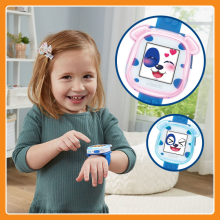
Image: A child pointing at the smartwatch screen, which displays a cute dog character.
Jocs i activitats
The smartwatch includes several interactive games and activities:
- Doggie Jump: Help your pet cross the river.
- Sneaky Toy: Guess which basket the toy is hiding under.
- Odd One Out: Find the image that is different from the others.
- Reproductor de música: Listen to pre-loaded music and nursery rhymes.
- Balloon Breathing: Practice deep breathing exercises.

Image: A grid showing various interactive activities and watch faces available on the smartwatch.
Routine Reminders
Set daily routine reminders for activities such as potty training, brushing teeth, and nap time. These reminders help children stay on track with their daily schedules.
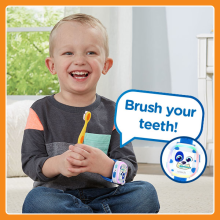
Image: A child holding a toothbrush, with the smartwatch displaying a 'Brush your teeth!' reminder.
Watch-to-Watch Connection
Connect your My First Kidi Smartwatch with a friend's smartwatch (sold separately) to engage in additional connected activities and games.
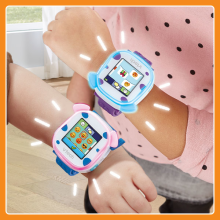
Image: Two children's wrists, each wearing a VTech My First Kidi Smartwatch, positioned close together to illustrate the watch-to-watch connection feature.
Vídeo oficial del producte
Vídeo: Un funcionari ha acabatview of the VTech My First Kidi Smartwatch, demonstrating its features including time-telling, pet interaction, games, and reminders.
Controls parentals
The smartwatch includes parental control features accessible through the settings menu. These controls allow parents to manage aspects such as game time limits and activate a 'School Mode'.
- Game Time Per Day: Set daily limits for game play (e.g., 15, 30, 60, 90 minutes, or disable games entirely).
- Modalitat escolar: When activated, the watch will only display the clock face during set hours (e.g., 7:00 AM - 11:00 PM on weekdays), preventing access to games and other interactive features. Note that activating School Mode may also disable alarms.
Manteniment
- Neteja: Wipe the smartwatch with a slightly damp tela. No utilitzeu productes químics aggressivs ni netejadors abrasius.
- Resistència a l'aigua: The watch has an IPX4 waterproof rating, meaning it is resistant to splashing water but is no waterproof. Avoid submerging the watch in water.
- Emmagatzematge: Store the watch in a cool, dry place away from direct sunlight when not in use.
Resolució de problemes
- El rellotge no s'encén: Ensure the battery is fully charged. Connect to the micro-USB cable and allow it to charge for at least 30 minutes before attempting to power on.
- La pantalla no respon: Try restarting the device by holding down the Home button for a few seconds. If the issue persists, ensure the screen is clean and dry.
- Problemes de so: Check the volume settings in the menu. Ensure the watch is not muted.
- Problemes de connectivitat: When attempting to connect with another smartwatch, ensure both devices are within close proximity and follow the on-screen instructions for pairing.
Especificacions
| Característica | Detall |
|---|---|
| Sistema operatiu | VTech Proprietary OS |
| Característiques especials | Activity Tracker, Connect and play with a friend, Pet Pal, Reminders, Time-Telling, Touchscreen |
| Tecnologia de connectivitat | USB |
| Composició de les cèl·lules de la bateria | Polímer de liti |
| GPS | Sense GPS |
| Mida de la pantalla | 2.17 polzades |
| Tipus de visualització | LCD |
| Resolució | 240 x 240 |
| Pes de l'article | 3.04 unces |
| Dimensions de l'article | 8.58 x 0.94 x 2.2 polzades |
| Nivell de resistència a l'aigua | IPX4 (Not Water Resistant for submersion) |
| Públic objectiu | Unisex Children |
| Descripció del rang d'edat | Nen (3-5 anys) |
Garantia i Suport
This VTech My First Kidi Smartwatch comes with a Limited Warranty. For specific details regarding warranty coverage, duration, and how to obtain service, please refer to the warranty information provided in the Quick Start Guide included with your product or visit the official VTech support weblloc.