
1. Introducció
The CZUR Shine Ultra Pro is a professional 24-megapixel document camera scanner designed for high-resolution scanning of various materials, including documents, books, and cards. It features advanced OCR (Optical Character Recognition) technology, a foldable design for portability, and adjustable fill lights for optimal image quality. This manual provides comprehensive instructions for its setup, operation, maintenance, and troubleshooting.

The CZUR Shine Ultra Pro document camera scanner, showcasing its sleek, foldable design and integrated lighting.
2. Contingut del paquet
Abans de continuar amb la configuració, assegureu-vos que tots els elements que s'enumeren a continuació estiguin presents al paquet:
- Main Device (CZUR Shine Ultra Pro Scanner)
- Manual d'usuari
- Pedal de peu
- Cable USB
- Coixí tou

The package includes the main CZUR Shine Ultra Pro device, a user manual, a convenient foot pedal for hands-free scanning, a USB cable for connectivity, and a soft pad to protect documents during scanning.
3. Instruccions de configuració
3.1 Configuració física
- Unfold the Scanner: Gently unfold the scanner arm to its upright position. The arm is 90-degree foldable for compact storage and portability.
- Place the Soft Pad: Position the included soft pad on a flat surface directly beneath the scanner's camera lens. This pad provides a stable and contrasting background for scanning.
- Connecteu el cable USB: Connect one end of the USB cable to the scanner and the other end to an available USB port on your computer.
- Connecteu el pedal (opcional): If desired, connect the foot pedal to the designated port on the scanner. This allows for hands-free scanning operation.

The scanner's portable design allows for a 90-degree foldable arm and adjustable height, accommodating scanning areas up to A3 (16.5 x 11.69 inches) and A4 (8.26 x 11.69 inches).
3.2 Instal·lació del programari
The CZUR Shine Ultra Pro requires dedicated software for full functionality. Please follow these steps:
- Descarregar programari: Visit the official CZUR website to download the latest version of the CZUR scanning software for your operating system.
- Requisits del sistema: The software is compatible with Windows XP, 7, 8, 10 (32/64-bit), and macOS 10.11 or newer (including macOS 12 Monterey).
- Instal·lar programari: Executeu l'instal·lador descarregat i seguiu les instruccions que apareixen a la pantalla per completar la instal·lació.
- Programari de llançament: Once installed, launch the CZUR scanning application. The scanner should be automatically detected if properly connected.
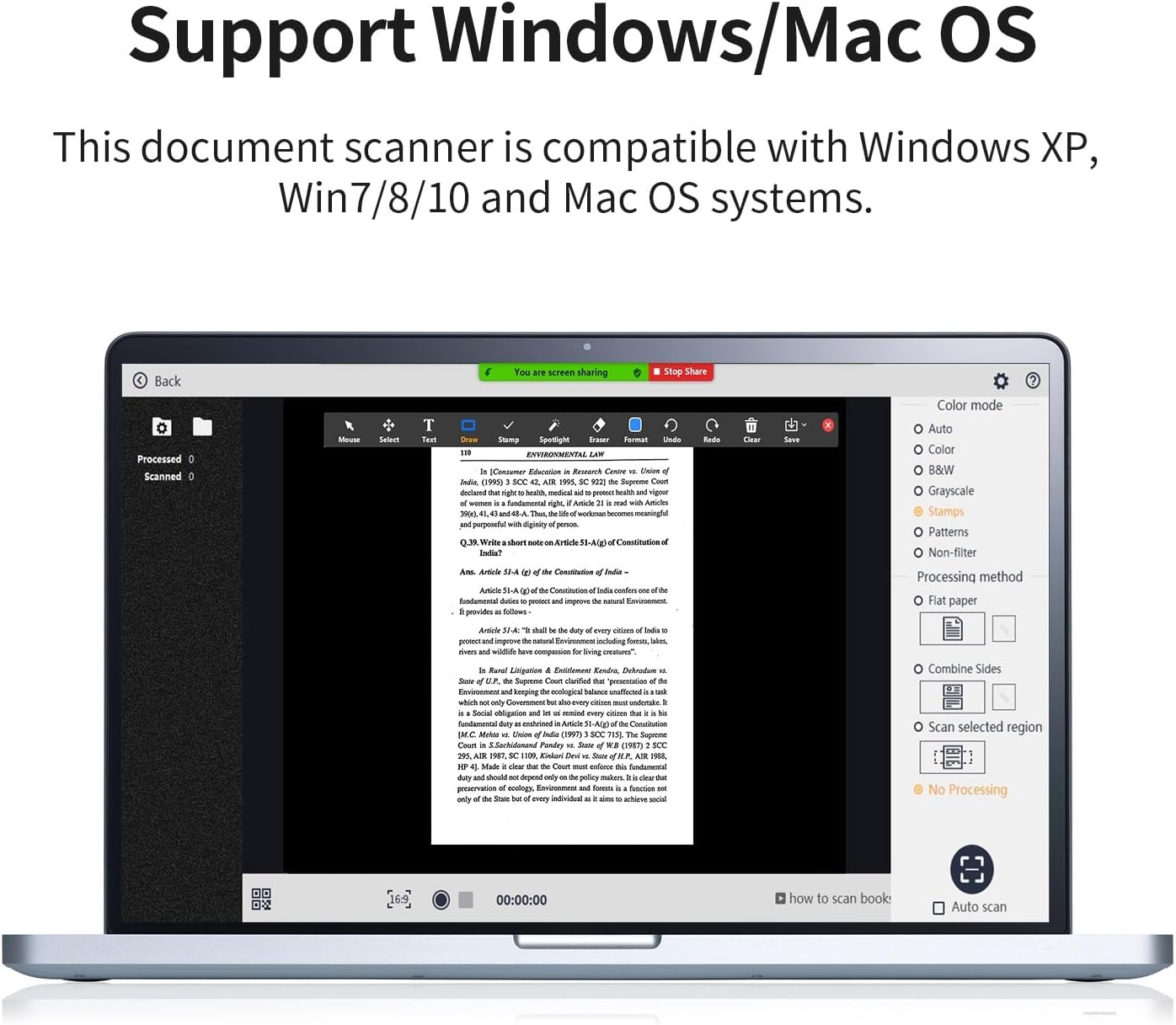
The CZUR scanning software, compatible with Windows XP, 7, 8, 10, and macOS 10.11 or newer, provides various scanning modes (color, B&W, grayscale), processing options (flat paper, combine sides), and an auto-scan function.
4. Instruccions de funcionament
4.1 Adjusting Scanner Height and Lights
- Ajust d'alçada: The scanner features an extendable arm. Adjust the height to match the size of your document. For A4 documents, use a lower height; for A3 documents, extend the arm to its maximum height.
- Fill Lights: The scanner is equipped with two top-mounted fill lights. Rotate the knob on the device to adjust the brightness of these lights. Adjust the brightness according to ambient light conditions to achieve the best scanning results.

This image highlights the 24-megapixel camera sensor for high-resolution scanning and the integrated LED lights for optimal illumination. It also indicates scanning resolutions for A4 (440 DPI) and A3 (320 DPI) documents.
4.2 Escaneig de documents
- Document de lloc: Place the document flat on the soft pad, ensuring it is within the scanning area indicated by the software preview.
- Seleccioneu el mode d'escaneig: In the software, choose your desired scan mode (e.g., Color, Black & White, Grayscale, Stamp, Pattern).
- Inicia l'escaneig: Click the scan button in the software or press the foot pedal to capture the image. The scanner can capture one page in approximately 1 second.
- Auto-Scan Feature: The scanner supports an auto-scan function, which can automatically detect and scan pages as they are turned.
4.3 Scanning Books and Curved Pages
The CZUR Shine Ultra Pro features patented flattening technology for scanning books:
- Place Book: Open the book and place it on the soft pad. The software's AI algorithm will intelligently flatten the curved pages.
- Smart Image Processing: The scanner automatically removes finger marks, converts unwrapped sheets into two single pages, and corrects tilt, cropping, or merging pages.
4.4 OCR Text Recognition
The integrated OCR technology allows you to convert scanned images into editable text formats:
- Process Scanned Images: After scanning, select the images you wish to process with OCR within the software.
- Convert to Editable Formats: The software can convert scanned JPG images into editable Word, PDF, Excel, or TIFF files. It supports 185 languages.

The scanner features advanced OCR (Optical Character Recognition) technology, capable of recognizing text in 185 languages and converting scanned JPG images into editable Word, PDF, Excel, or TIFF documents with a single click.
4.5 Video Recording and Screen Sharing
The scanner can also synchronize video recording and screen display, making it suitable for online meetings or teaching:
- Initiate Video Recording: Use the software to start video recording of the scanned area.
- Share Screen: Share the scanned images or live video feed through platforms like Zoom, Skype, or Microsoft Teams for convenient online collaboration.
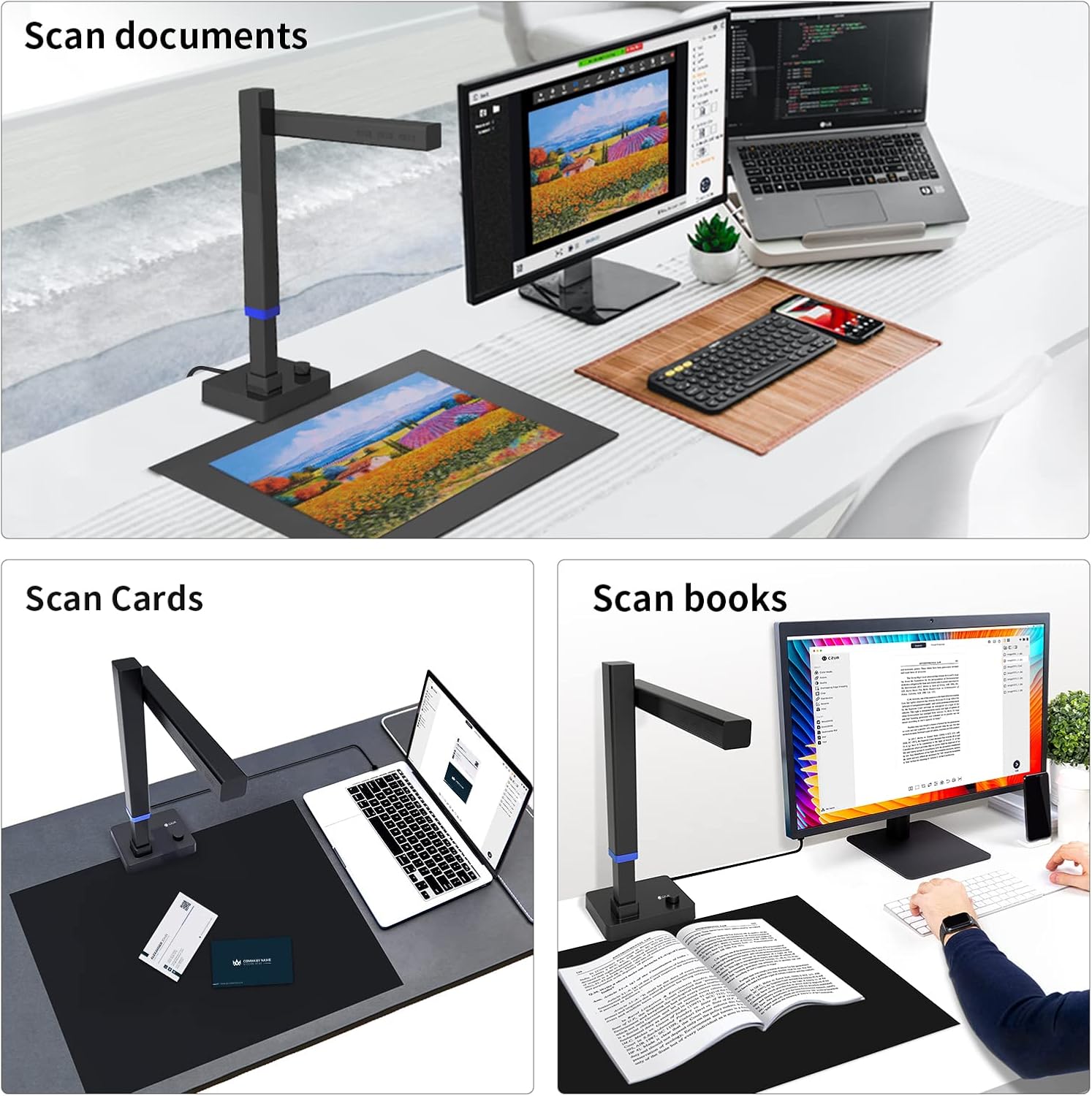
The CZUR Shine Ultra Pro is versatile, suitable for scanning various materials including standard documents, business cards, and books, making it ideal for diverse office and home use.
5. Manteniment
- Neteja de la lent: Use a soft, dry, lint-free cloth to gently clean the camera lens. Avoid abrasive materials or harsh chemicals.
- Neteja del dispositiu: Wipe the exterior of the scanner with a slightly damp cloth. Ensure no moisture enters the device.
- Actualitzacions de programari: Regularly check the official CZUR website for software updates to ensure optimal performance and access to new features.
- Emmagatzematge: When not in use, fold the scanner arm down for compact storage. Store in a dry, dust-free environment.
6. Solució De Problemes
- Escàner no detectat:
- Assegureu-vos que el cable USB estigui connectat correctament tant a l'escàner com a l'ordinador.
- Proveu de connectar-vos a un port USB diferent.
- Reinicieu l'ordinador i el programari d'escaneig.
- Verify that the correct drivers are installed. Reinstall the software if necessary.
- Mala qualitat d'imatge:
- Adjust the fill light brightness using the knob on the device.
- Ensure the document is placed flat and within the scanning area.
- Clean the camera lens for any smudges or dust.
- Avoid scanning highly glossy materials (e.g., glossy photos, magazines) as they are not recommended due to potential glare.
- OCR Issues:
- Ensure the scanned image is clear and well-lit.
- Check if the correct language is selected for OCR processing in the software.
- Bloqueig/bloqueig del programari:
- Assegureu-vos que el vostre ordinador compleixi els requisits mínims del sistema.
- Actualitzeu el programari a la darrera versió.
- Close other demanding applications running in the background.
7. Especificacions
| Característica | Especificació |
|---|---|
| Tipus d'escàner | Càmera de documents |
| Marca | CZUR |
| Nom del model | CZUR Shine Ultra Pro |
| Tecnologia de connectivitat | USB |
| Dimensions del producte (P x A x A) | 29.5 x 11.7 x 40.9 cm (11.63 x 4.61 x 16.12 inches extended) |
| Resolució | 24 Megapixels (A4: 440 DPI, A3: 320 DPI) |
| Pes del producte | 1 quilograms |
| Profunditat de color | 24 bits |
| Tecnologia de sensors òptics | CMOS |
| Font de llum | LED |
| Requisits mínims del sistema | Windows XP, 7, 8, 10 (32/64-bit), macOS 10.11 or newer |

This diagram illustrates the compact dimensions of the CZUR Shine Ultra Pro, showing its height and base measurements when folded (13.19 inches high, 6.22 inches wide base) and extended (16.12 inches high, 4.61 inches wide base).
8. Garantia i Suport
8.1 Informació de la garantia
The CZUR Shine Ultra Pro comes with a garantia d'un any des de la data de compra. Aquesta garantia cobreix defectes de fabricació i avaries en condicions d'ús normal. Conserveu el comprovant de compra per a reclamacions de garantia.
8.2 Atenció al client
For technical assistance, troubleshooting, or warranty inquiries, please contact CZUR customer support through their official website. Provide your product model and a detailed description of the issue to receive prompt assistance.


