
1. Producte acabatview
The Unitek 120W 10-Port Type-C Charging Station is designed to efficiently charge multiple devices simultaneously. It features a total power output of 120W, distributed across 10 ports: two USB-C Power Delivery (PD) ports (one 60W and one 18W) and eight USB-A ports (each providing up to 2.4A). This station is suitable for charging a wide range of devices including smartphones, tablets, and laptops like the MacBook Pro/Air, iPad Pro, Pixel, iPhone, and Galaxy devices.

Image 1.1: The Unitek 120W 10-Port Type-C Charging Station in use, demonstrating its ability to charge various devices simultaneously.
2. Què hi ha a la caixa
Si us plau, verifiqueu que tots els elements siguin presents al paquet:
- 1 x Unitek 120W 10-Port USB Charging Station
- 11 x High Detachable Dividers
- 1 x adaptador de corrent continu de 20V/6A
NOTE: Charging cables are NOT INCLUDED and must be purchased separately.
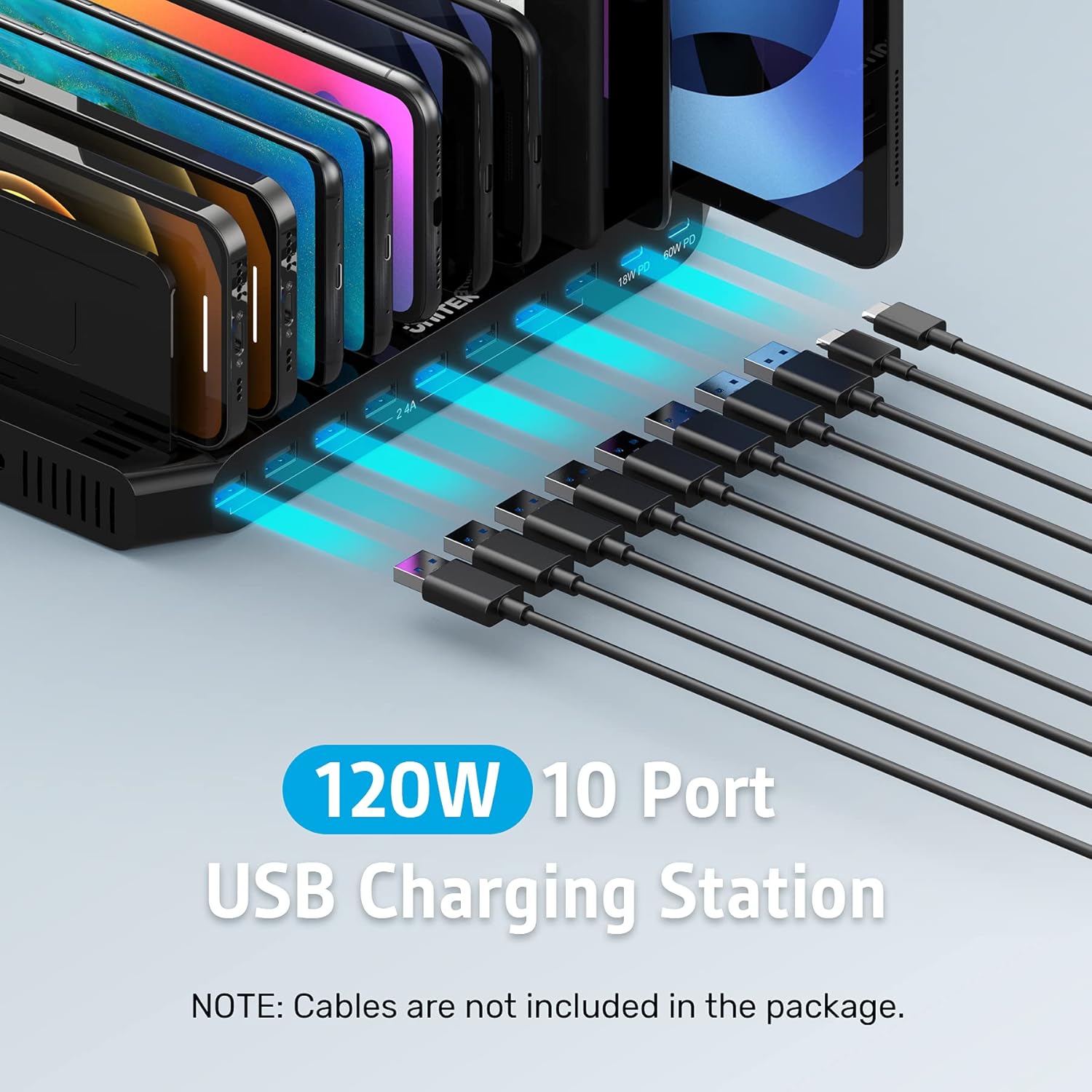
Image 2.1: The charging station with various cables, emphasizing that these cables are not part of the standard package.
3. Instruccions de configuració
- Connecteu l'adaptador de corrent: Plug the provided 20V/6A DC Power Adapter into the charging station's power input port and then into a wall outlet.
- Install Detachable Dividers: Insert the 11 high detachable dividers into the slots on the charging station. Adjust the spacing of the dividers to match the thickness of your devices, ensuring a snug fit. This helps prevent devices from being scratched and keeps them organized.
- Col·locació del dispositiu: Place your devices (smartphones, tablets, etc.) between the dividers. Ensure that the weight of the devices rests on the charging station base, not solely on the dividers. It is recommended for devices less than 11 inches; avoid placing laptops directly on the station.

Image 3.1: Detachable dividers being installed into the charging station, illustrating how to customize spacing for various devices.

Image 3.2: The charging station effectively organizing and charging multiple devices on a desk, demonstrating its organizational benefits.
4. Instruccions de funcionament
Once the charging station is powered on and dividers are set, you can begin charging your devices:
- Ports USB-A: Connect your USB-A compatible devices (e.g., older smartphones, smartwatches, power banks) to any of the eight USB-A ports. Each port provides up to 5V/2.4A (12W) output.
- Ports USB-C PD: For faster charging of compatible devices, use the two USB-C Power Delivery ports. The 60W PD port is ideal for laptops like MacBook Pro/Air and larger tablets, while the 18W PD port is suitable for fast-charging smartphones and smaller tablets.
- Estat de càrrega: The vivid LED display on the station indicates the charging status of connected devices.

Imatge 4.1: Una imatge detallada view of the charging station's ports, showing the distribution of USB-A and USB-C PD outputs.

Image 4.2: The charging station efficiently charging up to 10 iPads at once, demonstrating its multi-device capability.
Video 4.1: An official product video demonstrating the Unitek 120W 10-Port Type-C Charging Station in action, showcasing les seves característiques i facilitat d'ús.
5. Informació de seguretat
The Unitek Charging Station is designed with multiple safety features to protect your devices and ensure safe operation:
- Seguretat certificada: The power supply adapter is UL listed, CE, FCC, and RoHS certified.
- Sistema de protecció múltiple: Equipped with Unitek's Multi-Protection safety system, it provides complete protection against over-charging, over-heating, over-voltage, i curtcircuit.
- Protecció contra sobretensions: Built-in surge protection keeps your connected devices safe from power fluctuations.

Image 5.1: Visual representation of the comprehensive safety protections integrated into the Unitek charging station.
6. Manteniment
To ensure the longevity and optimal performance of your charging station, follow these maintenance guidelines:
- Neteja: Disconnect the power adapter before cleaning. Use a soft, dry cloth to wipe the surface of the charging station. Avoid using liquid cleaners or abrasive materials.
- Emmagatzematge: Quan no l'utilitzeu durant períodes prolongats, guardeu l'estació de càrrega en un lloc fresc i sec, allunyat de la llum solar directa i de temperatures extremes.
- Gestió de cables: Regularly check charging cables for any signs of wear or damage. Replace damaged cables immediately to prevent potential hazards.
7. Solució De Problemes
If you encounter issues with your Unitek Charging Station, please refer to the following common troubleshooting steps:
- El dispositiu no es carrega:
- Assegureu-vos que l'estació de càrrega estigui correctament connectada a una presa de corrent que funcioni.
- Verify that the power adapter is securely connected to the charging station.
- Check if the charging cable is securely connected to both the device and the charging station.
- Prova un cable o port de càrrega diferent per descartar un cable o port defectuós.
- Confirm your device is compatible with the charging port (e.g., USB-C PD for fast charging).
- Càrrega lenta:
- Ensure you are using the appropriate port for your device's charging speed requirements (e.g., PD ports for fast charging compatible devices).
- Check if the charging cable supports fast charging.
- Avoid using the station in excessively hot environments, as this can affect charging efficiency.
- LED Indicator Not On:
- Confirm the power adapter is connected and the wall outlet is active.
- Si el problema persisteix, poseu-vos en contacte amb el servei d'atenció al client.
If these steps do not resolve the issue, please contact Unitek customer service for further assistance.
8. Especificacions
| Característica | Detall |
|---|---|
| Marca | Unitek |
| Número de model | PS120C200Y6000M |
| Wat totaltage | 120W |
| USB-C PD Ports | 1 x 60W PD, 1 x 18W PD |
| Ports USB-A | 8 x 2.4A (Max 5V/2.4A per port) |
| Tipus de connector | USB tipus A, USB tipus C |
| Font d'alimentació | Elèctric amb cable |
| Longitud del cable | 9 Feet (Power Adapter Cable) |
| Característiques especials | 11 High Removable Dividers, Multi-Protection Safety System (Over-charging, Over-heating, Over-voltage, Short-circuiting, Surge Protection) |
| Color | Black with PD |
| Material | Silicona |
| Certificacions | UL, CE, FCC, RoHS |
9. Garantia i Suport
Unitek is committed to providing high-quality products and customer satisfaction. For any inquiries, technical support, or warranty claims, please utilize our customer service channels:
- Atenció al client: We offer 24-hour friendly customer service.
- Suport per correu electrònic: For detailed assistance, please contact us via email. Refer to the product packaging or the official Unitek weblloc per obtenir informació de contacte.


