
iDance Blaster (d99051c9-aec6-4745-9ed7-e5ce94fdc19f)
iDance Blaster Bluetooth Party Box Speaker Sound System User Manual
Model: Blaster (d99051c9-aec6-4745-9ed7-e5ce94fdc19f)
Marca: iDance
1. Introducció
Welcome to the user manual for your iDance Blaster Bluetooth Party Box Speaker Sound System. This manual provides essential information for the safe and efficient operation of your device. Please read it thoroughly before use and retain it for future reference.
The iDance Blaster B2X is a portable audio system designed to deliver powerful sound and dynamic light effects. It features 100 watts of output with extra bass, a rechargeable battery offering 4-8 hours of playtime, and versatile connectivity options including Bluetooth, MP3 playback, and an FM tuner. Its integrated disco LED lighting enhances any gathering, making it ideal for parties and entertainment.
2. Contingut del paquet
Si us plau, assegureu-vos que tots els elements que s'enumeren a continuació estiguin presents al vostre paquet:
- iDance Blaster Bluetooth Party Box Speaker
- Cable de càrrega USB
- Manual d'usuari (aquest document)
3. Característiques clau
- Àudio potent: 100 Watts output with Extra Bass for crystal clear sound.
- Llarga vida útil de la bateria: Rechargeable LI-ON battery provides 4-8 hours of playtime.
- Espectacle de llum dinàmica: In-built dual disco LED lighting within the woofer.
- Connectivitat sense fils: Bluetooth® streaming from smartphones, tablets, or laptops.
- Reproducció versàtil: MP3 Playback, FM tuner, USB, and 3.5mm Line-In Inputs.
- Karaoke llest: Microphone input with Echo Effect, compatible with YouTube, Spotify, and most karaoke apps.
- Portabilitat: Compact design with a carry handle and dock for smart devices.
4. Producte acabatview
Familiarize yourself with the different parts of your iDance Blaster speaker.

Figura 4.1: Frontal View
Shows the speaker's front grille with two illuminated woofers displaying multi-color LED light effects.
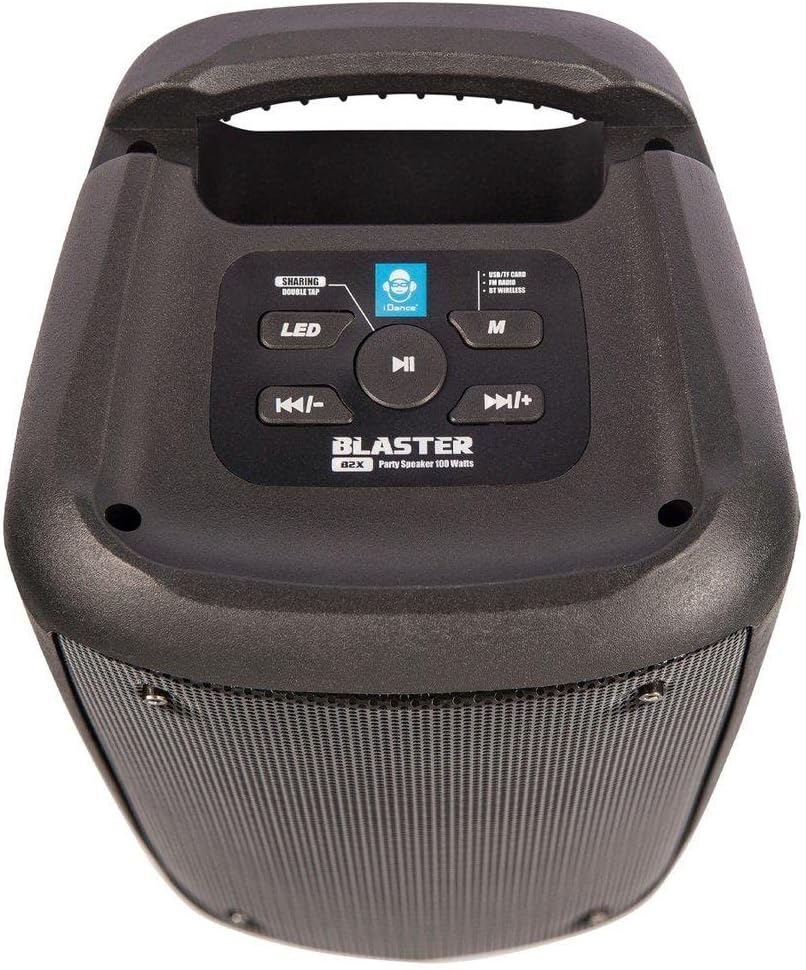
Figura 4.2: Tauler de control superior
Details the top panel with buttons for LED control, sharing mode, play/pause, track navigation, mode selection, and a dock for a smartphone/tablet.

Figura 4.3: Panell posterior
Illustrates the rear panel with the power switch, DC 5V charging port, TF card slot, USB port, AUX input, and Microphone input.

Figura 4.4: Dimensions
Shows the speaker's height (28cm), width (13cm), and depth (13.5cm).
5. Configuració
5.1 Càrrega de l'altaveu
Before first use, fully charge the iDance Blaster speaker. Connect the supplied USB charging cable to the DC 5V port on the rear of the speaker and the other end to a compatible USB power adapter (not included) or a computer's USB port. The charging indicator light will illuminate during charging and turn off when fully charged.
5.2 Engegada/apagada
To power on the speaker, slide the power switch located on the rear panel to the "ON" position. To power off, slide the switch to the "OFF" position.
6. Instruccions de funcionament
6.1 Vinculació Bluetooth
- Assegureu-vos que l'altaveu estigui encès.
- The speaker will automatically enter Bluetooth pairing mode, indicated by a flashing LED.
- Al telèfon intel·ligent, la tauleta o l'ordinador portàtil, activeu el Bluetooth i cerqueu els dispositius disponibles.
- Select "iDance Blaster" from the list of devices.
- Un cop emparellat, l'altaveu emetrà un so de confirmació i el LED deixarà de parpellejar.
You can now stream audio wirelessly from your device to the iDance Blaster.
6.2 Using the FM Tuner
- Press the "M" (Mode) button on the top panel until you hear the FM radio mode announcement.
- Press the Play/Pause button to automatically scan and save available FM stations.
- Use the "Previous Track" and "Next Track" buttons to navigate between saved stations.
Reproducció de targetes USB/TF de 6.3
Insert a USB flash drive or TF (microSD) card containing MP3 audio files into the respective port on the rear panel. The speaker will automatically switch to USB/TF card mode and begin playing music. Use the control buttons on the top panel for playback control (play/pause, next/previous track).
6.4 Entrada AUX
Connect an external audio device (e.g., MP3 player, computer) to the AUX input port on the rear panel using a 3.5mm audio cable (not included). The speaker will automatically switch to AUX mode. Control playback from your connected device.
6.5 Microphone Input and Echo Effect
Connect a microphone (not included) to the MIC input port on the rear panel. Adjust the microphone volume and echo effect using the dedicated controls on the speaker (if available, otherwise through the connected device or app).
6.6 Control de llum LED
Press the "LED" button on the top panel to cycle through different light modes or to turn the LED lights on/off.
6.7 Sharing Mode (TWS - True Wireless Stereo)
The iDance Blaster supports Sharing Mode, allowing you to connect two iDance Blaster speakers wirelessly for a stereo sound experience. Refer to the specific instructions for TWS pairing, usually involving pressing and holding the "SHARING" button on both speakers simultaneously until they pair.
7. Manteniment
- Neteja: Feu servir un drap suau i sec per netejar l'exterior de l'altaveu. No utilitzeu netejadors abrasius, ceres ni dissolvents.
- Emmagatzematge: Quan no l'utilitzeu durant períodes prolongats, guardeu l'altaveu en un lloc fresc i sec, allunyat de la llum solar directa i de temperatures extremes.
- Cura de la bateria: Per allargar la durada de la bateria, eviteu descarregar-la completament amb freqüència. Carregueu l'altaveu regularment, fins i tot si no l'esteu fent servir.
- Exposició a l'aigua: This product is not waterproof. Avoid exposing it to water or excessive moisture.
8. Solució De Problemes
| Problema | Causa possible | Solució |
|---|---|---|
| Sense poder | La bateria està esgotada. | Carregueu l'altaveu amb el cable USB subministrat. |
| Sense so | Volume is too low; Incorrect input mode; Device not paired (Bluetooth). | Increase volume on speaker and source device; Select correct input mode (Bluetooth, FM, USB, AUX); Re-pair Bluetooth device. |
| Connexió Bluetooth inestable | El dispositiu és massa lluny de l'altaveu; Interferències d'altres dispositius. | Move device closer to speaker (within 10 meters); Avoid placing speaker near other wireless devices. |
| Ràdio FM estàtica | Senyal feble. | Recol·loca l'altaveu a una zona amb millor recepció. |
9. Especificacions
| Característica | Detall |
|---|---|
| Nom del model | Blaster |
| Número de model de l'article | d99051c9-aec6-4745-9ed7-e5ce94fdc19f |
| Marca | iDance |
| Potència de sortida | 100 watts |
| Connectivitat | Bluetooth, USB, 3.5mm AUX, TF Card, FM Radio |
| Durada de la bateria | 4-8 Hours (rechargeable LI-ON) |
| Dimensions del producte (A x A x P) | 28 cm x 13 cm x 13.5 cm |
| Color | Negre |
| Material | Plàstic |
| Components inclosos | Cable de càrrega USB |
10. Garantia i Suport
The iDance Blaster Bluetooth Party Box Speaker comes with a limited warranty. Please refer to the warranty card included in your original packaging for specific terms and conditions. For technical support, service, or warranty claims, please contact your local retailer or visit the official iDance weblloc per obtenir informació de contacte.
Fabricant: iDance
Weblloc: www.idanceaudio.com
Ask a question about this manual
Ask about setup, troubleshooting, compatibility, parts, safety, or missing instructions. Manuals+ will review the question and use this page’s manual context to help answer it.