
1. Producte acabatview
The LENRUE TouchGo F4 is a compact, portable Bluetooth speaker designed for clear audio and ease of use. It features touch controls, Bluetooth 5.0 connectivity, and supports TWS (True Wireless Stereo) pairing for an enhanced audio experience. The speaker comes with a hard EVA travel case for protection and portability.

Figure 1: LENRUE TouchGo F4 Bluetooth Speaker.
2. Contingut del paquet
Si us plau, comproveu el paquet per veure si hi ha els elements següents:
- LENRUE TouchGo F4 Bluetooth Speaker
- Hard EVA Travel Case
- Cable de càrrega TIPUS C
- Manual d'usuari
3. Configuració
3.1 Càrrega inicial
Before first use, fully charge the speaker. Connect the provided TYPE-C charging cable to the speaker's charging port and a compatible USB power adapter (not included). The charging indicator light will show the charging status. A full charge typically takes approximately 4 hours.
3.2 Engegada/apagada
- Per encendre: Press and hold the power button (usually the central play/pause button) for a few seconds until you hear an audible prompt and the indicator light illuminates.
- Per apagar: Press and hold the power button again for a few seconds until you hear an audible prompt and the indicator light turns off.
3.3 Vinculació Bluetooth
To connect the speaker to your device:
- Assegureu-vos que l'altaveu estigui encès i en mode d'emparellament (el llum indicador normalment parpellejarà en blau).
- Al dispositiu (telèfon intel·ligent, tauleta, etc.), activeu el Bluetooth i cerqueu els dispositius disponibles.
- Select "ToughGo" or "LENRUE TouchGo" from the list of devices.
- Un cop connectat, sentireu un so de confirmació i l'indicador lluminós es tornarà blau fix.
L'altaveu es tornarà a connectar automàticament al darrer dispositiu emparellat quan s'engegui, si el dispositiu es troba dins del rang i el Bluetooth està habilitat.

Figure 2: Speaker with touch controls for sensitive and elegant operation.
3.4 TWS Wireless Pairing (Connect Two Speakers)
To achieve dual-channel stereo sound, you can pair two TouchGo F4 speakers together:
- Power on both TouchGo F4 speakers.
- Ensure both speakers are disconnected from any other Bluetooth devices.
- On un of the speakers, press and hold the "+" button until you hear a prompt indicating TWS pairing mode.
- The two speakers will automatically pair with each other. You will hear a "beep" sound upon successful TWS pairing.
- Now, connect your device's Bluetooth to the device name "ToughGo". Both speakers will play audio in stereo.
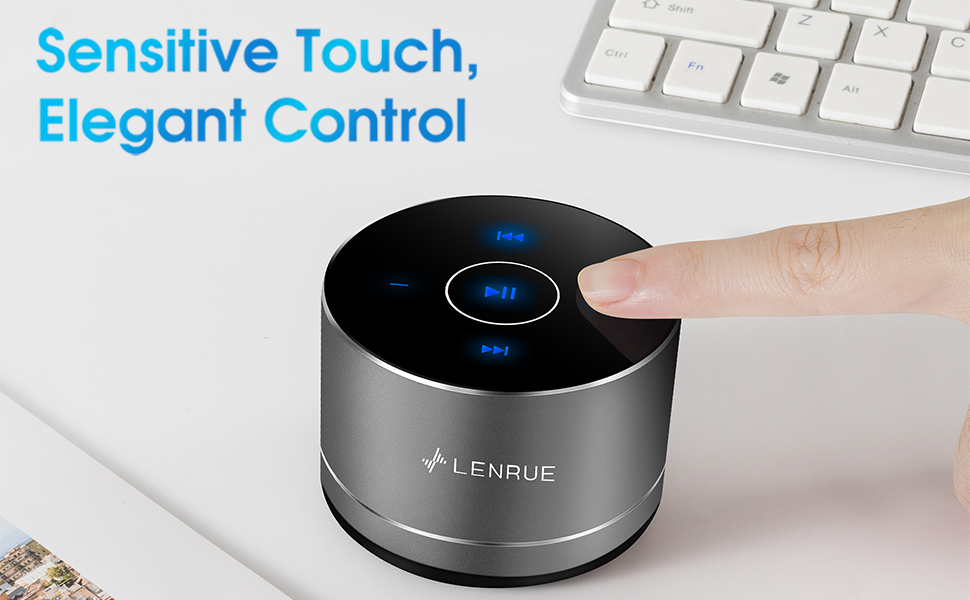
Figure 3: Two speakers connected for TWS wireless stereo pairing.
4. Instruccions de funcionament
4.1 Controls tàctils
The speaker features intuitive touch controls located on the top surface:
- Reproduir/pausa: Tap the central button once to play or pause music.
- Pujar el volum: Tap the "+" button to increase volume.
- Baixar el volum: Tap the "-" button to decrease volume.
- Pista següent: Tap the ">>" button to skip to the next song.
- Pista anterior: Tap the "<<" button to go to the previous song.
4.2 Trucades de mans lliures
The speaker includes a built-in microphone for hands-free calls:
- Respon a la trucada: When a call comes in, tap the central button once to answer.
- Finalitzar la trucada: During a call, tap the central button once to end the call.
- Rebutja la trucada: Premeu i manteniu premut el botó central durant aproximadament 2 segons per rebutjar una trucada entrant.

Figure 4: Speaker with hands-free calling capability.
4.3 Battery Life and Power Saving
The speaker is equipped with a 1200mAh lithium-ion battery, providing 6-15 hours of music playback at 2/3 volume. To conserve power, the speaker will automatically shut down if Bluetooth is disconnected for 30 minutes.
5. Manteniment
5.1 Neteja
To clean the speaker, use a soft, dry cloth. Do not use abrasive cleaners, solvents, or immerse the speaker in water.
5.2 Emmagatzematge
When not in use for extended periods, store the speaker in its hard EVA travel case in a cool, dry place. Avoid extreme temperatures and direct sunlight.
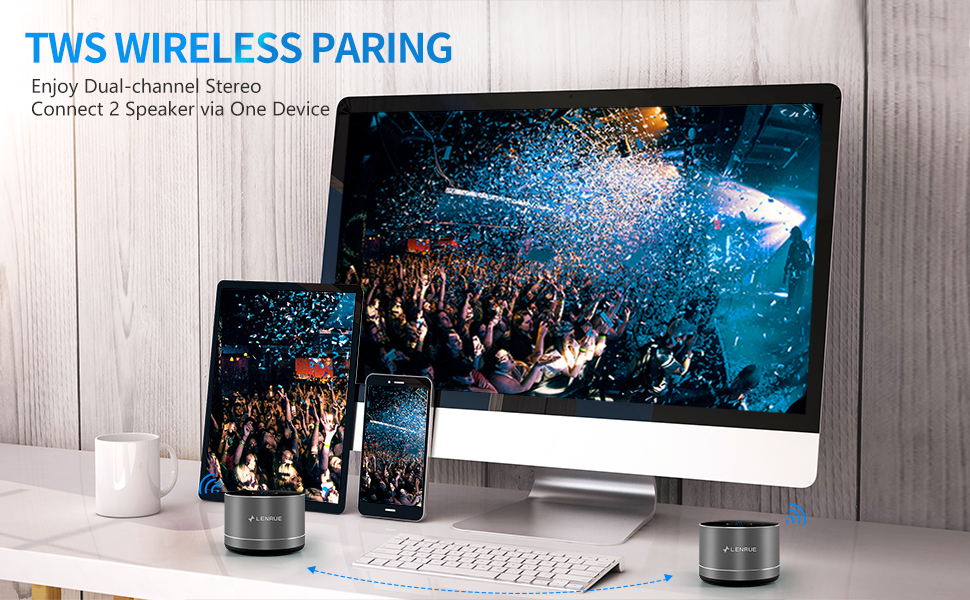
Figure 5: Speaker with its protective hard EVA travel case.
6. Solució De Problemes
| Problema | Causa possible | Solució |
|---|---|---|
| L'altaveu no s'encén. | Bateria baixa; botó d'engegada no premut correctament. | Charge the speaker fully; Press and hold the power button for a few seconds. |
| No es pot emparellar amb un dispositiu Bluetooth. | Speaker not in pairing mode; Device Bluetooth off; Speaker already connected to another device. | Ensure speaker is in pairing mode (flashing blue light); Turn on Bluetooth on your device; Disconnect from other devices and try again. |
| Poor sound quality / Muffled sound. | Speaker placement; Obstructions; Low volume. | Ensure the speaker is placed on a flat, open surface, ideally not directly on its bottom where the speaker grille is located. Try placing it on its side for clearer sound. Remove any obstructions; Adjust volume on both speaker and device. |
| L'emparellament TWS falla. | Speakers already paired to a device; Incorrect pairing procedure. | Ensure both speakers are disconnected from any Bluetooth devices before initiating TWS pairing. Follow the TWS pairing steps precisely. |
| Sense so. | Volume too low; Paused playback; Device not connected. | Increase volume on both speaker and device; Press play; Verify Bluetooth connection. |
7. Especificacions
| Característica | Detall |
|---|---|
| Número de model | F4 |
| Tecnologia de connectivitat | Bluetooth 5.0 |
| Potència de sortida màxima dels altaveus | 5 watts |
| Font d'alimentació | Funciona amb bateria (1 bateria d'ions de liti inclosa) |
| Capacitat de la bateria | 1200 mAh |
| Hora de joc | 6-15 hours (at 2/3 volume) |
| Temps de càrrega | Aproximadament 4 hores |
| Mètode de control | Toca |
| Dimensions del producte | 3.15 x 3.15 x 1.18 polzades |
| Pes de l'article | 9 unces |
| Característica especial | Portable, Hands-Free Calling, TWS Pairing |
8. Garantia i Suport
For warranty information and customer support, please refer to the documentation included with your purchase or contact LENRUE customer service directly. Contact details can typically be found on the official LENRUE weblloc web o a través del vostre distribuïdor.