
1. Introducció
This user manual provides detailed instructions for the installation, configuration, and operation of the Newgoal 2-Channel Ewelink App Remote Control WiFi 433MHz RF Wireless Switch Relay, model DC2+433. This device allows you to remotely control connected home appliances or power circuits via the eWeLink mobile application, 433MHz RF remote control, or voice commands through compatible smart assistants.
2. Informació de seguretat
- Ensure all power is disconnected before installation or wiring to prevent electric shock.
- Installation should be performed by a qualified professional if you are unfamiliar with electrical wiring.
- Do not exceed the maximum load ratings of the relays (AC 250V/10A, DC 30V/10A).
- The device operates on 2.4GHz Wi-Fi networks only. It does not support 5GHz Wi-Fi or Mesh Wi-Fi systems.
- The relays are switches without output; the power supply input (AC/DC) is solely for the PCBA.
3. Contingut del paquet
- 1 x WiFi Relay Module (DC2+433)
- 1 x 433MHz RF Remote Control
- 1 x Manual d'usuari

Image: The package includes the Newgoal WiFi relay module, a 433MHz remote control, and a user guide. The module is shown with its green circuit board and blue terminal blocks, alongside the black remote with four buttons and a metal keychain ring.
4. Producte acabatview
The Newgoal DC2+433 is a 2-channel wireless switch relay that supports momentary (inching), self-locking, and interlock work modes. It integrates WiFi connectivity for app control and 433MHz RF for remote control. It is compatible with Amazon Alexa and Google Home for voice control.

Image: A detailed diagram of the Newgoal DC2+433 module, highlighting key components such as the 2.4GHz WiFi Chip, WiFi Antenna, 433RF Receiver, Micro USB input (5V), AC/DC input (7-32V), CH1/CH2 ON-OFF LEDs, RF Pairing/Manual Switch buttons, and Momentary/Self-lock/Interlock Modes Toggle button. The relay load specifications (AC 250V, DC 30V, 10A) and terminal connections (NC, COM, NO) are also labeled.
Característiques principals:
- 2-Channel Control: Independently control two electrical devices.
- Multiple Work Modes: Supports Inching (Momentary), Self-locking, and Interlock modes.
- Control dual: WiFi control via eWeLink App and 433MHz RF remote control.
- Integració de la llar intel·ligent: Compatible with Amazon Alexa, Google Home, and IFTTT.
- Accés remot: Control devices from anywhere using the eWeLink app.
- Horaris: Set schedules for automatic device operation.
- Device Sharing & Group Management: Share control with family and manage multiple devices.

Image: The Newgoal WiFi relay module is shown alongside icons representing its key functionalities: Momentary Button, 3 Working Modes (Inching, Self-locking, Interlock), Smart Timer, and Share Control. It also highlights compatibility with Google Home and Amazon Alexa, and shows the 433RF Control and WiFi Control options.
5. Especificacions
| Característica | Especificació |
|---|---|
| Model | DC2+433 |
| Entrada Voltage | AC/DC 7-32V or USB 5V |
| Corrent de càrrega màxima | 10A per canal |
| Volum de càrrega màximatage | AC 250V / DC 30V |
| Estàndard WiFi | 2.4 GHz 802.11b/g/n |
| Freqüència RF | 433 MHz |
| RF Code Type | Fixed code / Learning code (up to 14 codes) |
| RF Max Range | Fins a 98 peus (30 m) |
| Modes de funcionament | Inching (Momentary), Self-locking, Interlock |
| Dimensions | 67 mm (L) x 41 mm (A) x 20 mm (Al) |
| Compatibilitat | eWeLink App (Android/iOS), Amazon Alexa, Google Home, IFTTT |
6. Configuració i instal·lació
6.1 Connexió a la font d'alimentació
The module can be powered by either USB 5V or AC/DC 7-32V. Connect the power supply to the appropriate terminals labeled "Input1 Micro USB 5V/500mA" or "Input2 AC/DC 7-32V/500mA" as shown in the product overview diagrama.
6.2 Esquema de cablejat
Connect your electrical appliances to the relay output terminals (NC, COM, NO). Ensure correct wiring based on your application (e.g., garage door opener, lights, motors). The relays act as switches; they do not provide power output.
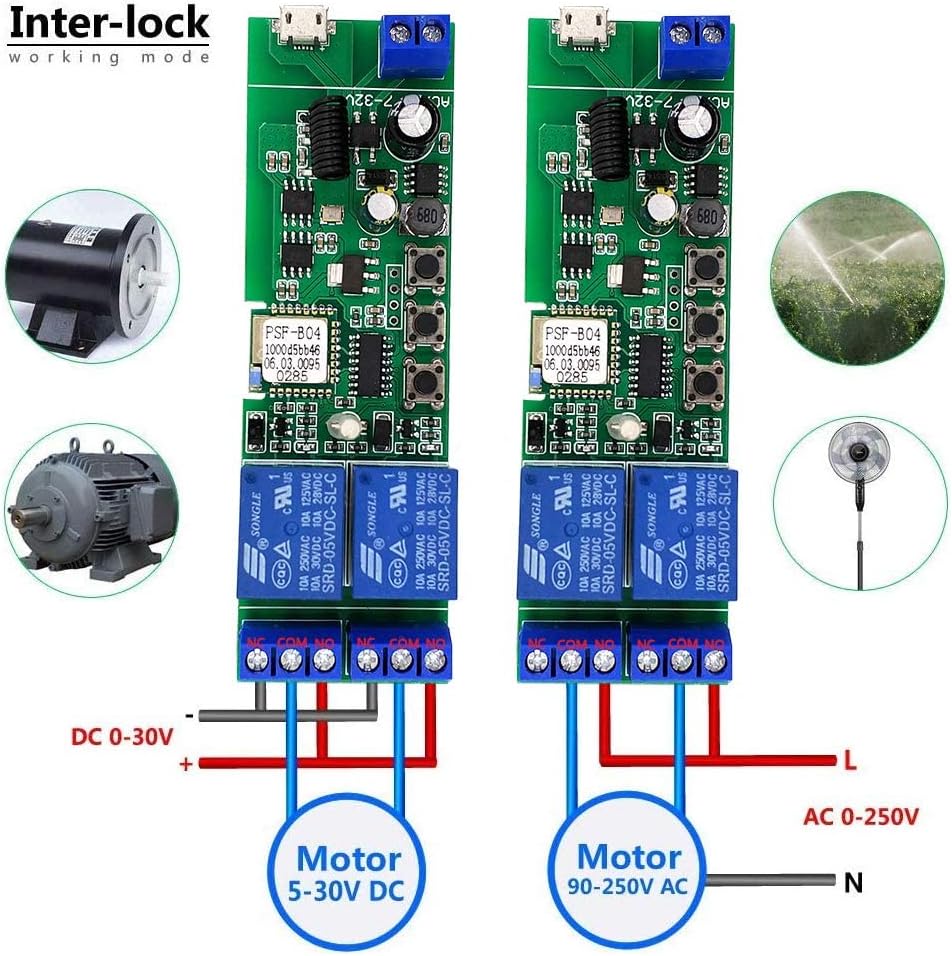
Image: Two wiring examples for the Newgoal relay module in interlock mode. The left diagram shows wiring for a DC motor (5-30V DC) using the COM and NO terminals. The right diagram illustrates wiring for an AC motor (90-250V AC) using the COM and NO terminals, with L and N connections for power. This demonstrates how to control motors for applications like garage doors or irrigation systems.
6.3 eWeLink App Download and Pairing
- Download the eWeLink App from the App Store (iOS) or Google Play Store (Android), or scan the QR code provided in the package. You can also visit http://app.coolkit.cc/dl.html.
- Registra't i inicia la sessió al teu compte d'eWeLink.
- Power on the Newgoal relay module.
- Press and hold the WiFi pairing button (often labeled as "RF Pairing Button1/Manual Switch1/Setting button" or similar, refer to the detailed diagram) for approximately 7 seconds until the WiFi LED flashes rapidly (usually three short flashes, then one long flash, repeating).
- In the eWeLink App, tap the "+" icon to add a device. Select "Quick Pairing Mode" or "Compatible Pairing Mode" as instructed by the app.
- Segueix les instruccions que apareixen a la pantalla per connectar el dispositiu a la teva xarxa Wi-Fi de 2.4 GHz.
- Un cop s'hagi emparellat correctament, el dispositiu apareixerà a l'aplicació eWeLink.

Image: A smartphone screen displaying the eWeLink app interface, demonstrating features like remote control for each channel, real-time status monitoring, setting up to 8 time schedules, self-locking mode, interlock mode, inching mode, and share control. The Newgoal relay module is visible in the foreground.
7. Modes de funcionament
The Newgoal DC2+433 supports three operating modes: Inching (Momentary), Self-locking, and Interlock. All channels on the module operate in the same selected mode. You can change the working mode by pressing the dedicated "Momentary/Self-lock/Interlock Modes Toggle button" on the board.
- Mode d'avançament lent (momentani):
In this mode, the relay turns on for a set duration (e.g., 1 second) and then automatically turns off. This is ideal for triggering devices that require a brief pulse, such as garage door openers or gate controls. You can configure the inching duration in the eWeLink app. Two wiring options are available: turn on for 1s then auto-off, or turn off for 1s then auto-on.
- Mode d'autobloqueig:
In self-locking mode, pressing the button (either on the app or the manual switch) will turn the relay ON. The relay will remain ON until the button is pressed again, which will turn it OFF. This is suitable for controlling lights or other devices that need to stay on or off for extended periods.
- Mode d'enclavament:
(Supported by 2-gang and 4-gang modules) In interlock mode, when one relay is turned ON, all other relays in the group are automatically turned OFF. This prevents multiple devices from being active simultaneously, commonly used for controlling motors with forward/reverse functions or ensuring only one garage door is open at a time.
8. RF Remote Control Pairing
The WiFi+RF version can learn up to 14 different 433MHz codes per channel. It does not support encrypted or rolling codes.
- Per emparellar: Press and hold the desired manual switch button on the module (e.g., "RF Pairing Button1/Manual Switch1") for approximately 3 seconds. The corresponding LED will indicate it's ready for pairing. Then, press a button on your 433MHz remote control. The LED will flash to confirm successful pairing. Repeat for the second channel if desired.
- To Clear RF Codes: Press and hold the desired manual switch button on the module for approximately 15 seconds. The LED will flash to indicate that all learned RF codes for that channel have been cleared.

Image: The Newgoal WiFi relay module is shown with its accompanying 433MHz RF remote control and a smartphone displaying the eWeLink app. This illustrates the dual control capabilities of the device, allowing users to operate it via both the physical RF remote and the mobile application over WiFi.
9. Integració del control per veu
The Newgoal DC2+433 is compatible with Amazon Alexa and Google Home, allowing for voice-activated control of your connected devices.
9.1 Amazon Alexa
- Ensure your Newgoal device is successfully paired with the eWeLink app.
- Obriu l'aplicació Amazon Alexa.
- Go to "Skills & Games" and search for "eWeLink Smart Home".
- Activa l'habilitat i enllaça el teu compte eWeLink.
- Discover devices. Alexa will find your Newgoal relay.
- You can now use voice commands such as: "Alexa, turn on [Device Name]", "Alexa, turn off [Device Name]". (Note: Only US/UK English and German voice commands are supported.)
9.2 Google Home
- Ensure your Newgoal device is successfully paired with the eWeLink app.
- Obriu l'aplicació Google Home.
- Toca "+" > "Configura el dispositiu" > "Funciona amb Google".
- Cerca "eWeLink Smart Home" and link your eWeLink account.
- Assign your Newgoal relay to a room.
- You can now use voice commands such as: "Hey Google, turn on [Device Name]", "Hey Google, turn off [Device Name]".
9.3 Integració d'IFTTT
The device also supports IFTTT (If This Then That) for advanced automation. Cerca "eWeLink Smart Home" in the IFTTT app to create custom applets.
10. Manteniment
- Mantingueu el dispositiu en un lloc sec, allunyat de la humitat i de temperatures extremes.
- Reviseu regularment les connexions del cablejat per assegurar-vos que siguin segures.
- Periodically update the eWeLink app to ensure optimal performance and access to new features.
- Clean the device with a dry, soft cloth. Do not use liquid cleaners.
11. Solució De Problemes
| Problema | Causa possible | Solució |
|---|---|---|
| El dispositiu no es pot connectar a la Wi-Fi. | Incorrect Wi-Fi password; 5GHz Wi-Fi network; device too far from router; Mesh Wi-Fi system. | Ensure correct 2.4GHz Wi-Fi password. Move device closer to router. Disable 5GHz band during pairing if necessary. This device does not support 5GHz or Mesh Wi-Fi. |
| RF remote control not working. | Remote not paired; battery low; out of range; encrypted/rolling code remote. | Re-pair the remote control (see Section 8). Replace remote battery. Ensure remote is within 98ft (30m) range. This device only supports fixed/learning codes. |
| El control per veu no respon. | Device not linked to Alexa/Google Home; incorrect device name; internet connectivity issues. | Verify eWeLink skill is enabled and linked in Alexa/Google Home app. Check device name in eWeLink app and use that name for voice commands. Ensure stable internet connection. |
| Relay not switching. | Incorrect wiring; power supply issue; device malfunction. | Double-check wiring against diagrams. Ensure the module is powered correctly. Contact support if issues persist. |
12. Garantia i Suport
For warranty information and technical support, please refer to the contact details provided with your purchase or visit the Newgoal official weblloc. Conserveu el rebut de compra per a reclamacions de garantia.