
Introducció
Thank you for choosing the MageGee GT860 96-Key Wired RGB Backlit Gaming Keyboard. This keyboard is designed for both gaming and daily use, featuring a compact layout, ergonomic design, and customizable RGB backlighting. This manual will guide you through the setup, operation, and maintenance of your new keyboard to ensure optimal performance and user experience.
Contingut del paquet
- MageGee GT860 96-Key Wired RGB Backlit Gaming Keyboard
- Manual d'usuari
Producte acabatview
Disposició del teclat
The MageGee GT860 features a 92% compact layout, retaining essential keys while offering a space-saving design. It includes a full numeric keypad and function keys.

Image: The MageGee GT860 keyboard showcasing its 96-key layout with RGB backlighting and black and yellow keycaps.

Imatge: Una imatge detallada view of the standard 96-key layout with full RGB backlighting, highlighting the compact yet functional design.
Característiques clau
- Disseny compacte al 92%: Offers a balance between full functionality and a space-saving design.
- Membrana amb sensació mecànica: Utilizes advanced imitation mechanical technology for a tactile typing experience.
- Disseny ergonòmic: Key layout is engineered for comfortable use during extended periods, reducing fatigue.
- Retroil·luminació RGB: Features multiple lighting modes and colors, with adjustable brightness and breathing speed.
- Plug and Play: No drivers required for basic functionality.
- Àmplia compatibilitat: Supports Windows 10, 8, 7, XP, VISTA, and Mac OS.
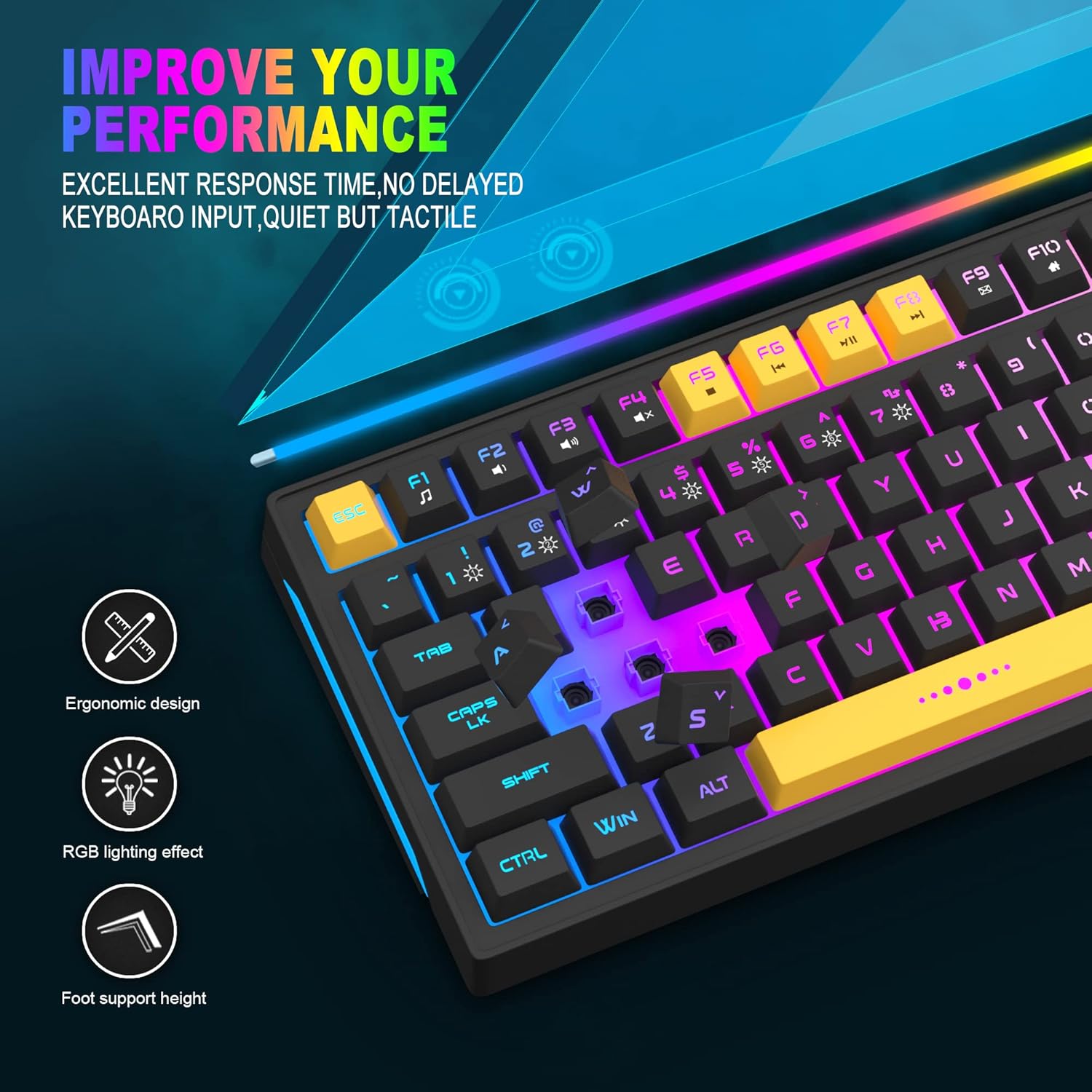
Image: Close-up showing the ergonomic design and RGB lighting effect of the keyboard, emphasizing comfort and visual appeal.

Imatge: Un costat view of the keyboard illustrating its thoughtful ergonomic design with a 7-degree tilt for improved typing posture.
Instruccions de configuració
- Unpack the keyboard and ensure all package contents are present.
- Connecteu el cable USB del teclat a un port USB disponible de l'ordinador.
- The keyboard is plug-and-play and should be automatically recognized by your operating system (Windows, Mac OS). No additional drivers are typically required for basic functionality.
- Once connected, the RGB backlighting will illuminate, indicating the keyboard is powered on and ready for use.
Instruccions de funcionament
Control de retroiluminació RGB
The MageGee GT860 keyboard features customizable RGB backlighting with various modes and effects.
- Canvi de modes d'il·luminació: Premeu el botó FN key combined with keys 1 a través de 6 to cycle through different RGB lighting effects and colors.
- Ajust de brillantor: Use specific key combinations (refer to keyboard legends or experiment with FN + Arrow keys if not explicitly labeled) to increase or decrease backlight brightness.
- Adjusting Breathing Speed: Some modes allow adjustment of the breathing or animation speed.

Image: The keyboard displaying various RGB backlit lighting modes, illustrating the range of color options available.

Image: A dynamic view de la presentació del teclatasing its 18 RGB LED light effects, highlighting the vibrant backlighting.
Tecles multimèdia i de funció
The keyboard includes dedicated function keys (F1-F12) that can be accessed by pressing the FN simultàniament amb la tecla F desitjada.
| Combinació de tecles | Funció |
|---|---|
| FN + F1 | Reproductor multimèdia |
| FN + F2 | Baixa el volum |
| FN + F3 | Puja el volum |
| FN + F4 | Silenciar |
| FN + F5 | Pista anterior |
| FN + F6 | Pista següent |
| FN + F7 | Reproduir/Pausa |
| FN + F8 | Atureu-vos |
| FN + F9 | Correu electrònic |
| FN + F10 | Pàgina d'inici |
| FN + F11 | Bloqueig de desplaçament |
| FN + F12 | Calculadora |

Image: Diagram illustrating the various multimedia and function key combinations using the FN key (FN + F1-F12).
Manteniment
To ensure the longevity and optimal performance of your MageGee GT860 keyboard, follow these maintenance guidelines:
- Neteja: Regularly clean the keyboard with a soft, dry cloth. For deeper cleaning, use compressed air to remove dust and debris from between the keys. A slightly damp cloth (not wet) can be used for keycap surfaces.
- Eviteu líquids: No vessiu líquids sobre el teclat. Si es produeix un vessament, desconnecteu immediatament el teclat de l'ordinador i deixeu-lo assecar completament abans de tornar-lo a connectar.
- Emmagatzematge: Guardeu el teclat en un lloc fresc i sec, allunyat de la llum solar directa i de temperatures extremes quan no l'utilitzeu durant períodes prolongats.
- Cura del cable: Eviteu doblegar o girar excessivament el cable USB per evitar danys interns.

Imatge: Un primer pla view of the keyboard with some keycaps removed, showing the underlying switches. This illustrates the internal structure for cleaning purposes.
Resolució de problemes
If you encounter issues with your MageGee GT860 keyboard, please refer to the following common troubleshooting steps:
- El teclat no respon:
- Ensure the USB cable is securely connected to both the keyboard and your computer's USB port.
- Prova de connectar el teclat a un port USB diferent de l'ordinador.
- Prova el teclat en un altre ordinador per determinar si el problema és del teclat o del sistema.
- La retroiluminació no funciona o és incorrecta:
- Verifiqueu que el teclat estigui connectat correctament i que rebi alimentació.
- Cycle through the RGB lighting modes using FN + 1-6 to ensure a mode is selected.
- Adjust the brightness settings.
- Claus que no es registren:
- Netegeu les tecles afectades per eliminar qualsevol residu que pugui estar obstruint l'interruptor.
- Assegureu-vos que no hi hagi conflictes de programari (per exemple, altres controladors de teclat o programari de jocs).
- Comportament inesperat:
- Reinicieu l'ordinador.
- If the issue persists, contact MageGee customer support for further assistance.
Especificacions
| Característica | Detall |
|---|---|
| Marca | MageGee |
| Model | GT860 |
| Disseny | 96 tecles (92% compactes) |
| Connectivitat | USB per cable |
| Il·luminació de fons | RGB Backlit (Multiple modes) |
| Tipus de clau | Membrane with Mechanical Feeling |
| Ergonomia | Disseny ergonòmic |
| Sistema operatiu compatible | Windows 10, 8, 7, XP, VISTA, Mac OS |
| Dimensions del producte | 35.56 x 10.16 x 5.08 cm (14 x 4 x 2 polzades) |
| Pes | 744 g (1.64 lliures) |
| Voltage | 5 Volts |
| Color | Negre Groc |
Garantia i Suport
For warranty information or technical support, please refer to the documentation provided with your purchase or contact MageGee customer service directly. Contact details can typically be found on the manufacturer's official weblloc web o a l'embalatge del producte.
Si us plau, conserveu el comprovant de compra per a qualsevol reclamació de garantia.