
Introducció
This manual provides comprehensive instructions for the use and care of your new Remote brand compatible remote control. This remote is specifically designed to function seamlessly with Nordmende ND40S3000J SMART televisions, offering full functionality without the need for complex programming.
Please read this manual carefully to ensure proper setup and operation of your remote control.
Configuració
1. Instal·lació de la bateria
The remote control requires alkaline batteries (not included). Follow these steps to install them:
- Localitzeu la tapa del compartiment de la bateria a la part posterior del comandament a distància.
- Feu lliscar la coberta cap avall o premeu el pestell per obrir-la.
- Insert two new alkaline batteries, ensuring the positive (+) and negative (-) terminals match the diagrams inside the compartment.
- Torneu a col·locar la tapa del compartiment de la bateria, fent-la lliscar fins que faci clic de manera segura.
Important: Always use new alkaline batteries for optimal performance. Do not mix old and new batteries, or different types of batteries.
2. Ús inicial (no cal programació)
This compatible remote control is pre-programmed for the Nordmende ND40S3000J SMART TV model. No additional programming or setup steps are required. Once batteries are installed, the remote is ready for immediate use with your television.
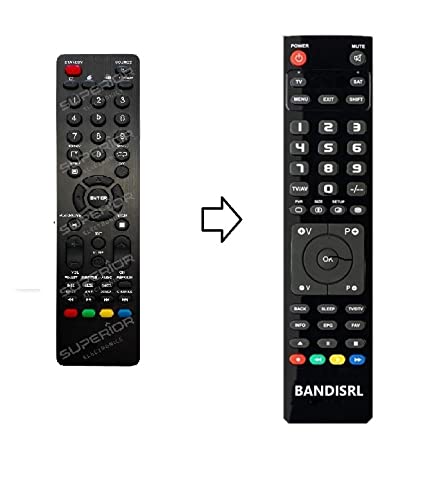
Figura 1: The Remote compatible remote control. This image displays the layout of the buttons and the overall design of the remote, ready for use with your Nordmende TV.
Instruccions de funcionament
To operate your Nordmende ND40S3000J SMART TV with this remote control, point the remote directly at the television's infrared receiver. Ensure there are no obstructions between the remote and the TV.
- Botó d'encesa: Premeu per engegar o apagar el televisor.
- Pujar/baixar el volum: Ajusta el volum d'àudio.
- Canal amunt/avall: Changes TV channels sequentially.
- Botons numèrics (0-9): Selecciona directament els canals de televisió.
- Botons de navegació (tecles de fletxa, OK): Navegueu pels menús i seleccioneu opcions.
- Botons de Smart TV: Access specific Smart TV functions or applications (e.g., Home, Apps, Netflix, YouTube, etc., depending on the remote's layout and TV's features).
- Botó de silenci: Silencia l'àudio del televisor.
- Botó font/entrada: Passa ciclísticament per les fonts d'entrada disponibles (HDMI, AV, etc.).
Refer to your Nordmende TV's original user manual for specific details on its menu structure and Smart TV functionalities.
Manteniment
Neteja del comandament a distància
Per netejar el comandament a distància, utilitzeu un drap suau i sec. Per a la brutícia resistent, netegeu-lo lleugerament.ampen the cloth with water. Do not use abrasive cleaners, alcohol, or solvents, as these can damage the remote's surface and internal components.
Canvi de bateria
Replace batteries when the remote control's response becomes sluggish or stops working. Always replace both batteries simultaneously with new alkaline batteries. Dispose of used batteries according to local regulations.
Emmagatzematge
Guardeu el comandament a distància en un lloc fresc i sec, allunyat de la llum solar directa i de temperatures extremes. Si no heu d'utilitzar el comandament a distància durant un període prolongat, és recomanable treure les piles per evitar fuites.
Resolució de problemes
- El comandament a distància no funciona:
- Comproveu si les piles estan inserides correctament amb la polaritat correcta (+/-).
- Replace the batteries with new alkaline batteries.
- Assegureu-vos que no hi hagi obstacles entre el comandament a distància i el receptor d'infrarojos del televisor.
- Assegureu-vos d'apuntar el comandament a distància directament al televisor.
- Verifiqueu que el televisor estigui encès.
- Some buttons are not responding:
- This remote is designed for the Nordmende ND40S3000J SMART TV. If you are using it with a different model, some advanced functions may not be compatible.
- Assegureu-vos que els botons estiguin nets i lliures de brutícia.
- TV responds intermittently:
- Pot ser que les piles estiguin baixes; substituïu-les.
- Ensure a clear line of sight to the TV's infrared sensor.
- Avoid strong light sources (like direct sunlight) that might interfere with the infrared signal.
If troubleshooting steps do not resolve the issue, please refer to the Support section.
Especificacions
| Marca: | Remote (Manufacturer: Bandisrl) |
| Dispositius compatibles: | Nordmende ND40S3000J SMART Television |
| Tecnologia de connectivitat: | Infrarojos (IR) |
| Característica especial: | No requereix programació |
| Tipus de bateria: | Alcalí |
| Bateries incloses: | No |
| Color: | Negre |
| Nombre de botons: | 25 |
| Tipus de controlador: | Control de botons |
Garantia i Suport
Informació de la garantia
Specific warranty details for this compatible remote control are not provided in this manual. Please refer to the purchase documentation or contact the seller/manufacturer (Bandisrl) for information regarding warranty coverage and terms.
Atenció al client
For further assistance, technical support, or inquiries regarding compatibility with other TV models, please contact the manufacturer, Bandisrl. Contact information can typically be found on the product packaging or the seller's weblloc.
If you own a different TV model than the Nordmende ND40S3000J SMART, it is recommended to contact Bandisrl to confirm compatibility before purchase or use.