
1. Introducció
This manual provides comprehensive instructions for the installation, operation, and maintenance of your zemismart Tuya Zigbee Rechargeable Roller Blind Motor (Model ZM25EL). This motor is designed to automate roller blinds with 38mm tubes, offering smart control via the Tuya Smart Life app, remote control, and voice assistants. Please read this manual carefully before installation and use to ensure proper function and safety.
2. Característiques del producte
- Integrated Tuya Zigbee Receiver: Converts normal blinds into smart, controllable devices.
- Compatibilitat: Designed for 38mm (1-1/2 inch) roller blind tubes.
- Bateria recarregable: Features a built-in 3000mAh lithium battery for cordless operation.
- Múltiples opcions de control: Supports Tuya Smart / Smart Life app control, RF433 remote control, and voice control via Alexa, Google Home, and Siri.
- Càrrega USB: Càrrega còmoda mitjançant un cable USB estàndard.
- Panell solar opcional: Can be charged directly using an optional solar panel (sold separately).
- Funcionalitat del temporitzador: Set schedules for automatic opening and closing of blinds.
3. Configuració i instal·lació
3.1 Contingut del paquet
Abans de començar, assegureu-vos que hi hagi tots els components:
- zemismart Tuya Zigbee Roller Blind Motor (ZM25EL)
- Set de corona i accionament
- Suports d’instal·lació
- Comandament a distància RF433
- Cable de càrrega USB
- Manual d'usuari (aquest document)
3.2 Motor Components Overview

Imatge: Detallada view of the motor components, highlighting the motor set key, battery power switch, and USB charging port.
3.3 Instal·lació física
- Prepare the Roller Blind Tube: Ensure your roller blind tube has an inner diameter of 38mm. The motor is designed to fit snugly inside.
- Attach Crown and Drive Set: Slide the crown and drive set onto the motor shaft. These components ensure the motor properly engages with the blind tube.
- Insert Motor into Tube: Carefully insert the motor assembly into the roller blind tube. Ensure it is fully seated and secure.
- Mount the Blind: Install the roller blind assembly, including the motor, into your window frame using the provided mounting brackets. This motor supports interior mounting. The maximum recommended blind width for installation is 3 meters, and the maximum weight is 4kg.

Image: Illustration of the motor's dimensions and its fit within a 38mm tube, alongside mounting accessories.
3.4 Càrrega inicial
Before first use, fully charge the motor's built-in 3000mAh lithium battery. Connect the provided USB charging cable to the motor's USB charging port and to a standard USB power adapter (not included). A full charge typically takes several hours.
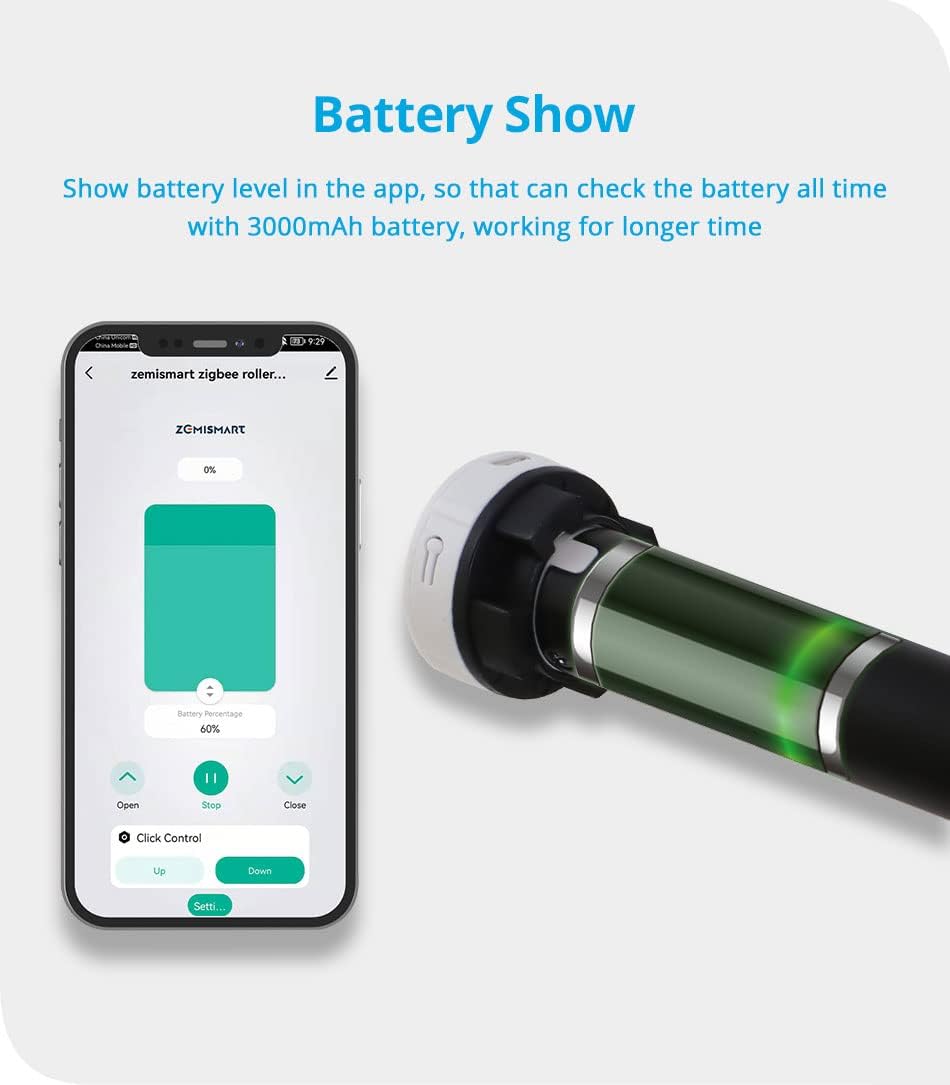
Image: The motor's battery level can be monitored via the app. The motor features a USB charging port for convenience.
An optional solar panel can be connected for continuous charging, reducing the need for manual USB charging.
4. Instruccions de funcionament
4.1 Tuya Zigbee Hub Requirement
This motor requires a Tuya Zigbee Gateway (hub) to function with the Tuya Smart / Smart Life app and for voice control integration. Ensure your Zigbee hub is set up and connected to your home network.

Image: A visual reminder that a Tuya Zigbee Hub is essential for smart functionality.
4.2 Control d'aplicacions (Tuya Smart / Smart Life)
- Descarregar l'aplicació: Download the 'Tuya Smart' or 'Smart Life' app from your smartphone's app store.
- Afegeix un dispositiu: Open the app, log in, and follow the instructions to add a new device. Select 'Curtain Motor' or similar, and ensure your Zigbee hub is detected.
- Maridatge: Follow the app's instructions to put the motor into pairing mode (usually by pressing a button on the motor or remote).
- Funcionament bàsic: Once paired, you can use the app to open, close, or stop the blinds at any position.
- Establiment de límits: Use the app's settings to define the upper and lower limits for your blinds. This ensures the motor stops precisely at the desired open and closed positions.
- Programació: Create schedules within the app to automate the opening and closing of your blinds at specific times.

Image: The Tuya Smart Life app interface demonstrating control over the roller blind, including open, stop, and close functions.

Imatge: Example of setting schedules in the app for automatic blind operation at specific times, such as 7:00 AM and 4:00 PM.
4.3 Control remot RF433
The included RF433 remote control provides direct and convenient operation of your blinds.
- Comandament remot de vinculació: Refer to the motor's specific pairing instructions (usually a combination of button presses on the motor and remote) to link the remote control.
- Botons: The remote typically features 'Up', 'Down', and 'Stop' buttons for basic control.
- Control multicanal: Some remotes support multiple channels, allowing control of several motors individually or in groups. One remote can control up to 50 motors.

Image: A user operating roller blinds with the RF remote control, showing simple and direct control.
4.4 Voice Control (Alexa, Google Home, Siri)
Once the motor is integrated with your Tuya Zigbee hub and linked to your smart home platform (Alexa, Google Home, or Apple HomeKit via Siri), you can use voice commands.
- Enllaç de comptes: In the Alexa, Google Home, or Apple Home app, link your Tuya Smart / Smart Life account.
- Descobriu els dispositius: Demana al teu assistent de veu que descobreixi nous dispositius.
- Comandaments de veu: Utilitzeu ordres com ara:
- "Alexa, open the blinds."
- "Hey Google, close the living room blinds."
- "Hey Siri, set the bedroom blinds to 50%."

Image: Diagram illustrating the connectivity for voice control, showing the motor, Zigbee hub, router, and smart speakers (Amazon Echo, Google Home).

Image: An integrated smart home environment where blinds are controlled via voice assistants and a smartphone app.
5. Manteniment
5.1 Càrrega de la bateria
Regularly check the battery level via the Tuya Smart / Smart Life app. Recharge the motor using the USB cable when the battery is low. If using an optional solar panel, ensure it is clean and positioned to receive adequate sunlight for optimal charging.
5.2 Neteja
The motor itself requires minimal cleaning. If necessary, use a soft, dry cloth to wipe the exterior. For the roller blind fabric, follow the manufacturer's instructions, typically involving spot cleaning.
6. Solució De Problemes
- El motor no respon:
- Comproveu el nivell de la bateria i recarregueu-la si cal.
- Ensure the RF remote control has working batteries.
- Verify the motor is properly paired with the remote and the Zigbee hub.
- Problemes de connectivitat de l'aplicació:
- Ensure your Tuya Zigbee hub is powered on and connected to your home Wi-Fi network.
- Comproveu la vostra connexió a Internet.
- Restart the Tuya Smart / Smart Life app.
- If issues persist, try re-pairing the motor with the Zigbee hub.
- El control per veu no funciona:
- Confirm that your Tuya Smart / Smart Life account is correctly linked to Alexa, Google Home, or Apple Home.
- Ensure your voice assistant device is online and functioning.
- Prova de redescobrir dispositius a través de l'aplicació d'assistent de veu.
- Limits Not Set Correctly:
- Access the motor settings in the Tuya Smart / Smart Life app and re-calibrate the upper and lower limits.
7. Especificacions
| Característica | Especificació |
|---|---|
| Número de model | ZM25EL |
| Marca | zemismart |
| Material | Alumini |
| Entrada Voltage | DC7.4V |
| Potència nominal | 8W |
| Corrent màxim | 1A |
| Capacitat de la bateria | 3000 mAh |
| Torque | 0.8 Nm |
| RPM nominal | 25PRM |
| Soroll corrent | 35-40 dB |
| Compatibilitat de tubs | 38mm (1-1/2 inch) |
| Max Supported Blind Width | 3 metres |
| Max Supported Blind Weight | 4 kg |
| Tipus de muntatge | Interior Mount |
| Ús recomanat | Doors, Windows |

Image: Detailed product parameters including physical dimensions and technical specifications of the motor and accessories.
8. Garantia i Suport
For warranty information and technical support, please refer to the zemismart official weblloc web o poseu-vos en contacte amb el vostre distribuïdor. Conserveu el rebut de compra com a comprovant de compra per a qualsevol reclamació de garantia.


