
TOUCARE T9S
TOUCARE T9S Motorcycle Bluetooth Intercom User Manual
Model: T9S | Brand: TOUCARE
Introducció
The TOUCARE T9S is a high-performance Bluetooth intercom system designed for motorcycle riders. It enables clear communication between up to four riders, offers music sharing, and integrates with your mobile phone for calls and GPS navigation. With advanced noise cancellation and a robust waterproof design, the T9S ensures a reliable and enjoyable riding experience in various conditions.
Característiques clau
- 1200M Maximum Distance: Equipped with Bluetooth 5.0 for high compatibility and stability, allowing group communication within a 1200m intercom range.
- Support 4-Riders Intercom: Full-duplex communication for up to 4 riders simultaneously. Universal pairing function ensures compatibility with most Bluetooth headsets and mobile phones.
- Compartir música: Share music with another rider, enjoy Hi-Fi stereo music, FM radio, or GPS voice guidance.
- Noise Reduction and IP67 Waterproof: DSP and CVC advanced noise reduction technology for clear communication up to 120km/h. IP67 waterproof rating for all-weather use.
- Ultra-Long Standby Battery: 800mAh rechargeable battery provides up to a week of standby time and 15 hours of working time.

Image: The T9S system supports communication for up to four riders over a distance of 1200 meters.

Image: CVC & DSP Noise Cancellation Technology ensures clear and smooth communication even at high speeds.

Image: The IP67 waterproof rating makes the T9S suitable for use in all weather conditions, including water sports.

Image: The T9S offers extended endurance times for talking, music playback, and standby, supporting long-distance travel.
Contingut del paquet
Each TOUCARE T9S package includes the following components:
- 1 x Bluetooth Intercom Unit
- 1 x Hi-Fi Speaker Set
- 1 x Micròfon de braç
- 1 x Micròfon de botó
- 1 x cable USB
- 1 x Suport de muntatge
- 1 x Clamp Placa
- 1 x clau Allen

Image: All components included in the TOUCARE T9S package, ensuring you have everything needed for installation and use.
Producte acabatview i funcions de botons
Familiarize yourself with the buttons and indicators on your T9S intercom unit:
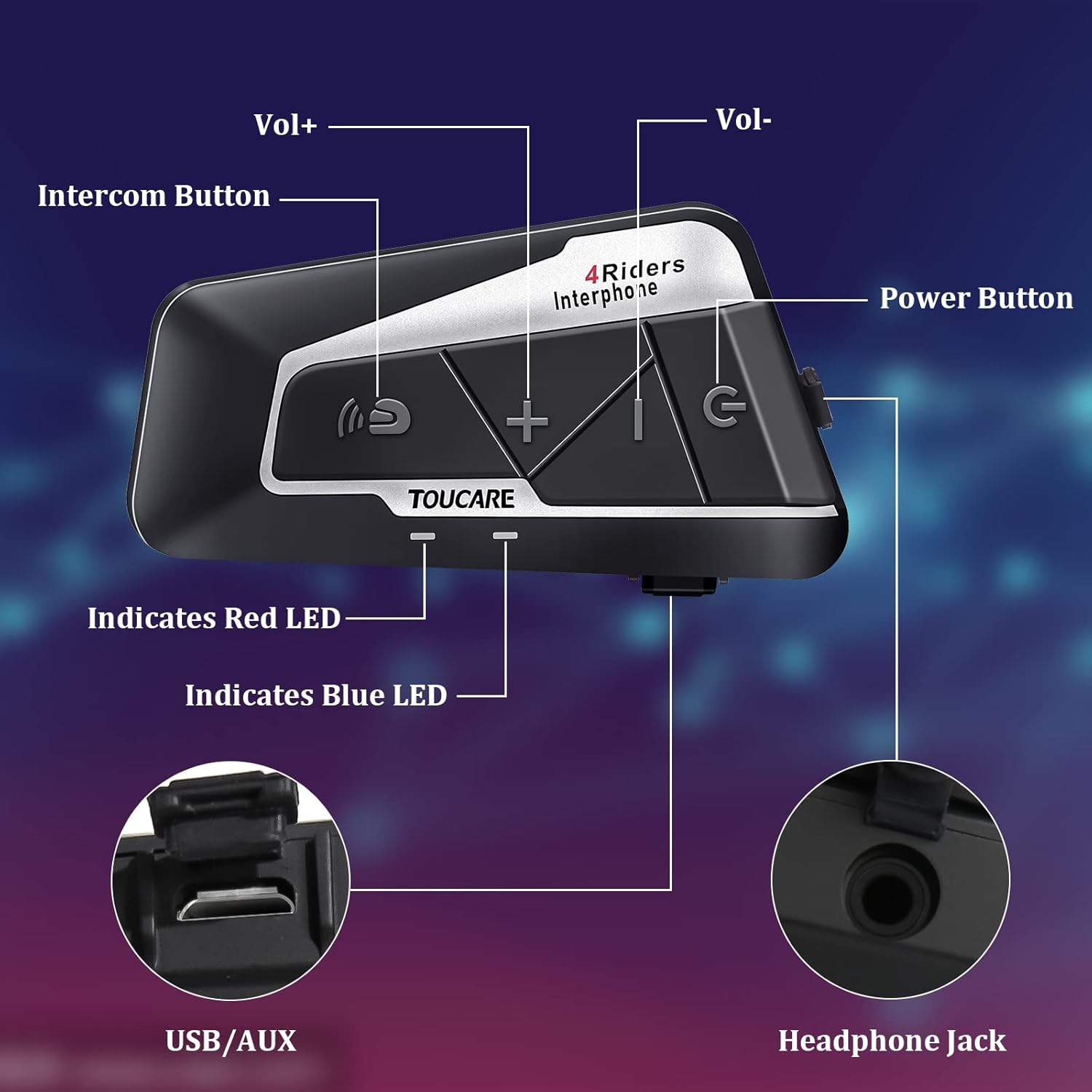
Image: Detailed diagram of the T9S unit, highlighting the location and labels of each button and port.
Power On/Off Button (G)
- Encès/apagat: Manteniu premut per encendre o apagar el dispositiu.
- Paired Mobile Phone: Short press to connect/disconnect with a paired mobile phone.
- Indicació d'alimentació: Short press to hear battery level prompt.
- Hang up Bluetooth Intercom: Short press during an intercom call to end it.
- Reproducció / pausa de música: Premeu breument per reproduir o posar en pausa la música.
- Call Answering/Third Party Answer/End/Reject: Manage phone calls.
Bluetooth Intercom Button (Intercom Icon)
- Volum +: Premeu breument per augmentar el volum.
- Última cançó: Long press to go to the previous song.
- FM Turn Up: Short press during FM mode to tune up.
- FM Turn On/Off: Long press to turn FM radio on or off.
- Remarcació de l'últim número: Double press to redial the last dialed number.
Volume - Button (-)
- Volum -: Premeu breument per reduir el volum.
- Següent cançó: Premeu llargament per anar a la cançó següent.
- FM Turn Down: Short press during FM mode to tune down.
- FM Turn On/Off: Long press to turn FM radio on or off.
- Marcatge per veu: Double press to activate voice dialing (if supported by your phone).

Image: The T9S features ultra-large buttons, designed for easy operation even while wearing gloves.
Guia d'instal·lació
Mètode d'instal·lació fixa
Follow these steps to securely install the T9S intercom unit on your helmet:
- Locate and Clean: Identify a suitable flat area on the left side of your helmet for mounting. Ensure the surface is clean and dry.
- Preparació de l'adhesiu: Peel off the protective film from the 3M adhesive on the back of the mounting bracket.
- Aplicar pressió: Firmly press the mounting bracket onto the chosen location on your helmet. Apply consistent pressure for several seconds to ensure a strong bond.
- Unitat segura: Slide the T9S intercom unit onto the mounted bracket until it clicks securely into place.
- Instal·leu els altaveus i el micròfon: Route the speaker and microphone wires inside the helmet lining. Position the speakers inside the ear pockets and the microphone near your mouth for optimal audio.
Instruccions de funcionament
Vinculació amb el telèfon mòbil
- Ensure the T9S is powered off.
- Press and hold the Power On/Off button until the LED indicator flashes red and blue alternately, indicating pairing mode.
- On your mobile phone, enable Bluetooth and search for new devices. Select "TOUCARE T9S" from the list.
- Once paired, the LED will flash blue slowly.
Initiating Intercom Communication
- Ensure all T9S units are powered on and within range.
- To initiate a group intercom, short press the Bluetooth Intercom Button on your unit. The units will attempt to connect.
- To end an intercom call, short press the Power On/Off button.
Reproducció de música
- Reproduir/pausa: Premeu breument el botó d'encesa/apagada.
- Següent cançó: Premeu llargament el botó de volum -.
- Cançó anterior: Long press the Bluetooth Intercom button.
- Ajust de volum: Short press Volume + or Volume - buttons.
Ràdio FM
- Activar/Desactivar: Long press either the Bluetooth Intercom button or the Volume - button.
- Sintonitza: Short press the Bluetooth Intercom button.
- Sintonitza cap avall: Premeu breument el botó de volum -.
Contestar/acabar trucades
- Respon a la trucada: Short press the Power On/Off button when a call comes in.
- Finalitzar la trucada: Short press the Power On/Off button during a call.
- Rebutja la trucada: Long press the Power On/Off button when a call comes in.
- Marcatge per veu: Double press the Volume - button (requires phone support).
- Remarcació de l'últim número: Double press the Bluetooth Intercom button.
Especificacions tècniques
| Característica | Especificació |
|---|---|
| Versió Bluetooth | 5.0 |
| Bluetooth Profiles Admet | HSP, HFP, A2DP, AVRCP, AGHSP |
| Horari de treball | 15 hores |
| Temps d'espera | 350 hores |
| Temps de càrrega | 3 hores |
| Tipus de bateria | Rechargeable Lithium Battery, 800mAh, 3.7V |
| Dimensions | 89 x 46 x 30 mm |
| Pes | 85 g |
| Control de soroll | Active Noise Cancellation (DSP & CVC) |
| Nivell de resistència a l'aigua | IP67 |
| Tecnologia de connectivitat | Sense fil |
| Material | Cautxú |
| Tipus de control | Voice Control (via phone), Button Control |
Manteniment
To ensure the longevity and optimal performance of your TOUCARE T9S intercom, follow these maintenance guidelines:
- Neteja: Netegeu la unitat amb un suau, damp tela. No utilitzeu productes químics aggressivs, dissolvents de neteja o detergents forts.
- Emmagatzematge: Guardeu el dispositiu en un lloc fresc i sec, allunyat de la llum solar directa i de temperatures extremes quan no l'utilitzeu.
- Cura de la bateria: For long-term storage, charge the battery to about 50% every three months to prevent deep discharge and extend battery life.
- Exposició a l'aigua: Although IP67 rated, avoid prolonged submersion. Ensure charging port is dry before charging.
- Gestió de cables: Handle cables and connectors gently to prevent damage.
Resolució de problemes
If you encounter issues with your T9S intercom, try the following solutions:
Sense poder
- Comproveu la bateria: Ensure the unit is fully charged. Connect it to a power source and check if the charging indicator lights up.
- Restablir: If unresponsive, try holding the Power On/Off button for an extended period (e.g., 10-15 seconds) to force a reset.
Cannot Pair with Mobile Phone/Other Intercoms
- Mode de sincronització: Ensure the T9S is in pairing mode (LED flashing red and blue alternately).
- Device Visibility: Make sure Bluetooth is enabled on your phone/other intercoms and they are discoverable.
- Esborra l'historial de vinculació: On your phone, forget the T9S device and try pairing again. For intercoms, consult the manual for clearing pairing history if available.
- Distància: Ensure devices are within close proximity (e.g., 1 meter) during pairing.
Poor Audio Quality/No Sound
- Volum: Check if the volume is turned up on both the T9S and the connected device (phone/intercom).
- Posició del micròfon: Ensure the microphone is correctly positioned near your mouth and not obstructed.
- Connexió de l'altaveu: Verify that the speakers are securely plugged into the headphone jack.
- Interferència: Allunyeu-vos de fonts de fortes interferències electromagnètiques.
- Firmware: Comproveu el del fabricant weblloc web per a qualsevol actualització de firmware disponible que pugui millorar el rendiment d'àudio.
Garantia i Suport
For warranty information, technical support, or service inquiries, please refer to the warranty card included with your product or visit the official TOUCARE weblloc web. Conserveu el rebut de compra com a comprovant de compra per a reclamacions de garantia.
For further assistance, you may also contact TOUCARE customer service through the contact information provided on their official channels.
Ask a question about this manual
Ask about setup, troubleshooting, compatibility, parts, safety, or missing instructions. Manuals+ will review the question and use this page’s manual context to help answer it.