1. Introducció
This manual provides detailed instructions for the safe and efficient operation of your InFocus P120 INL412 Multimedia Projector (Model INL4128). Please read this manual thoroughly before using the projector and keep it for future reference. This projector is designed for high-quality image projection, suitable for various applications including presentations, home entertainment, and gaming.
2. Informació de seguretat
Observeu les següents precaucions de seguretat per evitar danys al projector i garantir la seguretat de l'usuari:
- Ventilació: Ensure adequate ventilation around the projector. Do not block ventilation openings. Maintain a minimum distance of 30 cm (12 inches) from walls or other objects.
- Font d'alimentació: Feu servir només la font d'alimentació i el volum especificatstage. Connecteu el cable d'alimentació de manera segura.
- Calor: The projector generates heat during operation. Do not touch the projector's vents or exhaust areas directly after use.
- Sortida de llum: No mireu directament a la lent del projector quan estigui encès.amp està encès, ja que la llum intensa pot causar lesions oculars.
- Col·locació: Place the projector on a stable, level surface. Avoid placing it in direct sunlight, near heat sources, or in areas with high humidity or dust.
- Neteja: Desconnecteu el cable d'alimentació abans de netejar-lo. Feu servir un drap suau i sec. No utilitzeu netejadors líquids ni en aerosol.
- Manteniment: No intenteu fer la reparació del projector vosaltres mateixos. Envieu totes les tasques de manteniment a personal de servei qualificat.
3. Producte acabatview
3.1 Top Panel and Lens Area
The top panel features the control buttons for basic operation and the lens area with focus and zoom adjustments.

Figura 3.1: superior view of the InFocus P120 INL412 projector, highlighting the control panel on the right and the lens adjustment area on the left. The InFocus logo is visible on the top surface.
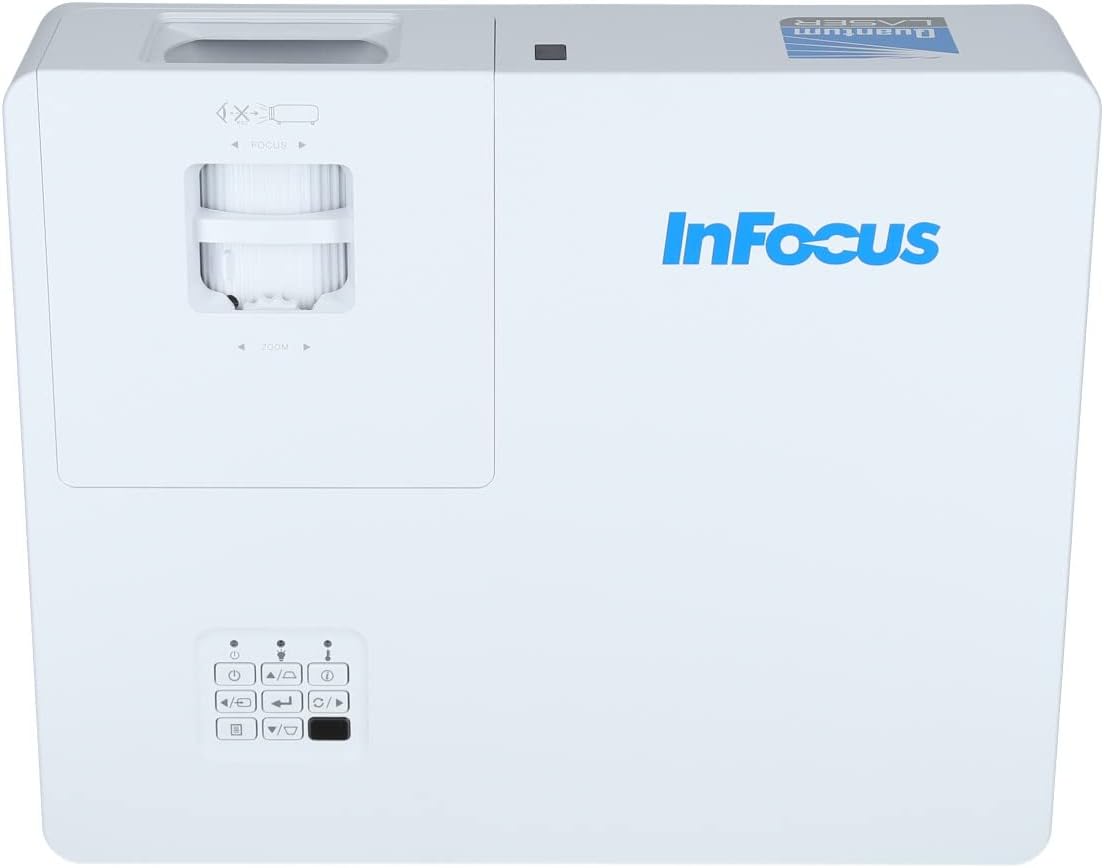
Figura 3.2: Un tancador view of the projector's top panel, showing the focus and zoom rings near the lens opening and the array of control buttons for power, menu, source selection, and navigation.
3.2 Connexions del panell posterior
El panell posterior proporciona diversos ports d'entrada i sortida per connectar dispositius externs.

Figure 3.3: Rear panel of the InFocus P120 INL412 projector, displaying a comprehensive array of connectivity options including HDMI (x2), USB, S-Video, Ethernet (LAN), VGA In (x2), VGA Out, RS232, and Audio In/Out ports. The power input is located on the bottom left.
Els ports clau inclouen:
- HDMI 1 i 2: For connecting high-definition digital video and audio sources.
- USB: For connecting USB devices, potentially for media playback or firmware updates.
- Vídeo S: For connecting older video sources.
- VGA IN 1 & 2: For connecting computers or other devices with VGA output.
- SORTIDA VGA: Per connectar a un monitor extern.
- Ethernet (LAN): Per a la connectivitat i el control de la xarxa.
- Audio IN 1 & 2 / Audio OUT: Per a connexions d'àudio analògiques.
- RS232: Per al control en sèrie.
- Entrada d'alimentació: Per connectar el cable d'alimentació de CA.
3.3 Front and Side Panels
The front panel houses the projection lens and front ventilation, while the side panels feature additional ventilation grilles.

Figura 3.4: Frontal view of the InFocus P120 INL412 projector, displaying the main projection lens on the right and the extensive front ventilation grille on the left, crucial for heat dissipation.
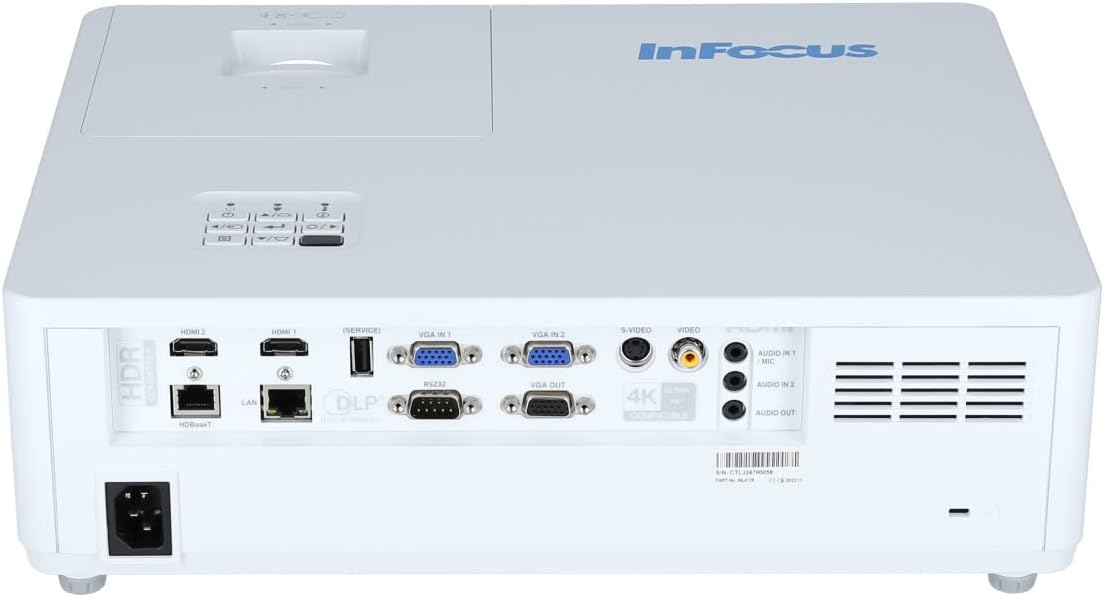
Figura 3.5: lateral view of the InFocus P120 INL412 projector, illustrating the side ventilation grilles that contribute to maintaining optimal operating temperature.
4. Configuració
4.1 Col·locació del projector
Position the projector on a stable, flat surface or mount it securely. Ensure the projector is within the optimal projection distance for your screen size. Maintain clear space around the projector for proper ventilation.
4.2 Connexió de dispositius
Before connecting any cables, ensure the projector and all source devices are powered off.
- Connexió HDMI: Connect an HDMI cable from your source device (e.g., laptop, Blu-ray player, gaming console) to either the HDMI 1 or HDMI 2 port on the projector.
- Connexió VGA: Connect a VGA cable from your computer to either VGA IN 1 or VGA IN 2. For audio, connect a separate audio cable from your computer's audio output to the corresponding Audio IN port on the projector.
- Connexió USB: Insert a USB drive into the USB port for media playback (if supported by firmware) or service functions.
- Connexió Ethernet (LAN): Connect an Ethernet cable to the LAN port for network control or updates.
- Sortida d'àudio: If using external speakers, connect an audio cable from the Audio OUT port on the projector to your audio system.
4.3 Connexió d'alimentació
Connect the power cord to the projector's power input and then plug the other end into a grounded electrical outlet.
5. Instruccions de funcionament
5.1 Engegada/apagada
- Encès: Premeu el botó Poder button on the projector's control panel or the remote control. The power indicator light will change.
- Apagar: Premeu el botó Poder button again. A confirmation message may appear. Press the button a second time to confirm shutdown. Allow the projector to cool down before unplugging it.
5.2 Ajust de l'enfocament i el zoom
Rotate the focus ring around the lens until the image appears sharp and clear. Use the zoom ring to adjust the image size to fit your screen.
5.3 Selecció de la font d'entrada
Premeu el botó Font button on the control panel or remote control to cycle through available input sources (HDMI 1, HDMI 2, VGA 1, VGA 2, S-Video, USB). Select the input corresponding to your connected device.
5.4 Navegació de menús
Utilitza el Menú button to access the on-screen display (OSD) menu. Use the arrow buttons to navigate through menu options and the Entra botó per seleccionar. Premeu Menú de nou per sortir.
6. Manteniment
6.1 Neteja de la lent
Gently wipe the lens with a soft, lint-free cloth specifically designed for optical surfaces. Do not use abrasive cleaners or excessive force, as this can scratch the lens.
6.2 Cleaning the Projector Exterior
Feu servir un drap suau i sec per netejar la part frontal del projector.asing. Per a la brutícia persistent, dampen the cloth slightly with water, then wipe dry immediately. Avoid getting liquids into the projector's openings.
6.3 Ventilation Care
Regularly check the projector's ventilation grilles for dust accumulation. Use a soft brush or a vacuum cleaner with a brush attachment to gently remove dust from the vents to ensure proper airflow and prevent overheating.
7. Solució De Problemes
7.1 No es mostra cap imatge
- Assegureu-vos que el projector estigui encès i que l'indicador lluminós d'engegada estigui fix.
- Verify that the video cable (HDMI, VGA, etc.) is securely connected to both the projector and the source device.
- Comproveu que s'ha seleccionat la font d'entrada correcta al projector.
- Confirm that the source device (laptop, player) is powered on and outputting a signal.
7.2 La imatge està borrosa o desenfocada
- Ajusteu l'anell d'enfocament de la lent del projector fins que la imatge sigui nítida.
- Assegureu-vos que el projector estigui a la distància correcta de la pantalla.
- Netegeu la lent del projector si sembla bruta.
7.3 Sense so
- If using HDMI, ensure the source device's audio output is set to HDMI.
- If using VGA, ensure a separate audio cable is connected from the source to the projector's Audio IN port.
- Comproveu la configuració de volum tant al projector com al dispositiu font.
- If using external speakers, ensure they are properly connected to the Audio OUT port and powered on.
8. Especificacions
| Característica | Detall |
|---|---|
| Marca | Enfoc |
| Fabricant | En focus |
| Nom del model | P120 INL412 |
| Número de model | INL4128 |
| Any | 2023 |
| Interfície del maquinari | Ethernet, HDMI, S-Video, USB |
| Nombre d'articles | 1 |
| Relació d'aspecte | 16:9 |
| Wattage | 341 watts |
| Piles incloses | No |
| Piles necessàries | No |
| Factor de forma | Escriptori |
| Tipus de muntatge | Muntatge de taula |
| Comandament a distància inclòs | Sí |
| Dimensions del producte | 56.13 x 46.48 x 25.15 cm |
| Pes de l'article | 5.5 kg |
| Mida màxima de la imatge | 308.28 polzades |
| Mida mínima de la imatge | 910.63 mil·límetres |
| Primera data disponible | 5 de gener de 2022 |
9. Garantia i Suport
For warranty information and technical support, please refer to the documentation included with your purchase or visit the official InFocus weblloc web. Conserveu el comprovant de compra per a reclamacions de garantia.