
1. Introducció
This manual provides essential information for setting up, operating, maintaining, and troubleshooting your MEDION Akoya S3003 Desktop PC. Please read this manual thoroughly before using your device to ensure proper function and safety.

Imatge 1.1: Frontal view of the MEDION Akoya S3003 Desktop PC, showcasinel seu disseny compacte i els seus ports frontals.
2. Informació de seguretat
Observe the following safety guidelines to prevent damage to your device and ensure personal safety:
- No exposeu el dispositiu a temperatures extremes, humitat o llum solar directa.
- Mantingueu el dispositiu allunyat de líquids i humitat.
- Assegureu-vos una ventilació adequada per evitar el sobreescalfament. No obstruïu les obertures de ventilació.
- Utilitzeu només l'adaptador d'alimentació subministrat amb el dispositiu.
- No intenteu obrir ni reparar el dispositiu vosaltres mateixos. Encarregueu totes les tasques de manteniment a personal qualificat.
- Disconnect the power cable before cleaning or if the device will not be used for an extended period.
3. Producte acabatview
Familiarize yourself with the components and ports of your MEDION Akoya S3003 Desktop PC.
3.1 Tauler frontal

Imatge 3.1: Anglesa view of the front panel, highlighting accessible ports.
- Botó d'encesa: Per encendre o apagar l'ordinador.
- Ports USB: Per connectar dispositius USB com ara teclats, ratolins o emmagatzematge extern.
- Preses d'àudio: Headphone output and microphone input.
3.2 Panell posterior

Imatge 3.2: posterior view of the PC, showing various connectivity options.
- 4 x USB 3.2 Gen 2 Tipus-A: Ports USB d'alta velocitat per a perifèrics.
- 1 x HDMI-out: Per connectar-lo a un monitor o pantalla.
- 1 x VGA: Per connectar-se a monitors o pantalles més antics.
- 1 x RJ45 GigaLAN: Per a la connexió de xarxa amb cable.
- 1 x Mikrofon-In: Entrada de micròfon.
- 1 x Audio Line-out: Audio output for speakers or headphones.
- 1 x Netzteilananschluss (Power Adapter Connection): Per connectar la font d'alimentació.
3.3 Dimensions and VESA Mounting
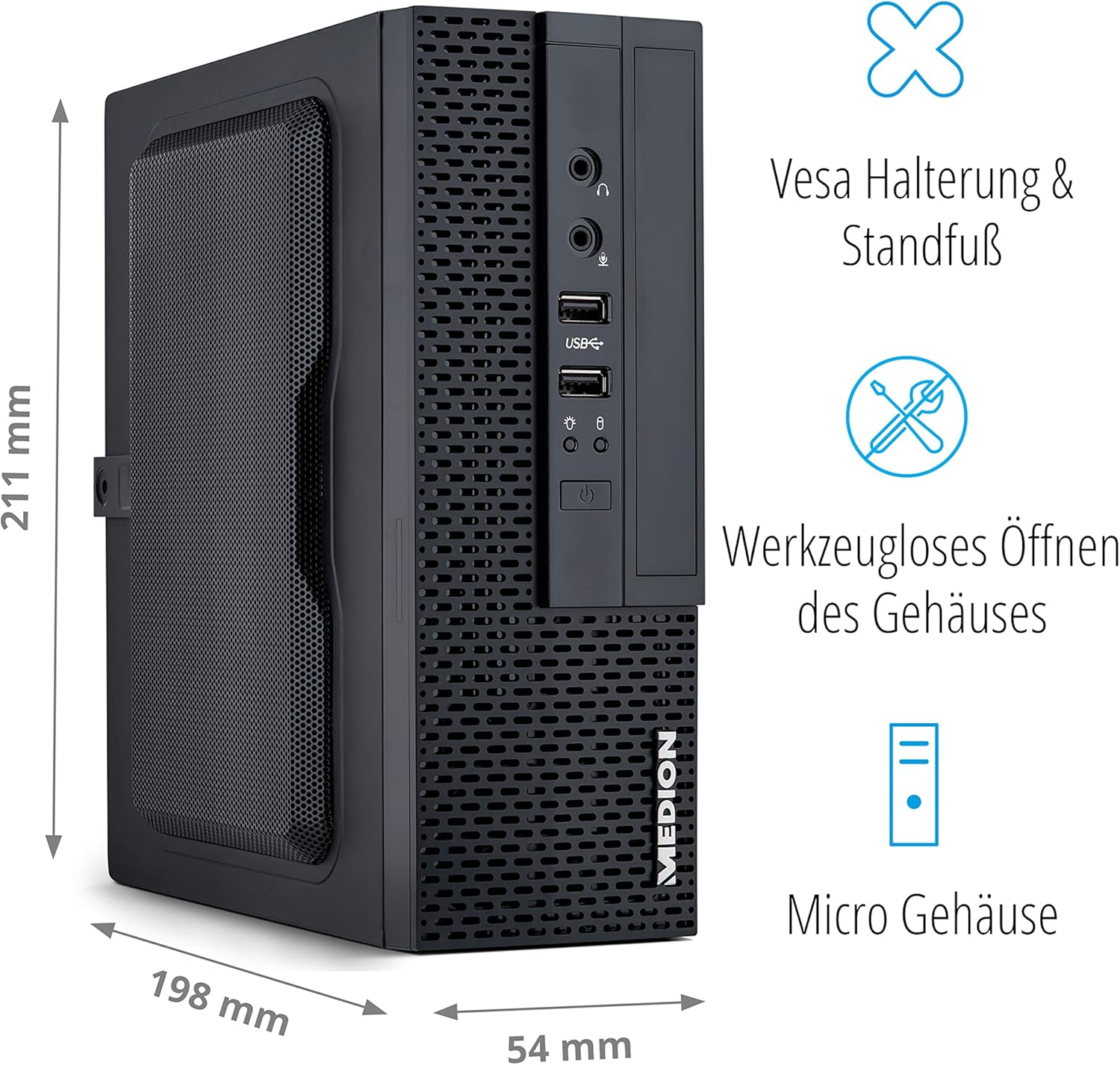
Image 3.3: Illustration showing the compact dimensions (211mm H x 198mm D x 54mm W) and VESA mounting capability of the PC.
The MEDION Akoya S3003 features a compact micro-case design, measuring approximately 211 mm in height, 198 mm in depth, and 54 mm in width. It supports VESA mounting, allowing it to be attached to the back of a compatible monitor or other VESA-compatible surfaces for space-saving installation. The case is designed for tool-less opening for easier access to internal components.

Image 3.4: A VESA mount bracket, illustrating the mounting mechanism.
4. Instruccions de configuració
Follow these steps to set up your MEDION Akoya S3003 Desktop PC.
- Desempaquetar l'ordinador: Traieu amb cura l'ordinador i tots els accessoris de l'embalatge.
- Connecteu els perifèrics:
- Connect your monitor(s) to the HDMI or VGA ports on the rear panel.
- Connect your keyboard and mouse to the available USB ports (front or rear).
- If using wired internet, connect an Ethernet cable to the RJ45 GigaLAN port.
- Connect speakers or headphones to the audio line-out port if desired.
- Connectar l'alimentació: Plug the power adapter into the power adapter connection on the rear panel, then plug the other end into a wall outlet.
- Encès: Press the power button on the front panel to turn on the PC.
- Configuració inicial de Windows: Seguiu les instruccions que apareixen a la pantalla per completar la configuració del Windows 10 Home, incloent-hi l'idioma, la regió, la connexió de xarxa i la creació del compte d'usuari.

Image 4.1: Diagram illustrating how to connect peripherals like monitors, projectors, printers, and headsets to the MEDION Akoya S3003.
5. Instruccions de funcionament
Your MEDION Akoya S3003 comes pre-installed with Windows 10 Home, powered by an Intel Core i5 processor and a 512 GB SSD.
5.1 Funcionament bàsic
- Encès/apagat: Premeu el botó d'engegada per engegar. Per apagar, feu clic al botó Inici del Windows i, a continuació, a Engegada > Apaga.
- Reinicia: Al menú Inici, seleccioneu Energia > Reinicia.
- Mode de repòs: Al menú Inici, seleccioneu Energia > Suspensió.

Processador Intel Core i5

Sistema operatiu Windows 10 Home

Fast SSD Storage

Memòria del sistema (RAM)
5.2 Connectivitat de xarxa
- Connexió per cable: Connect an Ethernet cable to the RJ45 port on the rear panel. Windows will automatically detect the connection.
- Wireless Connection (WLAN):
- Click the network icon in the Windows taskbar.
- Seleccioneu la xarxa Wi-Fi que vulgueu de la llista.
- Introduïu la clau de seguretat de xarxa (contrasenya) si se us demana.
- Feu clic a "Connecta".

Image 5.1: Graphic representing WLAN connectivity.
6. Manteniment
Un manteniment regular ajuda a garantir la longevitat i el rendiment òptim del vostre PC.
- Neteja:
- Use a soft, dry cloth to clean the exterior of the PC.
- Per a la brutícia persistent, lleugerament dampRenta el drap amb aigua. Evita productes químics agressius.
- Use compressed air to gently clear dust from ventilation openings.
- Actualitzacions de programari: Comproveu i instal·leu regularment si hi ha actualitzacions de Windows i controladors per garantir l'estabilitat i la seguretat del sistema.
- Còpia de seguretat de dades: Feu còpies de seguretat periòdiques de les dades importants en un disc dur extern o en un emmagatzematge al núvol per evitar la pèrdua de dades.
- Programari antivirus: Keep your antivirus software (e.g., McAfee, if pre-installed) up to date to protect against malware.

Image 6.1: McAfee antivirus software logo, indicating potential pre-installed security.
7. Solució De Problemes
Aquesta secció tracta problemes comuns que podeu trobar.
| Problema | Causa possible | Solució |
|---|---|---|
| El PC no s'encén. | Cable d'alimentació no connectat, problema amb la presa de corrent. | Ensure power cable is securely connected to both the PC and a working power outlet. Test the outlet with another device. |
| No es mostra cap imatge al monitor. | Monitor not connected, incorrect input selected, monitor power off. | Check monitor cable connections (HDMI/VGA). Ensure monitor is powered on and set to the correct input source. |
| Sense connexió a Internet. | Ethernet cable loose, Wi-Fi disconnected, router issue. | For wired: Check Ethernet cable. For Wi-Fi: Reconnect to network, verify password. Restart your router/modem. |
| PC is running slow. | Massa programes en execució, poc espai al disc, programari maliciós. | Close unnecessary applications. Free up disk space. Run a full system scan with antivirus software. Check for Windows updates. |
8. Especificacions
Key technical specifications for the MEDION Akoya S3003 Desktop PC.
| Característica | Detall |
|---|---|
| Número de model | S30003 |
| Marca | MEDIÓ |
| Processador | Intel Core i5 |
| Sistema operatiu | Windows 10 Home |
| Emmagatzematge | SSD de 512 GB |
| RAM | 8 GB |
| Approximate Case Dimensions (H x D x W) | 211 mm x 198 mm x 54 mm |
| Pes | 2.5 quilos |
| Color | Negre |
| Connectivitat | 4x USB 3.2 Gen 2 Type-A, 1x HDMI-out, 1x VGA, 1x RJ45 GigaLAN, 1x Microphone-In, 1x Audio Line-out, WLAN |
| Característiques especials | VESA mount support, Tool-less case opening |
9. Garantia i Suport
Your MEDION Akoya S3003 Desktop PC is covered by a manufacturer's warranty. For detailed warranty terms and conditions, please refer to the documentation included with your product or visit the official MEDION weblloc.
For technical support, driver downloads, or service inquiries, please contact MEDION customer support through their official channels.
MEDION Official Weblloc: www.medion.com