
1. Introducció
Thank you for choosing the E-ACE 11.26-inch Mirror Dash Cam. This device is designed to enhance your driving safety and provide comprehensive recording capabilities. It features a large, full-screen display, GPS functionality, and advanced monitoring features. This manual provides detailed instructions for installation, operation, and maintenance.
Característiques principals:
- Gravació simultània de 3 canals: Records front, internal, and rear views concurrently.
- Pantalla tàctil completa de 11.26 polzades: Provides a clear and intuitive interface for easy operation and display switching.
- GPS integrat: Records driving speed, direction, and route for playback.
- Visió nocturna avançada: Equipped with a 2-megapixel CMOS sensor and STARVIS technology for clear night recordings.
- Essential Recording Functions: Includes loop recording, emergency recording (G-sensor), and 24-hour parking monitoring.
- Fàcil instal·lació: Designed for simple attachment over your vehicle's existing rearview mirall.
2. Contingut del paquet
Si us plau, verifiqueu que tots els elements que s'enumeren a continuació estiguin inclosos al vostre paquet:
- 1x E-ACE 11.26-inch Mirror Dash Cam (Main Unit)
- 1x Built-in Internal Camera with Infrared Light
- 1x càmera posterior
- 2x Rubber Bands for Fixing
- 1x Rear Camera Mounting Sticker
- 1x Manual d'instruccions en anglès
- 1x Rear Camera Cable (approx. 6 meters)
- 1x GPS Antenna (1 meter)
- 1x Cigarette Lighter Power Cord (approx. 3 meters)
- 1x Micro SD Card (32GB/CLASS10)

Image: All components included in the E-ACE Mirror Dash Cam package.
3. Configuració i instal·lació
Follow these steps to install your E-ACE Mirror Dash Cam:
- Muntar la unitat principal: Secure the main dash cam unit over your vehicle's existing rearview mirror using the provided rubber bands. Ensure it is firmly attached and does not obstruct your view.
- Connectar l'alimentació: Insert the cigarette lighter power cord into your vehicle's cigarette lighter socket. Connect the other end to the Mini USB port on the main dash cam unit. Route the cable neatly to avoid interference with driving.
- Instal·leu la càmera posterior:
- Choose a suitable location on the rear of your vehicle, typically above the license plate or on the rear window.
- Use the provided double-sided tape for attachment. If a more permanent fixture is desired, use the screws (drilling may be required).
- Connect the rear camera cable to the main unit and route it carefully through the vehicle's interior.
- Instal·lació de l'antena GPS: Attach the GPS antenna to a location on your dashboard or windshield with a clear view of the sky. Connect the GPS antenna cable to the designated GPS port on the main unit.
- Inseriu la targeta Micro SD: Insert the included 32GB Micro SD card into the designated slot on the main unit. Ensure it is inserted correctly until it clicks into place.
- Parking Monitoring (Optional): For 24-hour parking monitoring functionality, a separate step-down cable (not included) is required. This cable connects directly to your car's fuse box to provide continuous power.

Image: E-ACE Mirror Dash Cam and its primary accessories.
4. Instruccions de funcionament
This section details the primary functions and how to operate your dash cam.
4.1 Funcionament bàsic
- Encès/apagat: The device will automatically power on and begin recording when your vehicle's engine starts. It will power off automatically when the engine is turned off.
- Control de pantalla: The 11.26-inch display is a full touch screen. Swipe the screen up, down, left, or right to adjust the camera view or switch between different display modes (front, internal, rear camera views).
- Canvi de càmera Views: On the display, touch the car icon once to cycle through front, internal, and rear camera views.
4.2 Funcions d'enregistrament
- Enregistrament en bucle: The dash cam continuously records video in segments (1, 2, or 3 minutes). When the SD card is full, the oldest unlocked files es sobreescriuen.
- Enregistrament d'emergència (sensor G): In the event of a sudden impact or collision, the built-in G-sensor automatically detects the event and locks the current video segment, preventing it from being overwritten by loop recording.
- Monitorització d'aparcament les 24 hores: With a connected step-down cable, the dash cam can monitor your vehicle even when parked. It will automatically start recording if an impact is detected.
- Gravació per lapse de temps: This feature records video at a lower frame rate, compressing long periods into shorter video files, useful for extended parking monitoring.
- Gravació de veu: The built-in microphone allows for audio recording during driving. This can be enabled or disabled via the settings.

Image: Display showing simultaneous recording from front, internal, and rear cameras.

Image: Explanation of 24-hour parking monitoring and GPS functionality.

Image: Features like G-sensor, voice recording, and reverse assist.
5. Manteniment
Un manteniment adequat garanteix la longevitat i el rendiment òptim de la càmera del salpicader.
- Neteja de les lents i la pantalla: Use a soft, lint-free cloth to gently wipe the camera lenses and the display screen. Avoid using abrasive cleaners or solvents that could damage the surfaces.
- Gestió de la targeta SD: Periodically format the Micro SD card (at least once a month) to prevent data corruption and ensure smooth recording. Back up any important files abans de formatar.
- Actualitzacions de firmware: Check the E-ACE official website for any available firmware updates. Follow the instructions carefully to update the device.
- Consideracions sobre la temperatura: Avoid exposing the dash cam to extreme temperatures for extended periods, as this can affect battery life and electronic components.
6. Solució De Problemes
If you encounter any issues with your E-ACE Mirror Dash Cam, refer to the following common problems and solutions:
| Problema | Possible causa/solució |
|---|---|
| El dispositiu no s'encén. | Ensure the cigarette lighter power cord is securely connected and the vehicle's power outlet is functioning. Check the fuse in the cigarette lighter plug. |
| Screen flickers or device stops working. | This could indicate a hardware issue. Please contact customer support for assistance. |
| GPS signal is weak or slow to acquire. | Assegureu-vos que l'antena GPS estigui muntada en un lloc amb claredat view of the sky, away from obstructions. Environmental factors (e.g., tunnels, dense urban areas) can affect signal strength. |
| Loop recording is not smooth or freezes. | Format the Micro SD card regularly. Ensure you are using a high-speed (Class 10 or higher) SD card. If the issue persists, the SD card may be faulty and require replacement. |
| Rear camera image is not displayed. | Comproveu la connexió del cable de la càmera posterior tant a la càmera posterior com a la unitat principal. Assegureu-vos que el cable no estigui malmès. |
7. Especificacions
| Característica | Especificació |
|---|---|
| Marca | E-ACE |
| Model | B09Q2RT7S3 |
| Mida de la pantalla | 11.26 inches (LCD Touch Screen) |
| Resolució de captura de vídeo | 1080p (Front, Internal, Rear) |
| Angle de la càmera frontal | 170° |
| Internal Camera Angle | 330° |
| Angle de la càmera posterior | 150° |
| Tecnologia de sensors òptics | CMOS |
| Característiques especials | Built-in GPS, Night Vision, G-Sensor, Loop Recording, Parking Monitor, WDR, HDR |
| Tipus de muntatge | Clip-on (over rearview mirall) |
| Components inclosos | User Manual, GPS Antenna, 32GB Micro SD Card |
| Dimensions del producte | 29 cm (A) x 7 cm (Alt) x 1.5 cm (F) |
| Dimensions del paquet | 33.4 x 11.4 x 5.9 cm; 920 g |
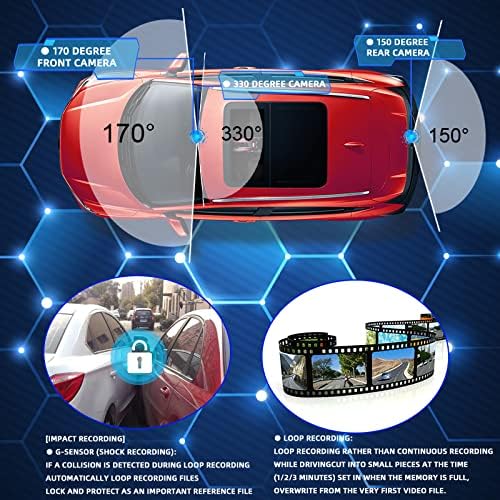
Image: Camera viewing angles for comprehensive coverage.
8. Garantia i Suport
E-ACE stands behind the quality of its products. Your Mirror Dash Cam comes with the following:
- Garantia de qualitat de 2 anys: We provide a 2-year warranty covering manufacturing defects.
- 1-Month Full Refund/Exchange: If you are not satisfied with your purchase within one month, you are eligible for a full refund or exchange.
For any questions, technical support, or warranty claims, please contact our customer service team. We are committed to providing prompt assistance.