
1. Introducció
This manual provides essential information for the safe and efficient use of your LDNIO 65W 4-Port USB C Charger, Model A4808Q. Please read this manual thoroughly before using the product and retain it for future reference.
2. Informació de seguretat
- No exposeu el carregador a líquids, humitat ni temperatures extremes.
- Eviteu deixar caure el carregador ni sotmetre'l a impactes forts.
- Do not disassemble, modify, or attempt to repair the charger. This may void the warranty and pose safety risks.
- Use only compatible cables that support fast charging speeds for optimal performance and safety.
- Assegureu-vos d'una ventilació adequada al voltant del carregador durant l'ús.
- Desendolleu el carregador de la presa de corrent quan no l'utilitzeu o durant tempestes elèctriques.
3. Què hi ha a la caixa
- 1 x LDNIO 65W 4-Port USB C Charging Station (Model A4808Q)
- 1 x 5ft Extension Power Cable
4. Producte acabatview
The LDNIO 65W 4-Port USB C Charger is designed to provide efficient and fast charging for multiple devices simultaneously. It features an LED display to show real-time charging information and multiple safety protections.
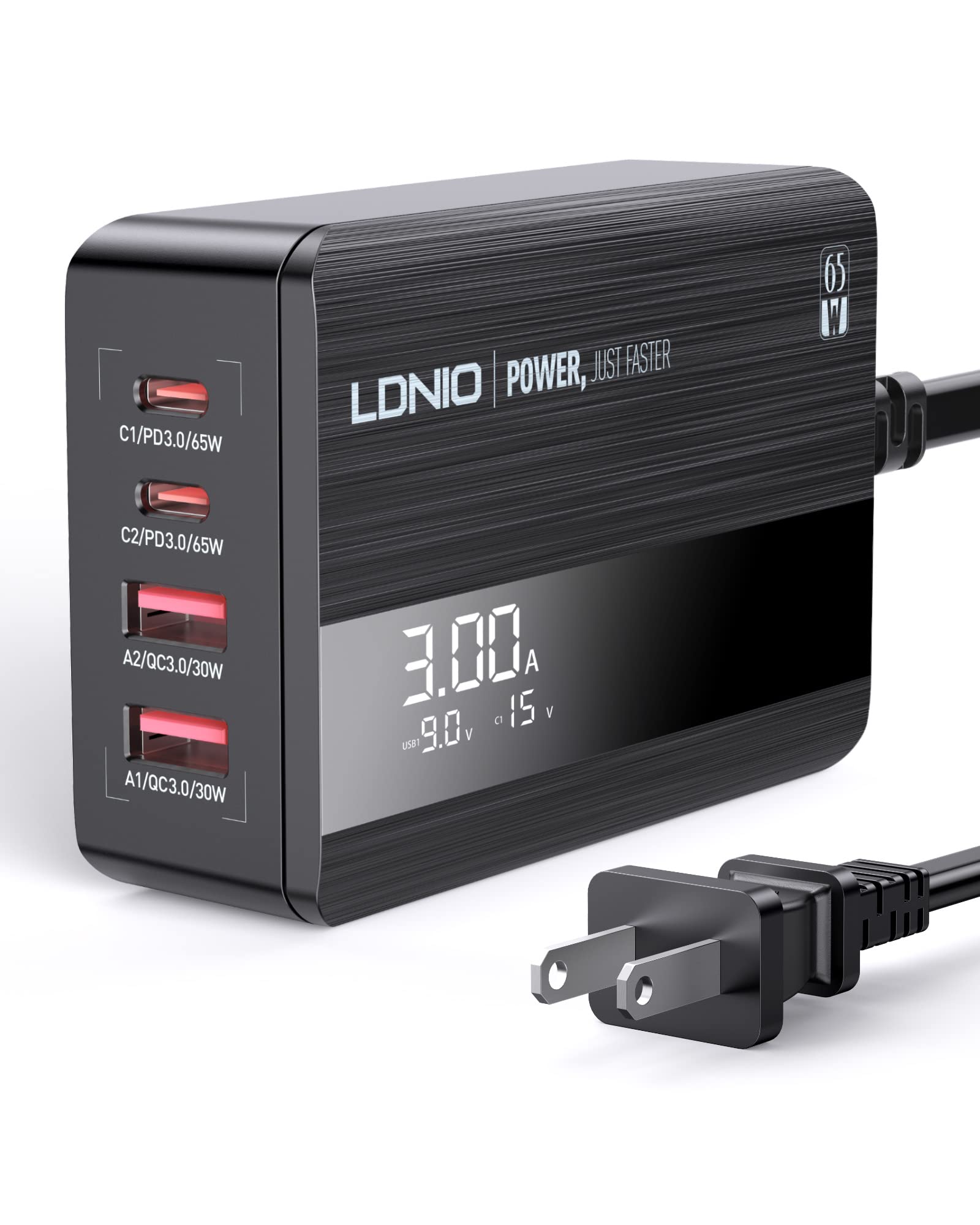
Image: The LDNIO 65W 4-Port USB C Charger connected to a laptop, tablet, and smartphone, demonstrating its multi-device charging capability.
4.1 Característiques clau
- Càrrega de 4 ports: Two USB-C ports and two USB-A ports.
- Potència total de 65 W: Delivers up to 65W of power for fast charging compatible devices.
- Pantalla LED: Mostra el volum en temps realtage i amperage for connected devices.
- Múltiples protocols de càrrega ràpida: Supports Power Delivery 3.0 (PD3.0), Quick Charge 4+ (QC4.0), and PPS.
- Proteccions de seguretat: Includes over-power, over-voltage, protecció contra sobrecàrrega i sobretemperatura.

Imatge: Una imatge detallada view of the charger's ports, showing the power delivery capabilities for each: C1/PD3.0/65W, C2/PD3.0/20W, A2/QC3.0/30W, A1/QC3.0/30W.

Image: A graphic highlighting the charger's safety features, including over-power, over-voltage, protecció contra sobrecàrrega i sobretemperatura.
Video: An official product video demonstrating the LDNIO 65W 4-Port USB C Charging Station, showcasing el seu disseny i funcionalitat.
5. Configuració
- Desembalar: Carefully remove the LDNIO 65W 4-Port USB C Charger and the 5ft extension power cable from its packaging.
- Connecteu el cable d'alimentació: Insert the included 5ft extension power cable into the power input port on the back of the charging station.
- Connecteu-vos a la presa de corrent: Plug the other end of the power cable into a standard wall outlet (100-240V, 50-60Hz). The LED display on the charger will illuminate.
- Place Charger: Position the charger on a stable, flat surface, ensuring adequate ventilation. The anti-slip rubber feet on the bottom help prevent it from sliding.
6. Instruccions de funcionament
6.1 Dispositius de càrrega
- Connexió de dispositius: Use appropriate USB charging cables (not included) to connect your devices to the available USB-C (C1, C2) or USB-A (A1, A2) ports on the charger.
- Pantalla LED del monitor: The LED display will show the real-time current (Amps) i voltage (Volts) for the active charging ports. The display cycles through the information for each connected port.
- Càrrega multidispositiu: The charger can charge up to four devices simultaneously. When a new device is connected, the charger may briefly pause charging on other devices to intelligently redistribute power based on each device's protocol. This is normal behavior to protect your device's battery.

Image: The LDNIO 65W charger positioned on a desk, efficiently charging a laptop, tablet, and smartphone, illustrating its desktop use and cable management benefits.
6.2 Comprensió de la pantalla LED
The LED display provides dynamic feedback on the charging status. It typically shows the current (A) and voltage (V) for each active port. When multiple ports are in use, the display will cycle through the information for each port, often indicated by a brief flicker on the corresponding port's display value.
Video: An official product video demonstrating the LDNIO 4-Port 65W USB C Charger, highlighting its features and the LED display in action.
7. Manteniment
- Neteja: Desconnecteu el carregador de la presa de corrent abans de netejar-lo. Feu servir un drap suau i sec per netejar la superfície. No utilitzeu netejadors líquids ni aerosols.
- Emmagatzematge: Guardeu el carregador en un lloc fresc i sec, allunyat de la llum solar directa i de temperatures extremes quan no l'utilitzeu.
- Cura del cable: Avoid bending or crimping the power cable or charging cables excessively.
8. Solució De Problemes
- El dispositiu no es carrega: Ensure the charger is properly plugged into a live power outlet and the power cable is securely connected to the charger. Verify that the charging cable is fully inserted into both the charger and your device.
- Càrrega lenta: Check if your device supports fast charging and if the cable you are using is rated for fast charging speeds. Third-party cables may sometimes result in slower charging. The charging power is determined by your device's capabilities and the maximum power it can accept.
- LED display flickering: This is normal when multiple devices are connected. The charger is intelligently redistributing power, and the display cycles through the current and voltage information for each port.
- El carregador s'escalfa: It is normal for the charger to become warm during operation, especially when charging multiple devices or high-power devices. If it becomes excessively hot, disconnect it immediately and contact support.
9. Especificacions
| Característica | Especificació |
|---|---|
| Número de model | A4808Q |
| Ports USB totals | 4 (2x USB-C, 2x USB-A) |
| Wat totaltage | Màxim 65W |
| Sortida USB-C (C1) | PD3.0 65W (5V/3A, 9V/3A, 12V/3A, 15V/3A, 20V/3.25A) |
| Sortida USB-C (C2) | PD3.0 20W (5V/3A, 9V/2.22A, 12V/1.67A) |
| USB-A Output (A1/A2) | QC3.0 30 W (5 V/3 A, 9 V/2 A, 12 V/1.5 A) |
| Entrada Voltage | 100-240V ~ 50-60Hz, 1.5A Max |
| Material | Policarbonat |
| Pes | 0.28 quilos |
| Components inclosos | 65W USB C Charging Station, 5ft Extension Power Cable |
10. Garantia i Suport
LDNIO products are manufactured with high-quality standards. For warranty information or technical support, please refer to the warranty card included with your product or visit the official LDNIO weblloc web. Conserveu el rebut de compra com a comprovant de compra per a reclamacions de garantia.