
1. Introducció
The RunSTAR Smart Scale FG2116WB is designed to provide comprehensive body composition analysis, offering more than just weight measurement. Equipped with advanced technology, this digital scale helps you track various health metrics and monitor your progress over time through a dedicated smartphone application.
Les característiques clau inclouen:
- Alta precisió: Features 4 high-precision G-shape sensors and 4 high-sensitive electrodes for accurate readings with a division of 0.2lb/100g, up to a maximum capacity of 400lb/180kg.
- Dades exhaustives: Measures 13 essential body data points including Weight, BMI, Body Fat, Subcutaneous Fat, Body Water, Protein, Muscle Mass, Bone Mass, Visceral Fat, Skeletal Muscle, BMR, and Body Age.
- Seguiment intel·ligent: The Starfit app provides detailed charts and saves historical data, allowing you to track body composition changes over days, weeks, months, or years.
- Suport multiusuari: Supports up to 24 user profiles, automatically recognizing individuals when they step on the scale.
- Fitness App Integration: Syncs health data with popular third-party fitness applications such as Apple Health, Google Fit, Fitbit, and Samsung Health.

Image 1: The RunSTAR Smart Scale FG2116WB, showcasing its sleek design and integration with a smartphone app.
2. Configuració
2.1 Instal·lació de la bateria
The RunSTAR Smart Scale requires 4xAAA batteries (included). To install or replace batteries:
- Localitzeu el compartiment de la bateria a la part inferior de la bàscula.
- Obriu la tapa del compartiment de la bateria.
- Remove the insulator strip from the batteries if it's a new scale.
- Insert the 4xAAA batteries, ensuring correct polarity.
- Tanqueu bé la tapa del compartiment de la bateria.
2.2 App Download and Registration
The Starfit app is essential for accessing and tracking your body composition data. Follow these steps to download and register:
- Scan the QR code provided in the Quick Start Guide or search for "Starfit" on the App Store (iOS) or Google Play (Android).
- Download and install the Starfit app on your smartphone.
- Open the app and complete the registration process by creating a new user account or logging into an existing one.
- Add your personal data such as age, height, and gender. This information is crucial for accurate body composition calculations.
2.3 Emparellament de dispositius
To connect your scale to the Starfit app:
- Ensure Bluetooth is enabled on your smartphone. For Android users, GPS and Location services must also be ON along with Bluetooth.
- Open the Starfit app. Navigate to "Account" and then select "My Devices".
- Toqueu la icona "+" a la cantonada superior dreta per afegir un dispositiu nou.
- The app will search for smart devices. When "Runstar-RX" (the scale's Bluetooth name) appears, tap to connect.
- A connected logo will appear on the scale screen once pairing is successful.

Image 2: The Starfit app interface demonstrating connectivity with other popular fitness applications.
3. Instruccions de funcionament
3.1 Col·locació d'escala
For accurate measurements, place the scale on a hard, flat surface. Avoid placing it on soft surfaces like carpets or rugs, as this can affect precision.
3.2 Prendre una mesura
To take a body composition measurement:
- Gently step on the scale to activate it. The LED screen will display '0.0'.
- Step off the scale and wait for the display to return to '0.0'.
- Step back onto the scale with bare, dry feet, ensuring both feet make full contact with the metal sensors.
- Stand still on the scale until the display locks your weight and blinks 3 times.
- Your detailed body analysis data will automatically sync to the Starfit app.
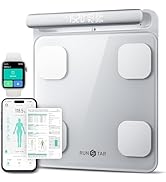
Image 3: Proper foot placement on the scale's sensors for accurate body composition analysis.
3.3 Canvi d'unitats
To switch between measurement units (kg/lb/st):
- Turn the scale over to access the underside.
- Locate the unit button near the battery compartment.
- Press the button to cycle through the available units until your desired unit is displayed.
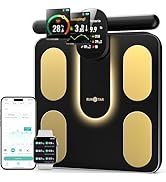
Image 4: Location of the unit change button on the back of the scale.
4. Comprensió de les vostres dades
The RunSTAR Smart Scale, in conjunction with the Starfit app, provides a comprehensive analysis of your body composition. The app displays 13 essential body data points:
- Pes: Your current body mass.
- IMC (índex de massa corporal): Una mesura del greix corporal basada en l'alçada i el pes.
- Greix corporal: Percenttage of total body weight that is fat.
- Greix subcutani: Greix emmagatzemat directament sota la pell.
- Aigua corporal: Percenttage of total body weight that is water.
- Proteïna: Percenttage of total body weight that is protein.
- Massa muscular: Total weight of muscle in your body.
- Massa òssia: Total weight of bone in your body.
- Greix visceral: Fat stored around the organs in your abdomen.
- Múscul esquelètic: Muscle attached to bones that allows movement.
- BMR (taxa metabòlica basal): The number of calories your body needs to function at rest.
- Edat corporal: An estimation of your body's biological age based on your health metrics.

Image 5: Visual representation of the 13 essential body measurements tracked by the scale.
4.1 Tracking Progress with the Starfit App
The Starfit app is designed to help you visualize and understand your health trends:
- The app provides detailed charts and graphs to illustrate changes in your body composition over time.
- Tu pots view historical data to monitor your progress and identify trends.
- The app includes an Athlete Mode for individuals with higher fitness levels, offering specialized analysis.

Image 6: The Starfit app's tracking feature, displaying body data fluctuations over time.
4.2 Funcionalitat multiusuari
L'escala admet fins a 24 usuaris professionalsfiles, making it suitable for families or shared environments. The scale automatically recognizes the user when they step on it, eliminating the need for manual selection.

Image 7: The multi-user feature of the Starfit app, allowing up to 24 profiles.
5. Manteniment
To ensure the longevity and accuracy of your RunSTAR Smart Scale:
- Netegeu la bàscula amb una mica damp tela. No utilitzeu productes químics de neteja.
- No submergiu l’escala en aigua.
- Avoid dropping or shaking the scale.
- Always keep your scale in a horizontal position when not in use.
6. Solució De Problemes
6.1 Problemes de connexió de l'aplicació
If your Starfit app is not connecting with the scale:
- Ensure Bluetooth is ON on your smartphone.
- For Android devices, ensure GPS & Location services are ON along with Bluetooth.
- Verify the scale is ON and displaying '0.00' during the pairing process.
- If issues persist, try reinstalling the Starfit app and logging in, ensuring all requested authorizations are granted.
6.2 Inaccurate or Inconsistent Readings
If you experience inaccurate or inconsistent readings:
- Ensure the scale is placed on a hard, flat surface, not carpet or uneven flooring.
- The LED screen must display '0.00' before each reading. If the scale has been moved, recalibrate it by stepping on it briefly until '0.00' is displayed (ignore the first reading).
- Ensure your personal data (age, height, gender) entered in the app is correct, as this affects body composition calculations.
- For body fat measurements, ensure bare and dry feet are making full contact with all metal sensors.
- Body weight can fluctuate throughout the day due to food and liquid intake. For best accuracy, weigh yourself at the same time each morning on an empty stomach.
6.3 Low Battery / Overload Indication
The scale's display will show specific indicators for low battery or overload conditions:
- "Lo": Indicates low battery. Replace the 4xAAA batteries.
- "Er-1": Indicates overload. The scale's maximum capacity is 400 lbs (180 kg).
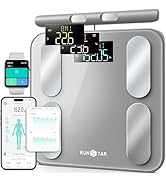
Image 8: Display indicators for low battery ('Lo') and overload ('Er-1').
7. Especificacions
| Característica | Detall |
|---|---|
| Marca | RunSTAR |
| Número de model | FG2116WB |
| Color | Negre |
| Tipus de visualització | LED |
| Límit de pes | 400 lliures (180 kg) |
| Exactitud de lectura | +/- 0.2lb/100g |
| Material | Vidre temperat |
| Font d'alimentació | 3 x piles AAA |
| Dimensions del producte | 13.1 x 12.79 x 1.96 polzades |
| Pes de l'article | 3.58 lliures |
| UPC | 860007976537 |
8. Garantia i Suport
To activate your product warranty, please visit the official RunSTAR website or scan the QR code provided in the Quick Start Guide within 15 days of purchase.
For any questions, concerns, or support needs, please contact RunSTAR customer service:
- Correu electrònic: service@runstar.store
9. Guia oficial del producte en vídeo
Watch the official product video for a visual guide on the RunSTAR Smart Scale's features and usage.
Vídeo 1: Un oficial acabatview of the RunSTAR Smart Scale, demonstrating its design and key functionalities.