
1. Introducció
Thank you for choosing the TOTAL TMT460013 Digital Multimeter. This device is designed for safe and accurate measurement of various electrical parameters, including AC/DC voltage, DC current, resistance, and continuity. It is an essential tool for electricians, technicians, and hobbyists for electrical testing and troubleshooting. Please read this manual thoroughly before use to ensure proper operation and safety.
2. Informació de seguretat
Always adhere to basic safety precautions when using this multimeter to reduce the risk of fire, electric shock, or personal injury. Failure to follow these instructions can result in severe injury or damage to the device.
- No ho facis exceed the maximum input values specified for each measurement range.
- No ho facis use the multimeter if it appears damaged or if the test leads are compromised.
- Sempre ensure the test leads are correctly connected to the appropriate input jacks for the desired measurement.
- Mai attempt to measure voltage on a circuit with the function switch set to current, resistance, or continuity mode.
- Sigueu prudents quan es treballa amb el voltagper sobre de 30 V CA RMS, 42 V pic o 60 V CC, ja que representen un perill de descàrrega elèctrica.
- Eliminar the test leads from the circuit before changing the function switch position.
- Substituïu the battery immediately when the low battery indicator appears to ensure accurate readings.
- Adhereix-te to local and national safety codes.
3. Producte acabatview
The TOTAL TMT460013 Digital Multimeter is a compact and robust device designed for various electrical measurements. Its intuitive interface and clear display make it easy to use for both professionals and DIY enthusiasts.
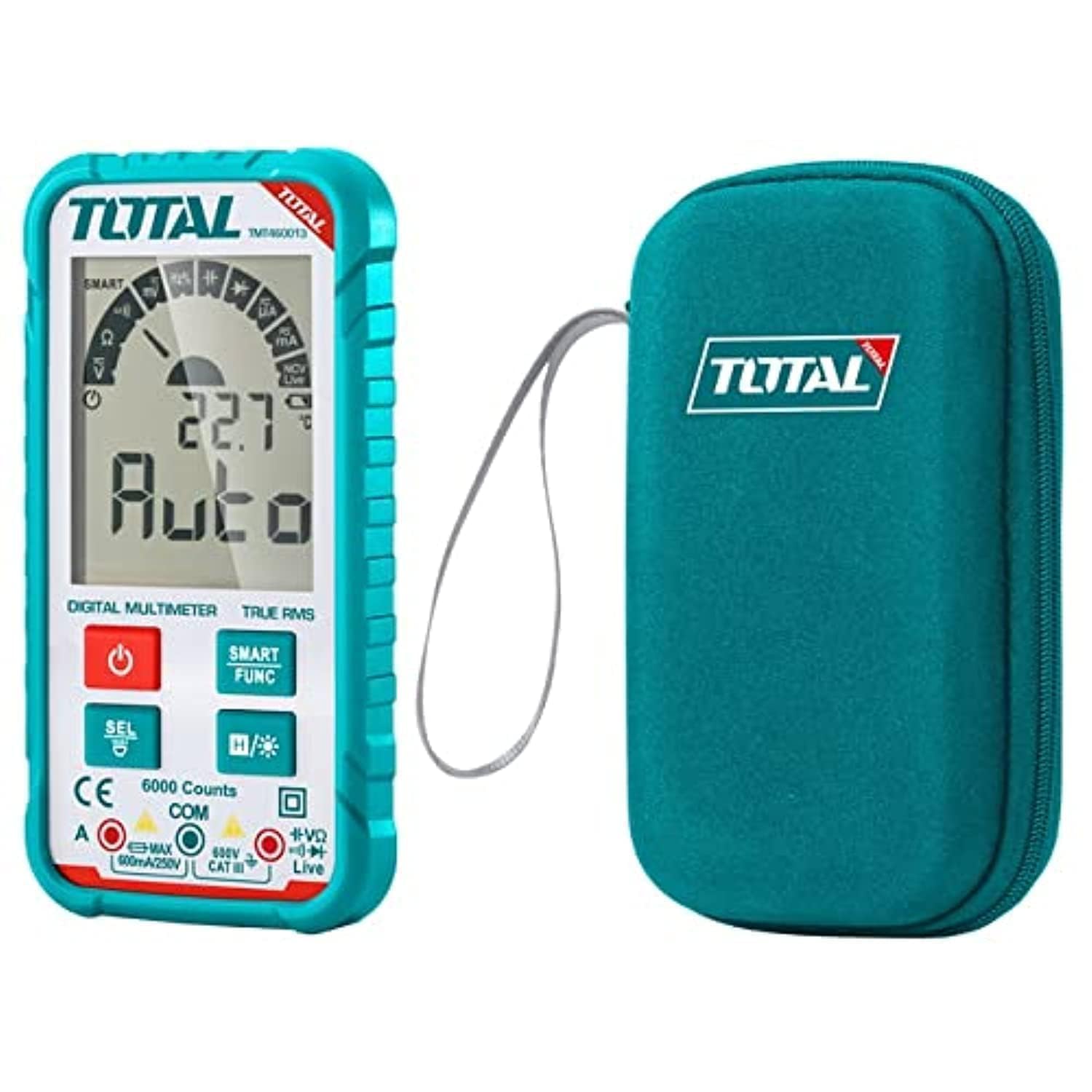
Figura 1: Frontal view of the TOTAL TMT460013 Digital Multimeter, showing the LCD display, function buttons, and input terminals.
Controls i pantalla
- Pantalla LCD: Mostra lectures de mesura, unitats i indicadors de funció.
- Botó d'engegada (vermell): Press to turn the multimeter ON or OFF.
- SMART FUNC Button (Green): Cycles through different measurement functions within a mode (e.g., AC/DC voltage, resistència/continuïtat).
- HOLD Button (Blue): Freezes the current reading on the display. Press again to release.
- Preses d'entrada: Terminals for connecting test leads (COM, VΩmA).
4. Configuració
4.1 Instal·lació de la bateria
The multimeter is powered by internal batteries. Ensure batteries are correctly installed before first use or when replacing them.
- Turn off the multimeter by pressing the Power button.
- Localitzeu la tapa del compartiment de la bateria a la part posterior de la unitat.
- Feu servir un tornavís per afluixar el(s) cargol(s) que fixen la coberta.
- Remove the cover and insert the batteries, observing correct polarity (+ and -).
- Torneu a col·locar la tapa del compartiment de la bateria i estrenyeu el(s) cargol(s).
4.2 Connexió dels cables de prova
Proper connection of test leads is crucial for accurate and safe measurements.
- Introduïu el cable de prova negre al COM Presa d'entrada (comuna).
- Introduïu el cable de prova vermell al VΩmA presa d'entrada per a volumtage, resistance, or current measurements.
- Ensure connections are firm before proceeding with any measurements.
5. Instruccions de funcionament
5.1 Engegada/apagada
Press the red Power button once to turn the multimeter ON. Press and hold the Power button for a few seconds to turn it OFF.
5.2 Selecting Measurement Functions
The TMT460013 features an auto-ranging function, simplifying measurement selection. The device will automatically detect the type of measurement (AC/DC voltage, resistance, continuity) when the leads are connected. Use the SMART FUNC button to cycle between specific functions if needed (e.g., between AC and DC voltage, or resistance and continuity).
5.3 Prendre mesures
- VoltagMesura (CA/CC):
Connect the test leads in parallel to the circuit or component you wish to measure. The multimeter will automatically detect AC or DC voltage. - Mesura de la resistència:
Ensure the circuit is de-energized before measuring resistance. Connect the test leads across the component. - Prova de continuïtat:
Ensure the circuit is de-energized. Connect the test leads across the component or wire. A low resistance (typically less than 50Ω) will indicate continuity, often accompanied by an audible beep. - Mesura de corrent DC:
ADVERTIMENT: To measure current, the multimeter must be connected in series with the circuit. Ensure the circuit is de-energized before connecting the multimeter. Break the circuit, then connect the red lead to the higher potential side and the black lead to the lower potential side.
5.4 Funció de retenció de dades
Premeu el blau MANTENIM button to freeze the current reading on the display. This is useful for recording measurements in difficult-to-read locations. Press the button again to release the hold and resume live readings.
6. Manteniment
6.1 Neteja
Netegeu el cas amb l'anunciamp cloth and mild detergent. Do not use abrasives or solvents. Ensure the device is completely dry before use.
6.2 Substitució de la bateria
When the low battery indicator appears on the display, replace the batteries as described in Section 4.1. Always use the specified battery type.
6.3 Emmagatzematge
If the multimeter is not used for an extended period, remove the batteries to prevent leakage and damage. Store the device in a cool, dry place away from direct sunlight and extreme temperatures.
7. Solució De Problemes
Consulteu la taula següent per veure els problemes habituals i les seves solucions.
| Problema | Causa possible | Solució |
|---|---|---|
| Sense pantalla o pantalla tènue | Piles baixes o gastades; instal·lació incorrecta de la bateria | Canvieu les piles; comproveu la polaritat de la pila |
| Lectures incorrectes | Incorrect function selected; Poor test lead connection; Damaged test leads | Ensure correct function; Check lead connections; Replace damaged leads |
| No hi ha bip de continuïtat | Circuit not continuous; Multimeter not in continuity mode | Check circuit for breaks; Select continuity function using SMART FUNC button |
| Multimeter does not respond | Internal fault; Completely drained battery | Replace batteries; Contact customer support if issue persists |
8. Especificacions
Key technical specifications for the TOTAL TMT460013 Digital Multimeter.
| Característica | Detall |
|---|---|
| Fabricant | Total |
| Número de model | TMT460013 |
| Tipus de mesura | Multímetre |
| Font d'alimentació | Funciona amb bateria |
| Pes de l'article | 209 g (0.21 quilograms) |
| Dimensions del producte | 10 x 20 x 37 cm |
| Color | Turquesa |
| Normes de seguretat | UL 61010-1, IEC 61010-2-030 |
| ASIN | B09QZWHFNR |
| GTIN | 06941639846475 |
9. Garantia i Suport
For warranty information and technical support, please refer to the documentation provided with your purchase or visit the official TOTAL Tools weblloc web. Conserveu el rebut de compra com a comprovant de compra per a qualsevol reclamació de garantia.