
Introducció
This manual provides detailed instructions for the proper use and maintenance of your iCarsoft CR Max Professional Multibrand Automotive Diagnostic Scanner. Please read this manual thoroughly before operating the device to ensure correct usage and to maximize its functionality.

Figure 1: The iCarsoft CR Max diagnostic scanner, its OBDII cable, and protective carrying case.
1. Configuració
1.1 Desembalatge i contingut del paquet
Carefully unpack all items from the box. Verify that all components are present according to the packing list.

Figure 2: Package contents typically include the CR Max unit, main cable, data cable, external power adapter, quick guide, and hardcopy user's manual.
1.2 Encès inicial
- Connect the external power adapter to the CR Max unit and a power outlet.
- Premeu el botó d'engegada per encendre el dispositiu.
- Follow the on-screen prompts for initial setup, including language selection and Wi-Fi connection.
1.3 Actualitzacions de programari
It is recommended to update the software regularly to ensure access to the latest vehicle models and diagnostic functions. The CR Max supports one-click free updates via Wi-Fi.
- Assegureu-vos que el dispositiu estigui connectat a una xarxa Wi-Fi estable.
- Navigate to the 'Upgrade' icon on the main menu.
- Seguiu les instruccions que apareixen a la pantalla per descarregar i instal·lar les actualitzacions disponibles.

Figure 3: The CR Max features a 7-inch screen, 4-core 1.3GHz CPU, and a 5000mAh battery for extended operation and smooth performance.
2. Funcionament
2.1 Connexió al vehicle
- Locate the vehicle's OBDII port, typically under the dashboard on the driver's side.
- Connect the CR Max main cable to the OBDII port.
- Gireu el contacte del vehicle a la posició 'ON' (motor apagat).
- The CR Max will automatically power on and attempt to establish communication with the vehicle.
2.2 Navegació al menú principal
The CR Max features a user-friendly interface. Use the touchscreen to navigate through the main menu options:
- Diagnòstic: Access vehicle-specific diagnostic functions.
- Servei: Perform various maintenance and reset functions.
- Vehicle History: Review informes de diagnòstic anteriors.
- Actualització: Update software and vehicle data.
- Configuració: Configure device preferences.
2.3 Funcions OBDII
The CR Max supports comprehensive OBDII functions for general vehicle diagnostics:
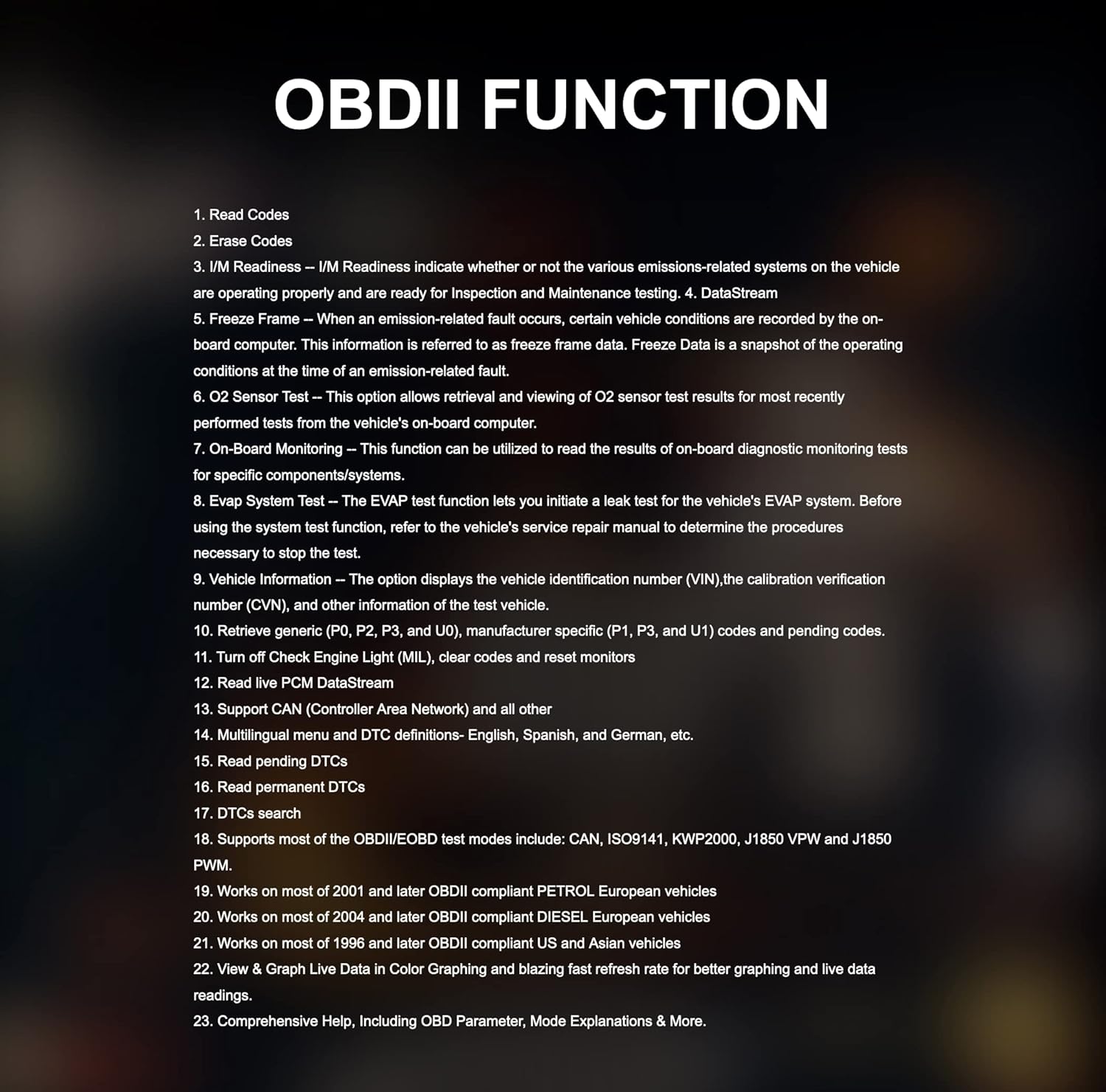
Figure 4: Key OBDII functions include reading and erasing codes, I/M readiness, DataStream, Freeze Frame, O2 Sensor Test, On-Board Monitoring, EVAP System Test, and Vehicle Information.
- Llegir codis: Displays Diagnostic Trouble Codes (DTCs) from the vehicle's control modules.
- Esborra codis: Clears DTCs from the vehicle's memory.
- Preparació I/M: Checks if various emissions-related systems are operating correctly.
- DataStream: Displays live data parameters from the vehicle.
- Congelar fotograma: Shows a snapshot of operating conditions when an emission-related fault occurred.
- Informació del vehicle: Recupera el número d'identificació del vehicle (VIN) i altra informació rellevant.
2.4 Special Functions and Maintenance Services
The CR Max offers over 49 comprehensive maintenance services for various vehicle systems:

Figure 5: The CR Max provides a wide range of maintenance services including Oil Reset, EPB Reset, Transmission Reset, Injector Coding, Airbag Reset, TPMS Reset, and many more.
- Reinicialització d'oli: Reinicia la llum de servei d'oli després d'un canvi d'oli.
- Restabliment de l'EPB: Deactivates and reactivates the Electronic Parking Brake system for replacement.
- Restabliment del BMS: Registers a new battery to the Battery Management System.
- Restabliment de SAS: Calibra el sensor d'angle de direcció.
- Regeneració del DPF: Initiates the Diesel Particulate Filter regeneration process.
- Codificació de l'injector: Programs new injector control parameters.
- Restabliment de TPMS: Reprograms TPMS sensor IDs.
- Sagnat de l'ABS: Realitza procediments de purgat de frens ABS.
2.5 Actuation Tests / Bi-directional Control
The CR Max supports bi-directional control, allowing the tool to send commands to vehicle systems and components to perform active tests.

Figura 6: Examples of bi-directional control tests include Injector Test, ABS Pump Motor Test, EV-AP Valve Test, Throttle Position Actuator Test, Cooling Fan Test, and Headlight Test.
2.6 Smart Auto VIN & Auto Scan
The device can automatically detect vehicle identification information (VIN) in seconds. If auto scan is not supported for a specific vehicle, manual VIN input or selection is available.

Figure 7: The Smart Auto VIN feature streamlines vehicle identification for quicker diagnostics.
2.7 Visualització de dades en directe
The CR Max can display live data in various formats, including 4-in-1 graphic displays, for detailed analysis of vehicle parameters.

Figure 8: Multiple data streams can be viewed simultaneously in a graphical format for comprehensive monitoring.
2.8 Informe de diagnòstic
After completing diagnostics, the CR Max can generate detailed reports that can be customized and printed, aiding in identifying the root cause of faults.

Figure 9: The diagnostic report feature allows for documentation and sharing of vehicle diagnostic results.
2.9 Cobertura del vehicle
The iCarsoft CR Max supports a wide range of car brands, covering Asian-based cars since 1996, USA-based cars since 1996, and EU-based cars since 2001.

Figure 10: The CR Max offers extensive compatibility with various vehicle manufacturers and models.
3. Manteniment
3.1 Actualitzacions de programari
Regular software updates are crucial for maintaining optimal performance and expanding vehicle coverage. Refer to Section 1.3 for detailed instructions on updating your device.
3.2 Neteja del dispositiu
Utilitzeu un suau, damp cloth to clean the screen and exterior of the CR Max. Avoid using abrasive cleaners or solvents that could damage the device.
3.3 Cura de la bateria
The CR Max is equipped with a 5000mAh lithium-polymer battery. To prolong battery life:
- Eviteu descarregar completament la bateria amb freqüència.
- Guardeu el dispositiu en un lloc fresc i sec quan no el feu servir durant períodes prolongats.
- Charge the device using only the provided power adapter.

Figure 11: The CR Max supports battery testing and registration functions for proper vehicle maintenance.
4. Solució De Problemes
This section addresses common issues you might encounter with your iCarsoft CR Max.
4.1 El dispositiu no s'encén
- Ensure the device is fully charged or connected to the external power adapter.
- Verify that the power adapter is securely connected to both the device and a working power outlet.
- If connected to a vehicle, ensure the vehicle's ignition is in the 'ON' position.
4.2 Error de comunicació amb el vehicle
- Check that the OBDII cable is securely connected to both the CR Max and the vehicle's OBDII port.
- Confirm the vehicle's ignition is 'ON' (engine off).
- Prova de connectar-te a un vehicle diferent per descartar un problema específic del vehicle.
- Ensure the software is up to date. Outdated software may not support newer vehicle models.
4.3 Specific Function Not Working
- Some functions are vehicle-specific. Verify that the function is supported for your vehicle's make, model, and year.
- Assegureu-vos que el programari estigui actualitzat a la darrera versió.
- Consult the iCarsoft official support for vehicle compatibility details regarding specific functions.
5. Especificacions
Below are the technical specifications for the iCarsoft CR Max diagnostic scanner:

Figure 12: Detailed product specifications for the iCarsoft CR Max.
| Característica | Detall |
|---|---|
| Sistema operatiu | Android 8.1.0 |
| Processador | 4-core 1.3 GHz |
| Memòria | 16 GB |
| Mostra | 7-inch LCD Capacitive Touchscreen with 1024x600 Resolution |
| Connectivitat | Mini USB 2.0, USB2.0, Wi-Fi, Bluetooth, OBD II |
| Potència i bateria | 3.7V 5000mAh Lithium-Polymer Battery, Charges via 5VDC Power Supply |
| OBD DLC Voltage Rang | 9-18V |
| Durada de la bateria provada | Al voltant de 5 hores d'ús continu |
| Temperatura de funcionament | 0-40 °C (32-104 °F) |
| Temperatura d'emmagatzematge | -20-70 ° C (-4-158 ° F) |
| Mides (W * H * D) | 40.0 mm * 150.0 mm * 35.0 mm |
| Pes net | 750 g |
| Protocols compatibles | ISO9141-2, ISO14230-2, ISO15765, K/L-Line, SAE-J1850 VPW, SAE-J1850PWM, ISO11898 (Highspeed, Middlespeed, Lowspeed and Singlewire CAN, Fault-tolerant CAN), SAE J2610.GM UART UART ECHO BYTE PROTOCOL, HONDA DIAG-H PROTOCOL, TP2.0, TP1.6 |
6. Garantia i assistència
6.1 Informació de la garantia
The iCarsoft CR Max includes lifetime free hardware repair. Please note that shipping costs for repair services are the responsibility of the customer.
6.2 Atenció al client
For technical assistance, specific vehicle compatibility inquiries, or advanced troubleshooting, please contact iCarsoft customer support. Refer to the official iCarsoft weblloc web per obtenir la informació de contacte més actualitzada.