
1. Introducció
Welcome to the user manual for your new Electro-Voice EVERSE 8 Loudspeaker. The EVERSE 8 is a state-of-the-art, battery-powered, 8-inch, two-way loudspeaker designed to deliver exceptional audio performance in a highly portable and weatherized package. It combines decades of Electro-Voice engineering expertise with the latest technological advancements to provide a truly wireless and versatile audio experience.
This manual provides essential information for setting up, operating, and maintaining your EVERSE 8 loudspeaker, ensuring you get the most out of its advanced features, including Bluetooth audio streaming and control, automatic feedback suppression, and music ducking.

Figure 1.1: The EVERSE 8, a weatherized battery-powered loudspeaker with Bluetooth audio and control.
2. Configuració
2.1 Desembalatge i inspecció inicial
Traieu amb cura tots els components de l'embalatge. Verifiqueu que hi hagi els elements següents:
- EVERSE 8 Loudspeaker
- Cable d'alimentació
- Paquet de bateries
- Weatherized Input Cover
- Manual d'usuari (aquest document)
Inspect the loudspeaker for any signs of damage during transit. If any damage is found, contact your dealer immediately.
2.2 Càrrega de la bateria
The EVERSE 8 is powered by a custom-designed high-capacity Li-ion battery pack. For optimal performance and longevity, fully charge the battery before first use.
- Assegureu-vos que l'interruptor d'alimentació del panell posterior estigui en la posició OFF.
- Connect the supplied power cable to the MAINS IN port on the rear panel and then to a suitable AC power outlet.
- The battery charging indicator will illuminate. A full charge typically takes several hours. The battery provides up to 12 hours of run time depending on usage.
2.3 Engegada/apagada
To power on the EVERSE 8, flip the power switch on the rear panel to the ON position. The QuickSmartDSP display will illuminate, indicating the unit is ready for operation. To power off, flip the switch back to the OFF position.

Figure 2.1: Rear panel of the EVERSE 8, showing power input and various audio connections.
2.4 Opcions de col·locació
The EVERSE 8 offers flexible placement options to suit various applications:
- Muntatge de trípode: For a longer throw and wider coverage, mount the EVERSE 8 on a standard speaker tripod using the integrated pole mount socket on the bottom.
- Stage Wedge: Place the loudspeaker long-side down at a 55° monitor angle for use as a stage monitor.
- Kick-back Angle: Use the 30° kick-back angle when placing the unit upright on the floor to project sound upwards from the performance area.

Figura 2.2: A baix view of the EVERSE 8, highlighting the integrated pole mount for tripod use.

Figure 2.3: The EVERSE 8 can be positioned at a kick-back angle for upward sound projection.
2.5 Connexió de fonts d'àudio
The EVERSE 8 features a versatile input panel:
- Entrades 1 i 2: Combo XLR/TRS jacks for microphones or line-level instruments. Input 1 offers 48V switchable phantom power for condenser microphones. Input 2 is Hi-Z compatible for direct instrument connection.
- Input 3/4: Stereo 3.5mm input for connecting external audio devices.
- Bluetooth: Per a la transmissió d'àudio sense fil des de dispositius compatibles.
2.6 Vinculació Bluetooth
To pair a Bluetooth device for audio streaming:
- Press and hold the Bluetooth pairing button on the Input 3/4 section of the rear panel until the Bluetooth indicator flashes.
- On your mobile device, search for "EVERSE 8" in the Bluetooth settings and select it to pair.
- Once paired, the indicator will glow solid blue.
For true wireless stereo (TWS) streaming with a second EVERSE 8 unit, refer to the detailed instructions in the QuickSmart Mobile app or the full user manual.
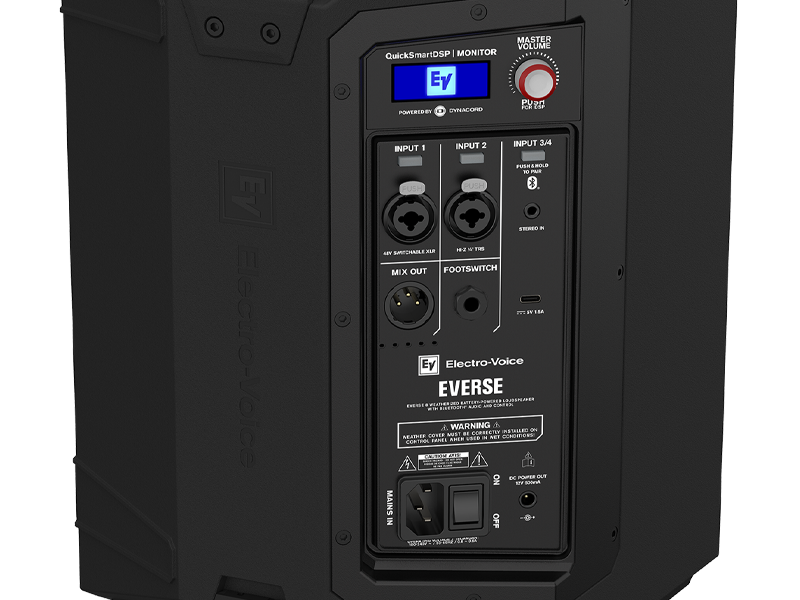
Figura 2.4: Detallada view of the EVERSE 8 control panel, showing inputs and Bluetooth pairing button.
3. Funcionament
3.1 QuickSmartDSP and Master Volume
The EVERSE 8 features an integrated QuickSmartDSP module, developed in collaboration with Dynacord, providing professional-grade audio processing. The Master Volume knob controls the overall output level of the loudspeaker. Push the knob to access and navigate the DSP menu for advanced settings.
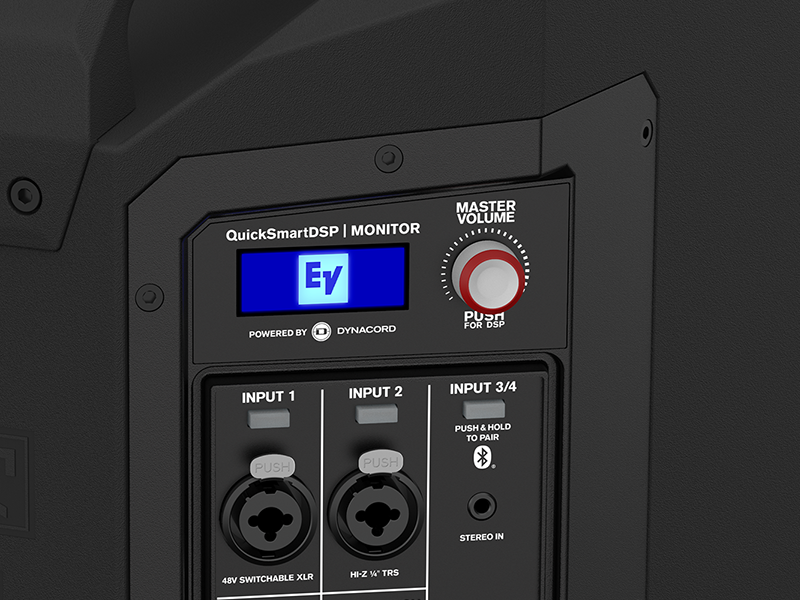
Figure 3.1: The QuickSmartDSP display and Master Volume knob for comprehensive control.
3.2 Input Controls and Features
- Guany d'entrada: Adjust the gain for each input channel using the dedicated controls on the rear panel or via the QuickSmart Mobile app.
- Barreja: An XLR output allows you to send the mixed audio signal to another EVERSE 8 unit or an external mixer.
- Interruptor de peu: Connect an optional footswitch for remote control of certain DSP functions (e.g., effects mute).
- DC Power Out: A 12V DC port provides convenient power for wireless microphone systems, eliminating the need for separate power supplies.
- Càrrega USB: A charging port is included for mobile devices, allowing you to top up your phone or tablet while streaming.
3.3 Funcions DSP
The QuickSmartDSP offers a range of professional features:
- EQ: Built-in four-channel digital mixer with studio-quality effects and processing. Adjust equalization for each input to tailor the sound to your environment and source.
- Efectes: Access a variety of studio-quality effects to enhance vocals and instruments.
- Automatic Feedback Suppression (AFS): This feature automatically detects and eliminates feedback, ensuring clear and stable audio.
- Music Ducking: Automatically lowers the music volume when a microphone signal is detected, ideal for announcements or spoken word over background music.
3.4 QuickSmart Mobile App
For best-in-class control and streaming, download the QuickSmart Mobile app for iOS and Android devices. The app provides comprehensive control over all audio, effects, and mix functions of your EVERSE 8 from your smartphone or tablet.

Figure 3.2: Control your EVERSE 8 wirelessly using the QuickSmart Mobile app.
4. Manteniment
4.1 Cura i emmagatzematge de la bateria
To maximize the lifespan of your Li-ion battery pack:
- Eviteu descarregar completament la bateria amb freqüència.
- For long-term storage, charge the battery to approximately 50% and store it in a cool, dry place.
- The battery pack is designed for easy removal with tool-free screws, allowing for convenient replacement if needed.
4.2 Neteja
The EVERSE 8 features an IP43-rated weatherized design, making it resistant to splashes and light rain. To clean the unit:
- Utilitzeu un suau, damp cloth to wipe down the polypropylene enclosure.
- No utilitzeu netejadors abrasius ni dissolvents.
- Ensure the weatherized input cover is properly installed when using the unit in wet conditions to maintain its IP43 rating.

Figure 4.1: The EVERSE 8 is designed to withstand light rain and splashes.
5. Solució De Problemes
This section addresses common issues you might encounter with your EVERSE 8 loudspeaker. For more detailed troubleshooting, refer to the QuickSmart Mobile app or the comprehensive user manual available on the Electro-Voice weblloc.
5.1 Sense sortida de so
- Potència: Ensure the unit is powered on and the battery is charged or connected to AC power.
- Volum: Check the Master Volume knob and individual input gain controls.
- Connexió d'entrada: Verify that audio sources are correctly connected to the appropriate inputs (XLR, TRS, 3.5mm, or Bluetooth).
- Silenciar: Check if any channels or the master output are muted via the DSP or QuickSmart Mobile app.
5.2 Problemes de connexió Bluetooth
- Mode de sincronització: Ensure the EVERSE 8 is in Bluetooth pairing mode (flashing indicator).
- Device Visibility: Make sure your mobile device's Bluetooth is enabled and visible.
- Distància: Keep the Bluetooth device within range (typically up to 30 feet/10 meters).
- Interferència: Allunyeu-vos d'altres dispositius sense fil que puguin causar interferències.
5.3 Feedback (Squealing Sound)
- Col·locació del micròfon: Reposition microphones further away from the loudspeaker or behind it.
- Reducció de guany: Lower the gain of the input channel connected to the microphone.
- Automatic Feedback Suppression (AFS): Ensure the AFS feature is enabled and configured correctly via the DSP or QuickSmart Mobile app.
6. Especificacions
The following table outlines the key specifications for the Electro-Voice EVERSE 8 Loudspeaker:
| Característica | Especificació |
|---|---|
| Marca | Electro-veu |
| Nom del model | F.01U.399.423 (ELE EVERSE8US) |
| Tipus d'altaveu | Monitor |
| Característica especial | Portable, Weatherized (IP43) |
| Usos recomanats | For Music Players, Live Sound, Events |
| Dispositius compatibles | Smartphone, Microphones, Instruments |
| Diàmetre del woofer | 8 polzades |
| Diàmetre del Tweeter | 1 polzades |
| Recompte d'unitats | 1.0 recompte |
| Tipus de controlador | App Control, Voice Control (via app) |
| Configuració del canal de so envoltant | 2.0 (Stereo via Bluetooth TWS) |
| Color | Negre |
| Durada de la bateria | Fins a 12 hores |
| Components inclosos | Power Cable, Battery Pack, Weatherized Input Cover, User Manual |
| Dimensions del producte | 19 "P x 14" W x 15" H |
| Pes de l'article | 10.5 quilograms (23.1 lliures) |
| Material | Polipropilè |
| Font d'alimentació | Funciona amb bateria |
| Tecnologia de connectivitat | Bluetooth |
| Mode de sortida d'àudio | Stereo (Bluetooth) |
| Tipus de muntatge | Freestanding, Pole Mount |
| UPC | 800549612746 |

Figure 6.1: Physical dimensions of the EVERSE 8 loudspeaker.
7. Informació de la garantia
The Electro-Voice EVERSE 8 Loudspeaker comes with a limited warranty. For specific terms, conditions, and registration details, please refer to the warranty card included with your product or visit the official Electro-Voice weblloc web. Conserveu el comprovant de compra per a reclamacions de garantia.
8. Suport
For further assistance, technical support, or to download the latest version of the QuickSmart Mobile app, please visit the official Electro-Voice support weblloc web. També hi podeu trobar recursos addicionals, preguntes freqüents i informació de contacte per al servei d'atenció al client.
Electro-Voice Official Weblloc: www.electrovoice.com