
BEBEN 1
Manual d'usuari dels auriculars sense fil BEBEN
Model: 1
Brand: BEBEN
Introducció
Welcome to the user manual for your BEBEN Wireless Earbuds, Model 1. These earbuds are designed to provide a superior audio experience with features like 36 hours of playtime, smart touch controls, ergonomic design for sports, Hi-Fi sound, and active noise reduction for clear calls. This manual will guide you through the setup, operation, maintenance, and troubleshooting of your new earbuds.

Image: The BEBEN Wireless Earbuds, featuring the two earbuds with ear hooks and their compact charging case.
Què s'inclou
- Auriculars sense fil BEBEN (esquerra i dreta)
- Estoig de càrrega sense fil
- Cable de càrrega USB tipus C
- Puntes d'orella de silicona (talles S/M/L)
- Bossa d'emmagatzematge portàtil
- Manual d'usuari
Especificacions
| Característica | Detall |
|---|---|
| Nom del model | 1 |
| Tecnologia de connectivitat | Bluetooth 5.0 |
| Temps de joc total | Fins a 36 hores (amb estoig de càrrega) |
| Temps de reproducció dels auriculars (càrrega única) | Fins a 6 hores |
| Càrrega ràpida | 5 minutes charge for 2 hours standby |
| Tipus de control | Control tàctil intel·ligent |
| Nivell de resistència a l'aigua | Impermeable |
| Control de soroll | Cancel·lació activa de soroll (per a trucades) |
| Forma de l'auricular | Ganxos per a les orelles |
| Dispositius compatibles | Multiple Bluetooth-enabled devices (smartphones, tablets, laptops, smart speakers) |
Configuració
1. Càrrega inicial
Abans del primer ús, carregueu completament els auriculars i l'estoig de càrrega.
- Col·loqueu els dos auriculars a la caixa de càrrega.
- Connect the USB Type-C charging cable to the charging case and a power source.
- The LED indicators on the case will show charging status. A full charge for the case takes approximately 6 hours.
- The earbuds themselves charge quickly, with 5 minutes of charging providing 2 hours of standby time.

Image: Earbuds inside the charging case, illustrating the Type-C charging port and battery life indicators.
2. Emparellament amb el dispositiu (emparellament automàtic en un pas)
Els auriculars tenen aparellament automàtic en un sol pas per a més comoditat.
- Assegureu-vos que el Bluetooth estigui habilitat al vostre telèfon intel·ligent, tauleta o altre dispositiu compatible.
- Obre l'estoig de càrrega i treu els dos auriculars. S'encendran automàticament i entraran en mode d'emparellament.
- On your device, search for Bluetooth devices and select "C3" from the list.
- Un cop connectat, sentiràs un missatge de confirmació i els auriculars estaran llestos per utilitzar.

Image: A smartphone screen showing "C3" as a discoverable Bluetooth device, with the earbuds next to it, demonstrating the one-step auto pairing process.
Note: The earbuds support single or binaural mode, allowing you to use one earbud independently or both together.
Instruccions de funcionament
Controls tàctils
The earbuds feature smart touch controls for easy management of music and calls. Please keep your hands dry when touching the controls for optimal sensitivity.
- Encès/apagat:
- Automatically power on when taken out of the charging case.
- Automatically power off when placed back into the charging case.
- Reproduir/pausa: Un sol toc a qualsevol dels auriculars.
- Següent cançó: Toqueu dues vegades l'auricular dret.
- Cançó anterior: Toqueu dues vegades l'auricular esquerre.
- Pujar el volum: Premeu llargament l'auricular dret.
- Baixar el volum: Premeu llargament l'auricular esquerre.
- Respondre/Finalitzar la trucada: Un sol toc a qualsevol dels auriculars.
- Rebutja la trucada: Manteniu premut qualsevol dels auriculars durant 2 segons.
- Activa l'assistent de veu (Siri/Assistent de Google): Toqueu tres vegades qualsevol dels auriculars.
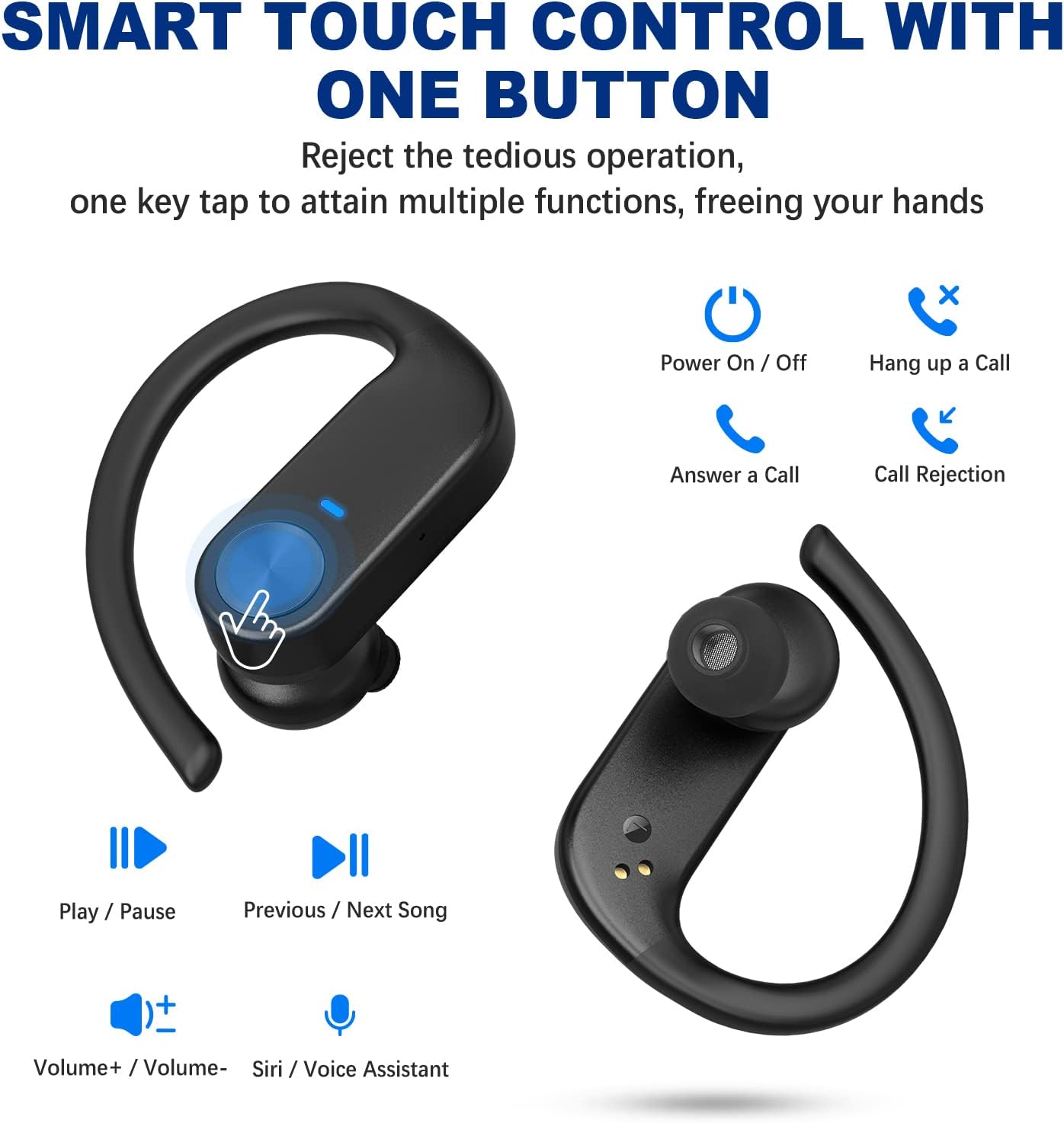
Image: Visual guide to the smart touch controls on the earbuds, showing functions like play/pause, volume, call management, and voice assistant activation.
Portant els auriculars
For optimal comfort and sound quality, choose the correct ear tips and adjust the ear hooks.
- Select the silicone ear tips (S/M/L) that best fit your ear canal.
- Inseriu l'auricular al canal auditiu.
- Place the ear hook over your ear and adjust it for a secure and comfortable fit. The ergonomic design ensures stability during activities like sports and workouts.

Image: Instructions on how to properly wear the earbuds, highlighting the soft ear tips and secure ear hooks for a comfortable and stable fit.
Manteniment i cura
- Regularly clean the earbuds, especially the ear tips and charging contacts, with a soft, dry cloth.
- Eviteu utilitzar productes químics o materials abrasius per netejar.
- Guarda els auriculars a la seva funda de càrrega quan no els facis servir per protegir-los i assegurar-te que es mantinguin carregats.
- Keep the earbuds away from extreme temperatures, humidity, and dust.
- While waterproof, avoid prolonged submersion in water. Dry thoroughly if exposed to moisture.
Resolució de problemes
| Problema | Solució |
|---|---|
| Els auriculars no s'emparellan/connecten. |
|
| Només funciona un auricular. |
|
| Volum baix o mala qualitat de so. |
|
| Els auriculars no es carreguen. |
|
Garantia i Suport
BEBEN products come with a standard manufacturer's warranty. For detailed warranty information, technical support, or customer service inquiries, please refer to the contact information provided on the product packaging or visit the official BEBEN weblloc.
També podeu visitar el BEBEN Store on Amazon per obtenir més informació sobre el producte i recursos d'assistència.
Ask a question about this manual
Ask about setup, troubleshooting, compatibility, parts, safety, or missing instructions. Manuals+ will review the question and use this page’s manual context to help answer it.