
1. Introducció
This manual provides essential information for the safe and efficient use of your Getac V110 Rugged Convertible Laptop/Tablet PC. Please read this manual thoroughly before operating the device and retain it for future reference. The Getac V110 is designed for durability and performance in challenging environments, offering versatility as both a laptop and a tablet.
2. Informació de seguretat
Observeu les següents precaucions de seguretat per evitar danys al dispositiu o lesions personals:
- No exposeu el dispositiu a temperatures extremes, llum solar directa ni humitat excessiva.
- Use only Getac-approved power adapters and accessories.
- Avoid dropping or subjecting the device to severe impacts, despite its rugged design.
- No intenteu desmuntar ni reparar el dispositiu vosaltres mateixos. Poseu-vos en contacte amb personal de servei qualificat.
- Mantingueu les obertures de ventilació netes per evitar el sobreescalfament.
3. Sobrecàrrega físicaview
The Getac V110 is a versatile device designed for rugged use. It features a convertible design, allowing it to function as both a traditional laptop and a tablet. Key components include a durable chassis, an 11.6-inch touchscreen display, a full-sized keyboard, and various ports for connectivity.

Figura 3.1: Explotat view illustrating the internal structure and ruggedized layers of the Getac V110.
3.1. Teclat i touchpad
The device includes a backlit keyboard for typing in various lighting conditions and a precision touchpad for navigation.
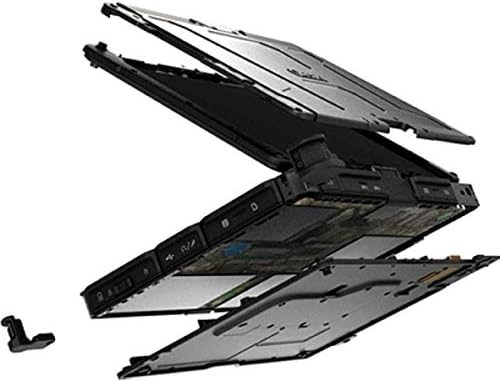
Figura 3.2: De dalt a baix view of the Getac V110 keyboard and integrated touchpad.
3.2. Convertible Design
The V110 can be easily converted between laptop and tablet modes by rotating the screen. This flexibility allows for optimal use in different scenarios.

Figure 3.3: The Getac V110 configured in laptop mode, displaying the screen and keyboard.

Figure 3.4: The Getac V110 in tablet mode, showcasing the touchscreen interface.
4. Configuració
4.1. Engegada inicial
- Connecteu l'adaptador de corrent al dispositiu i a una presa de corrent.
- Press the power button located on the side or front of the device.
- Follow the on-screen prompts to complete the initial Windows 8.1 setup, including language, region, and user account creation.
4.2. Connectivitat de xarxa
The Getac V110 supports both Wi-Fi and Ethernet for internet access.
- Wi-Fi: Access the network settings in Windows 8.1, select your desired Wi-Fi network, and enter the password if required.
- Ethernet: Connect an Ethernet cable from your network router or switch to the Ethernet port on the device.
4.3. Emparellament Bluetooth
Per connectar dispositius Bluetooth:
- Assegureu-vos que el dispositiu Bluetooth estigui en mode de vinculació.
- On the Getac V110, navigate to PC Settings > PC and devices > Bluetooth.
- Turn Bluetooth on and select the device from the list to pair.
5. Funcionament del dispositiu
5.1. Switching Between Laptop and Tablet Modes
To convert the device:
- Gently rotate the screen 180 degrees clockwise or counter-clockwise.
- Fold the screen back over the keyboard to enter tablet mode.
- Unfold the screen and rotate it back to the original position for laptop mode.
5.2. Ús de la pantalla tàctil
The 11.6-inch LED touchscreen supports multi-touch gestures. Use your fingers or a compatible stylus for navigation, selection, and input.
5.3. Gestió d'energia
To conserve battery life, adjust power settings in Windows 8.1. You can configure sleep mode, display brightness, and other power-saving options.
- Mode de repòs: Briefly press the power button to put the device into sleep mode.
- Apagar: Go to the Charms bar (swipe from right edge or move mouse to top-right corner), select Settings > Power > Shut down.
- Reinicia: Go to the Charms bar, select Settings > Power > Restart.
6. Manteniment
6.1. Neteja del dispositiu
Regular cleaning helps maintain performance and appearance.
- Utilitzeu un drap suau i sense pelusa lleugerament dampened with water or a mild, non-abrasive cleaner for the screen and exterior.
- Eviteu ruixar líquids directament sobre el dispositiu.
- No utilitzeu productes químics agressius, dissolvents ni materials abrasius.
6.2. Cura de la bateria
Per maximitzar la vida útil de la bateria:
- Eviteu descarregar completament la bateria amb freqüència.
- Store the device in a cool, dry place if not used for extended periods.
- If the device has removable batteries, ensure they are properly seated.
6.3. Actualitzacions de programari
Regularly check for and install operating system and driver updates to ensure optimal performance and security. Access Windows Update through PC Settings.
7. Solució De Problemes
This section addresses common issues you might encounter with your Getac V110.
7.1. El dispositiu no s'encén
- Assegureu-vos que l'adaptador de corrent estigui connectat correctament i que la presa de corrent funcioni.
- Check if the battery is charged. If not, allow it to charge for at least 30 minutes before attempting to power on again.
- If the battery is removable, ensure it is correctly installed.
7.2. Problemes de connectivitat Wi-Fi
- Verifiqueu que el Wi-Fi estigui habilitat a la configuració de Windows.
- Restart your router and the Getac V110.
- Assegureu-vos que esteu dins de l'abast de la xarxa Wi-Fi i que teniu la contrasenya correcta.
- Check for updated Wi-Fi drivers.
7.3. Touchscreen Unresponsive
- Reinicieu el dispositiu.
- Assegureu-vos que la pantalla estigui neta i lliure de residus.
- Check for any recent software updates or driver issues.
7.4. Rendiment lent
- Tanca les aplicacions innecessàries que s'executen en segon pla.
- Comproveu l'espai d'emmagatzematge disponible.
- Executeu una anàlisi de virus.
- Assegureu-vos que Windows i els controladors estiguin actualitzats.
8. Especificacions
| Característica | Detall |
|---|---|
| Marca | Getac |
| Número de model | V110 |
| Processador | Intel Core i5-6300U (2.6 GHz) |
| Memòria RAM | 8 GB DDR4 SDRAM |
| Capacitat d'emmagatzematge | 128 GB |
| Mida de la pantalla | 11.6 polzades |
| Resolució de visualització | 1366 x 768 píxels |
| Tipus de visualització | LED |
| Entrada de la interfície humana | Pantalla tàctil |
| Sistema operatiu | Windows 8.1 |
| Coprocessador gràfic | Intel HD Graphics 520 |
| Tecnologia de connectivitat | Bluetooth, Ethernet, HDMI, USB, Wi-Fi |
| Pes de l'article | 4.4 lliures |
| Item Dimensions (L x W x Th) | 11.99" x 18.9" x 3.9" |
| Tipus de pila de bateria | Lithium Ion (23 Watt Hours) |
9. Informació de la garantia
The Getac V110 Rugged Convertible Laptop/Tablet PC comes with a Garantia limitada de 90 dies. This warranty covers manufacturing defects and malfunctions under normal use. It does not cover damage caused by misuse, accidents, unauthorized repairs, or modifications. Please retain your proof of purchase for warranty claims.
For detailed terms and conditions, refer to the warranty documentation provided with your device or contact Getac customer support.
10. Suport
If you require further assistance or encounter issues not covered in this manual, please contact Getac customer support. You can typically find support contact information on the manufacturer's official website or within the device's pre-installed documentation.
When contacting support, please have your device's model number (V110) and serial number ready.