
1. Introducció
The YangDiana LM002 LTE 4G GPS Tracker is a high-performance device designed for real-time location monitoring and anti-theft security. It utilizes advanced GSM/GPRS network and GPS satellite positioning technology to provide comprehensive tracking solutions for vehicles, motorcycles, boats, and other assets. This manual provides detailed instructions for setting up, operating, and maintaining your GPS tracker.

Figure 1.1: The LM002 LTE GPS Tracker shown alongside a smartphone displaying its real-time tracking interface, indicating its primary function for location monitoring.
2. Què hi ha a la caixa
Si us plau, verifiqueu que tots els components següents estiguin inclosos al vostre paquet:
- GPS Tracker Unit (LM002 LTE)
- Cable de càrrega USB
- Manual d'usuari
- Bateria interna (preinstal·lada)

Figure 2.1: All components included with the LM002 LTE GPS Tracker, laid out for inspection.
3. Especificacions
| Característica | Detall |
|---|---|
| Número de model | LM002 LTE |
| Dimensions del producte | 2.83 x 1.81 x 0.87 polzades (7.8 cm x 4.5 cm x 2.2 cm) |
| Pes de l'article | 3.53 unces |
| Tecnologia de connectivitat | Cellular (2G/3G/4G compatible SIM cards) |
| Bateria | 1 Lithium Polymer battery (5000mAh, 15W rapid recharge) |
| Material | Acrilonitril butadiè estirè (ABS) |
| Voltage Rang | 9 V - 95 V |
| Classificació impermeable | Classificació IP65 |

Figure 3.1: Physical dimensions of the LM002 LTE GPS Tracker.
4. Guia de configuració
Follow these steps to set up your GPS tracker for the first time:
- Instal·lació de la targeta SIM:
The device requires a 2G/3G/4G compatible SIM card with an active data plan (minimum 30MB monthly data recommended). Open the SIM card slot cover and insert the SIM card as shown in Figure 4.1. Ensure the SIM card is correctly oriented and securely seated.

Figure 4.1: Inserting the SIM card into the LM002 LTE GPS Tracker.
- Càrrega inicial:
Before first use, fully charge the device using the provided USB cable. Connect the cable to the USB port on the tracker and a standard USB power adapter. The indicator light will show charging status.
- Device Activation and Authorization:
To activate the device and authorize tracking numbers, send specific SMS commands to the SIM card number inserted in the tracker. Refer to the detailed SMS command list in the Guia d'usuari PDF for exact commands. You can authorize up to 4 numbers for control and alerts.
- Platform Setup (App/Web):
Download the official tracking application from your smartphone's app store or access the web platform. Follow the on-screen instructions to register your device using its unique ID (usually found on the device or packaging). This platform allows for real-time tracking, historical route playback, and setting up various alerts.
5. Funcionament del dispositiu
The LM002 LTE GPS Tracker offers multiple ways to monitor and manage your assets:
5.1 Real-Time Tracking
Access real-time location data through the dedicated mobile application or web platform. The interface displays the current position on a map, speed, and other relevant information.

Figure 5.1: Real-time tracking interface on a smartphone.
5.2 Geo-Fencing
Set up virtual boundaries (geo-fences) on the tracking platform. You will receive alerts if the tracker enters or exits these predefined areas. Both circular and polygonal fences are supported.
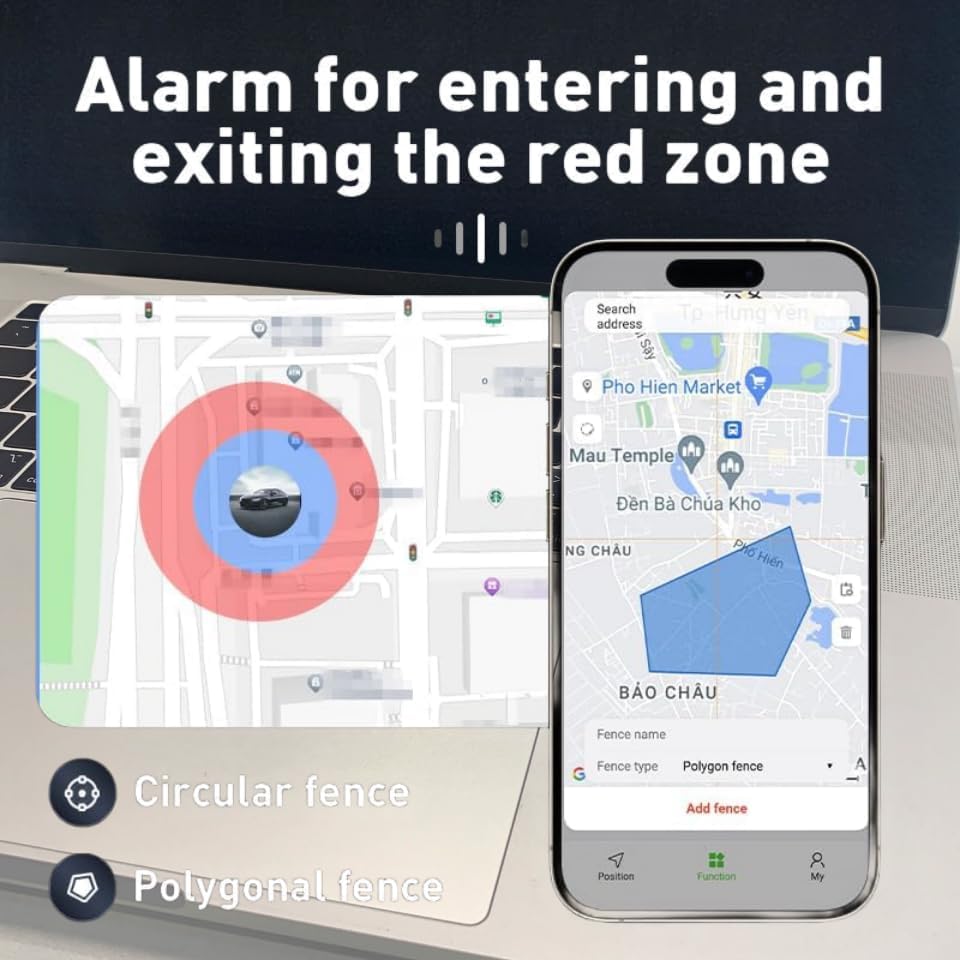
Figure 5.2: Geo-fencing setup and alert zones.
5.3 Muntatge magnètic
The LM002 LTE features a built-in strong magnet for easy, no-installation-required attachment to metallic surfaces on vehicles. Common mounting locations include the front bumper, car door glove box, under the driver seat, armrest, trunk, and rear bumper.

Figure 5.3: Recommended magnetic mounting points on a vehicle.
5.4 Remote Voice Monitoring
The device supports remote voice monitoring. By calling the SIM card number in the tracker from an authorized phone, you can listen to the surrounding audio. This feature is intended for security and monitoring purposes.

Figure 5.4: Remote voice monitoring capability.
5.5 Historical Route Playback
The tracking platform stores historical route data for up to 6 months. You can review past movements of the tracker, which is useful for analyzing travel patterns or investigating incidents.

Figure 5.5: Historical route playback feature.
6. Manteniment
6.1 Gestió de la bateria
The LM002 LTE is equipped with a 5000mAh Lithium Polymer battery supporting 15W rapid recharge. To ensure optimal performance and battery longevity, charge the device regularly. Avoid completely draining the battery before recharging.

Figure 6.1: Battery capacity and charging speed.
6.2 Resistència a l'aigua
The device is IP65 rated, meaning it is protected against dust ingress and low-pressure water jets from any direction. While it can withstand splashes and light rain, it is not designed for submersion in water. Ensure the USB port cover is securely closed to maintain water resistance.

Figure 6.2: IP65 water resistance for outdoor use.
6.3 Atenció general
- Mantingueu el dispositiu net i lliure de pols i residus.
- Eviteu exposar el dispositiu a temperatures extremes o a la llum solar directa durant períodes prolongats.
- No intenteu obrir ni modificar el dispositiu, ja que això anul·larà la garantia.
7. Solució De Problemes
If you encounter issues with your GPS tracker, please refer to the following common problems and solutions:
| Problema | Possible causa/solució |
|---|---|
| Device not responding to SMS commands. |
|
| No real-time tracking updates on app/web. |
|
| La bateria s'esgota ràpidament. |
|
| Dades de localització inexactes. |
|
For more detailed troubleshooting or issues not covered here, please refer to the comprehensive Manual d'usuari (PDF) o poseu-vos en contacte amb el servei d'atenció al client.
8. Garantia i Suport
YangDiana products are manufactured to high quality standards. For information regarding warranty coverage, please refer to the warranty card included with your product or visit the official YangDiana weblloc web. Conserveu el rebut de compra com a comprovant de compra per a qualsevol reclamació de garantia.
For technical support, product inquiries, or service requests, please contact YangDiana customer support through the contact information provided on the product packaging or the official brand website. When contacting support, please have your product model number (LM002 LTE) and purchase details ready.
Recursos addicionals:
- Guia de l'usuari (PDF)
- Manual d'usuari (PDF)
- Visita el YangDiana Store on Amazon per obtenir més informació sobre el producte.
Nota important sobre els vídeos
While this product may have associated videos, the necessary information (such as video URLs and creator type) was not available to embed them directly into this manual. Please refer to the product's online listing or the manufacturer's weblloc web per a qualsevol demostració en vídeo o tutorial disponible.


