
1. Introducció
The Sunshine DT-17N Digital Multimeter is a versatile and reliable tool designed for accurate electrical measurements. It is particularly suitable for phone repair technicians and general electronics work, capable of measuring various electrical parameters including voltage, current, resistance, capacitance, and temperature. Its compact design and user-friendly features make it an essential tool for diagnosing and repairing electronic devices.

Figure 1: The Sunshine DT-17N Digital Multimeter, demonstrating its compact size for portability.
2. Informació de seguretat
To ensure safe operation and prevent damage to the meter, please read and follow all safety instructions carefully. This multimeter features double insulation protection for enhanced user safety.
- Always ensure the test leads are in good condition and properly connected before taking measurements.
- No aplicar voltage or current that exceeds the maximum rated values for each range.
- Never use the multimeter if it appears damaged or if the test leads are frayed.
- Aneu amb compte quan treballeu amb volumtagper sobre de 30 V CA RMS, 42 V pic o 60 V CC, ja que representen un perill de descàrrega elèctrica.
- Desconnecteu sempre l'alimentació del circuit i descarregueu l'energia d'alt volum.tage condensadors abans de mesurar la resistència, la continuïtat o els díodes.
- Substituïu la bateria immediatament quan aparegui l'indicador de bateria baixa per garantir lectures precises.
3. Producte acabatview
3.1. Multimeter Components

Figura 2: Frontal view of the DT-17N Multimeter, highlighting its main display and controls.
3.2. Característiques de la pantalla
The DT-17N features a large LCD display with a backlight, ensuring clear readability in various lighting conditions.

Figure 3: The multimeter's LCD display with its backlight feature, improving visibility in low-light environments.
- Pantalla LCD gran: Provides clear numerical readings.
- Il·luminació de fons: Improves visibility in dark or low-light conditions. Activated by pressing and holding the HOLD button.
- Unitat de mesura: Displays the appropriate unit (e.g., V, A, Ω, °C/°F).
- Estat de la bateria: Indica el nivell actual de la bateria.
- Automatic Polarity Display: Shows positive or negative polarity automatically.
3.3. Controls and Input Ports
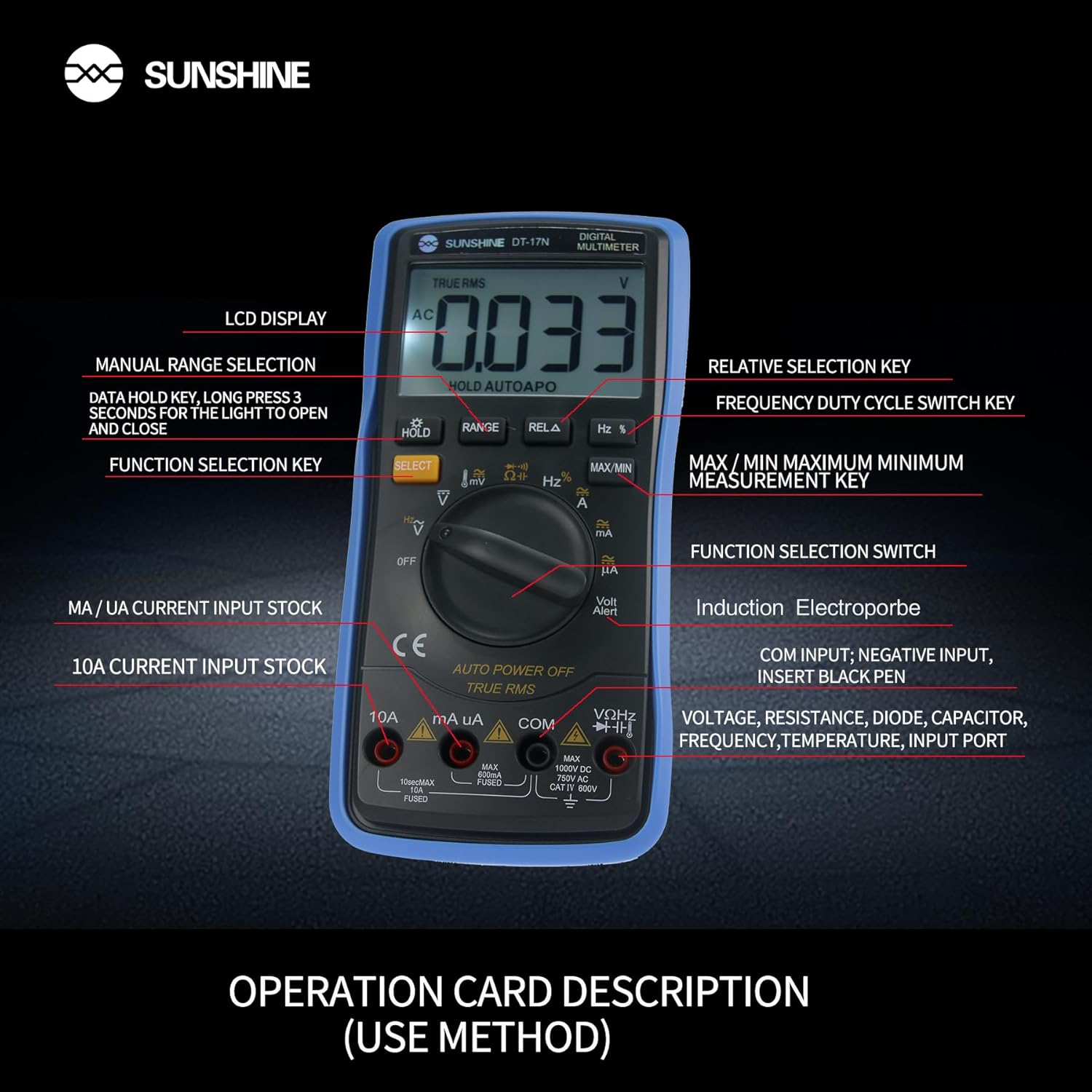
Figura 4: Detallada view of the multimeter's controls and input ports with their respective functions.
- Interruptor de funció rotatiu: Used to select the desired measurement function (e.g., Voltage, Current, Resistance, Temperature).
- Botó SELECCIÓ: Toggles between different measurement modes within a single rotary switch position (e.g., AC/DC voltage, Díode/Continuitat).
- Botó HOLD: Freezes the current reading on the display. Press and hold to activate/deactivate the backlight.
- Botó RANGE: Allows manual selection of measurement ranges, overriding the automatic ranging feature.
- RELA Button (Relative Selection Key): Measures the difference between a stored reference value and the current reading.
- Hz % Button (Frequency Duty Cycle Switch Key): Toggles between frequency and duty cycle measurements.
- Botó MAX/MIN: Displays the maximum or minimum measured value during a measurement session.
- VΩHz Input Port: Connect the red test lead for voltage, resistance, frequency, capacitance, diode, and temperature measurements.
- COM Input Port: Connect the black test lead (common ground) for all measurements.
- mA/uA Input Port: Connect the red test lead for measuring small currents (milliamperes and microamperes).
- 10A Input Port: Connect the red test lead for measuring large currents (up to 10 Amperes).
- Volt Alert (NCV): Vol. Sense contactetage detection feature.
4. Configuració
4.1. Instal·lació de la bateria
The DT-17N is battery-powered. To install or replace the battery:
- Assegureu-vos que el multímetre estigui APAGAT.
- Localitzeu la tapa del compartiment de la bateria a la part posterior de la unitat.
- Descargoleu el(s) cargol(s) de subjecció i traieu la coberta.
- Insert the new battery, observing correct polarity (+ and -).
- Torneu a col·locar la tapa del compartiment de la bateria i fixeu-la amb el(s) cargol(s).
4.2. Connexió dels cables de prova
Always connect the black test lead to the COM input jack. Connect the red test lead to the appropriate input jack based on the measurement you intend to perform:
- Per al voltage, Resistance, Capacitance, Frequency, Diode, and Temperature measurements: Connect the red test lead to the VΩHz jack.
- For Current measurements (mA/uA): Connect the red test lead to the mA/uA jack.
- For High Current measurements (10A): Connect the red test lead to the 10A jack.
5. Instruccions de funcionament
The Sunshine DT-17N features automatic identification for most ranges, simplifying operation. Use the rotary switch to select the primary function and the SELECT button to toggle sub-functions.
5.1. Measuring Voltage (AC/DC)
- Gireu el commutador giratori cap a V posició.
- Si cal, premeu el botó SELECCIONA button to toggle between AC (~) and DC (—) voltage.
- Connecteu el cable de prova negre al COM jack i el cable de prova vermell al VΩHz jack.
- Connecteu les sondes de prova en paral·lel al circuit o component que voleu mesurar.
- Llegeix el voltage valor a la pantalla.

Figure 5: The multimeter showing a DC millivolt measurement on its display.
5.2. Measuring Current (AC/DC)
Precaució: Never connect the multimeter in parallel when measuring current, as this can damage the meter and the circuit. Always connect in series.
- Gireu el commutador giratori cap a mA/uA or 10A posició, depenent del corrent previst.
- Si cal, premeu el botó SELECCIONA button to toggle between AC (~) and DC (—) current.
- Connecteu el cable de prova negre al COM Connecteu el cable de prova vermell al mA/uA or 10A jack accordingly.
- Open the circuit and connect the test probes in series with the load.
- Llegiu el valor actual a la pantalla.
5.3. Mesura de la Resistència
- Gireu el commutador giratori cap a Ω posició.
- Connecteu el cable de prova negre al COM jack i el cable de prova vermell al VΩHz jack.
- Assegureu-vos que el circuit estigui desenergitzat i que tots els condensadors estiguin descarregats.
- Connect the test probes across the component to measure its resistance.
- Llegiu el valor de resistència a la pantalla.
5.4. Measuring Capacitance
- Gireu el commutador giratori cap a Capacitat symbol (often shared with diode/continuity).
- Premeu el botó SELECCIONA button until the capacitance mode is active.
- Connecteu el cable de prova negre al COM jack i el cable de prova vermell al VΩHz jack.
- Ensure the capacitor is fully discharged before connecting the test probes.
- Connecteu les sondes de prova a través del condensador.
- Llegiu el valor de la capacitat a la pantalla.
5.5. Measuring Frequency / Duty Cycle
- Gireu el commutador giratori cap a % Hz posició.
- Premeu el botó % Hz botó per alternar entre freqüència (Hz) i cicle de treball (%).
- Connecteu el cable de prova negre al COM jack i el cable de prova vermell al VΩHz jack.
- Connecteu les sondes de prova en paral·lel a la font de senyal.
- Llegiu el valor de freqüència o cicle de treball a la pantalla.
5.6. Mesura de la temperatura
The DT-17N can measure temperature using a K-type thermocouple (not always included, check package contents).

Figura 6: Example of temperature measurement using the DT-17N Multimeter with a thermocouple.
- Gireu el commutador giratori cap a ° C / ° F posició.
- Si cal, premeu el botó SELECCIONA button to choose between Celsius or Fahrenheit.
- Connect the K-type thermocouple to the VΩHz i COM preses, observant la polaritat.
- Place the thermocouple tip on or in the object whose temperature you wish to measure.
- Llegiu el valor de la temperatura a la pantalla.
5.7. Diode Test and Continuity
- Gireu el commutador giratori cap a Díode/Continuitat símbol.
- Premeu el botó SELECCIONA button to toggle between Diode Test and Continuity Test.
- Connecteu el cable de prova negre al COM jack i el cable de prova vermell al VΩHz jack.
- For Diode Test: Connect the probes across the diode. The display will show the forward voltage drop. Reverse the probes to check for open circuit.
- For Continuity Test: Connect the probes across the circuit or component. A beep indicates continuity (low resistance).
5.8. Vol sense contactetage (NCV) Detecció
The NCV function allows detection of AC voltage sense contacte directe amb els conductors.
- Gireu el commutador giratori cap a NCV position (often indicated by a Volt Alert symbol).
- Move the top part of the multimeter near the conductor.
- The meter will beep and/or flash an indicator light if AC voltages detecta e.
5.9. Data Hold and Backlight
- Conservació de dades: Premeu el botó MANTENIM button briefly to freeze the current reading on the display. Press again to release.
- Il·luminació de fons: Manteniu premut el botó MANTENIM button for approximately 3 seconds to turn the display backlight ON or OFF.
5.10. MAX/MIN Measurement
This function records the maximum and minimum values measured during a session.
- Seleccioneu la funció de mesura desitjada (per exemple, Voltagi).
- Premeu el botó MAX/MIN button. The display will show 'MAX' and the maximum value recorded.
- Premeu MAX/MIN again to cycle to 'MIN' and view the minimum value.
- Mantén premut MAX/MIN per sortir d'aquest mode.
6. Manteniment
Un manteniment adequat garanteix la longevitat i la precisió del vostre multímetre.
6.1. Neteja
Netegeu el cas amb l'anunciamp drap i detergent suau. No utilitzeu abrasius ni dissolvents. Assegureu-vos que el mesurador estigui completament sec abans d'utilitzar-lo.
6.2. Substitució de la bateria
Refer to Section 4.1 for battery replacement instructions. Always use the specified battery type.
6.3. Holster Care
The multimeter is protected by a thick rubber shockproof holster, designed for durability and a non-slip grip. Keep the holster clean and free from debris.

Figure 7: The durable rubber holster provides protection and a comfortable grip for the multimeter.
7. Solució De Problemes
If you encounter issues with your DT-17N multimeter, refer to the table below for common problems and solutions.
| Problema | Causa possible | Solució |
|---|---|---|
| Sense pantalla o pantalla tènue | Low or dead battery; Poor battery contact | Replace battery; Check battery contacts |
| Lectures incorrectes | Wrong function selected; Improper test lead connection; Damaged test leads; Out of range | Select correct function; Ensure leads are in correct jacks; Replace leads; Select higher range or check specifications |
| No hi ha bip de continuïtat | Circuit resistance too high; Continuity mode not selected | Ensure resistance is below threshold; Press SELECT to enter continuity mode |
| Fuse blown (for current measurements) | Overcurrent applied | Replace fuse with specified type and rating; Ensure correct current measurement procedure |
8. Especificacions
Technical specifications for the Sunshine DT-17N Digital Multimeter.
| Característica | Especificació |
|---|---|
| Model | DT-17N |
| Tipus de mesura | Multímetre |
| Mostra | 5999 (5 5/6) counts, Automatic Polarity Display, Backlit LCD |
| SampTarifa ling | Aproximadament 3 vegades per segon |
| Font d'alimentació | Funciona amb bateria |
| Vol operatiu mínimtage | 3 volts (CC) |
| Interval de mesura de temperatura | De 0 °C a 1000 °C (32 °F a 1832 °F) |
| Induction Electroprobe Function | Yes (NCV) |
| Doble conversió A/D integral | Sí |
| Dimensions de l'article | 5.51 x 2.76 x 1.18 polzades |
| Pes de l'article | 0.55 quilos |
| Color | Blau |
9. Garantia i Suport
9.1. Informació de la garantia
This product comes with a warranty of 3 mesos des de la data de compraSi us plau, conserveu el comprovant de compra per a reclamacions de garantia. La garantia cobreix defectes de fabricació en condicions d'ús normal.
9.2. Atenció al client
For technical assistance or inquiries regarding your Sunshine DT-17N Digital Multimeter, please contact your retailer or the manufacturer's customer service department. Refer to your purchase documentation for specific contact details.
