
Dorman 601-620
Manual d'instruccions del mòdul d'enllaç de dades intel·ligent Dorman 601-620
Model: 601-620
1. Producte acabatview
The Dorman 601-620 Smart Data Link Module is a direct replacement part designed to match the fit, function, and performance of the factory module on specified Ford and Lincoln vehicles. This module, also known as a gateway module, is crucial for ensuring communication between the Controller Area Network (CAN) bus and various devices and tools that utilize the onboard diagnostic (OBD-II) port.
It is situated under the dashboard, typically below the steering column, and plays a vital role in maintaining proper vehicle engine and electronic functions. A malfunctioning data link module can lead to communication breakdowns, resulting in disabled vehicle convenience features or the activation of engine limp mode.
1.1. Contingut del paquet
- 1 OBD II Data Link Module
1.2. Producte Views
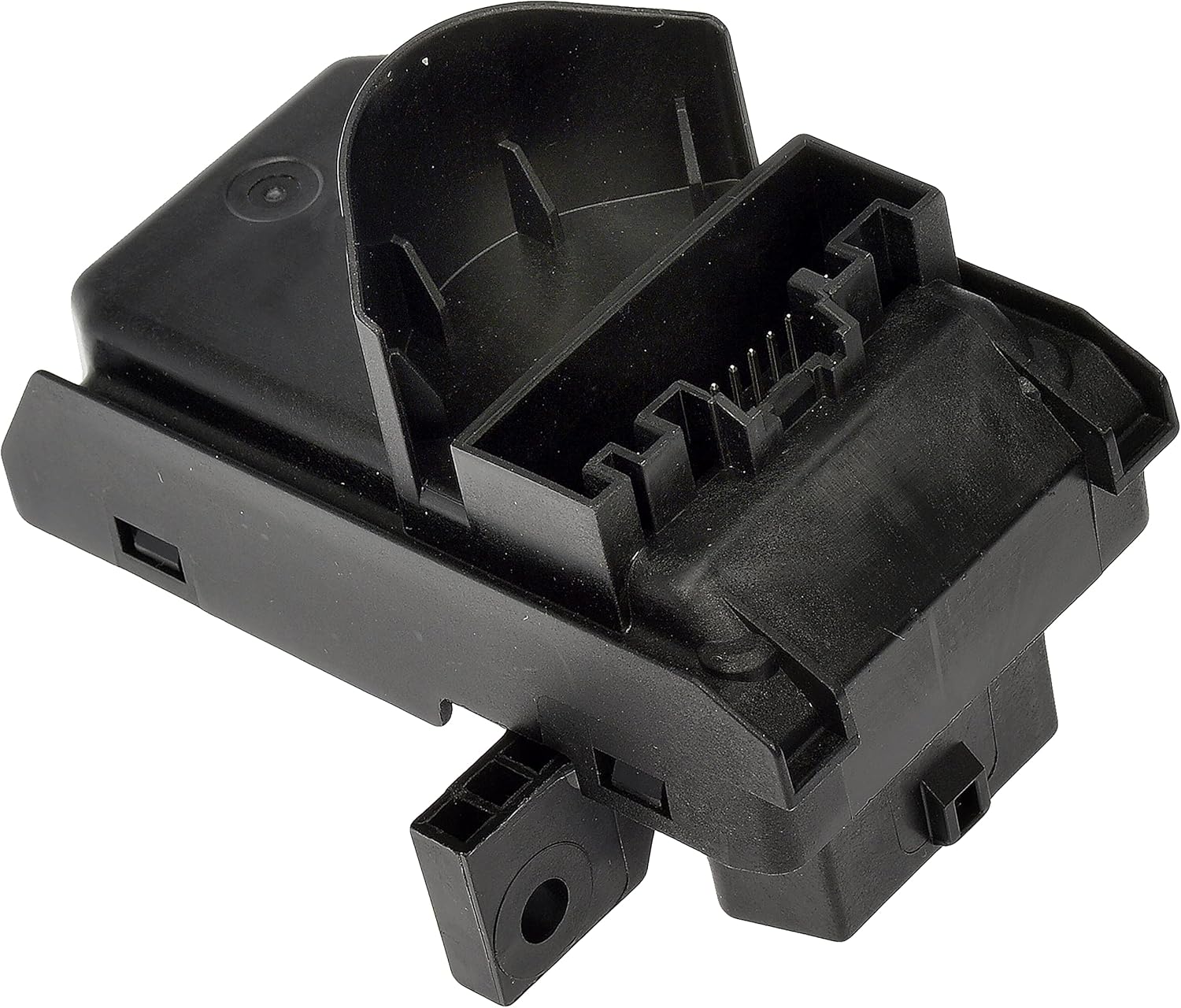
This image displays the Dorman 601-620 module from a top-down perspective, highlighting its overall shape and the primary connector interface.

Aquesta imatge ofereix un avantatge addicionalfile of the module, illustrating its depth and the design of its mounting tabs.
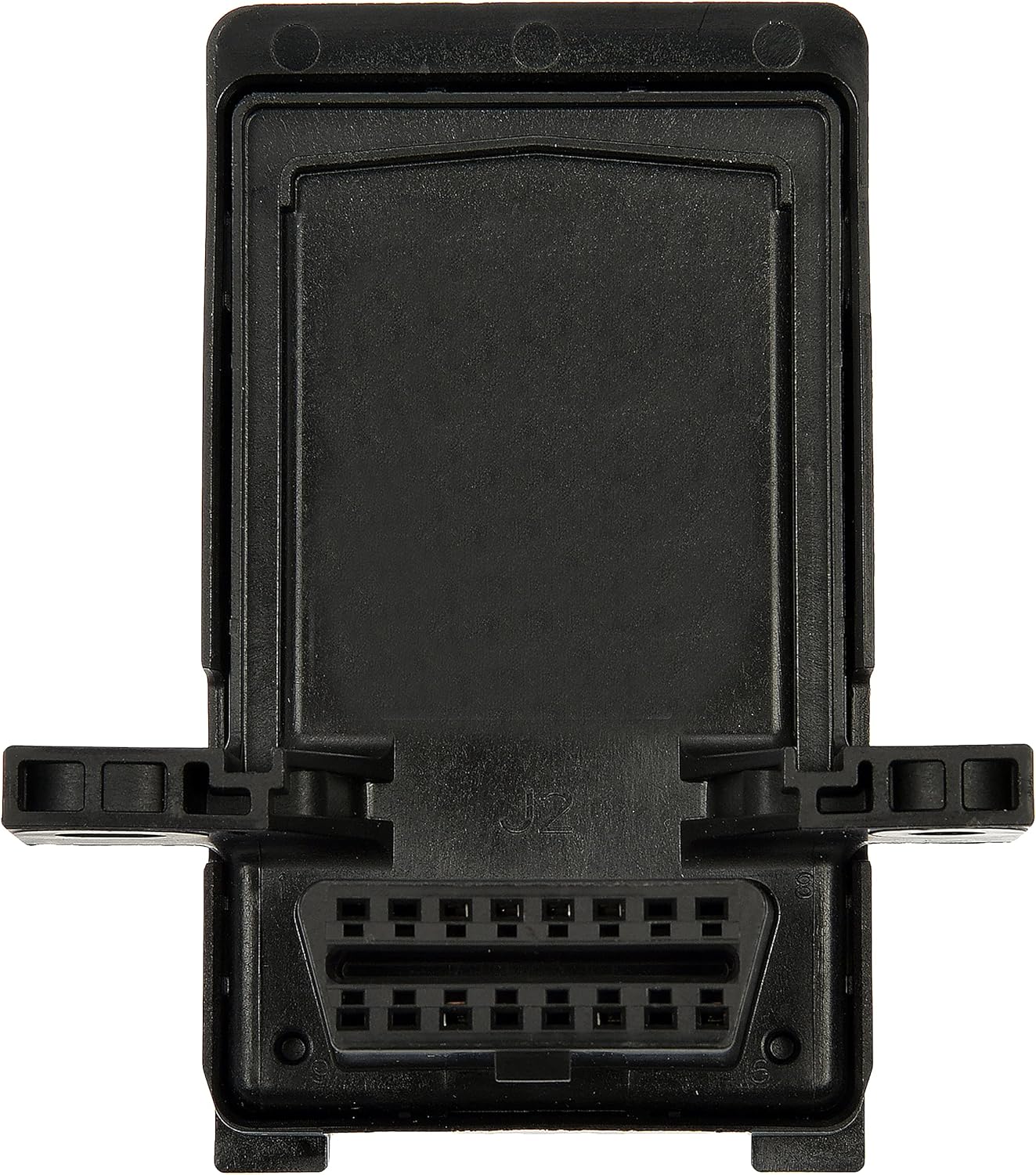
This image shows the underside of the module, prominently featuring the OBD-II diagnostic port where scan tools connect.

Aquesta imatge proporciona una view of the module's top surface, indicating where internal connections are made.
2. Instal·lació i configuració
The Dorman 601-620 Smart Data Link Module is designed as a direct replacement for the original equipment module. Professional installation is recommended due to the critical nature of this component within the vehicle's electronic system.
2.1. Comprovació prèvia a la instal·lació
Before installation, it is crucial to confirm that this part is compatible with your specific vehicle. Refer to the vehicle fitment information provided by Dorman or use a vehicle compatibility tool by inputting your vehicle's make, model, and trim level.
- Verify vehicle compatibility using the manufacturer's fitment guide.
- Assegureu-vos que la bateria del vehicle estigui desconnectada abans de començar qualsevol treball elèctric.
- Locate the existing data link module, typically found under the dashboard below the steering column.
2.2. Passos d'instal·lació (orientació general)
- Desconnecta la bateria: Always disconnect the vehicle's negative battery terminal before working on electrical components to prevent accidental short circuits or damage.
- Mòdul d'accés: Carefully remove any trim panels or components necessary to gain access to the existing data link module.
- Desconnecta el mòdul antic: Unplug all electrical connectors from the old data link module. Note the orientation and connection points for reassembly.
- Elimina el mòdul antic: Unfasten any mounting screws or clips securing the old module and remove it from its position.
- Instal·la el nou mòdul: Position the Dorman 601-620 module in the same location. Secure it using the original mounting hardware.
- Connect New Module: Reconnect all electrical connectors to the new module, ensuring they are fully seated and locked.
- Torneu a muntar: Reinstall any removed trim panels or components.
- Torneu a connectar la bateria: Torneu a connectar el terminal negatiu de la bateria del vehicle.
- Comprovació del sistema: After installation, perform a system check to ensure all vehicle functions are restored and no diagnostic trouble codes (DTCs) are present. This may require a diagnostic scan tool.
Note: Specific installation procedures may vary by vehicle model. Consult your vehicle's service manual for detailed instructions.
3. Funcionament
The Dorman 601-620 Smart Data Link Module operates automatically within the vehicle's electronic system. It functions as a gateway, facilitating communication between the Controller Area Network (CAN) bus and external diagnostic tools or other vehicle modules connected via the OBD-II port.
Once correctly installed, the module ensures that data flows seamlessly, allowing various vehicle systems to communicate effectively. This includes critical engine and electronic functions. There are no user-operable controls on the module itself; its operation is entirely integrated with the vehicle's onboard computer systems.
4. Manteniment
The Dorman 601-620 Smart Data Link Module is a sealed electronic component designed for long-term, reliable service without requiring routine user maintenance. It is built with durable construction and tested to strict specifications.
To ensure its longevity, avoid exposing the module to excessive moisture, extreme temperatures, or physical impact. If the module becomes dirty, gently wipe it with a dry, clean cloth. Do not use harsh chemicals or abrasive cleaners.
5. Solució De Problemes
The primary indication of a faulty data link module is a breakdown in communication between various vehicle systems. This can manifest in several ways:
- Disabled Vehicle Convenience Features: Functions such as power windows, central locking, or infotainment systems may stop working.
- Engine Limp Mode Activation: The vehicle's engine may enter a reduced power mode to prevent further damage.
- Inability to Connect Diagnostic Tools: OBD-II scan tools may fail to establish communication with the vehicle's onboard computer.
- Multiple Warning Lights: Various dashboard warning lights may illuminate due to communication errors.
5.1. Diagnostic Steps
- Comproveu les connexions: Ensure all electrical connectors to the data link module are securely attached and free from corrosion.
- Inspeccioneu el cablejat: Visually inspect the wiring harness connected to the module for any signs of damage, fraying, or pin corrosion.
- Escaneja codis: Use an OBD-II scan tool to retrieve any diagnostic trouble codes (DTCs) stored in the vehicle's computer. Codes related to CAN bus communication or module failure can indicate a problem with the data link module.
- Diagnòstic professional: If communication issues persist, it is recommended to seek diagnosis from a qualified automotive technician. They have specialized tools and expertise to accurately pinpoint the cause of communication failures.
If the module is determined to be faulty due to electrical malfunction or data corruption, replacement with a new Dorman 601-620 module is the recommended solution.
6. Especificacions
| Atribut | Valor |
|---|---|
| Fabricant | Productes Dorman |
| Marca | Dorman |
| Model | Dorman 601-620 |
| Pes de l'article | 3.52 unces |
| Dimensions del producte | 11 x 5 x 3.15 polzades |
| Número de model de l'article | 601-620 |
| Número de peça del fabricant | 601-620 |
| Número de peça OEM | FR3Z14F642A; HB5Z14F642A |
| Data de primera disponibilitat | 2 de març de 2022 |
7. Garantia i Suport
Dorman products are backed by a team of product experts in the United States and more than a century of automotive experience, ensuring trustworthy quality.
For specific warranty information regarding the Dorman 601-620 Smart Data Link Module, please refer to the warranty documentation included with your purchase or contact Dorman Products directly through their official website or customer service channels. Warranty terms and conditions may vary.
For technical support or further assistance, please visit the official Dorman weblloc web o poseu-vos en contacte amb el seu departament d'atenció al client. La informació de contacte normalment es pot trobar a l'embalatge del producte o al fabricant. weblloc.
Ask a question about this manual
Ask about setup, troubleshooting, compatibility, parts, safety, or missing instructions. Manuals+ will review the question and use this page’s manual context to help answer it.