
Bloody ES9Pro
Bloody ES9Pro FPS RGB Gaming Mouse User Manual
Model: ES9Pro
Introducció
This manual provides detailed instructions for the setup, operation, and maintenance of your Bloody ES9Pro FPS RGB Gaming Mouse. Designed for professional FPS gamers, this mouse offers precision, customization, and durability to enhance your gaming experience.
Característiques del producte
- PMW3389 Sensor: Provides no latency, precise control, and lightning-fast response.
- Adjustable CPI: Ranging from 100 to 16000 for optimal sensitivity.
- Freqüència d'informe de 2000 Hz: Ensures rapid data transmission to your computer.
- 400 IPS Tracking Speed: High-speed tracking for swift movements.
- 4M Onboard Memory: Stores up to 120K macros for personalized settings.
- Botons totalment programables: Customize buttons for different gaming scenarios.
- Smooth X'Glide Metal Feet: Improves mouse glide and durability on all surfaces.
- 15-Zone RGB Animation: Customizable RGB lighting effects.
Configuració
Connectant el ratolí
- Unpack the Bloody ES9Pro FPS RGB Gaming Mouse from its packaging.
- Localitzeu un port USB disponible al vostre ordinador.
- Connecteu el connector USB del ratolí al port USB.
- L'ordinador hauria de detectar i instal·lar automàticament els controladors necessaris.
Software Installation (Optional, for Advanced Customization)
For full customization of buttons, macros, CPI settings, and RGB lighting, download and install the official Bloody Esports Software from the manufacturer's weblloc. El programari us permet:
- Crea i gestiona diversos professionalsfiles per a diferents jocs.
- Program individual buttons with custom functions or macros.
- Adjust CPI sensitivity stages.
- Personalitza els efectes d'il·luminació i els colors RGB.
Instruccions de funcionament
DPI/CPI Adjustment
The mouse features adjustable CPI settings from 100 to 16000. You can typically cycle through preset CPI levels using dedicated buttons on the mouse, or fine-tune them via the Bloody Esports Software.

Imatge: Més deview of Bloody ES9Pro mouse highlighting key performance specifications like 16000 CPI resolution, 50G acceleration, 400 IPS tracking speed, and 2000Hz report rate.
Programmable Buttons and Macros
The ES9Pro mouse is equipped with multiple programmable buttons. Use the Bloody Esports Software to assign custom functions, complex macros, or specific game commands to these buttons. The 4M onboard memory allows you to save up to 120K macros, ensuring your personalized settings are always available.
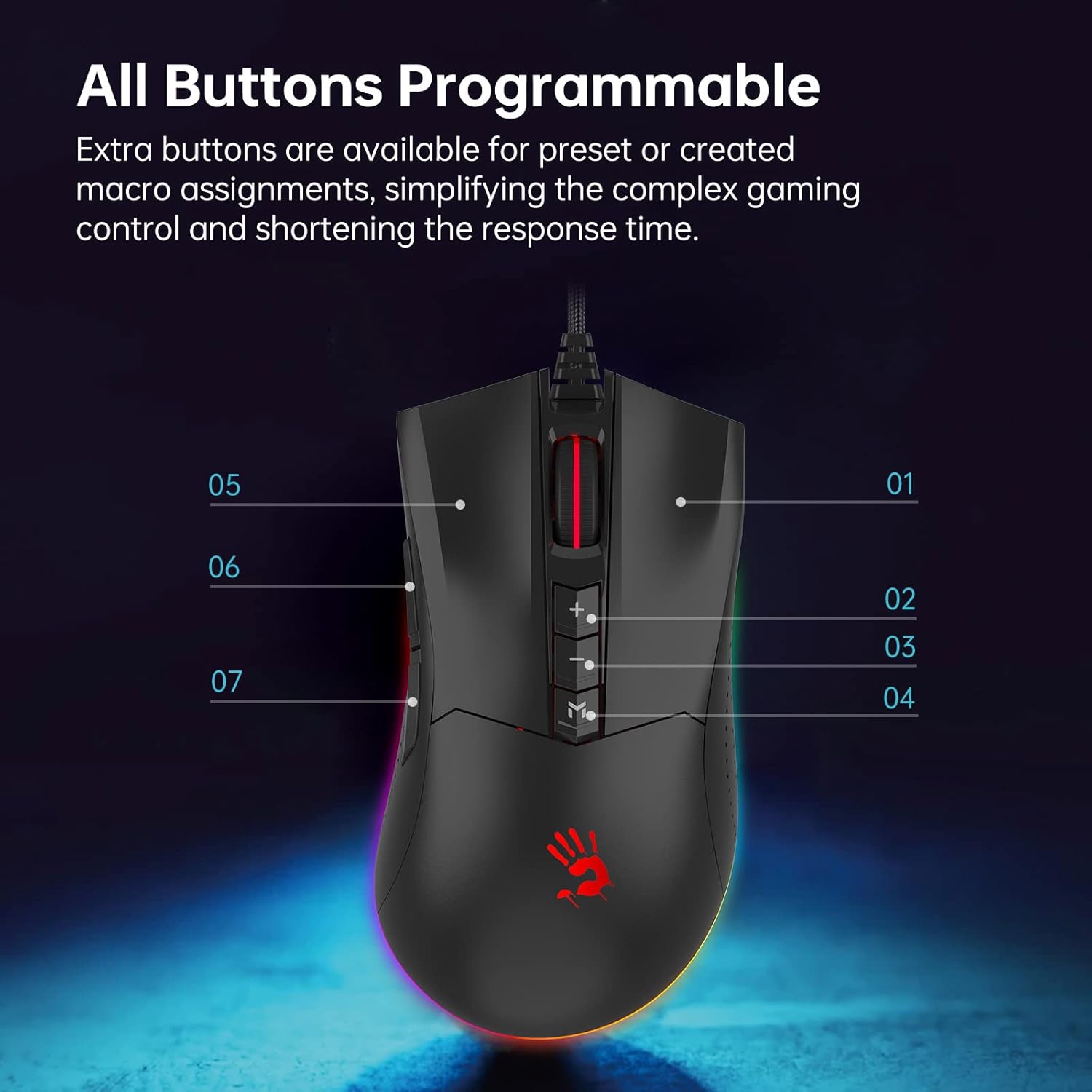
Imatge: De dalt a baix view of the Bloody ES9Pro mouse, indicating its programmable buttons with numerical labels for customization.

Imatge: Lateral view of the Bloody ES9Pro mouse, highlighting the 4M onboard memory capacity for storing macros and settings.
Report Rate and Lift Off Distance (LOD) Adjustment
The mouse allows for adjustment of both Report Rate (polling rate) and Lift Off Distance (LOD) directly from the mouse's underside. This enables users to fine-tune responsiveness and tracking behavior to their preference.

Image: Underside of the Bloody ES9Pro mouse, illustrating switches for adjusting Report Rate (Hz) and Lift Off Distance (mm) with corresponding indicator lights.
Personalització de la il·luminació RGB
The ES9Pro features 15-zone RGB animation. Customize the lighting effects and colors using the Bloody Esports Software to match your gaming setup or personal style.

Image: The Bloody ES9Pro mouse showcasing its vibrant RGB lighting effects along the base.
X & Y Axis Calibration
Achieve pixel-perfect accuracy with X & Y Axis Calibration. This feature, often managed through the software, ensures precise tracking tailored to your mousepad and movement style.

Image: A graphic illustrating the X & Y Axis Calibration feature of the Bloody ES9Pro mouse, emphasizing accurate pixel tracking for enhanced precision.
Vídeo oficial del producte
Video: An official product video from BloodyGaming showcasing the ES9Pro Gaming Mouse and its features.
Manteniment
- Neteja: Feu servir un drap suau i sec per netejar el ratolí. Eviteu productes de neteja o dissolvents abrasius.
- Cura del sensor: Keep the optical sensor on the underside of the mouse clean and free from dust or debris for optimal tracking performance.
- Gestió de cables: Eviteu doblegar bruscament o estirar excessivament el cable USB per evitar danys.
- Emmagatzematge: Store the mouse in a dry, cool place when not in use.
Resolució de problemes
El ratolí no respon
- Assegureu-vos que el cable USB estigui ben connectat a un port USB que funcioni de l'ordinador.
- Try plugging the mouse into a different USB port or another computer to rule out port or system issues.
- Reinicieu l'ordinador.
Inaccurate Tracking or Jittery Cursor
- Netegeu el sensor òptic de la part inferior del ratolí.
- Ensure you are using the mouse on a suitable surface (preferably a mousepad).
- Check and adjust the CPI/DPI settings via the mouse buttons or Bloody Esports Software.
- Perform X & Y Axis Calibration if available in the software.
RGB Lighting Not Working Correctly
- Ensure the Bloody Esports Software is installed and running.
- Check the RGB settings within the software to ensure desired effects are selected.
- Update the mouse firmware through the software if an update is available.
Especificacions
| Característica | Detall |
|---|---|
| Marca | Sagnant |
| Model | ES9Pro |
| Sensor | PMW3389 Optical Sensor |
| CPI/DPI | 100 - 16000 (ajustable) |
| Taxa d'informes | 2000 Hz |
| Velocitat de seguiment | 400 IPS |
| A bord de memòria | 4M (stores up to 120K macros) |
| Connectivitat | Cable USB |
| Il·luminació RGB | Animació RGB de 15 zones |
| Característiques especials | Programmable Buttons, X'Glide Metal Feet |
| Pes de l'article | 3.81 unces |
| Dimensions del paquet | 7.36 x 5.04 x 2.01 polzades |
Garantia i suport
Bloody provides a two-year manufacturer warranty for the ES9Pro FPS RGB Gaming Mouse. For technical support, driver downloads, or warranty claims, please visit the official Bloody weblloc o poseu-vos en contacte amb el seu servei d'atenció al client.
Weblloc: www.bloody.com (Please refer to the product packaging or official website for the most current support information.)
Ask a question about this manual
Ask about setup, troubleshooting, compatibility, parts, safety, or missing instructions. Manuals+ will review the question and use this page’s manual context to help answer it.