
T-WOLF TF230
T-WOLF TF230 Keyboard and Mouse Set
Manual d'usuari
1. Introducció
Gràcies per la compraasing the T-WOLF TF230 Wired Light-Emitting Keyboard and Mouse Set. This product is designed to provide a comfortable and responsive experience for both office work and gaming. This manual will guide you through the setup, operation, and maintenance of your new peripheral set.
2. Característiques del producte
- Mechanical Feel Design: Enjoy a responsive and tactile typing experience.
- Vibrant Backlighting: Features cool rainbow backlight effects with colorful luminescence for an immersive experience.
- Tecles flotants: Modern design with floating keycaps for enhanced aesthetics and ease of cleaning.
- Waterproof Keyboard: Designed with a front waterproof structure to prevent damage from spills and simplify cleaning.
- Ratolí còmode: The mouse features a frosted texture, comfortable non-slip rollers, and cool LED breathing light effects.
- Plug and Play: Simple USB connectivity for quick setup.
- Tecles de funció multimèdia: Integrated multimedia keys for convenient control.

Figure 2.1: The T-WOLF TF230 Keyboard and Mouse Set showcasing its vibrant rainbow backlighting.

Figure 2.2: Detail of the keyboard's waterproof design, illustrating its spill resistance.
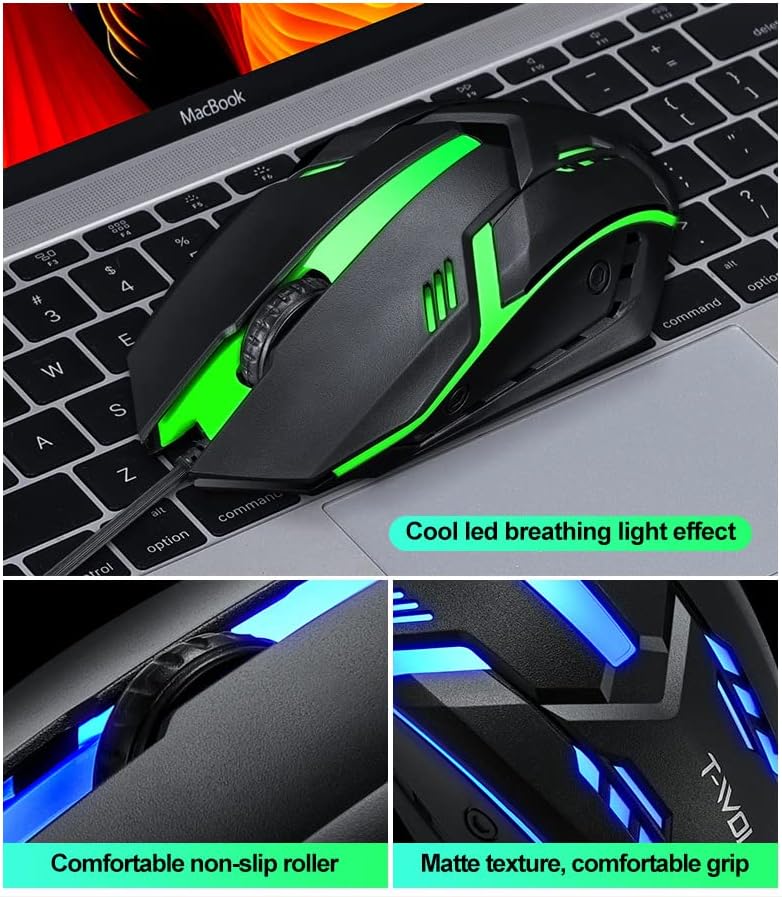
Figure 2.3: Features of the T-WOLF mouse, including its LED lighting, comfortable scroll wheel, and ergonomic grip.
3. Configuració
The T-WOLF TF230 Keyboard and Mouse Set is designed for simple plug-and-play installation. Follow these steps to connect your devices:
- Localitzeu un port USB disponible al vostre ordinador.
- Connecteu el connector USB del teclat al port USB.
- Plug the USB connector of the mouse into another available USB port.
- Your computer should automatically detect and install the necessary drivers. No additional software is required.
- Once installed, the keyboard and mouse will be ready for use.
4. Instruccions de funcionament
4.1 Funcionament del teclat
- Mecanografia estàndard: Use the keyboard as a standard 104-key layout for typing and data entry.
- Control de la llum de fons: The keyboard features a dedicated key to turn the backlight on or off. This is typically the Bloqueig de desplaçament key. Press it to toggle the lighting effect.
- Tecles multimèdia: Utilitzeu les tecles de funció (F1-F12) en combinació amb Fn key (if present, though not explicitly mentioned for this model, it's common for multimedia functions) for quick access to media controls, volume, and other system functions.

Figure 4.1: The Scroll Lock key on the keyboard, used to toggle the backlight effect.
4.2 Funcionament del ratolí
- Standard Navigation: Use the left and right click buttons for standard mouse functions.
- Roda de desplaçament: The scroll wheel allows for smooth vertical scrolling through documents and web pages. It also functions as a middle click button.
- Ajust de DPI: The mouse has a photoelectric resolution of 1200dpi. If there is a dedicated DPI button (not explicitly shown but common for gaming mice), press it to cycle through different sensitivity settings.
5. Manteniment
Proper maintenance will extend the lifespan of your T-WOLF TF230 Keyboard and Mouse Set.
- Neteja del teclat: Due to its waterproof design, the keyboard is easy to clean. You can gently wipe the surface with a damp cloth. For deeper cleaning, ensure the keyboard is unplugged and use compressed air to remove debris from between the keys. Avoid submerging the keyboard in water.
- Neteja del ratolí: Use a soft, dry cloth to wipe the exterior of the mouse. For the optical sensor, use a cotton swab lightly dampened with rubbing alcohol to gently clean the sensor area.
- Cura del cable: Avoid sharp bends or kinks in the USB cables to prevent internal wire damage.
- Emmagatzematge: When not in use for extended periods, store the set in a clean, dry environment away from direct sunlight and extreme temperatures.
6. Solució De Problemes
If you encounter issues with your T-WOLF TF230 Keyboard and Mouse Set, please refer to the following common solutions:
- Dispositius que no responen:
- Assegureu-vos que els connectors USB del teclat i del ratolí estiguin ben connectats als ports USB de l'ordinador.
- Prova de connectar els dispositius a diferents ports USB de l'ordinador.
- Reinicieu l'ordinador.
- Check your computer's Device Manager (Windows) or System Information (macOS) to see if the devices are recognized.
- La llum de fons no funciona:
- Premeu el botó Bloqueig de desplaçament key on the keyboard to toggle the backlight on/off.
- Ensure the keyboard is properly connected to the computer.
- El cursor del ratolí salta o és erràtic:
- Netegeu el sensor òptic de la part inferior del ratolí.
- Assegureu-vos que feu servir el ratolí sobre una superfície neta i no reflectant. Es recomana l'ús d'una estora de ratolí.
Si aquests passos no resolen el problema, poseu-vos en contacte amb l'atenció al client per obtenir més ajuda.
7. Especificacions

Figure 7.1: Detailed parameter specifications for the T-WOLF TF230 Keyboard and Mouse Set.
| Categoria | Especificació |
|---|---|
| Marca | T-WOLF |
| Fabricant | Thunder Wolves |
| Model | TF230 |
| Número de part | TF230 |
| Tecnologia de connectivitat | USB per cable |
| Tipus de teclat | 104 Keys, Mechanical Feel, Floating Keycap |
| Característiques del teclat | Backlit (Rainbow Effect), Waterproof Design |
| Keyboard Cable Length | 1.3 meters (approx. 130 cm) |
| Dimensions del teclat | Approx. 430 x 125 x 30 mm (530 x 145 x 42 mm for packing size) |
| Pes del teclat | Aprox. 400 g |
| Tipus de ratolí | Optical Engine, Built-in Counterweight |
| Resolució del ratolí | 1200 ppp |
| Number of Mouse Buttons | 3D (likely 3 buttons: left, right, scroll click) |
| Mouse Cord Length | 1.35 meters (approx. 135 cm) |
| Dimensions del ratolí | Aprox. 130 x 68 x 39 mm |
| Pes del ratolí | Approx. 95g (bare metal) |
| Sistema operatiu compatible | Windows 98, 98Se, 2000, XP Home Edition, Advanced Server 2003, Server Enterprise Edition 2003 or later |
| Plataforma de maquinari | PC |
| Piles necessàries | No |
8. Garantia i Suport
The T-WOLF TF230 Keyboard and Mouse Set comes with a limited warranty against manufacturing defects. Please refer to the retailer's or manufacturer's weblloc web per conèixer els termes i condicions específiques de la garantia.
For technical support, troubleshooting assistance, or warranty claims, please contact the manufacturer, Thunder Wolves, or your point of purchase. Keep your purchase receipt as proof of purchase.
Ask a question about this manual
Ask about setup, troubleshooting, compatibility, parts, safety, or missing instructions. Manuals+ will review the question and use this page’s manual context to help answer it.