
1. Introducció
This manual provides comprehensive instructions for the safe and effective operation, maintenance, and troubleshooting of your HITBOX MIG200 Synergy 5-in-1 Welder. Please read this manual thoroughly before using the equipment and retain it for future reference.
The HITBOX MIG200 Synergy (Model MIG200new) is a versatile welding machine designed for various welding processes, including MIG with gas, MIG without gas (Flux-cored), MMA (Stick), LIFT TIG, and Spot Welding. It features synergistic control for ease of use and is suitable for welding various materials including aluminum.

Figura 1: Frontal view of the HITBOX MIG200 Synergy Welder.
2. Precaucions de seguretat
Prioritzeu sempre la seguretat quan feu servir equips de soldadura. Si no seguiu les pautes de seguretat, podeu patir lesions greus o la mort.
- Assegureu-vos de ventilar adequadament per evitar la inhalació de fums de soldadura.
- Utilitzeu l'equip de protecció individual (EPI) adequat, incloent-hi un casc de soldadura, guants i roba de protecció.
- No toqueu peces elèctriques actives.
- Assegureu-vos que la màquina de soldar estigui correctament connectada a terra.
- Mantingueu els materials inflamables allunyats de la zona de soldadura.
- Desconnecteu l'alimentació abans de realitzar qualsevol manteniment o ajust.
- Refer to local safety regulations and standards for additional guidelines.
3. Producte acabatview
3.1 Característiques clau
- Modes de soldadura 5 en 1: MIG with Gas, MIG without Gas (Flux-cored), MMA (Stick), LIFT TIG, Spot Welding.
- Synergistic Control: Simplifies parameter settings for various welding tasks by automatically adjusting wire speed to voltage.
- Funció 2T/4T: Provides flexibility for torch trigger control, reducing hand fatigue during long welds.
- Panell de control digital: Clear digital displays for voltage, current, wire speed, and weld time.
- Aluminum Welding Capability: Supports welding of aluminum materials.
- Disseny portàtil: Compacte i lleuger per a un fàcil transport.
3.2 Tauler de control i connexions

Figure 2: Front control panel of the HITBOX MIG200II Welder with labeled functions.
- Display of Voltage, Weld Memory & Weld Time: Digital display for monitoring welding parameters.
- Display of Wire Speed & Current: Digital display for wire feed speed and welding current.
- Switch Button for Welding Mode: Selects between MIG, MMA, LIFT TIG, and Spot Welding modes.
- Switch Button for Spot/2T/4T: Toggles between spot welding, 2-stroke, and 4-stroke trigger modes.
- Choice for Wire Diameter: Selects appropriate wire diameter (e.g., 0.6mm, 0.8mm, 0.9mm, 1.0mm).
- Select Button for Metal: Chooses metal type (e.g., Fe CO2, Fe MIX, Flux, CrNi, AlMg) for synergistic settings.
- VoltagManeta electrònica: Ajusta el volum de soldaduratage.
- Current/Wire Speed Adjust Knob: Adjusts welding current or wire feed speed, depending on mode.
- Inductive Buttons: For fine-tuning inductance.

Figure 3: Rear panel of the HITBOX MIG200 Synergy Welder.
- Interruptor d'alimentació: Encén/apaga la màquina.
- Input AC 220V: Connexió d'entrada d'alimentació.
- Cooled Exhaust Fan: Ensures proper cooling of internal components.
- Gas Input Port: Connection for shielding gas hose.
4. Configuració
4.1 Desembalatge i inspecció
- Traieu amb cura la soldadora i tots els accessoris de l'embalatge.
- Inspect the machine for any signs of damage during transit. Contact your supplier immediately if damage is found.
- Verifiqueu que hi hagi tots els components que figuren a la llista d'embalatge.
4.2 Connexió d'accessoris
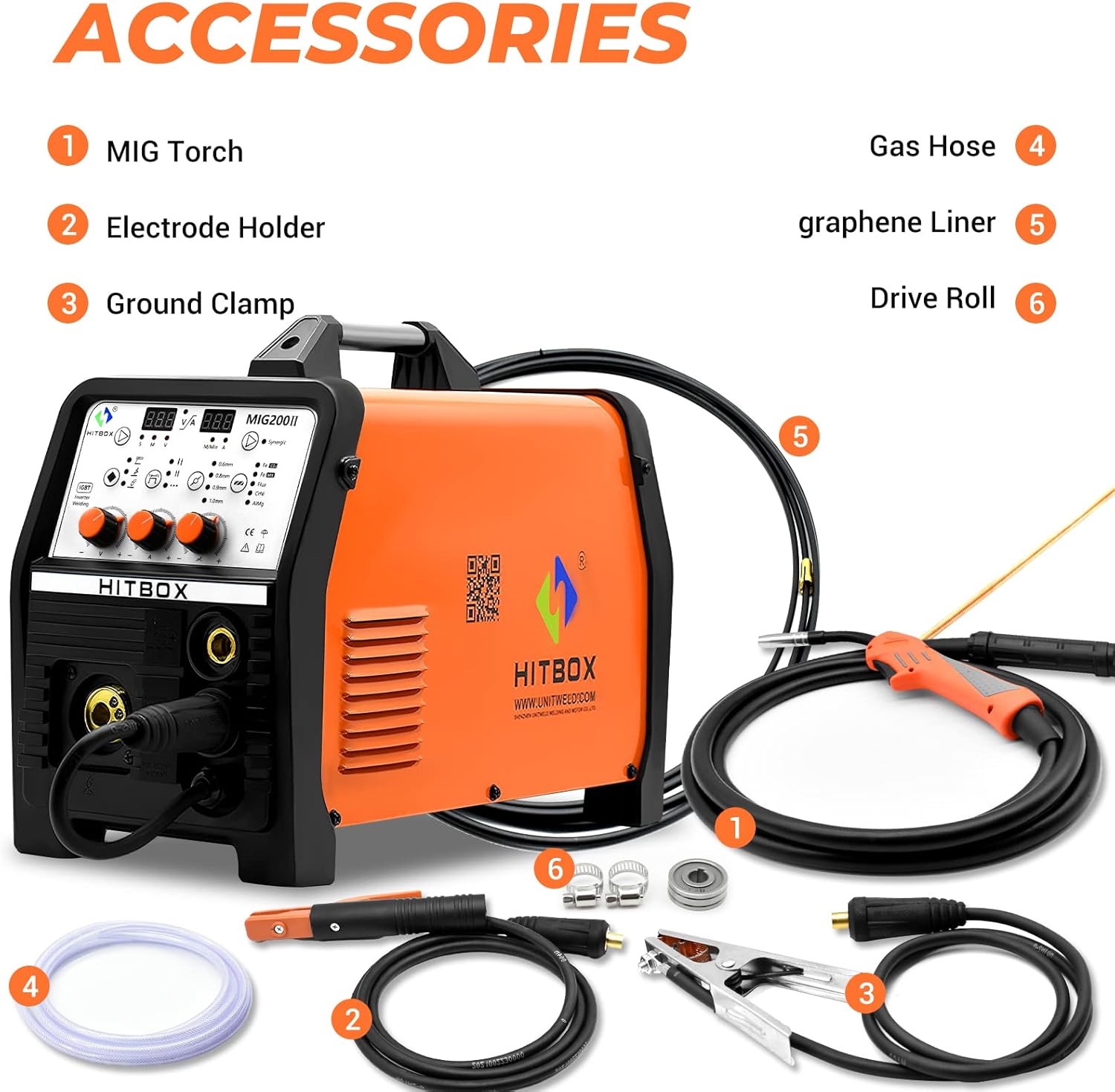
Figure 4: Included accessories for the HITBOX MIG200 Synergy Welder.
- Torxa MIG: Connect the MIG torch to the appropriate front panel connector.
- Portaelèctrodes: For MMA welding, connect the electrode holder to the positive (+) terminal.
- Terra Clamp: Connecteu la terra clamp to the negative (-) terminal. Ensure a good electrical connection to the workpiece.
- Mànega de gas: If using MIG with gas, connect one end of the gas hose to the gas input port on the rear panel and the other end to your shielding gas cylinder regulator.
- Graphene Liner: Ensure the correct liner is installed in the MIG torch for the wire type being used.
- Rotlle d'accionament: Install the appropriate drive roll for your wire diameter and type in the wire feeder compartment.
4.3 Installing Welding Wire

Figure 5: Wire spool compartment of the HITBOX MIG200 Synergy Welder.
- Obriu el compartiment de la bobina de filferro.
- Place the welding wire spool onto the spindle, ensuring it rotates freely.
- Feed the wire through the drive roll mechanism and into the MIG torch liner.
- Close the compartment and adjust the drive roll tension.
5. Modes de funcionament
The HITBOX MIG200 Synergy supports multiple welding processes. Select the desired mode using the control panel.

Figure 6: Connection diagrams for various welding modes.
5.1 MIG Welding (with Gas)
- Connect the MIG torch and ground clamp as shown in Figure 6 (MIG Gas).
- Ensure the gas hose is connected to a shielding gas cylinder (e.g., Argon, CO2, or Argon/CO2 mix).
- Select "MIG" mode on the control panel.
- Choose the appropriate wire diameter and metal type.
- Ajusta el voltage, wire speed, and inductance using the respective knobs. The synergistic function will assist in setting optimal parameters.
- Initiate welding by pressing the torch trigger.
5.2 Flux-Cored Welding (MIG without Gas)
- Connect the MIG torch and ground clamp. No shielding gas is required for flux-cored wire.
- Select "MIG" mode and ensure "Flux" is chosen for the metal type.
- Choose the appropriate flux-cored wire diameter.
- Ajustar els paràmetres de soldadura.
- Initiate welding.
5.3 Soldadura amb electrodo endollable (MMA)
- Connecteu el portaelèctrode al terminal positiu (+) i al connector de terra.amp to the negative (-) terminal (or vice-versa depending on electrode polarity requirements). Refer to Figure 6 (ARC).
- Seleccioneu el mode "MMA".
- Ajustar el corrent de soldadura.
- Strike the electrode against the workpiece to initiate the arc.
5.4 Soldadura LIFT TIG
- Connect a TIG torch (not included) to the negative (-) terminal and the ground clamp to the positive (+) terminal. Connect a gas hose to an Argon cylinder. Refer to Figure 6 (LIFT TIG).
- Select "LIFT TIG" mode.
- Ajustar el corrent de soldadura.
- Touch the tungsten electrode to the workpiece and then lift it slightly to initiate the arc.
5.5 Soldadura per punts
- This mode is typically used with MIG setup.
- Select "Spot" function using the dedicated button on the control panel.
- Set the desired spot welding time.
- Position the torch and activate.
6. Manteniment
Un manteniment regular garanteix la longevitat i el rendiment òptim de la vostra màquina de soldar.
- Diari: Clean the MIG torch nozzle and contact tip. Check all cable connections for tightness and damage.
- Setmanal: Clean the wire feeder mechanism. Inspect the drive rolls for wear. Check the cooling fan for obstructions.
- Mensual: Blow out dust and debris from inside the machine using dry, compressed air. Ensure the power is disconnected before opening the casing.
- Periòdicament: Inspect power cables and welding leads for cuts or damage. Replace any damaged components immediately.
7. Solució De Problemes
| Problema | Causa possible | Solució |
|---|---|---|
| Sense poder | Power switch off, circuit breaker tripped, loose power cable. | Turn on power switch, reset breaker, check power cable connection. |
| No arc in MIG mode | No wire feed, poor ground connection, wrong settings, clogged contact tip. | Check wire spool, tension, and feed path. Ensure ground clamp is secure. Verify settings. Clean/replace contact tip. |
| Mala qualitat de soldadura | Incorrect parameters, improper technique, contaminated workpiece, insufficient gas flow (MIG). | Ajusta el voltage/wire speed. Practice technique. Clean workpiece. Check gas cylinder and flow rate. |
| Protecció de sobreescalfament activada | Exceeded duty cycle, blocked cooling fan. | Allow machine to cool down. Ensure cooling fan is clear and functional. |
8. Especificacions
| Característica | Detall |
|---|---|
| Número de model | MIG200new |
| Dimensions del producte | 54 x 29 x 45 cm |
| Pes de l'article | 14.64 kg |
| Font d'alimentació | Electric_with_cord (AC 220V) |
| Processos de soldadura | MIG with Gas, MIG without Gas (Flux-cored), MMA, LIFT TIG, Spot Welding |
| Fabricant | SHEN ZHEN UNITWELD WELDING AND MOTOR.,LTD |
| ASIN | B09V2NVHLJ |
Note: Detailed electrical specifications (e.g., input current, output current, duty cycle) are typically found on the machine's rating plate.
9. Garantia i Suport
9.1 Informació de la garantia
The HITBOX MIG200 Synergy Welder comes with a 3 any de garantia. Please retain your proof of purchase for warranty claims. For specific warranty terms and conditions, refer to the warranty card included with your product or contact customer support.
9.2 Atenció al client
For technical assistance, troubleshooting, or warranty inquiries, please contact HITBOX customer support. You can find more information and contact details on the official HITBOX store page: