
Informació important de seguretat
Please read this manual carefully before assembly and use to ensure safe operation and to prevent damage to the product or injury to yourself.
- No supereu la capacitat de càrrega màxima de 100 kgLa sobrecàrrega pot causar inestabilitat i danys.
- Assegureu-vos que tots els cables estiguin correctament subjectats i fixats per evitar ensopegades o danys durant els ajustos d'alçada.
- Mantingueu els nens i les mascotes allunyats de l'escriptori durant el funcionament.
- Do not place hands or other body parts near moving parts of the desk frame during height adjustment.
- Only use the desk for its intended purpose as a workstation.
- Regularly check all screws and bolts to ensure they are tightened.
Producte acabatview
The FLEXISPOT E1B Electric Standing Desk is designed to provide a versatile and ergonomic workspace. It features a robust dual-motor system for smooth height adjustments and a durable tabletop.
Característiques principals:
- Sistema de motor dual: Ensures stable and efficient height adjustment at 25 mm/s.
- Interval d'alçada: Adjustable from 70 cm to 119 cm to suit various user heights and work preferences.
- Capacitat de càrrega: Supports up to 100 kg, accommodating multiple monitors and office equipment.
- Preajustos de memòria: Control panel with memory functions for saving preferred height settings.
- High-Quality Tabletop: 160x80cm black tabletop, made in the EU from FSC-certified MDF with scratch-resistant high-pressure laminate.
Contingut del paquet
Abans de començar el muntatge, verifiqueu que tots els components que s'enumeren a continuació siguin presents i no estiguin danyats. Si hi ha alguna peça que falti o que estigui danyada, poseu-vos en contacte amb el servei d'atenció al client.
- Desk Frame (E1B) components (legs, feet, crossbar, motor, control box)
- Tabletop (DT1608-BLACK-EU18)
- Control Panel with Memory Functions
- Adaptador d'alimentació i cable
- Assembly Hardware (screws, bolts, Allen keys)
- Accessoris de gestió de cables
- Manual d'usuari
Instruccions de muntatge i muntatge
Assembly is designed to be straightforward. It is recommended to assemble the desk on a soft, clean surface to prevent scratches. Two people are recommended for easier assembly.
Pas 1: Desempaquetar els components
Traieu amb cura totes les peces de l'embalatge i col·loqueu-les. Consulteu la llista de contingut del paquet.
Step 2: Assemble the Desk Frame
- Attach the lifting columns to the crossbar using the provided screws.
- Secure the desk feet to the bottom of the lifting columns.
- Mount the control box to the designated area on the frame.
- Connect the motor cables from the lifting columns to the control box.
- Connect the control panel cable to the control box.

Image: The FLEXISPOT E1B desk frame in black and white, illustrating the height adjustment range from 70cm to 119cm, highlighting the dual motor system, 25mm/s adjustment speed, and low noise operation (less than 50dB).
Step 3: Attach the Tabletop
Carefully place the tabletop upside down on a soft surface. Position the assembled desk frame onto the tabletop, aligning the pre-drilled holes. Secure the tabletop to the frame using the provided screws.

Image: A FLEXISPOT desk with a black tabletop, featuring a laptop, books, and a pen holder, demonstrating a functional and organized workspace.
Step 4: Connect Power and Cable Management
Connect the power adapter to the control box and then to a power outlet. Use the included cable management accessories to organize and secure all cables, preventing them from interfering with the desk's movement.
Instruccions de funcionament
Tauler de control acabatview:
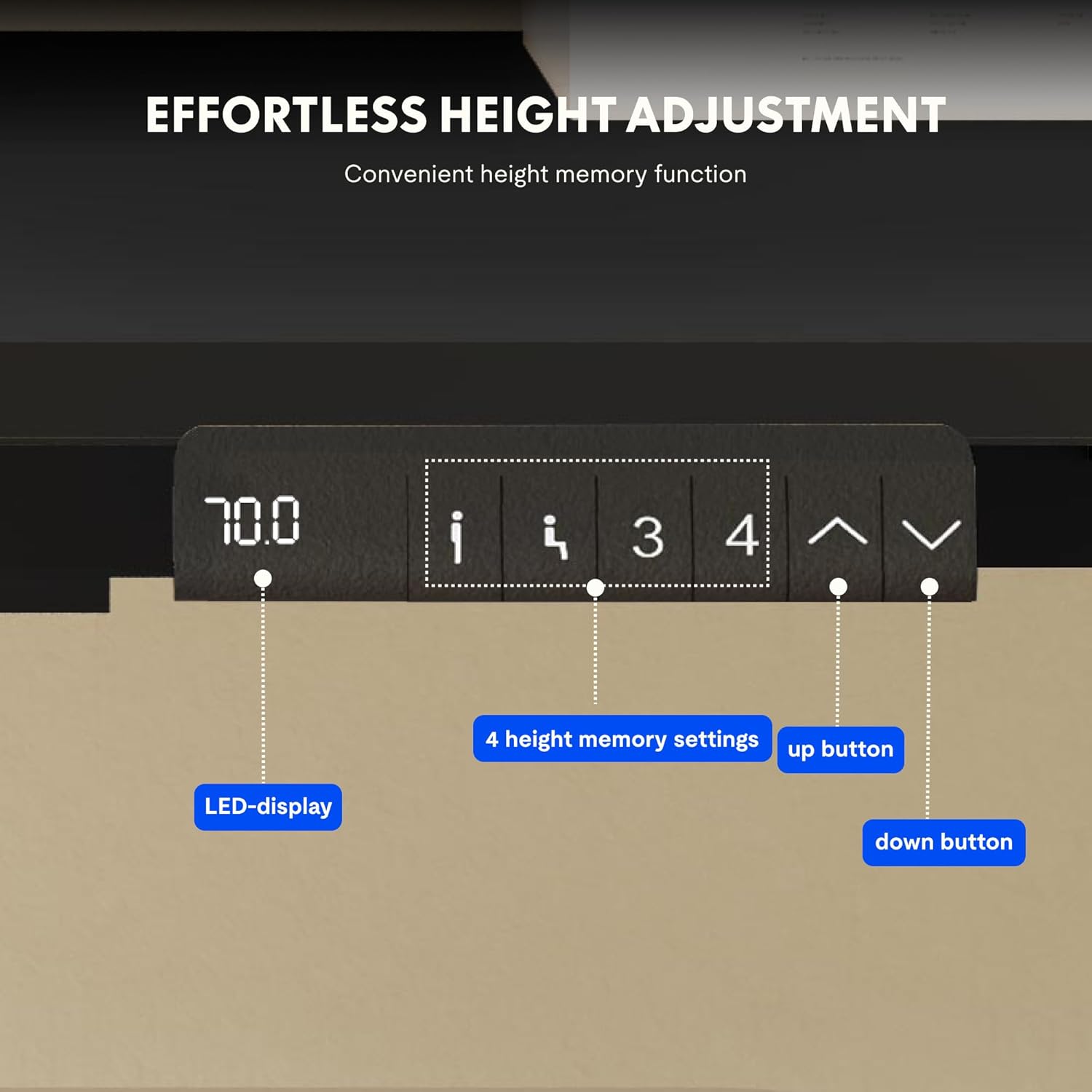
Image: Close-up of the FLEXISPOT desk control panel, showing the LED display for current height, up and down arrow buttons for manual adjustment, and four numbered buttons for saving and recalling height memory presets.
Manual Height Adjustment:
- Manteniu premut el botó Up arrow (^) botó per aixecar l'escriptori.
- Manteniu premut el botó Down arrow (v) botó per baixar l'escriptori.
- Release the button at your desired height. The LED display will show the current height.
Configuració de preajustos de memòria:
- Ajusteu l'escriptori a l'alçada desitjada amb les fletxes amunt/avall.
- Premeu el botó "M" or "CONFIGURAR" botó (si està disponible, altrament aneu al pas 3).
- Premeu un dels botons de memòria numerats (1, 2, 3 o 4) within 3 seconds. The display will show "S-" followed by the number, indicating the height is saved.
Recuperació de preajustos de memòria:
Simply press the desired numbered memory button (1, 2, 3 o 4). L'escriptori es mourà automàticament a l'alçada desada.
Funció de restabliment:
If the desk encounters an error or does not move smoothly, a reset may be required. Press and hold the "Avall" button until the desk reaches its lowest position, then release and press it again for 5-10 seconds until the display shows "RST" or "E-1" and then returns to the lowest height. The desk will then reset to its factory lowest position.
Manteniment
- Neteja: Netegeu la superfície i el marc de l'escriptori amb un drap suau iamp drap. Eviteu productes de neteja abrasius o productes químics agressius.
- Inspecció: Reviseu periòdicament tots els cargols i connexions per assegurar-vos que estiguin ben ajustats. Torneu a apretar-los si cal.
- Gestió de cables: Ensure cables remain tidy and do not obstruct the desk's movement.
- Distribució de pes: Distribute weight evenly on the tabletop to prevent strain on the motors and frame.
Resolució de problemes
| Problema | Causa possible | Solució |
|---|---|---|
| L'escriptori no es mou. | Power cable disconnected; control box error; overloaded desk. | Check power connections. Perform a reset (see Operating Instructions). Reduce weight on the desk. |
| L'escriptori es mou de manera irregular o fa sorolls estranys. | Connexions fluixes; obstrucció; distribució desigual del pes. | Check all screws and connections. Remove any obstructions. Redistribute weight evenly. Perform a reset. |
| La pantalla mostra un codi d'error (per exemple, E01, E02). | Error intern del sistema. | Perform a reset. If the error persists, contact customer support. |
| Els preajustaments de memòria no funcionen. | Els preajustos no s'han desat correctament. | Re-save the memory presets following the instructions. |
Especificacions
| Característica | Detall |
|---|---|
| Marca | FLEXISPOT |
| Número de model | E1B+DT1608-BLACK-EU18 |
| Dimensions de la taula (L x A) | 160 cm x 80 cm |
| Interval d'ajust d'altura | 70 cm - 119 cm |
| Capacitat de càrrega | 100 kg |
| Velocitat d'ajust | 25 mm/s |
| Tipus de motor | Motors duals |
| Material de taula | FSC-certified MDF with high-pressure laminate |
| Material del marc | Acer d'aliatge |
| Color | Black Tabletop + Black Frame |
Garantia i Suport
FLEXISPOT products are manufactured to high-quality standards. For warranty information and customer support, please refer to the official FLEXISPOT weblloc o poseu-vos en contacte amb el vostre distribuïdor.
- Garantia: Specific warranty terms may vary by region and product. Please check your purchase documentation or the manufacturer's weblloc per obtenir més informació.
- Atenció al client: For technical assistance, missing parts, or operational questions, please visit the FLEXISPOT Brand Store or contact their official support channels.