
Producte acabatview
The COLSUR S29 is a versatile device combining multiple functions: a digital alarm clock, wireless charger, USB charging port, Bluetooth speaker, FM radio, and a night light with an integrated phone holder. This manual provides instructions for its setup, operation, and maintenance to ensure optimal performance.

Imatge: Frontal view of the COLSUR S29 Digital Alarm Clock, showcasing its LED display and integrated phone holder.
Contingut del paquet
Si us plau, comproveu el paquet per veure si hi ha els elements següents:
- COLSUR S29 Digital Alarm Clock
- Adaptador d'alimentació
- Cable USB-Type C
- Manual d'usuari

Image: Contents of the COLSUR S29 package, including the alarm clock, power adapter, and USB cable.
Característiques del producte
- Digital LED Display with 3 adjustable brightness levels.
- Wireless Charging Pad for Qi-enabled devices.
- USB Charging Port for additional device charging.
- Bluetooth Speaker for audio playback.
- FM Radio with automatic station search.
- Alarm Clock with adjustable volume and snooze function (5 minutes, up to 3 times).
- Night Light with 3 adjustable colors/brightness levels.
- Integrated Phone Holder.
- Built-in battery for portability.
Controls i pantalla
Familiarize yourself with the buttons and display indicators on your COLSUR S29.
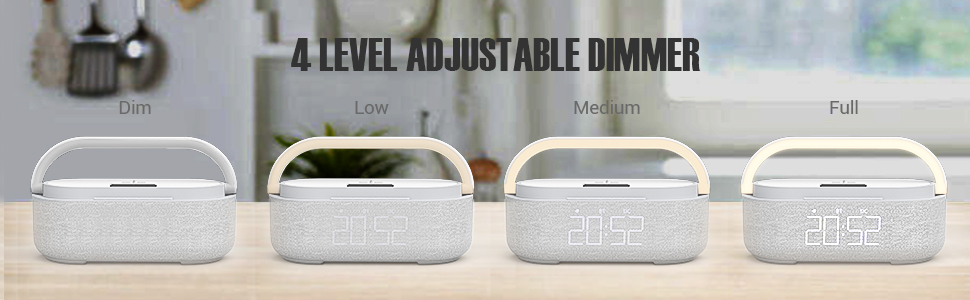
Image: Diagram showing the control buttons on the top panel of the COLSUR S29, including Mode, Switch, BT, FM, Volume/Track controls, and Alarm/Brightness buttons.
- Botó MODE: Short press to enter settings, long press to return to the main screen.
- SWITCH Button: Switches between setting areas and display modes.
- Botó BT: Premeu breument per entrar al mode Bluetooth.
- Botó FM: Short press to enter FM radio mode, long press to search for stations.
- Botons +/-: Adjust volume, navigate tracks, or change settings.
- Botó Reproduir/Pausa: Reprodueix o posa en pausa l'àudio.
- Alarm/Brightness Button: On/Off alarm in Bluetooth mode, long press to clear Bluetooth record. Adjust screen brightness.
- Botó de llum nocturna: Turn on/off night light, snooze settings.
Configuració
- Connexió d'alimentació: Connect the provided USB Type-C cable to the device and the power adapter. Plug the adapter into a wall outlet.
- Encesa inicial: The device will power on automatically. The LED display will show the current time.
- Configuració de l'hora:
- Premeu el botó MODE button twice. The hour digit will start flashing.
- Utilitza el +/- botons per ajustar l'hora.
- Premeu el botó CAMBIAR button to move to the minute setting.
- Utilitza el +/- botons per ajustar els minuts.
- Premeu llargament el botó MODE button to save the time setting.
Instruccions de funcionament
Rellotge despertador
- Configuració de l'alarma:
- Premeu el botó MODE button twice. The number representing the hour starts to flash.
- Ajusteu l'hora amb el botó +/- botons.
- Premeu el botó CAMBIAR button to jump to the minute setting.
- Adjust the minute using the +/- botons.
- Premeu llargament el botó MODE botó per desar la configuració de l'hora de l'alarma.
- Premeu llargament el botó +/- button to turn the alarm on/off. If the alarm is successfully set, the screen will display the alarm icon.
- Funció de posposar:
- When the alarm rings, short touch the light pole to activate snooze mode for 5 minutes.
- L'interval de repetició és de 5 minuts per un total de tres vegades.
- To exit snooze mode, short press the +/- botó.
- Desactivació de l'alarma:
- To turn off the alarm directly, long touch the light pole (2 seconds or more).
- Ajust del volum de l'alarma:
- While the alarm clock rings, press the +/- botons per ajustar el volum (16 nivells).
- The alarm volume has a memory function and is controlled independently of the radio volume.

Image: Detailed instructions on how to set the alarm, use the snooze function, and adjust alarm volume on the COLSUR S29.
Ràdio FM
- Entering FM Mode: Premeu breument FM button. The display will show FM characters.
- Cerca automàtica d'estacions: Premeu llargament el botó Reproduir/Pausa button to search for radio stations.
- Canvi d'estacions: Utilitza el +/- botons per canviar entre les emissores desades.
- Ajust de volum: Utilitza el +/- botons per ajustar el volum de la ràdio.

Image: A person relaxing while the COLSUR S29 plays FM radio, illustrating the radio function and volume control.
Altaveu Bluetooth
- Entering Bluetooth Mode: Premeu breument BT button. The device will enter pairing mode.
- Maridatge: On your mobile device, search for "COLSUR S29" in the Bluetooth settings and connect.
- Reproducció d'àudio: Once paired, you can play audio from your device through the COLSUR S29 speaker.
- Clearing Bluetooth Record: Premeu llargament el botó Reproduir/Pausa button in Bluetooth mode to clear the pairing record.
Càrrega sense fils
- Place your Qi-enabled smartphone on the designated wireless charging pad on top of the device.
- Ensure the phone is centered on the charging pad for optimal charging.
- The charging indicator on your phone will confirm charging has begun.

Image: A smartphone being wirelessly charged on the COLSUR S29, demonstrating the charging pad and night light feature.
Port de càrrega USB
Connect your device's USB charging cable to the USB port on the COLSUR S29 to charge it.
Llum nocturna
- Activació/desactivació: Short touch the light pole to turn the night light on or off.
- Ajust de brillantor/color: Continue touching the light pole to cycle through 3 levels of brightness/color options.

Image: The COLSUR S29 displaying different brightness levels of its night light, from dim to full illumination.
Brillantor de la pantalla LED
The LED display offers 3 levels of brightness (low, medium, high). Use the dedicated brightness button (often combined with alarm or other functions, refer to "Controls and Display" section) to adjust the display brightness.
Manteniment
- Neteja: Feu servir un drap suau i sec per netejar el dispositiu. No utilitzeu netejadors líquids ni aerosols.
- Emmagatzematge: Guardeu el dispositiu en un lloc fresc i sec quan no el feu servir durant períodes prolongats.
- Potència: Utilitzeu sempre l'adaptador d'alimentació i el cable subministrats.
Resolució de problemes
| Problema | Causa possible | Solució |
|---|---|---|
| El dispositiu no s'encén. | Sense connexió elèctrica. | Assegureu-vos que l'adaptador de corrent estigui connectat correctament al dispositiu i a una presa de corrent que funcioni. |
| La càrrega sense fil no funciona. | Phone not Qi-enabled or not positioned correctly. | Verify your phone supports Qi wireless charging. Reposition the phone on the charging pad. Remove any thick phone cases. |
| La recepció de ràdio FM és deficient. | Senyal feble o interferències. | Adjust the device's position. |
| El dispositiu Bluetooth no es pot emparellar. | Device not in pairing mode or already connected to another device. | Ensure the COLSUR S29 is in Bluetooth pairing mode. Disconnect from other Bluetooth devices. Clear previous Bluetooth records if necessary (long press Play/Pause button). |
| L'alarma no sona. | L'alarma no està configurada o el volum és massa baix. | Verify the alarm is set and the alarm icon is displayed. Increase the alarm volume. |
Especificacions
- Número de model: S29
- Marca: COLSUR
- Dimensions (L x A x A): 8 x 3.81 x 10 cm (3.15 x 1.5 x 3.94 polzades)
- Pes: 1.03 quilos (2.27 lliures)
- Font d'alimentació: Alimentat per piles (pila d'1 A inclosa)
- Tipus de visualització: LED digital
- Connectivitat: USB, Bluetooth
- Material: ABS, Robust Material, Integrated Halbach Magnetic Ring
- Material del marc: Wood (Note: Product images show a fabric/plastic finish, but specifications list wood as frame material.)
- Característiques especials: Wireless Charging, FM Radio, Bluetooth Speaker, Dimmable Night Light, USB Charging Port, Phone Holder.
Garantia i Suport
The COLSUR S29 comes with a 3-year warranty. For online customer service and support, please refer to the contact information provided with your purchase or visit the official COLSUR weblloc.
Per obtenir més ajuda, poseu-vos en contacte amb:
- Fabricant: COLSUR
- Venedor: Imego Life EU
- Amazon Product Link: COLSUR S29 Product Page
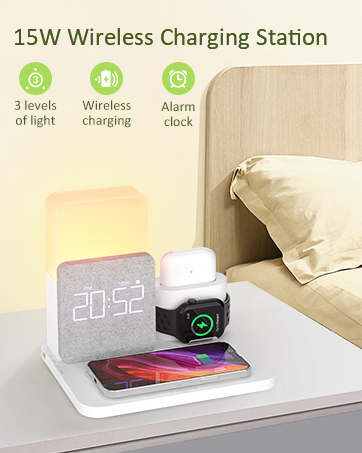
Image: A customer service representative, symbolizing available support for the COLSUR S29.