1. Producte acabatview
The podofo Wireless CarPlay Android Auto Portable Car Stereo is a versatile 7-inch touchscreen car player designed for various vehicles, including cars, RVs, and trucks (9-36V). It integrates wireless CarPlay and Android Auto, dual dash cam functionality, Bluetooth for hands-free calling and audio streaming, and an FM transmitter. The unit offers flexible mounting options and includes both front and rear cameras for comprehensive recording.
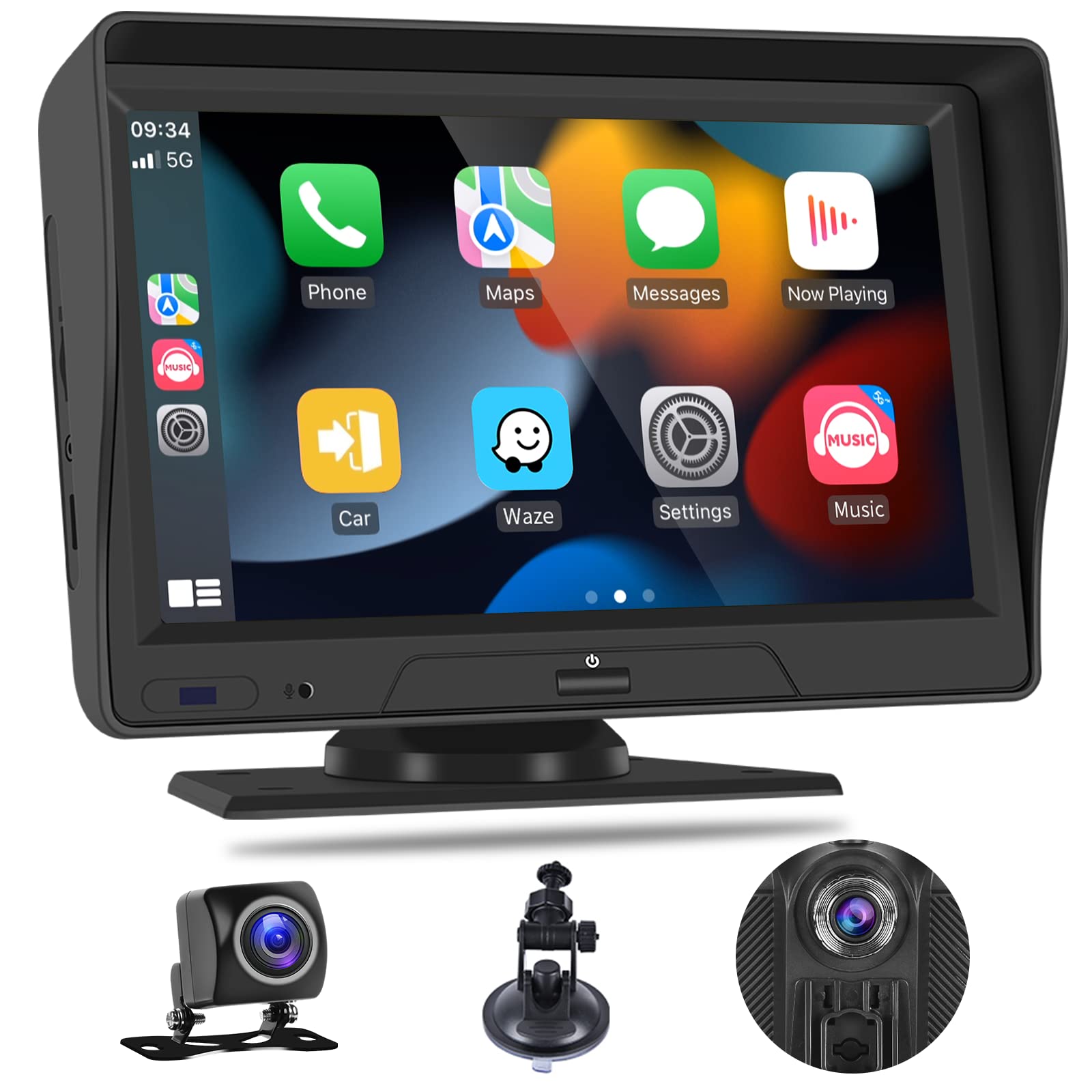
Figure 1: podofo Portable Car Stereo with Wireless CarPlay and Android Auto.
2. Contingut del paquet
Verifiqueu que tots els components siguin presents al paquet:
- Monitor intel·ligent de 7 polzades
- Power Plug (Car Charger)
- Base ventosa
- Base de muntatge
- Bracket Fixing Sticker
- 32GB TF Card (pre-inserted)
- Camera Mount Kit (Front and Rear Cameras with cables)
- Manual d'usuari
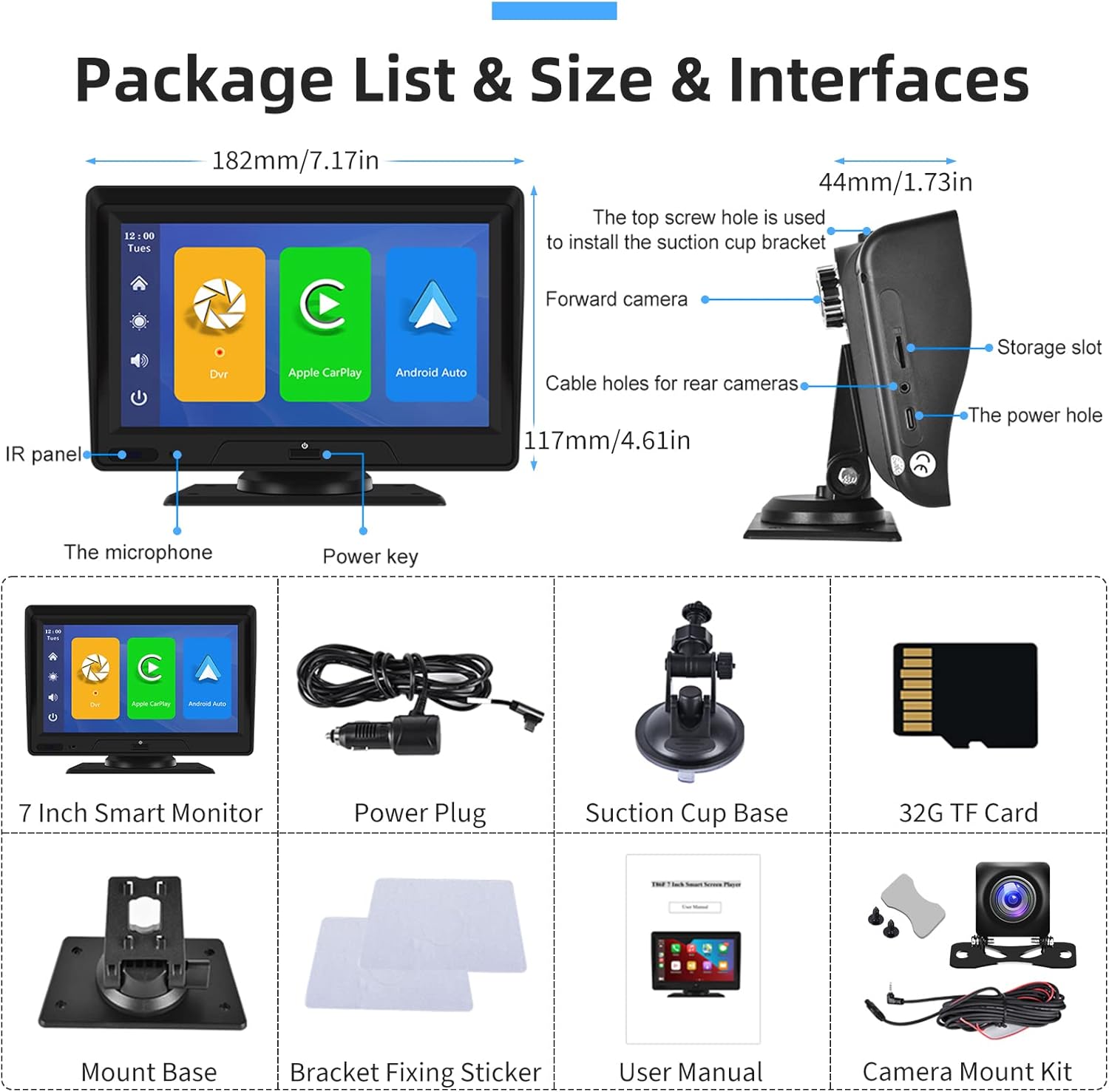
Figure 2: Package contents and interface overview. Includes the 7-inch monitor, power plug, suction cup base, mount base, bracket fixing sticker, 32GB TF card, and camera mount kit.
3. Configuració i instal·lació
The portable car stereo offers flexible installation options for your dashboard or windshield.
3.1 Muntatge de la unitat
- Choose between the suction mount or self-adhesive bracket for dashboard or windshield placement.
- Attach the chosen mount to the back of the main unit.
- Securely attach the unit to your desired location in the vehicle. The bracket allows for 360-degree rotation to adjust position and viewangle de ing.

Figure 3: Installation options showing dashboard and windshield mounting with the included brackets.

Figure 4: The adjustable bracket allows for 360-degree rotation and fine-tuning of the lens position.
3.2 Instal·lació de la càmera
Install the front and rear cameras according to the included Camera Mount Kit instructions. The rear camera typically mounts near the license plate, and its 10m cable provides amplongitud per a l'enrutament.
3.3 Connexió d'alimentació
Connect the power plug to the unit and then to your vehicle's 9-36V power outlet.
4. Instruccions de funcionament
This section details the primary functions and how to operate your podofo car stereo.
Video 1: Portable Car Stereo Function Display. This video demonstrates various features including CarPlay, Android Auto, voice control, video playback, FM transmitter, and system settings.
4.1 CarPlay sense fil i Android Auto
Connect your smartphone wirelessly to access navigation, music, calls, and messages. This feature allows for a safer driving experience by integrating your phone's essential functions directly onto the stereo's display.
- Connexió: Navigate to the CarPlay or Android Auto icon on the main screen. Follow the on-screen prompts to pair your smartphone via Bluetooth. (Refer to Video 1, timestamps 0:41 for CarPlay and 0:53 for Android Auto).
- Funcionalitat: Once connected, you can use compatible apps for navigation (e.g., Maps), music streaming (e.g., Spotify), hands-free calls, and voice commands.

Figure 5: The main interface displaying Wireless CarPlay and Android Auto options, along with common applications.

Figura 6: Example of Wireless Apple CarPlay and Android Auto interfaces on the stereo display.
4.2 Dual Dash Cam (Front and Rear Driving Recorder)
The unit features FHD 1080P front and rear cameras for continuous recording, day and night. A dedicated 32GB SD card is included for storage.
- Gravació: The system supports loop recording, automatically overwriting older footage when the SD card is full. (Refer to Video 1, timestamps 0:12-0:29 for dash cam view and recording controls).
- Visió nocturna: Advanced sensors provide clear recordings in low-light conditions.
- Optimització de la imatge: Features automatic gain control, white balance, and backlight compensation for optimal video quality.

Figure 7: Dual dash cam display showing simultaneous front and rear camera views, ideal for monitoring both directions.

Figure 8: Dash cam features highlighting automatic gain control, white balance, and backlight compensation for enhanced video quality, especially at night.

Figure 9: The driving recording function interface, showing options for recording and playback.
4.3 7-inch Touchscreen Backup Camera System
The unit can function as a backup camera system, offering split-screen ability with two-way video input.
- Modes de visualització: View a single camera image or a split screen for dual views.
- Línies invertides: The system provides adjustable reversing guidelines to assist with parking. (Refer to Video 1, timestamps 1:53-2:06 for reversing control and line adjustment).

Figure 10: Illustration of adjustable reversing guide lines on the display, allowing customization for precise parking assistance.
4.4 Transmissor FM
Transmit audio from the car stereo to your vehicle's original car speakers via FM radio.
- Feu clic a [FM Transmitter] button to enter the FM transmitting function.
- Feu clic a [FM switch] botó per activar.
- Select a frequency band to be emitted by the unit (e.g., FM 106.0 MHz). Avoid frequencies occupied by local radio stations.
- Tune your car's original stereo to the same FM frequency.
- Once connected, audio from the portable stereo will play through your car's speakers. (Refer to Video 1, timestamps 1:33-1:42 for FM setup).

Figure 11: The FM Radio Receiver interface, showing frequency selection and connection steps.
4.5 Assistent de veu
Utilize voice commands for hands-free operation, enhancing safety while driving.
- Ordres: Supported commands include "Turn off display," "Turn on display," "Show front camera," "Show rear camera," and "Show all cameras." (Refer to Video 1, timestamps 0:30-0:41 for voice control demonstration).
- Activació: Simply speak the command clearly.

Figure 12: Voice assistant in action, demonstrating commands like playing music, navigating, and sending messages.
4.6 Altres funcions
- Altaveus duals: The unit is equipped with dual speakers for direct audio output.
- Parasol: An integrated sunshade helps reduce glare on the screen for better visibility.
- Reproducció de vídeo: Review foo gravattage directly on the unit. (Refer to Video 1, timestamps 1:21-1:33 for video playback).
- Configuració: Access various settings for record resolution, split time, microphone, image mirror, camera format, time configuration, reversing control, screen saver, voice control, language, TF card format, and factory reset. (Refer to Video 1, timestamps 1:42-2:20 for settings menu overview).

Figure 13: The unit features dual speakers for clear audio output and a design optimized for heat dissipation.

Figure 14: The integrated sun visor helps to reduce glare on the screen, improving visibility in bright conditions.
5. Especificacions
| Característica | Descripció |
|---|---|
| Marca | podofo |
| Número de model | B09VL3JWHD |
| Mida de la pantalla | 7 polzades |
| Tecnologia de connectivitat | Wireless CarPlay, Android Auto, Bluetooth, USB |
| Tipus de suport | Targeta SD |
| Dispositius compatibles | Smartphone, altaveu |
| Mode de sortida d'àudio | estèreo |
| Voltage Suport | 9-36V (for cars, pickups, SUVs, RVs, buses, trucks) |
| Resolució de la càmera | FHD 1080P (Front and Rear) |
6. Solució De Problemes
Aquesta secció tracta problemes comuns que podeu trobar.
- Desconnexions de Bluetooth: If experiencing frequent Bluetooth disconnections with Android Auto, try restarting the device and your phone's Bluetooth. Ensure no other devices are interfering.
- Glitches or Random Restarts: Ensure the power connection is stable. If issues persist, try a factory reset (refer to Video 1, timestamp 2:16).
- Imatge de mirall de la càmera: Si la càmera view is mirrored incorrectly, check the 'Image Mirror' setting in the system menu (refer to Video 1, timestamp 1:48). This setting might affect both front and rear cameras.
- No Sound via FM Transmitter: Verify that the FM switch is ON and that the frequency on the car stereo matches the unit's output frequency. Ensure the chosen frequency is clear of other radio stations.
- La unitat no s'encén: Check the power plug connection and the vehicle's power outlet. Ensure the vehicle's ignition is on.
7. Manteniment
To ensure the longevity and optimal performance of your podofo car stereo, follow these maintenance guidelines:
- Neteja: Use a soft, dry cloth to clean the touchscreen and exterior. Avoid abrasive cleaners or solvents.
- Temperatura: Avoid exposing the unit to extreme temperatures for extended periods.
- Targeta SD: Periodically format the SD card (refer to Video 1, timestamp 2:14) to maintain recording performance and free up space. Back up important footage abans de formatar.
- Gestió de cables: Ensure all cables are securely routed and not pinched or damaged.
8. Garantia i Suport
podofo is committed to product performance and user experience.
- Garantia: The product comes with a 1-year warranty on labor and parts.
- Devolucions: A 30-day money-back guarantee is offered.
- Substitució: A 12-month replacement policy is available.
- Contacte amb l'assistència: For any questions or assistance, please contact podofo seller support via Amazon email.